win-acme: twelve feature bullets that describe three different tiers of the same tool
Automate SSL/TLS certificates on Windows with ease
At a glance
- What is it?
- An ACMEv2 client for Windows, officially maintained by ZeroSSL. It installs from a zip or a dotnet tool, creates its own renewal scheduled task, separates certificate storage from validation method, and has four distinct extension points.
- Who is it for?
- Adopt win-acme if your certificates live on Windows and you want renewal handled without thinking about it, since the client creates the scheduled task itself and the command line path is documented as fully unattended. Choose between the two install routes on whether you want a self-contained folder or a dotnet global tool, because both end at the same wacs.exe and the choice only affects how you update it later.
- Can I use it commercially?
- Yes. Apache-2.0 is a permissive licence: you can use, modify and sell software built on it, as long as you keep its copyright and licence notices.
- Is it still maintained?
- Yes. The repository last received commits 4 days ago.
- What is it written in?
- Mainly C#, according to GitHub's language statistics.
Answers come from the project's GitHub data, last synced on November 14, 2026, and from our analysis. They are not legal advice.
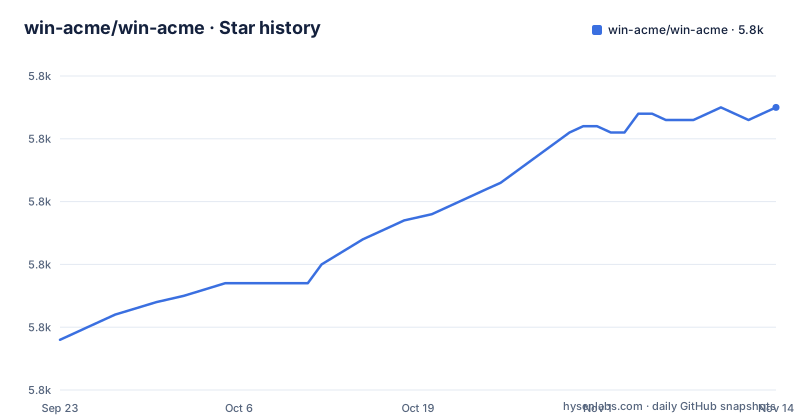
Star history
- win-acme/win-acme5,835 ★ · +37
| Repository | 2026-09-23 | 2026-11-14 |
|---|---|---|
| win-acme/win-acme | 5.8k | 5.8k |
37 Stars in the last 52 days, measured from the daily GitHub snapshot. Compare with other projects
Editorial analysis
Two install routes, and both end at the same wacs.exe
The getting started section is two sentences and one command. Either download the .zip from the download menu, unpack it to a location on your hard disk and run wacs.exe. Or install .NET Core, run the global tool install, and then run wacs.exe:
dotnet tool install win-acme --globalThe important thing about those two routes is what they have in common. The executable is called wacs.exe either way, so everything after installation is identical. The choice is purely about how the tool gets onto the machine and how you update it later.
The zip route gives you a directory on your hard disk that you own. That is the route to pick if you want the client to be a self-contained artifact you can place, inspect or remove.
The dotnet route installs it as a global tool, which means it participates in whatever dotnet tooling you already run, and updating is a tool operation rather than a file replacement. The cost is the prerequisite: .NET Core has to be installed first.
The project itself is written in C#, licensed Apache-2.0, on the master branch, and the homepage is win-acme.com. The repository is not archived and the last push was 2026-06-09.
One packaging detail worth noting: the distribution is a zip rather than a package in a Windows package manager, and there is a dist/ directory alongside build/ and src/. Combined with the appveyor.yml continuous integration file at the root, that suggests the zip is produced by that build rather than assembled by hand.
The twelve bullets describe three tiers, and the first two are the same sentence split in half
The feature list is the documentation, and reading it as a structure rather than as a list of unrelated capabilities makes the tool easier to evaluate.
The opening line frames the whole thing: an ACMEv2 client for Windows that aims to be very simple to start with, but powerful enough to grow into almost every scenario. That promise is then cashed out in the bullets, and the first two bullets are where the simple half lives. The first is a very simple interface to create and install certificates on a local IIS server. The second is a more advanced interface for many other use cases, including Apache and Exchange.
So the first decision the tool asks you to make is which of two interfaces you want, and the boundary between them is server software rather than feature depth. IIS is the default path; Apache and Exchange are where you leave it.
The middle tier is capability. Wildcards in the form of *.example.com, international names, and the OCSP Must Staple extension as an option. Re-use of private keys for DANE, EC cryptography, or bringing your own CSR, which are three different answers to the question of how the key material is produced. Advanced validation over DNS, HTTP and TLS, with SFTP/FTPS, acme-dns, Azure, Route53 and Cloudflare named as available. And certificate storage in the Windows store, the IIS Central Store, .pem files, a .pfx file, or KeyVault.
The last tier is automation, and it is four separate bullets. Completely unattended operation from the command line. Other forms of automation through manipulation of .json files. Writing your own Powershell .ps1 scripts to handle installation and validation. And building your own plugins with C#.
That last group is the one to notice. Four different extension mechanisms, at four different levels of effort, from editing a json file to writing a compiled plugin.
Renewal is a scheduled task the client creates, not something you configure
One bullet says it automatically creates a scheduled task to renew certificates when needed. That is worth pausing on, because it is the difference between a tool you run and a tool that runs itself.
Nothing in the feature list asks you to write a renewal script, schedule it, or decide how often it fires. The client arranges it. Combined with the bullet about completely unattended operation from the command line, the intended shape is that you install, you issue, and renewal is a property of the installation rather than a thing you maintain.
The pairing with unattended command-line operation matters for how you would use this in a fleet. If the certificate request can run with no interaction, and renewal is already scheduled, then a machine can be configured once and left alone. What the feature list does not say is how failures surface, and that is the gap worth planning around: a scheduled task that fails silently leaves you with an expiring certificate and no signal. The extension points are the answer the project offers, since you can write .ps1 scripts to handle installation and validation, which is where a notification would go.
The three other things in the same bullet group are about control rather than automation. Bring your own CSR means you are not relying on the client's key generation. Re-use of private keys is specifically framed for DANE, which is a protocol that requires the key to be known to the client publishing it, so reusing an existing key is a requirement there rather than a convenience. And EC cryptography is an option alongside whatever the default is.
None of these are exotic.
Storage and validation are two independent decisions, not one
The feature list treats where a certificate goes and how it was validated as separate concerns, and they appear as separate bullets. That separation is the thing to understand before configuring anything.
On the storage side the choices are the Windows certificate store, the IIS Central Store, .pem files, a .pfx file, or KeyVault. Those are five quite different targets. The Windows store and the IIS Central Store are what a Windows service reads without being told where the file is. A .pem file is what an Apache or nginx process reads. A .pfx is what gets imported somewhere else, and what you would hand to a partner. KeyVault is a remote secret store with its own access model.
On the validation side the choices are DNS, HTTP and TLS, with SFTP/FTPS, acme-dns, Azure, Route53 and Cloudflare named among the available methods.
Here is where the two decisions interact, and it is the one combination that constrains you. A wildcard certificate has no single host to serve a challenge on, so *.example.com cannot be validated over plain HTTP. That is not a limitation of this client, it is how name validation works, and it is why the wildcard bullet and the advanced validation bullet are both necessary rather than either being optional.
The client is also compatible with all popular ACME services, and the list is specific: Let's Encrypt, ZeroSSL, DigiCert, Sectigo, Buypass, Keyon and others. That list matters more than it first appears, because rate limits and validation strictness differ between authorities, and a client that hardcoded one authority would remove the choice.
The release tags and release titles do not match, and the newest release is over two years older than the last push
The three most recent releases are v2.2.9.1701 dated 2024-05-25, v2.2.9.1680 dated 2024-05-16, and v2.2.8.1635 dated 2024-02-27. Two things about that list are worth knowing.
The first is that the version has four parts and the fourth is a build number, not a semantic version component. The three-part part moves from 2.2.8 to 2.2.9, and the fourth goes 1635, 1680, 1701. So these are builds within a release line rather than semver releases, and the build number is what distinguishes two artifacts of the same 2.2.9.
The second is that the tag names and the release titles differ. The release titled v2.2.9.1 is tagged v2.2.9.1701, and the release titled v2.2.9 is tagged v2.2.9.1680. If you are pinning a version in a script, the tag is what git gives you and the title is what a person reads on the releases page, and they are not the same string. That is a small thing that produces a confusing afternoon.
The third is the gap between the newest release and the newest commit. The last release is from May 2024 and the last push to master is 2026-06-09. The repository is not archived, so work is continuing, but it is not being cut into releases at anything like that rate.
For planning, that means the tagged artifact is more than two years behind the working tree, and the two are not interchangeable. If you want a specific fix, the commit history is where it is; if you want a version you can name and reproduce, the tag is where it is. Neither statement is a criticism of the project, it is just the shape of the record, and it is the kind of thing worth reading before you build a deployment script around it.
The repository root is conventional for the ecosystem: src/, build/ and dist/ for code and build output, appveyor.yml for continuous integration, .gitmodules for submodules, CODE_OF_CONDUCT.md, CONTRIBUTING.md and PULL_REQUEST_TEMPLATE.md, and a LICENSE at the root for the Apache-2.0 grant.
Support means the manual first, and maintenance means a commercial certificate authority
The getting help section is one sentence and it is unambiguous: if you require assistance, check the manual first before looking for support.
That is a small statement carrying a real policy. It tells you the documentation is the first line of support and that issues are not where you start. Combined with the absence of any issue tracker link in the README, the implication is that the manual is the documentation and the support path is whatever the project points to outside the README.
Maintenance is stated just as plainly. The repository is officially maintained by ZeroSSL as part of their commitment to secure and reliable SSL/TLS solutions, with an invitation for community contributions and feedback, and a pointer to their services including free and paid SSL/TLS certificates.
The four extension points deserve one more pass, because they are the answer to almost every reason not to adopt an ACME client. If the defaults do not fit your storage, edit .json files. If the defaults do not fit your installation sequence, write Powershell .ps1 scripts for installation and validation. If you need behaviour neither of those reaches, build a plugin in C#. And if the problem is that your DNS provider or your validation method is not in the list, the list itself includes SFTP/FTPS, acme-dns, Azure, Route53 and Cloudflare, so the set of providers you are likely to have is already covered.
Editorial conclusion
Adopt win-acme if your certificates live on Windows and you want renewal handled without thinking about it, since the client creates the scheduled task itself and the command line path is documented as fully unattended. Choose between the two install routes on whether you want a self-contained folder or a dotnet global tool, because both end at the same wacs.exe and the choice only affects how you update it later. Decide storage and validation as two separate questions, since the certificate destination and the validation method are independent choices in the feature list, and a wildcard forces the second one away from plain HTTP. Read the tag names rather than the release titles before pinning a version, because they do not match, and note that the most recent tagged release predates the last push by more than two years. If you need custom behaviour, the documented automation and extension points are unattended command-line operation, json files, PowerShell scripts and C# plugins.
Frequently asked questions
how to install win acme
There are two routes. Download the .zip from the download menu, unpack it to a location on your hard disk and run wacs.exe. Or install .NET Core, run dotnet tool install win-acme --global, and then run wacs.exe. Both end at the same wacs.exe, so the choice only affects how the tool is installed and updated afterwards.
is win-acme deprecated
Nothing in the repository suggests deprecation. It is not archived, the primary language is C#, the licence is Apache-2.0, and the last push to master was 2026-06-09. It is officially maintained by ZeroSSL. What the record does show is a gap between releases, since the three most recent are tagged from February to May 2024 while commits have continued since.
is win acme open source
Yes. The repository carries a LICENSE at the root and the licence is recorded as Apache-2.0. The README also states that community contributions are welcome and that the repository is officially maintained by ZeroSSL. The binary distribution is a zip you unpack yourself, and the source is under src/ with the build driven by appveyor.yml.
what is win acme
It is an ACMEv2 client for Windows that aims to be very simple to start with but powerful enough to grow into almost every scenario. It offers a simple interface for a local IIS server and a more advanced one for cases such as Apache and Exchange, creates a scheduled task to renew certificates automatically, supports wildcards, international names, EC cryptography and bringing your own CSR, validates over DNS, HTTP and TLS, and stores certificates in the Windows store, the IIS Central Store, .pem files, a .pfx file or KeyVault.
Official sources
Add this badge to your README
If you maintain this project, the badge below links readers to this analysis and shows its maintenance status from the daily GitHub snapshot. Paste the markdown into your README; add ?metric=license or ?metric=stars to the image URL for a different field.

[](https://hysenlabs.com/projects/win-acme-win-acme)Star history chart for your README
[](https://hysenlabs.com/projects/win-acme-win-acme)Was this useful?