WiringPi claims to be the fastest GPIO library and ships no benchmark, plus five wrappers it will not maintain
The arguably fastest GPIO Library for the Raspberry Pi
At a glance
- What is it?
- A C library that reaches Raspberry Pi hardware registers directly using DMA, LGPL-3.0 licensed and maintained since 2024 by GrazerComputerClub as the continuation of the deprecated original. The engineering is real and the register access is genuinely direct. Three things qualify it. The headline claim is speed with nothing in the tree to measure it, the Pi 5 support has one named hole because the RP1 chip is undocumented, and all five language bindings are declared out of sync with version 3 and unsupported.
- Who is it for?
- WiringPi suits a C project on a Raspberry Pi that needs direct register access and low overhead, and the register path is the reason to choose it over a sysfs or gpiochip-based library. Check four things before committing.
- Can I use it commercially?
- Yes, with conditions. LGPL-3.0 is a weak copyleft licence: you can use it inside commercial and closed-source software, but if you distribute changes to its own files, you must publish those changes under the same licence.
- Is it still maintained?
- Yes. The repository last received commits 74 days ago.
- What is it written in?
- Mainly C, according to GitHub's language statistics.
Answers come from the project's GitHub data, last synced on November 15, 2026, and from our analysis. They are not legal advice.
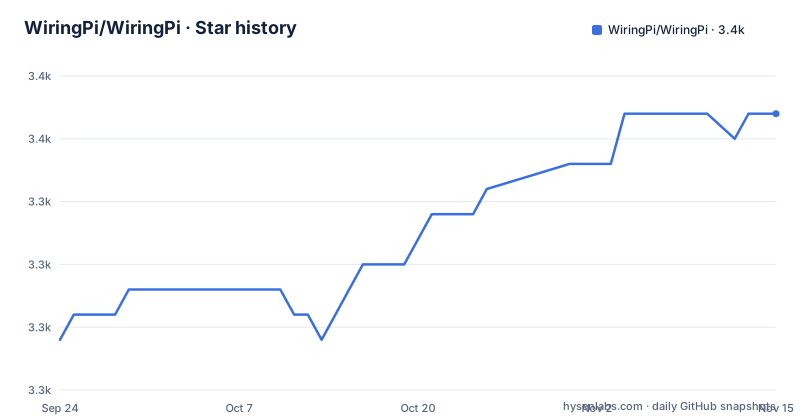
Star history
- WiringPi/WiringPi3,351 ★ · +9
| Repository | 2026-09-24 | 2026-11-15 |
|---|---|---|
| WiringPi/WiringPi | 3.3k | 3.4k |
9 Stars in the last 52 days, measured from the daily GitHub snapshot. Compare with other projects
Editorial analysis
The central claim is speed, and nothing in the tree measures it
The mechanism is stated plainly and it is the interesting part of the design. The library is written in C and provides control of the GPIO pins by directly accessing the hardware registers using DMA. Register access plus direct memory access is what makes the performance claim structurally plausible, and it is a real architectural choice rather than a wrapper around something slower.
The claims built on top of it are not measured. Minimal latency and maximum performance are asserted as consequences of that access. The project description calls it the arguably fastest GPIO library for the Raspberry Pi, hedged with arguably, and the maintenance note from the team now maintaining it refers to keeping the arguably best-performing GPIO library running smoothly, hedged again. Across both phrasings there is no figure, no comparison against another library, and no test method.
There is also nothing in the tree to produce one. The top level holds `wiringPi/` for the library itself, `gpio/` for the command line tool, `wiringPiD/` for the daemon, `pins/` for pin definitions, `devLib/` for add-on board support, `examples/` with roughly two dozen C files, `documentation/`, and the packaging directories. There is no benchmark directory, no results file and no comparison harness among them.
So the claim should be read as a design intent. Direct register access removes layers, and that reasoning holds on its own terms without a number attached to it.
Pi 5 works except for one clock, and the reason is missing documentation
Board support is stated as covering all Raspberry Pi boards including the Pi 5, with a single exception named in the same sentence. On the Pi 5, only the GCLK functionality is currently not supported, and the reason given is missing documentation of the RP1 chip.
That is a more useful statement than a bare list of supported boards, because it tells you exactly what will fail and why. The Pi 5 moved the GPIO controller behind the RP1 southbridge, and that chip is not documented, so the one function that would need knowledge of it cannot be implemented. The rest of the library, which talks to registers it does have documentation for, is expected to work.
GCLK is reachable through the pin mode constants rather than as a separate call. The mode values given in the example are `INPUT`, `OUTPUT`, `PWM_OUTPUT` and `GPIO_CLOCK`, and `GPIO_CLOCK` is the one that maps to general clock output. The pull-up and pull-down control is a separate call with its own three values, `PUD_OFF`, `PUD_UP` and `PUD_DOWN`.
So the practical check before choosing this library is whether your design needs a clock output on the Pi 5 specifically. If it does, this library will not provide it today, and the reason is a documentation gap rather than a missing contributor.
Two numbering schemes, and the sample output is a Pi 3B that stops four rows down
The library carries two pin numbering schemes and the output display shows both at once. The header row of the sample `gpio readall` output reads `BCM | wPi | Name | Mode | V | Physical | V | Mode | Name | wPi | BCM`, so every pin is labelled with its Broadcom number, its wiringPi number and its physical position.
Which one your code uses is decided by the setup call. The example calls `wiringPiSetupGpio()`, and the comment beside it says it uses BCM numbering of the GPIOs. So the modern entry point selects Broadcom numbering, while the wPi column in the display is there so you can translate older code and older tutorials.
Two naming details in that table are worth recognising. I2C pins appear as `SDA.1` and `SCL.1`, where the suffix distinguishes the second I2C bus from the primary one. And the display identifies the board in its header, which here reads `Pi 3B`.
That sample output does not show a whole board. Four data rows are visible, covering 3.3v, the two I2C lines, GPIO.7 and TxD, and the table ends there rather than continuing down to the 40-pin header. So the example is a fragment of a Pi 3B layout rather than a complete reference, and the `3.x` naming in the package filenames below has the same character: it is a placeholder standing in for a version you are expected to fill in.
Installing from source means running a script called build, then moving the deb
The from-source route is four commands, and two of them are not what you would guess.
# fetch the source
sudo apt install git
git clone https://github.com/WiringPi/WiringPi.git
cd WiringPi

# build the package
./build debian
mv debian-template/wiringpi-3.x.deb .

# install it
sudo apt install ./wiringpi-3.x.deb
The build step is a file called `build` at the top level, invoked with the single argument `debian`. There is no extension on it and no configure step, so it is a script rather than a makefile, and the packaging directories `debian/` and `debian-template/` sit beside it.
The odd part is the third line. The package is produced inside `debian-template/` and has to be moved into the repository root before the install command can refer to it as `./wiringpi-3.x.deb`. The move exists so the final command reads as a local path rather than a path into a build directory.
The filename itself carries a literal `3.x`, where the `x` stands in for the minor version, so you substitute the real number before running the last two commands. Installing is then `sudo apt install` pointed at a file path, not at a package name from a repository. That distinction matters, and it is the reason the install path in this project is different from what most people try first.
The prebuilt route unpacks a tarball and then shows the deb command
The alternative is to take the latest release archive and unpack it:
# unzip the archive
tar -xfv wiringpi_3.x.tar.gz
That is described as the portable prebuilt version, and the filename pattern differs from the package one, using low lines as separators and a tarball suffix rather than hyphens and a deb suffix.
What follows immediately is the package command again, with the comment that it installs a dpkg:
# install a dpkg
sudo apt install ./wiringpi-3.x.deb
The two snippets are the same text, and only the first one follows a step that is actually in the tarball route. Unpacking `wiringpi_3.x.tar.gz` does not by itself produce a `.deb` in the working directory, so as written the prebuilt section asks you to run a package install for a file that the preceding step did not create. The comment calls it a dpkg install while the surrounding text calls the artefact portable, so the section appears to combine two routes that were never fully separated.
The same `3.x` placeholder appears in both filenames, so the version number has to be filled in either way. It is worth resolving which artefact a given release actually publishes before following that second block.
All five language wrappers are declared out of sync and unsupported
Five language ports exist, one each for Node, Perl, PHP, Python and Ruby, each in its own repository under the same organisation.
They come with a warning, and it is not a soft one. The note states that the wrappers are not updated and maintained in sync with WiringPi version 3, and that the project therefore cannot guarantee functionality or provide support for a specific implementation.
Read plainly: if you are on version 3 or later, all five bindings are declared unsupported by the people who maintain the library. That is a different statement from the wrappers being broken, and it is also not a promise that they work. What it means is that when version 3 changed something underneath, these ports were not updated to match, and nobody is accepting bug reports about the result.
The language coverage is therefore uneven in a way the list of five links does not convey. C, which is what `wiringPi/` and `wiringPiD/` are written in, is maintained. The command line tool `gpio` is maintained. Everything reached through a language wrapper is not.
The C toolchain itself is documented in the two forms you would expect. A single-file compile is `gcc -o myapp myapp.c -l wiringPi`, and the CMake path is an `add_executable` plus a `target_link_libraries` naming `wiringPi` as a private dependency.
A continuation of a deprecated project, and the old tag spells the version two ways
The history section is where the governance questions are answered. This repository is the continuation of Gordon's wiringPi 2.5, which has been deprecated, and a link is given to an archived copy of the deprecation notice.
The old source is preserved at a tag, and here is a small inconsistency. The prose calls the old project version 2.5, while the tag is named `final_official_2.50`. Two spellings of the same version in adjacent sentences, which matters if you script anything against the tag name.
The default `master` branch is described as containing code written since version 2.5, to provide support for newer hardware as well as new features. So there are two bodies of code here: the archived original and a rewrite on top of it, and they are not interchangeable.
Maintenance changed hands. A note says that since 2024 GC2, from the GrazerComputerClub organisation, has taken over maintenance, supporting new OS versions and current hardware generations, and it describes the effort as a community one with no guarantees offered.
The support policy is unusually specific about where not to send things. Public reports go through the GitHub issue system, with a discussions area for questions about whether an issue is warranted. The file asks you not to email Gordon or the Gadgetoid account, and asks you not to email GC2 for reporting issues, offering a mailto address instead for anything not meant for the public.
LGPL-3.0 with COPYING.LESSER, and a CMake path that does no discovery
The licence recorded for the project is LGPL-3.0, and the tree carries `COPYING.LESSER` at the top level with a second copy inside `examples/`. There is no other licence text file at the top level.
The CMake integration is worth reading closely because it does less than it appears to. The snippet is an `add_executable` followed by a `target_link_libraries` naming `wiringPi`, under the condition that WiringPi is already installed.
There is no `find_package`, no imported target and no search path. CMake is asked to link a library by bare name, which works only because the library is already installed somewhere the linker searches by default. So the CMake path is a post-install convenience rather than a dependency mechanism, and a project that wants reproducible dependency resolution has to supply that itself.
The examples build with a plain makefile instead. From the `examples` directory, `make <example-name | really-all>` builds a single example or the aggregate target. The example set also shows the add-on board support: `examples/Gertboard/`, `examples/PiFace/` and `examples/PiGlow/` are present as directories, alongside `devLib/` at the top level, so third-party expansion boards are covered in-tree rather than through an external package.
Debugging needs no rebuild. Two invocations are given, `WIRINGPI_DEBUG=1` prefixed to your own program and to `gpio readall`, so the same environment variable turns on debug output for the library and for the command line tool.
Editorial conclusion
WiringPi suits a C project on a Raspberry Pi that needs direct register access and low overhead, and the register path is the reason to choose it over a sysfs or gpiochip-based library. Check four things before committing. Whether you need GCLK, because it is the one feature called out as unsupported on the Pi 5 and the stated reason is that the RP1 documentation is missing. Whether you are on version 2.5 or version 3, since master is a continuation written after the original was deprecated and the two are not interchangeable. Whether you need a language other than C, because all five wrappers are stated to be unmaintained against version 3 with no support offered. And whether you can live with an unmeasured performance claim, since the fastest-library assertion has no benchmark anywhere in the tree. Build the package with the bundled script rather than reaching for a distribution package, which is not what the documented path installs.
Frequently asked questions
how to use wiringpi
Include `wiringPi.h`, call `wiringPiSetupGpio()` which selects BCM numbering, then use `pinMode`, `pullUpDnControl` and `digitalRead`. The pin mode constants given are `INPUT`, `OUTPUT`, `PWM_OUTPUT` and `GPIO_CLOCK`, and the pull-up values are `PUD_OFF`, `PUD_UP` and `PUD_DOWN`. Link with `gcc -o myapp myapp.c -l wiringPi`.
what is wiringpi
It is a C library for Raspberry Pi GPIO access that reaches the hardware registers directly using DMA, recorded as LGPL-3.0 with `COPYING.LESSER` at the repository root. All Raspberry Pi boards including the Pi 5 are supported, the library lives in `wiringPi/`, the command line tool in `gpio/`, and there is a daemon in `wiringPiD/`.
how to install wiringpi on raspberry pi
By building a local package and installing it by path. Run `./build debian`, then `mv debian-template/wiringpi-3.x.deb .`, then `sudo apt install ./wiringpi-3.x.deb`. The `3.x` in the filename is a literal placeholder for the minor version, and the install command names a file path rather than a package from a repository.
how to install wiringpi on raspberry pi 5
The install path is the same as on any other board. The Pi 5 note is functional rather than procedural: all boards including Pi 5 are supported, with only GCLK not supported, and the stated reason is missing documentation of the RP1 chip. GCLK is reached through the `GPIO_CLOCK` pin mode constant.
is wiringpi deprecated
The original Gordon's wiringPi 2.5 was deprecated and an archived copy of that notice is linked. This repository is the continuation, with the old source preserved at the `final_official_2.50` tag and `master` carrying everything written since 2.5 for newer hardware and new features. Since 2024 GC2 from the GrazerComputerClub has taken over maintenance.
package wiringpi is not available
That error is expected, because the documented install never asks a package manager for a package named wiringpi. It builds a `.deb` locally with `./build debian` and installs it by path with `sudo apt install ./wiringpi-3.x.deb`. The other documented route takes a release archive and unpacks it with `tar -xfv wiringpi_3.x.tar.gz`.
Official sources
Add this badge to your README
If you maintain this project, the badge below links readers to this analysis and shows its maintenance status from the daily GitHub snapshot. Paste the markdown into your README; add ?metric=license or ?metric=stars to the image URL for a different field.

[](https://hysenlabs.com/projects/wiringpi-wiringpi)Star history chart for your README
[](https://hysenlabs.com/projects/wiringpi-wiringpi)Was this useful?