wordplaydev/wordplay: an educational language whose package and release versions disagree
An accessible, language-inclusive, web-based educational programming language and IDE for creating interactive typography.
At a glance
- What is it?
- A web-based programming language, IDE and platform for accessible interactive typography, designed with youth and teachers and built on SvelteKit with Firestore behind it. The repository is the interesting part: the README is under a hundred words and sends you to the website, so everything you can learn locally comes from the file tree and the npm scripts, including a version mismatch worth knowing about.
- Who is it for?
- Wordplay suits a classroom or a curious learner who wants to make type behave, and the honest way to approach it is through the website rather than the repository, since the tutorial and the about page are where the project actually explains itself. Before you clone, expect a heavier setup than a typical SvelteKit app: the postinstall chain assembles locales, fonts and git config, and the rule and end-to-end suites need the Firestore emulator running.
- Can I use it commercially?
- Check first. The repository uses a licence we do not classify automatically, so read its LICENSE file before any commercial use.
- Is it still maintained?
- Yes. The repository last received commits 4 days ago.
- What is it written in?
- Mainly TypeScript, according to GitHub's language statistics.
Answers come from the project's GitHub data, last synced on October 22, 2026, and from our analysis. They are not legal advice.
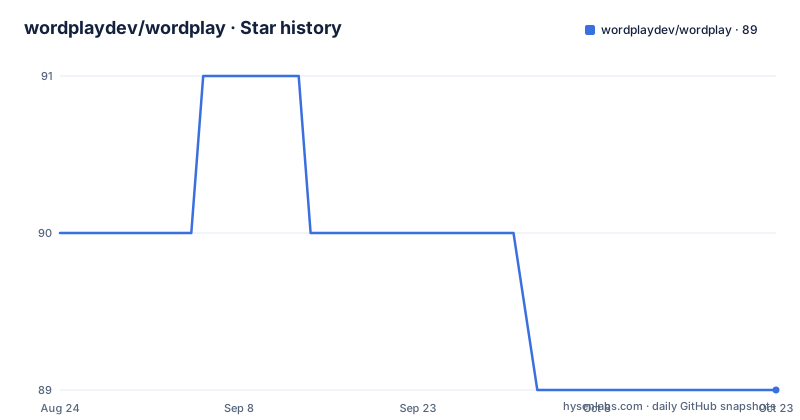
Star history
- wordplaydev/wordplay89 ★ · -1
| Repository | 2026-08-24 | 2026-10-22 |
|---|---|---|
| wordplaydev/wordplay | 90 | 89 |
-1 Stars in the last 59 days, measured from the daily GitHub snapshot. Compare with other projects
Editorial analysis
The package version and the release tags do not agree
Two version lines exist and they do not line up. package.json records the project at 0.38.1, while the recent GitHub releases are v0.6.37, tagged as A bit of polish on 2025-12-14, v0.6.36, tagged as Wordplay 0.6.36: Maintenance on 2025-12-07, and v0.12.0 from 2024-09-22. Read the release list in order and the numbering looks wrong in a second way, since 0.6.37 and 0.6.36 sit above a 0.12.0 even though they were published more recently. The last push to main is dated 2026-09-28, which is newer than any tag, so the tag list is not a reliable picture of current state either. If you need to cite a version of Wordplay, cite the commit, not the tag.
postinstall runs six setup steps before you see anything
Installing dependencies triggers a chain of setup work, not just a package download. The postinstall script is `run-script-os`, which picks between two platform variants, and the default variant chains svelte-kit sync, a copy of .env.template to .env, locales-assemble, updates, locale-assets, fonts-build and git-config. The Windows variant is the same chain with `copy` in place of `cp`. Two details are worth knowing before your first install. The environment file is generated for you from the template, with .env.demo-wordplay also present at the top level. And the last step, git-config, runs `npx tsx scripts/setup-git-config.ts`, so the install writes to your git configuration as a side effect rather than only touching the project directory.
Tests come in four projects, and the rules suite needs Firestore
The test surface is tiered rather than flat. The default test script runs vitest across the fast and isolated projects, test:run does the same without watch mode, test:sweep runs the sweep project, test:all runs everything, and test:coverage adds instrumentation. The interesting split is test:rules, which does not run vitest directly: it wraps the run in `firebase emulators:exec --only firestore` against vitest.rules.config.ts. In other words the security rules are tested against an emulated Firestore, not a stub. The end-to-end scripts follow the same pattern, each invoking firebase emulators:exec around a Playwright run scoped to the demo-wordplay project, with variants for a quick pass, a changed-files-only run using --only-changed, and a rerun of the last failures using --last-failed.
Firestore is the backend, and the rules have their own suite
The persistence layer is Firebase, and it is configured in the repository rather than assumed. At the top level sit firebase.json, .firebaserc, firestore.rules and firestore.indexes.json, alongside a functions/ directory for server-side code and migration_scripts/ for schema and data moves. Two things follow from that layout. Access control lives in firestore.rules, which is why a dedicated rules test project exists and why it needs the emulator rather than a mock: rules are the contract between the browser client and the database. And indexes are declared in their own file, so a query that outgrows a single-field index is a committed change rather than something discovered in production.
The top level is a working repository, not a package
What sits at the root tells you how the project is worked on. There are editor and agent configuration directories in .claude/, .nova/ and .vscode/, a .mcp.json, a .githooks/ directory, ARCHITECTURE.md, CLAUDE.md, CONTRIBUTING.md, EMAILS.md and RECOVERY.md, and a CHANGELOG.md. Alongside those are files that look like output rather than source: diff_output.txt and ui-debug.log are both committed, alongside test-time.mjs and .share-tabs.mjs as loose scripts. The build stack is SvelteKit with Vite, so you get svelte.config.js, vite.config.js and a tsconfig.json, plus two Playwright configurations, playwright.config.ts and playwright.contactsheet.config.ts, and a .nvmrc pinning the Node version for everyone who clones.
Formatting is enforced and hidden from blame afterwards
Prettier is wired into the scripts rather than left to individual discipline. `format` writes with prettier --write ., `format:check` verifies with prettier --check ., and the configuration sits in .prettierrc.json with an ignore list in .prettierignore. Type checking is separate and stricter: the check script runs svelte-check against ./tsconfig.json with --fail-on-warnings, and check:now runs the same thing without the watch flag. A .git-blame-ignore-revs file sits at the root, which tells you whole-tree reformats happen often enough that the project hides those commits from blame. That is the pattern to expect if you contribute: run the formatter, keep the reformat in its own commit, and register it.
The README points at the site, not at the code
The README is deliberately short, and what it contains is a set of destinations. It describes Wordplay as a web-based programming language, IDE and platform for creating accessible, interactive typography, designed, built and evolved with youth and teachers and facilitated by Amy J. Ko at the University of Washington. Then it sends you three places: wordplay.dev for the about page and the tutorial, the contributor guide in the project wiki, and LANGUAGE.md in the repository for the always evolving language specification. So the split is clear. The repository holds the application, the Firebase backend and the language specification; the teaching material lives on the site; and the process lives in the wiki. Reading ARCHITECTURE.md and CONTRIBUTING.md in the repository is the next step after the tutorial.
Editorial conclusion
Wordplay suits a classroom or a curious learner who wants to make type behave, and the honest way to approach it is through the website rather than the repository, since the tutorial and the about page are where the project actually explains itself. Before you clone, expect a heavier setup than a typical SvelteKit app: the postinstall chain assembles locales, fonts and git config, and the rule and end-to-end suites need the Firestore emulator running. Also do not trust either version number on its own, because package.json and the release tags disagree.
Frequently asked questions
What is wordplaydev/wordplay?
A web-based programming language, IDE and platform for creating accessible, interactive typography. It is designed, built and evolved with youth and teachers, facilitated by Amy J. Ko at the University of Washington.
Where is the wordplay language specification?
In LANGUAGE.md in the repository, described as always evolving. The README also points to the about page and the tutorial on wordplay.dev, and to the contributor guide in the project wiki.
What version of Wordplay is current?
The two sources disagree. package.json records 0.38.1, while recent GitHub releases are v0.6.37 from 2025-12-14, v0.6.36 from 2025-12-07 and v0.12.0 from 2024-09-22, and the last push to main is dated 2026-09-28.
What happens when I install Wordplay's dependencies?
The postinstall script dispatches by operating system and then chains svelte-kit sync, a copy of .env.template to .env, locales-assemble, updates, locale-assets and fonts-build, finishing with git-config, which runs scripts/setup-git-config.ts and writes to your git configuration.
What backend does Wordplay use?
Firebase, configured in the repository with firebase.json, .firebaserc, firestore.rules and firestore.indexes.json, plus a functions/ directory and migration_scripts/. The rules are tested against an emulated Firestore through the test:rules script.
Official sources
Add this badge to your README
If you maintain this project, the badge below links readers to this analysis and shows its maintenance status from the daily GitHub snapshot. Paste the markdown into your README; add ?metric=license or ?metric=stars to the image URL for a different field.

[](https://hysenlabs.com/projects/wordplaydev-wordplay)Star history chart for your README
[](https://hysenlabs.com/projects/wordplaydev-wordplay)Was this useful?