Wox ships five installers, a SQLite FTS5 index, and two plugin runtimes
A cross-platform launcher that simply works
At a glance
- What is it?
- Wox is a native cross-platform launcher for Windows, macOS and Linux, positioned as an open-source alternative to Raycast and Alfred. What the repository shows rather than what the marketing claims: local search is SQLite compiled with the FTS5 tag, plugins run on Node.js or Python out of process, the build carries Windows-specific fixes, and the app publishes its own updater manifests.
- Who is it for?
- Wox is worth installing if you want a launcher that is native on all three platforms and are willing to keep up with frequent tags, since v2.4.7, v2.4.8 and v2.4.9 landed between 2026-10-15 and 2026-10-31. Install from a package manager rather than the manual download, and on Arch take the wox-bin entry so you get a prebuilt binary.
- Can I use it commercially?
- Yes, with conditions. GPL-3.0 is a copyleft licence: if you distribute software that includes it, you must release that software's source code under the same licence. Running it internally without distributing it does not trigger that obligation.
- Is it still maintained?
- Yes. The repository received new commits within the last day.
- What is it written in?
- Mainly Go, according to GitHub's language statistics.
Answers come from the project's GitHub data, last synced on November 13, 2026, and from our analysis. They are not legal advice.
Star history
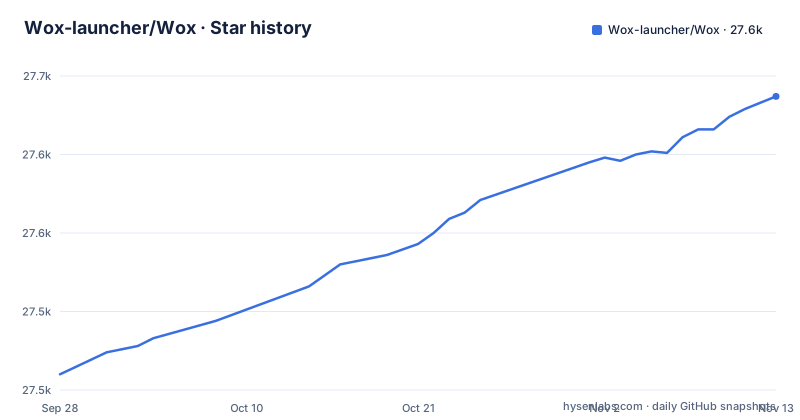
- Wox-launcher/Wox27,637 ★ · +177
| Repository | 2026-09-28 | 2026-11-13 |
|---|---|---|
| Wox-launcher/Wox | 27.5k | 27.6k |
177 Stars in the last 46 days, measured from the daily GitHub snapshot. Compare with other projects
Editorial analysis
Five package managers, and the Arch entry is the prebuilt one
The install table is the most complete part of the README, and it covers five package managers plus a manual fallback. Every command in it:
brew install --cask wox
winget install -e --id Wox.Wox
scoop install extras/wox
choco install wox
yay -S wox-bin
The macOS entry is a Homebrew cask. Windows has three, through Winget, Scoop and Chocolatey, which tells you the project treats Windows as a first-class target rather than an afterthought. Arch gets an AUR entry, and the detail there is the suffix: wox-bin is the binary package, so you are not compiling anything.
That is reinforced by the build file rather than the README. The Makefile carries appimage, deb and rpm targets, so the project builds its own Linux packages instead of leaving distribution to packagers, and a winget-update target, which suggests the Windows package is refreshed from the project side rather than by hand.
One more install-adjacent fact, and it matters on Windows: the sponsors section credits free code signing on Windows through SignPath.io, with certificates from the SignPath Foundation. A signed Windows launcher is the difference between a double-click that runs and one that a security warning greets you for.
The manual route, for all three platforms, is to download the latest stable package from Releases and run it.
Local search is SQLite, and the FTS5 tag is a build variable
The README says local search, and does not say how. The Makefile answers it in one line:
SQLITE_BUILD_TAGS ?= sqlite_fts5So the search index is SQLite compiled with the FTS5 full-text extension, and the build tag is an overridable variable rather than a constant. That single fact explains a lot about the behaviour you get: the indexing is done by an embedded database rather than a platform search API, and anyone who needs a different SQLite build can change the variable rather than patch a script.
The same part of the Makefile is where you can see that this project is actually built on three platforms. There is a block that handles GNU Make on Windows picking Git's sh.exe without exposing Git's usr/bin to recipes, and it normalises PATH itself so callers do not have to launch from a preconfigured MINGW64 shell. Next to it is a comment explaining that the build prefers a working global pnpm over a Corepack shim, because some Node installs expose the command while corepack pnpm still fails at runtime.
That is unglamorous and it is the most reassuring thing in the file. Cross-platform claims are cheap; a build file that carries workarounds for two different broken toolchain states on one platform is a project that has hit both.
Plugins are two runtimes, and there are three stores
The feature table says you can extend with Node.js, Python, or script plugins from the store. The directory layout shows how literal that is, and that both halves exist:
There is a host and an implementation for each language, wox.plugin.host.nodejs/ and wox.plugin.nodejs/, wox.plugin.host.python/ and wox.plugin.python/. The Go core is wox.core/, and www/ is the interface. So a plugin is not a call into the launcher process; it is a program in one of two runtimes, hosted separately. That is the architectural decision behind the plugin ecosystem, and it is the reason plugins are portable across operating systems rather than tied to a platform's scripting environment.
The stores are the other half, and there are three of them rather than one. store-plugin.json, store-theme.json and store-ai-command.json sit at the root of the repository, and the site exposes a plugin store and a separate theme store. So themes are a first-class distributed artefact alongside plugins, and there is a third category for AI commands that the feature table never mentions.
The Makefile agrees with the layout: it has plugins, themes and plugin-health targets, which is a reasonable way to keep a published catalogue from rotting.
The repository ships its own updater manifests
Two files at the top of the repository are updater.json and updater.beta.json, and there is no third entry that explains them. The names carry the whole meaning: a stable channel and a beta channel, described by manifests the project publishes itself.
That is a normal thing for a launcher to do and an awkward thing for a package manager user to discover. If you installed Wox with Homebrew, Scoop, Chocolatey, Winget or the AUR, you now have two mechanisms that can change the same program, and only one of them is visible to your system's package database. A user who accepts an in-app update has silently moved off the version their package manager knows about.
The practical advice is small but real. If you manage Wox as part of a fleet image, decide which channel owns the version, and if that is the package manager, check whether the in-app updater can be left alone before you ship. The repository does not document the interaction, so the decision is yours rather than the project's.
The other file worth knowing about is CHANGELOG.md, which has a Chinese counterpart, CHANGELOG.zh_CN.md, so release notes are kept in both languages at the top level.
Native and 150 MB are claims, and there is a way to sanity-check one of them
The README's case rests on two numbers and one adjective. It calls Wox fully native with GPU rendering on every platform, not Electron and not a browser shell. It puts everyday use at around 150 MB of memory. And it positions the project as an open-source Raycast and Alfred alternative.
Take them in order of how checkable they are. The native claim is the most checkable: if the launcher on your platform is a real window rather than a web view, that is visible in seconds, and the .swift-format configuration at the root of the repository is consistent with a native macOS interface rather than an embedded browser. The memory figure is the least checkable, because the README gives no methodology for it and no conditions, and a launcher that indexes a home directory behaves differently from one that does not.
The positioning against Raycast and Alfred is the comparison the project actually offers, and it is not a feature-by-feature one. What it claims for itself is platform coverage and a native UI, and the repository contains no comparison table, no benchmark and no migration notes. The difference to weigh is that the two projects it names are the reference implementations of the category on one platform, and Wox is betting that running natively on three is worth more than the features either of them has added over years of development.
That is a judgement, and it is the reader's to make.
Weekly tags, and the limits of what this repository tells you
The release rhythm is fast and regular. v2.4.7 was published on 2026-10-15, v2.4.8 on 2026-10-25 and v2.4.9 on 2026-10-31, and the README's own header reads Latest: v2.4.9, Oct 2026. The last push to the repository was on 2026-11-01.
A patch release every week or two is good news for a launcher and a real cost for anyone pinning one in an image. Upgrades are routine rather than events, which also means the rollback question is a real one, and the answer is not in the repository.
Three limits are worth naming directly. The README is short and, unusually for a project this size, contains no configuration, no plugin API reference and no theme documentation: those live on the documentation site, and the plugin and theme stores are two more. So the repository tells you the shape of the system and the docs tell you how to use it. Second, the repository carries plugin hosts only for Node.js and Python, although the feature table also mentions script plugins. Third, the licence is GPL-3.0, which is the constraint that matters if you intend to modify Wox and ship it inside a product, as distinct from installing it.
Editorial conclusion
Wox is worth installing if you want a launcher that is native on all three platforms and are willing to keep up with frequent tags, since v2.4.7, v2.4.8 and v2.4.9 landed between 2026-10-15 and 2026-10-31. Install from a package manager rather than the manual download, and on Arch take the wox-bin entry so you get a prebuilt binary. Before you choose it over Raycast or Alfred, measure the two claims the project makes for itself, a native UI rather than a web shell and an idle footprint around 150 MB, since both are self-reported without methodology. Decide what you will do about the updater, because the repository ships updater.json and updater.beta.json and that is a second update channel next to whatever package manager installed it. And if you plan to modify and redistribute it, the licence is GPL-3.0.
Frequently asked questions
What is the Wox launcher?
Wox is an open-source launcher for Windows, macOS and Linux, described as fully native with GPU rendering on every platform rather than an Electron or browser shell. It does local search, keyboard-first actions and plugin extensions, and positions itself as an open-source alternative to Raycast and Alfred.
What is Wox software?
Architecturally it is a Go core, wox.core/, with a www/ interface and two out-of-process plugin runtimes, wox.plugin.host.nodejs/ and wox.plugin.host.python/, each with a matching plugin directory. The project is licensed under GPL-3.0 and its releases are published as tags such as v2.4.9.
What is a wox?
Wox is distributed through five package managers: a Homebrew cask on macOS, Winget, Scoop and Chocolatey on Windows, and an AUR package on Arch Linux. The same builds are also available as a direct download from the repository's releases page, and the most recent release listed is v2.4.9 from October 2026.
Official sources
Add this badge to your README
If you maintain this project, the badge below links readers to this analysis and shows its maintenance status from the daily GitHub snapshot. Paste the markdown into your README; add ?metric=license or ?metric=stars to the image URL for a different field.

[](https://hysenlabs.com/projects/wox-launcher-wox)Star history chart for your README
[](https://hysenlabs.com/projects/wox-launcher-wox)Was this useful?