InstallerX Revived: the authorizer decides, the OEM can still refuse
More Expressive InstallerX !
At a glance
- What is it?
- InstallerX Revived is a GPL-3.0 Android package installer and the community continuation of InstallerX, with Root, Shizuku, Dhizuku and system package manager paths plus profile-driven install policy. It behaves less like a stock installer than a privileged install console, and what you get out of it depends on which authorizer is active and what your ROM permits.
- Who is it for?
- Adopt it if you routinely install split bundles or bundle formats the stock installer refuses, and you are on Android SDK 34 to 37 with Shizuku or Root available. Skip it if you need SDK 26 to 33 to behave identically, or if your ROM will not let you lock it as the default installer and you have no LSPosed module to fall back on.
- Can I use it commercially?
- Yes, with conditions. GPL-3.0 is a copyleft licence: if you distribute software that includes it, you must release that software's source code under the same licence. Running it internally without distributing it does not trigger that obligation.
- Is it still maintained?
- Yes. The repository last received commits 1 day ago.
- What is it written in?
- Mainly Kotlin, according to GitHub's language statistics.
Answers come from the project's GitHub data, last synced on November 14, 2026, and from our analysis. They are not legal advice.
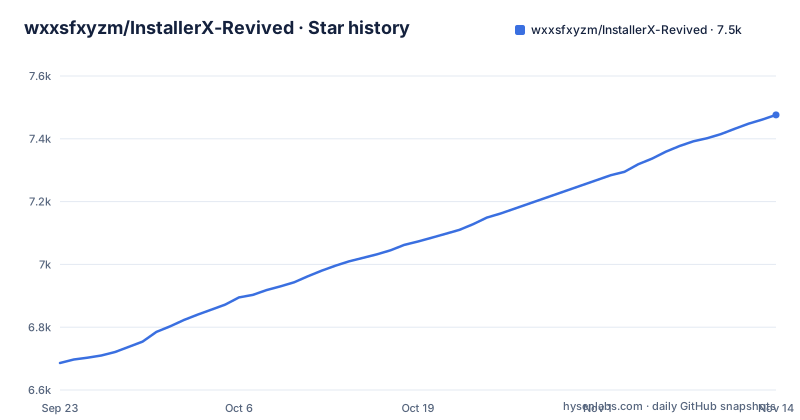
Star history
- wxxsfxyzm/InstallerX-Revived7,476 ★ · +790
| Repository | 2026-09-23 | 2026-11-14 |
|---|---|---|
| wxxsfxyzm/InstallerX-Revived | 6.7k | 7.5k |
790 Stars in the last 52 days, measured from the daily GitHub snapshot. Compare with other projects
Editorial analysis
Four authorizers, four different ceilings on the same install
Every privileged action goes through one of four authorizers, and the choice caps what a profile can do. Root can perform all privileged operations, and the project's own note is that it may be slower because of a cold `app_process` startup. Shizuku obtains shell or root capabilities depending on how it was activated, and is usually faster than direct Root. Dhizuku reaches DevicePolicyManager based operations such as default installer locking and app installation, and is limited for other privileged tasks. None is fully limited by the system, yet it can still install silently when InstallerX is running as the system package installer.
That ceiling matters because profiles carry an authorizer override, so the same profile does not behave the same way under each path. A rule written for Root can come back refused under Dhizuku, and a silent install configured under None disappears the moment the app is not registered as the system package manager.
One concrete case: on HyperOS, installing a system app draws a complaint that a valid installer is required. Shizuku or Root is needed for that workflow and Dhizuku is not enough, because there the app declares `com.android.shell` as the default compatibility installer package. That is a compatibility shim rather than a permission, so the OEM restriction still stands behind it.
Six package formats and one selection rule that restores itself
InstallerX Revived accepts APK, APKS, APKM, XAPK, APK files inside ZIP archives, and batch APK installation. The interesting part is not that list but what happens to per-file choices during analysis. Clearing a single-version package row clears its files. Selecting that row again restores the file choices from before clearing, including split and dex metadata choices. The same rule applies to both interface styles within one analysis.
That restore has two boundaries and both matter in practice. An individual file edit supersedes the saved choices, and so does an explicit APK-wide selection. The row remembers, but only until you touch the selection by hand or flip the whole APK. Anyone installing a split-heavy bundle hits this: clear a row to see what is inside, tap it again to get the splits back, then add one file manually. From that point the row no longer restores.
The project ships two interface styles, Material 3 Expressive and Miuix, alongside dark mode, dynamic color, advanced palettes, system icon packs, colorful dialogs, standard notifications, Live Activity, and Xiaomi HyperOS-style island notifications on supported Xiaomi devices. The restore rule is shared across both styles, so switching the theme does not change which files land on the device.
Profiles hold the policy, and the safety gates sit inside them
A profile is where policy lives. Each one defines how installation and uninstallation requests are handled, and the knobs are concrete: install mode, authorizer override, installer and requester metadata, target user, DexOpt, auto-delete behavior, split selection, blacklist policy, and signature gates.
The last two are why this is more than a convenience wrapper. Package-name and SharedUID blacklists can block a request outright, and signature gates decide what happens when a package carries a different certificate than expected or an unknown one. A permission preview and explicit install flags sit next to them, plus one-time smart suggestions for selected blocked cases. The practical effect is that a silent install is not a free-for-all: a profile can be the only reason a particular package is refused, and an install that fails under one authorizer can succeed under another with nothing visibly changed in the app.
The cost is that this policy surface is documented away from the code. The README names the fields without enumerating their combinations, and it sends the full user guide, advanced options, system integration notes, and FAQ to a separate documentation site. Working out which install mode pairs with which authorizer override is a documentation task, not a repo-reading one.
A local build needs JDK 25 and a token for a public package
The build is an ordinary Android Gradle project with two prerequisites that stop you first: JDK 25 with `JAVA_HOME` configured correctly, and GitHub Packages credentials for the snapshot `miuix` dependency. Authentication is required even though the package is public, so a classic personal access token with the `read:packages` scope goes into the global Gradle properties file rather than into the project. On Linux and macOS that file is `~/.gradle/gradle.properties`, on Windows it is `%USERPROFILE%\.gradle\gradle.properties`.
gpr.user=YOUR_GITHUB_USERNAME
gpr.key=YOUR_PERSONAL_ACCESS_TOKEN
Those credentials are not to be committed. A local debug build then comes down to a single Gradle task:
./gradlew assembleUnstableDebugA second variant exists for pull request style testing, and it builds under a separate application id so it can sit beside a real install:
./gradlew assemblePreviewDebug -PAPP_ID="com.rosan.installer.x.revived.test"If the `miuix` snapshot fails to resolve, the token is the first thing to check. Note what this path does not give you: a signed release artifact. What lands in the output directory is a debug build you install yourself, which happens to be what most people reading this want, and also why the release channels matter more than the build recipe.
Four download channels and one filename that no longer means anything
There are four ways to get the app. Stable releases come from the latest tag on the Revived repository, alpha builds are published on the earlier InstallerX releases page, CI builds come out of the auto-preview-dev.yml workflow, and a Telegram channel carries announcements. Bug reports are meant to be reproduced on the latest Alpha or CI build, because a problem in Stable may already be fixed.
One naming trap deserves a warning. The project is now published as a single APK and network access is an in-app setting rather than a build variant. The release filename still carries `online` purely for compatibility with older in-app update clients and no longer identifies a separate build. Anyone choosing a build by whether its filename says online is reading a legacy string, and anyone hunting for a network-free artifact will not find one in the name.
Alongside the Gradle files sit `app/`, `app-process/`, `hidden-api/`, `build-plugins/`, `baselineprofile/` and `docs/`, with `renovate.json` handling dependency updates and `AGENTS.md` and `CONTRIBUTING.md` carrying the contributor rules. The note about a cold `app_process` startup under Root is the one clue tying the `app-process/` entry to the authorizer model.
Where ROM policy beats the profile
Some limits belong to the project and some belong to the ROM, and the second kind is what wastes your afternoon. Locking InstallerX as the default installer fails on ROMs that strictly control the default package installer. The suggested path is to open the default installer page from the Home page status card and lock from there. If the ROM still refuses, the project points at an LSPosed module such as InxLocker, which is a different tool with a different privilege model.
Stalled background progress has the same shape and a different cause: some ROMs restrict background services aggressively, and the fix is to set InstallerX to unrestricted background or battery mode. It cleans up its foreground service shortly after the install task finishes.
Silent installation is conditional by definition. It needs privileges, and with the None authorizer it needs InstallerX to be running as the system package installer. Live Activity progress is scoped to Android 16 and later on supported systems. Adding InstallerX as a replacement system package manager is called a high-risk advanced workflow, and the documentation site carries the system integration notes. Read them before trying it on a daily driver.
SDK 34 to 37 is the supported band, and 26 to 33 is a qualified yes
Support is banded rather than open ended. Full support covers Android SDK 34 through 37.0. Limited support covers SDK 26 through 33, and limited is defined as InstallerX may work while some features are unavailable or behave differently because of Android framework, OEM, or authorizer limitations. On an older device that sentence is the warning: silent installs or default installer locking on SDK 26 to 33 can fail for reasons that have nothing to do with your configuration.
Maintenance is current rather than abandoned. The last push was on 2026-11-02, and the release line moved from 26.05.01 on 2026-05-30 to 26.09 on 2026-09-30, with preview 26.10.35d7c7a published on 2026-10-20. The version scheme is calendar based, which means a fix landing in a preview is simply absent from the stable tag you have installed, and that is the reason the project asks for Alpha or CI reproduction.
The licence is GPL-3.0 and the app ships as an APK. Anything you build and redistribute yourself carries the copyleft obligations of that licence.
Editorial conclusion
Adopt it if you routinely install split bundles or bundle formats the stock installer refuses, and you are on Android SDK 34 to 37 with Shizuku or Root available. Skip it if you need SDK 26 to 33 to behave identically, or if your ROM will not let you lock it as the default installer and you have no LSPosed module to fall back on. Before anything else, check which authorizer is active and read the documentation site for the install mode and authorizer override pairing, since the README names those fields without enumerating their combinations.
Frequently asked questions
What is InstallerX?
InstallerX Revived is an Android package installer and the community-maintained continuation of the original InstallerX project. It handles APK, APKS, APKM, XAPK and APK files inside ZIP archives, and reaches privileged install flows through Root, Shizuku, Dhizuku, or the system package manager mode.
How do you use InstallerX Revived?
Pick an authorizer first, because it decides what the app can do: Root for all privileged operations, Shizuku for shell or root depending on how it was activated, Dhizuku for DevicePolicyManager work, or None when the app runs as the system package installer. Then choose an install flow: dialog, background notification, automatic, or silent where privileges allow it.
How do you install InstallerX Revived?
Take the APK from the stable releases, the alpha builds, or the CI workflow, or from the Telegram channel. It is published as a single APK with network access controlled by an in-app setting, so there is no separate offline build to look for even though the release filename still contains online.
What is an alternative to InstallerX Revived?
The README positions it as a replacement for limited stock or OEM package installers and as the continuation of the original InstallerX project; InxLocker is an LSPosed module it suggests alongside it when a ROM blocks default-installer locking, not an alternative.
Official sources
Add this badge to your README
If you maintain this project, the badge below links readers to this analysis and shows its maintenance status from the daily GitHub snapshot. Paste the markdown into your README; add ?metric=license or ?metric=stars to the image URL for a different field.

[](https://hysenlabs.com/projects/wxxsfxyzm-installerx-revived)Star history chart for your README
[](https://hysenlabs.com/projects/wxxsfxyzm-installerx-revived)Was this useful?