solidworks-automation-skill: a CAD automation toolkit that publishes what is not yet verified
Python automation toolkit for SolidWorks API
At a glance
- What is it?
- A CAD automation toolkit for Windows that takes an unusual position by publishing what is not yet verified, declares a capability manifest as its only source of truth, grades many of its own features as pilot, and ships a Python installer that replaces existing script, reference and MCP-server directories in two tool directories.
- Who is it for?
- The rare thing about this project is that its feature list tells you which parts are not ready, and that list is more useful than the features. Read the capability file rather than the headings, and decide in advance whether a pilot gate is acceptable for the work you have in mind.
- Can I use it commercially?
- Yes. MIT is a permissive licence: you can use, modify and sell software built on it, as long as you keep its copyright and licence notices.
- Is it still maintained?
- Yes. The repository last received commits 4 days ago.
- What is it written in?
- Mainly Python, according to GitHub's language statistics.
Answers come from the project's GitHub data, last synced on November 15, 2026, and from our analysis. They are not legal advice.
Star history
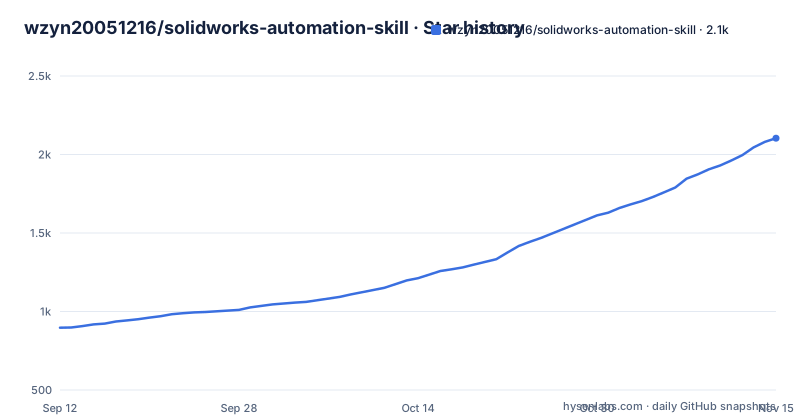
- wzyn20051216/solidworks-automation-skill2,104 ★ · +1,207
| Repository | 2026-09-12 | 2026-11-15 |
|---|---|---|
| wzyn20051216/solidworks-automation-skill | 897 | 2.1k |
1,207 Stars in the last 64 days, measured from the daily GitHub snapshot. Compare with other projects
Editorial analysis
Three version numbers, two package names, one release tag
The repository carries a Node manifest, a Python project file and a setup script, and the version and naming do not line up. The manifest is version 1.3.0 and is the distribution the page tells you to install with the Node package runner or an assistant skill command. The Python project file is also 1.3.0, requires Python 3.10 or newer, and tells the environment manager not to treat the project as a package. The only published release is tag v0.3.4, from the end of August, which matches neither file's 1.3.0. The install route on the page follows the repository name, while the Python installer writes into directories named solidworks-automation under the Claude and Codex skill folders, so the two routes can land in differently named skill folders.
The Python installer deletes the destination before copying
The setup script defines a post-install command whose job is registration, and the copy loop is where the detail is. It takes six items, a scripts directory, a references directory, the MCP server directory and three files, and copies them into two locations under the user's home, one per assistant client. For anything that is a directory, it removes the existing tree at the destination first and then copies. So a second install of the same skill name destroys whatever was at that path, and it does so in two separate tool configuration trees without asking. The copied set is also a subset of the repository: the capability manifest, the subskills directory, the examples and the golden workflow definitions are not in the list, so an installed copy is not the same thing as a clone, and the file the project calls its single source of truth is one of the files left behind.
The capability manifest is declared the only source of truth
One sentence sets the governance of the whole project: the real executable scope is the capability file at the repository root, and unverified capabilities are not to be packaged as completed unattended delivery. That claim is then honoured in the grading. Roughly two dozen features are listed and a large share of them carry a pilot grade, including standard spur gears, sheet metal design, weldment design, finite element analysis, routing review, complex surfaces and moulds, and the engineering drawing path. The featured real-machine cases make the ratio concrete: of the four cases in the table, one is marked verified, one is a stable sub-skill, and two are pilot. The environment section defers to the version fields inside the capability file for what works where, and states that SolidWorks 2025 is a compatibility target while 2024, 2026 service pack one point one and AutoCAD 2024 are the real-machine baselines.
Without the CAD program you lose native formats and keep the open ones
The degradation story is unusually well thought through and is stated in one sentence. When SolidWorks or AutoCAD is missing, only the corresponding native formats are blocked, and the open formats continue to work: the three-dimensional ones, a mesh exchange format, an object and mesh format, a glTF format, and the two-dimensional ones including DXF, SVG, PDF and PNG. That works because the geometry is produced by an external open-source kernel in an isolated process rather than by the CAD program, with a separate two-dimensional backend behind it, and complex features are blocked by the capability gate rather than failing the run. The diagnostic command reports the same picture as data: missing items with their impact scope, an official address, and a copyable install command, and the desktop application shows the identical advice in its settings and help screens.
The diagnostic bundle is scoped to exclude prompts and keys
The export command produces a zip that is described in terms of what it leaves out, which is the more useful half: only versions, stages, error codes and durations, with no prompts, no model content, no API keys and no full private paths. The queue commands beside it show the tool can also run without the real thing at all:
python scripts/cad_studio.py export-diagnostics --output .\cad-studio-diagnostics.zipThat is a deliberate design for a tool that wraps a model, and it means a support thread does not have to start with a redaction step. One flag on the run command enables mock execution while the retry and cancel commands take job identifiers.
The pilot items say what their own evidence is not worth
Read the feature list's own qualifiers and it becomes a different document. The finite element row says results are always kept for human review and do not constitute safety certification, and names an external solver rather than the CAD program's own. The routing row says native writing stays blocked when no add-on or licence is found. The complex surface row says continuity and curvature results are discrete sampling evidence and do not replace global self-intersection checking, or Class-A surface work, or mould design. The drawing row says the automatic check finds missing outputs and obvious collisions, while the title block, dimension chains, hole tables and manufacturing semantics still need an engineer's final visual review. The manufacturability row says a passing rule still needs human confirmation.
One dependency list and three more, for a Windows-only tool
The repository root holds a main requirements file and three more, one for mesh handling, one for the geometry kernel and one for PDF work, next to the Python project file, a lock file, the Node manifest and the setup script, plus three YAML control files. The declared dependencies are the MCP SDK, a validation library, a DXF library, a plotting library, a PDF library, a JSON schema library, and two Windows-only packages, both marked as such in the project file. The plain requirements file lists the same eight without the platform markers, so the file a user reaches for first is Windows-only by content while the project file reads as cross-platform. That matters for the isolation story above: the open-format path depends on the geometry kernel, which is one of the extras rather than the core list, so it is not installed by the simplest instruction on the page.
The flagship case is a standards body part, not a benchmark
The engineering drawing case is described in enough detail to be checkable, and its provenance is stated. It reads a complex test part published in the public domain by a national standards body, verifies a bounding box of 141.421 by 141.421 by 17 millimetres, and produces a native part file, a native drawing file, a PDF and an evidence JSON, with three views, an isometric view, a section and ten required dimensions. The drawing-oriented test count is seventy passing, and the page claims zero overlapping text boundaries in the extracted PDF. Then two sentences pull the claim back: the capability is still a pilot, and the part came from public-domain standards material rather than an official benchmark model the repository created. That is the pattern the rest of the page follows, and it is the reason the feature list is worth reading end to end.
Editorial conclusion
The rare thing about this project is that its feature list tells you which parts are not ready, and that list is more useful than the features. Read the capability file rather than the headings, and decide in advance whether a pilot gate is acceptable for the work you have in mind. If what you need is a signed-off drawing, a supplier-approved part or a safety case, the page says in its own words that the output is not one, and no amount of capability entries changes that.
Frequently asked questions
Does solidworks-automation-skill need SolidWorks installed?
For native format work, yes, on Windows 10 or 11. Without it the page says only the corresponding native formats are blocked, while the open formats keep working: STEP, IGES, BREP, STL, OBJ, GLB, DXF, SVG, PDF and PNG, through an isolated geometry process and a separate two-dimensional backend.
What does capabilities.yaml do in solidworks-automation-skill?
It is declared the single source of truth for what can actually be executed, with unverified capabilities deliberately not packaged as completed unattended delivery. Grades include verified, stable sub-skill and pilot, and the environment section defers to the version fields inside it.
How is solidworks-automation-skill installed?
Three independent routes: a skill import through the Node package runner or an assistant skill command, an MCP server the page recommends installing through a third-party registry service, and a Windows desktop installer or portable archive from the GitHub releases. A Python route also exists with its own post-install step.
Does the solidworks-automation-skill Python installer overwrite an existing skill?
The post-install command removes each existing copied directory (scripts, references and the MCP server) in two assistant skill locations before copying, so a reinstall replaces what was there. The copied set is also a subset of the repository and does not include the capability manifest or the subskills directory.
Can I use solidworks-automation-skill results for FEA?
The page marks the finite element feature as a pilot and says results are always kept for human review and do not constitute safety certification. The solver named is an external one, and the row describes solved linear static, geometry nonlinearity, limited plasticity and contact samples with mesh convergence sequences.
Official sources
Add this badge to your README
If you maintain this project, the badge below links readers to this analysis and shows its maintenance status from the daily GitHub snapshot. Paste the markdown into your README; add ?metric=license or ?metric=stars to the image URL for a different field.

[](https://hysenlabs.com/projects/wzyn20051216-solidworks-automation-skill)Star history chart for your README
[](https://hysenlabs.com/projects/wzyn20051216-solidworks-automation-skill)Was this useful?