Stellar's four content systems and the checks its own npm test skips
An all-in-one personal knowledge base theme for Hexo, ready to use out of the box, with built-in tags and dynamic data components. Suitable for personal blogs, project docs, knowledge bases, columns and notes.
At a glance
- What is it?
- Stellar folds posts, wiki pages, columns and notebooks into one Hexo theme, and the wiring behind the package decides more than its documentation admits: several of the repository's own checks sit outside npm test, and the installer's script is fetched from a different repository entirely.
- Who is it for?
- Adopt Stellar if you already run Hexo on Node.js 22 and want wiki pages, columns and notebooks beside your posts without assembling plugins yourself, because the shared navigation and search are the point of the package. Leave it alone if your site is one blog with nothing to organise, since you would carry its renderers and image libraries without using them.
- Can I use it commercially?
- Yes. MIT is a permissive licence: you can use, modify and sell software built on it, as long as you keep its copyright and licence notices.
- Is it still maintained?
- Yes. The repository last received commits 20 days ago.
- What is it written in?
- Mainly JavaScript, according to GitHub's language statistics.
Answers come from the project's GitHub data, last synced on November 7, 2026, and from our analysis. They are not legal advice.
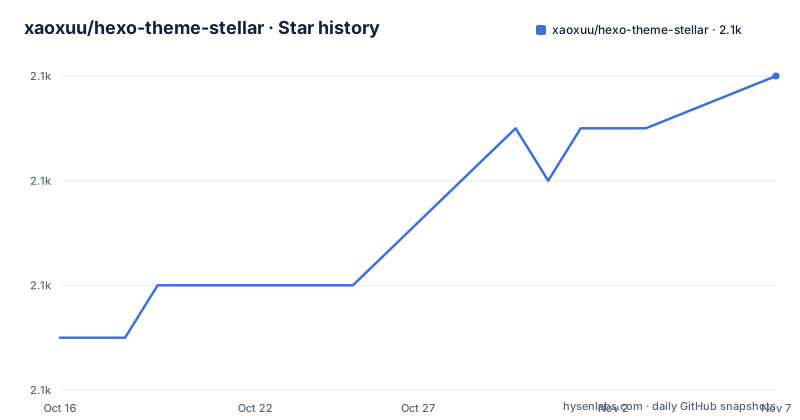
Star history
- xaoxuu/hexo-theme-stellar2,066 ★ · +5
| Repository | 2026-10-16 | 2026-11-07 |
|---|---|---|
| xaoxuu/hexo-theme-stellar | 2.1k | 2.1k |
5 Stars in the last 22 days, measured from the daily GitHub snapshot. Compare with other projects
Editorial analysis
Posts, wiki pages, columns and notebooks in one package
Stellar is a Hexo theme that treats a personal site as four content systems instead of one: ordinary posts, a Wiki for a documentation tree that has to stay stable, columns for a series of posts that has grown into a sequence, and notebooks for loose knowledge collected over time. All four share one navigation layer, one search, one sidebar and one reading experience, and the project claims that a system you never enable adds nothing to the output. Nothing in that claim is quantified: no bundle figure, no build-time figure, no statement of which layouts are dropped when you switch a system off. Meanwhile the repository keeps every system inside a single package, so the templates you skip are still on disk and still inside your node_modules. A companion repository of runnable example sites exists, which is where those four content models are demonstrated rather than described.
npm install pulls renderers the blog never asked for
A theme normally contributes templates and styles. This one contributes a rendering toolchain. package.json depends on hexo-renderer-ejs and hexo-renderer-stylus, which decide how your Markdown and Stylus become HTML for the entire blog, alongside hexo-front-matter and hexo-pagination that a Hexo site already expects from its core. The rest of the list runs cheerio ^1.1.0, js-yaml ^4.1.0, probe-image-size ^7.2.3 and sharp ^0.34.5, with hexo-front-matter at ^4.2.1 and hexo-pagination at ^3.0.0. Each of those version numbers uses a caret, so a rebuild later resolves a newer compatible package than the theme was written against. The engines block sets the floor:
  "engines": {
    "node": ">=22"
  },
Install it in the blog root, then read back what npm resolved:
npm install hexo-theme-stellar
npm ls hexo-theme-stellar
That install is unpinned by design, since it is described as taking the version npm currently provides, which leaves the second command as the only place a number appears. Two things stay undocumented on this page: why probe-image-size and sharp sit in the tree at all, and what to do when image handling fails mid-build.
The doctor command only exists after the theme is enabled
The theme stays inert until Hexo knows about it, which takes one line in your blog configuration file:
theme: stellarThen run the theme's own console command and build the site:
npx hexo stellar doctor
npx hexo generate
The doctor subcommand is not part of upstream Hexo. It exists because the theme registered it, which is why the step only works after an install has put the theme's own dependencies where Hexo can load them. The README asks for that order and then stops, without listing the checks, without showing what a clean run prints, and without saying what a failure looks like. Run it on a small site before you trust it on a large one, because hexo generate afterwards rebuilds everything and a configuration mistake surfaces only when the whole site is written.
Three routes to the same theme and what each one pins
Three acquisition paths exist, and they differ in what you can pin. npm serves whatever the registry currently holds, and package.json declares version 2.0.0 while the documentation gives no way to ask for a different one. The submodule route tracks a branch instead:
git submodule add -b main https://github.com/xaoxuu/hexo-theme-stellar.git themes/stellar
npm install --prefix themes/stellar
Read what -b main does there: the themes/stellar directory follows the main branch of the official repository, so an update is a submodule pull and the tree never records a version you can point at later. The npm route is the opposite, frozen at install time and blind to later commits until you reinstall. Both routes then run the same enable-and-generate steps from _config.yml onwards. This is the alternative that lives inside the project itself: keep the registry package and accept the renderers it pins, or own the source and own the dependency tree that arrives with it.
The bootstrap script is fetched from the examples repository
The one-line install on macOS and Linux does not come from the theme repository at all:
sh -c "$(curl -fsSL https://github.com/xaoxuu/hexo-theme-stellar-examples/raw/main/install.sh)"PowerShell 7+ receives the same treatment from install.ps1. Read that line before running it. The shell downloads the script and executes it in one step, so no copy reaches disk for inspection first, and the code that runs comes from the main branch of the examples repository at the moment you type the command. What happens afterwards is documented: the installer reads blueprints.json from that repository, lists the blueprints currently available, and then asks you to confirm the blueprint, the project directory, the dependency installation and the creation plan in turn. One repository therefore plays two roles, a gallery of runnable example sites and the origin of your bootstrap script, and the menu you see reflects that repository's main branch rather than any Stellar version.
Remote data loads on demand with no documented fetch layer
The README claims that remote content, community data and external services load on demand, stay decoupled from the static body, and let frequently changing data avoid a full-site rebuild. That is the most interesting promise here and the least documented. The dependency list covers rendering, front matter, pagination, YAML parsing and image sizing, the README names no fetch script or cache for that remote layer, and the root does contain scripts/ and _data/ without saying which of them handle remote sources or what happens when a source is slow or down. Read the on-demand claim as runtime behaviour you are trusting rather than a mechanism you can configure from this page. Every build you trigger is still npx hexo generate, which rewrites the site as a whole, so anything you expect to change between builds is not changing here.
Three repository checks never run in the default test path
package.json names seven scripts under ci/, and their wiring is where a skim stops. test:unit runs node ci/check-require-decls.js, then npm run reuse:check, then node --test, then node ci/check-agent-docs.js, and test adds npm run contributions:check on top. Those are the checks a contributor gets from npm test. npm run knowledge:check, npm run integration:check and npm run performance:check appear only in the publishing gate, which runs npm run check first, and lint runs only through npm run check as well. acceptance:prepare is the strangest of them: it points at node ci/check-package-integration.js with --prepare, the same file integration:check runs without that flag, and no other script in package.json calls it. So the prepare half of the package integration check is a manual step, and a green npm test tells you nothing about knowledge, integration or performance.
Agent instruction files and a migration page with no summary
The root of the repository is unusual for a theme: .agents/, .claude/, AGENTS.md and CLAUDE.md sit next to _config.yml, alongside giscus.json, eslint.config.js, test/, docs/, source/, layout/, languages/ and legal/. The topic list includes ready-for-agent, and the unit test chain ends with ci/check-agent-docs.js, so those files count as something that has to stay consistent rather than as personal notes. Nothing says what the agent files instruct or what that check enforces, so the directory listing is the only evidence. Stellar is not archived, the last push was on 2026-10-01, and the theme is distributed under the MIT License with copyright 2021 xaoxuu, with third-party licences collected in legal/THIRD-PARTY-NOTICES.md, which is the file to read before you redistribute a site that vendors those dependencies. One gap remains: the README links a v1 to v2 migration page and does not summarise what changed, so an existing v1 site gets no short answer on this page.
Editorial conclusion
Adopt Stellar if you already run Hexo on Node.js 22 and want wiki pages, columns and notebooks beside your posts without assembling plugins yourself, because the shared navigation and search are the point of the package. Leave it alone if your site is one blog with nothing to organise, since you would carry its renderers and image libraries without using them. Before adopting, add the theme to a scratch site, run npx hexo stellar doctor, and find out what loads at view time, because no page in the repository documents that layer.
Frequently asked questions
What does hexo-theme-stellar require before it will run?
Node.js 22 or higher and Hexo 8 or higher, with the first expressed in package.json as engines node >=22. No other runtime requirement is declared there.
How do I install hexo-theme-stellar from npm and confirm the result?
In the blog root, npm install hexo-theme-stellar followed by npm ls hexo-theme-stellar, a pair the documentation keeps together so you can confirm what npm actually resolved. The install carries no version constraint, so the tree output is where a number shows up.
Can I follow the latest Stellar source instead of a fixed version?
Adding the repository as a git submodule on its main branch and running npm install --prefix themes/stellar gives you the current branch rather than a registry snapshot. You then enable it with theme: stellar in _config.yml.
Is Stellar only for blogs, or also for documentation sites?
The package description covers blogs, project documentation, knowledge bases, series and notebooks. Posts, Wiki pages, columns and notebooks are meant to share the same navigation, search, sidebar and reading experience.
What does npx hexo stellar doctor actually check?
The README asks you to run Doctor after enabling the theme and before generating the site, but it does not list the checks or describe the output. The project wiki links an environment and installation page and a first-site page for that detail.
Official sources
Add this badge to your README
If you maintain this project, the badge below links readers to this analysis and shows its maintenance status from the daily GitHub snapshot. Paste the markdown into your README; add ?metric=license or ?metric=stars to the image URL for a different field.

[](https://hysenlabs.com/projects/xaoxuu-hexo-theme-stellar)Star history chart for your README
[](https://hysenlabs.com/projects/xaoxuu-hexo-theme-stellar)Was this useful?