PYNQ: Python on the other side of a programmable logic fabric
Python Productivity for ZYNQ
At a glance
- What is it?
- Xilinx's framework for driving FPGA fabric and an ARM processor from one Python program, shipped as an SD card image, a set of board overlays, and a pip-installable package with a dependency list that has not moved in a year.
- Who is it for?
- PYNQ is an unusual release in that the interesting artifact is not the repository. The code here is the Python layer; what you actually run is a precompiled micro SD card image with PYNQ already installed, plus a board overlay built from Vivado that gives your specific board its bitstream and drivers.
- Can I use it commercially?
- Yes. BSD-3-Clause is a permissive licence: you can use, modify and sell software built on it, as long as you keep its copyright and licence notices.
- Is it still maintained?
- Yes. The repository last received commits 7 days ago.
- What is it written in?
- Mainly Jupyter Notebook, according to GitHub's language statistics.
Answers come from the project's GitHub data, last synced on October 22, 2026, and from our analysis. They are not legal advice.
Star history
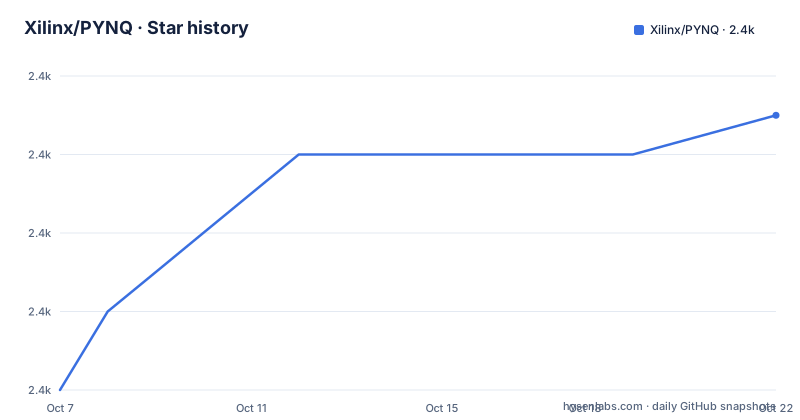
- Xilinx/PYNQ2,373 ★ · +7
| Repository | 2026-10-07 | 2026-10-22 |
|---|---|---|
| Xilinx/PYNQ | 2.4k | 2.4k |
7 Stars in the last 15 days, measured from the daily GitHub snapshot. Compare with other projects
Editorial analysis
One Python program, two very different processors
PYNQ is an open-source project from Xilinx for Zynq All Programmable Systems on Chips, and the description line is the fastest summary available: Python Productivity for ZYNQ.
The architecture it targets is the reason the project exists. A Zynq device puts a hard ARM processor and a programmable logic fabric on the same silicon. That pairing means an algorithm can run in three places at once: in software on the ARM cores, in hardware inside the fabric, or split across a pipeline between them. PYNQ's job is to let you express that in one language rather than in a hardware description language plus a C driver plus a userspace library.
The README lists what that buys you: parallel hardware execution, high frame-rate video processing, hardware accelerated algorithms, real-time signal processing, high bandwidth IO, and low latency control. Each of those is a different answer to the same question, which is what to do with the fabric next to the CPU.
The observable facts about the project: 2,359 stars and 867 forks, which is an unusually high fork ratio for a hardware framework and suggests people vendor it into their own board support. Forty-two open issues. BSD 3-Clause licensed. Homepage at pynq.io, documentation hosted on ReadTheDocs at pynq.readthedocs.io, and a support forum at discuss.pynq.io. The last push was 2026-09-24.
The topic list contains exactly one tag, `pynq`. For a project with a name this widely used, that is poor discoverability, and it means most people arrive here through a search for PYNQ-Z1 or a specific board rather than through the topic.
What actually ships is an SD card, not a package
The delivery model is the part worth internalising before anything else.
You download a precompiled image, write it to a micro SD card, and boot the board from that card. PYNQ supports multiple boards, listed on pynq.io. Inside the image, the Linux kernel, the device tree, the drivers and the Python package are already present, so the board boots into a working Python environment with a Jupyter-style interface rather than into a bare embedded Linux.
The Python source lives in a `/pynq` folder on the board itself, and that is where SDK software projects and Python-C sources also sit. When you install the `pynq` package, the compiled target files are saved into the package automatically. The SD card image is therefore a build output, and the repository is closer to its source.
To update an existing card to the latest `pynq` package, the README gives one command:
sudo pip3 install --upgrade --upgrade-strategy only-if-needed pynqThe `--upgrade-strategy only-if-needed` flag is the interesting part, and the README explains it: dependencies are upgraded only when they do not already satisfy the requirements, which speeds the install and avoids upgrade errors. On an embedded board with pinned native extensions, that flag is not a convenience, it is the difference between an update working and an update leaving you with a broken numpy.
Board files live in `/boards`, and that folder holds Vivado projects, bitstreams and example notebooks together. On Linux you rebuild an overlay by running make in the overlay folder, for example `/boards/Pynq-Z1/base`. On Windows you source the appropriate tcl files instead. So the overlay is a real hardware build, just a smaller one than the full SoC design.
Reading setup.py tells you what the package assumes
`setup.py` is short enough to be the most informative file in the repository, and it is worth reading before you plan anything around PYNQ.
The dependency list is:
required = [
    'pynqmetadata',
    'pynqutils',
    "setuptools>=24.2.0",
    "cffi",
    "numpy<2.0",
    "nest_asyncio",
    'grpcio==1.64.0',
    'grpcio-tools==1.64.0',
]
Two exact pins and one upper bound in eight dependencies tells you a lot. `grpcio` and `grpcio-tools` are pinned to exactly 1.64.0, so there is no negotiation, and `numpy<2.0` is the sort of ceiling that exists because something in the stack has not been validated against NumPy 2. If you want to use PYNQ from a host machine with a modern scientific stack, this is the constraint you will hit first.
`nest_asyncio` is there because PYNQ runs notebooks and needs to nest event loops. `cffi` is the FFI layer for the compiled runtime. The `pynqmetadata` and `pynqutils` dependencies suggest that board and overlay metadata are handled by separate packages rather than in-tree.
Then there is the architecture handling. Two device family constants are defined, `ZYNQ_ARCH = "armv7l"` and `ZU_ARCH = "aarch64"`, covering Zynq-7000 and Zynq UltraScale+. A `PYNQ_BUILD_ARCH` environment variable overrides the detected value, and the result is checked against the supported list. The reason for the override is build-time cross-compilation: you build the package on a host, and the target architecture is not the host's.
The one genuine maintenance smell is at the top of the file. It imports `copy_tree`, `copy_file` and `move_file` from `distutils.dir_util` and `distutils.file_util`. `distutils` was removed from the Python standard library in Python 3.12, and setuptools has supplied a replacement since well before that. So building this package on a modern interpreter depends on a compatibility shim that no longer ships by default. That is a concrete, checkable fact about the state of the build, and it is worth knowing before you hit it on your own host.
Version 3.1 rebuilt the toolchain, then went quiet
The release history has three entries and each one tells you what the project considers its own job.
v3.1, tagged 2025-07-29, is the substantive one. All overlays were rebuilt with Vivado 2024.1, and the Linux kernel and build were updated to Petalinux 2024.1. That is a full toolchain move, and it is the kind of release where the honest expectation is a long tail of bug reports, which is exactly what 3.1.1 delivered.
v3.1 also shipped SD card images for PYNQ-Z1, PYNQ-Z2 and ZCU104, hosted on download.amd.com. PYNQ-ZU, RFSoC4x2 and ZCU208 images were listed as coming soon. It added beta releases of PYNQ.remote and PYNQ.cpp, added a Docker flow for building images with a `pynqremote` target in the SD build Makefile, deprecated Alveo platform support, and removed the Vagrant VM path for image builds in favour of the Docker flow. Two deprecations in one release is a signal about where the project thinks the platform market is going.
3.1.1, tagged 2025-09-26, fixed three real bugs: DMAs configured with 32-bit address widths were being given 64-bit addresses, the global state file cache failed to update in some circumstances, and `pyxrt.close()` was returning an error. It also added a local cache for `RemoteBuffer` in PYNQ.remote, which the notes describe as vastly improving usability, added `CITATION.cff`, and made the SDIST buildable inside the SD build Docker container.
v3.1.2, tagged 2025-09-30, resolved a `setup.py` dependency-resolution problem affecting PyPI installs and host-side use with PYNQ.remote, with no new SD card images because the changes were host-side only.
Then nothing, for about a year. That is worth stating plainly: the most recent release is 2025-09-30 while commits continued through 2026-09-24. For a project where the SD card image is the product, a year without an image means an image built from a year-older kernel, so plan around the released artifacts rather than around the branch tip. The open question is whether the next image is pending or whether the project has shifted its focus, and nothing in the repository answers that yet.
Naming, hosting and a stale license link
Three details in the repository add up to something you should know before citing or redistributing.
First, the hosting. The repository lives under the `Xilinx` GitHub organization and the README consistently says Xilinx, while the v3.1 SD card image links point at `download.amd.com`, an AMD domain. Both facts are visible in the same repository. Whatever the corporate history is, the practical consequence is that the code host and the binary host are different properties, so a network policy that allows one may block the other.
Second, the license bundle lags the release. The README links its license and copyright information tarball, and its open components source code tarball, at filenames that name `pynq-v3.0`. The releases are at v3.1.x. So the license and source-of-records bundle the README points you to describes version 3.0, not the version you are running. The per-component licensing statements are current, naming BSD 3-Clause for PYNQ, a multiple license file for Xilinx Embedded SW, and MIT for Digilent IP, with `THIRD_PARTY_LIC` in the tree. The bundled third-party material is the part that trails.
Third, GitHub reports the language of this repository as Jupyter Notebook. That is arithmetically defensible, since notebooks under `boards/` are a large share of the files, and it is misleading as a signal, since the shipped artifact is a Python package assembled by `setup.py` with a C extension. If you are triaging repositories by language badge, this one will sort oddly.
The rest of the tree tells you the build story: `build.sh` and `build.mk` for the SD image, `sdbuild/` for the image tooling that v3.1 moved to Docker, `pynq/` for the package, `docs/` for the ReadTheDocs site, `tests/` with a `pytest.ini` and a `.coveragerc`, and `.gitmodules` for the external dependencies the image pulls in.
Editorial conclusion
PYNQ is an unusual release in that the interesting artifact is not the repository. The code here is the Python layer; what you actually run is a precompiled micro SD card image with PYNQ already installed, plus a board overlay built from Vivado that gives your specific board its bitstream and drivers. That shape has real advantages. You write Python against a board that already boots, already has a kernel, and already exposes its fabric, and you iterate over software without a hardware toolchain in the loop. It also has real costs. Your Python runs on an ARM processor on the board, so version skew is your problem, and the `--upgrade-strategy only-if-needed` flag the README recommends exists precisely because naive upgrades break those pins. Meanwhile `setup.py` still imports `distutils`, which Python removed from the standard library in 3.12, and it pins `numpy<2.0` plus exact gRPC versions, which tells you the package is built for a known-good environment rather than for yours. The release gap since v3.1.2 deserves watching rather than panic, since commits continue and the fixes are the kind that accumulate in one branch. If you are starting a new Zynq or Zynq UltraScale+ design, read the setup.py pins before you plan your host-side tooling, and get the SD card image before you write any code.
Frequently asked questions
What is the difference between PYNQ and Zynq?
Zynq is the silicon: an All Programmable System on Chip that pairs an ARM processor with programmable logic fabric. PYNQ is the software framework that lets you write Python for that combination, so a single program can move work between the ARM cores and the fabric. You install PYNQ on the Zynq board, not the other way round.
What does PYNQ stand for?
Python Productivity for ZYNQ. The repository description reads exactly that, and the project presents itself as an open-source effort from Xilinx for designing embedded systems with Zynq All Programmable SoCs using Python and libraries to exploit programmable logic and microprocessors together.
Is Zynq an AMD Chip?
The repository is published under the Xilinx GitHub organization and the README refers to Xilinx throughout, while the v3.1 SD card images for PYNQ-Z1, PYNQ-Z2 and ZCU104 download from download.amd.com. So the code host and the binary host sit under different names today. Check both domains if a network policy separates them, since you need the repository for source and the download host for the board image.
Official sources
Add this badge to your README
If you maintain this project, the badge below links readers to this analysis and shows its maintenance status from the daily GitHub snapshot. Paste the markdown into your README; add ?metric=license or ?metric=stars to the image URL for a different field.

[](https://hysenlabs.com/projects/xilinx-pynq)Star history chart for your README
[](https://hysenlabs.com/projects/xilinx-pynq)Was this useful?