xmonad: the install section has three links and no steps
The core of xmonad, a small but functional ICCCM-compliant tiling window manager
At a glance
- What is it?
- xmonad is a tiling window manager for X11, written, configured and extended in Haskell, whose repository is deliberately the stable core rather than the whole project. Its installation section contains three links and no instructions, its contributing section says patches usually belong in another repository, and its newest release is a patch that took two years.
- Who is it for?
- xmonad fits a Linux user on X11 who wants keyboard-driven tiling and is willing to write their own configuration in a real language. Verify four things before you install it.
- Can I use it commercially?
- Yes. BSD-3-Clause is a permissive licence: you can use, modify and sell software built on it, as long as you keep its copyright and licence notices.
- Is it still maintained?
- Yes. The repository last received commits 29 days ago.
- What is it written in?
- Mainly Haskell, according to GitHub's language statistics.
Answers come from the project's GitHub data, last synced on November 14, 2026, and from our analysis. They are not legal advice.
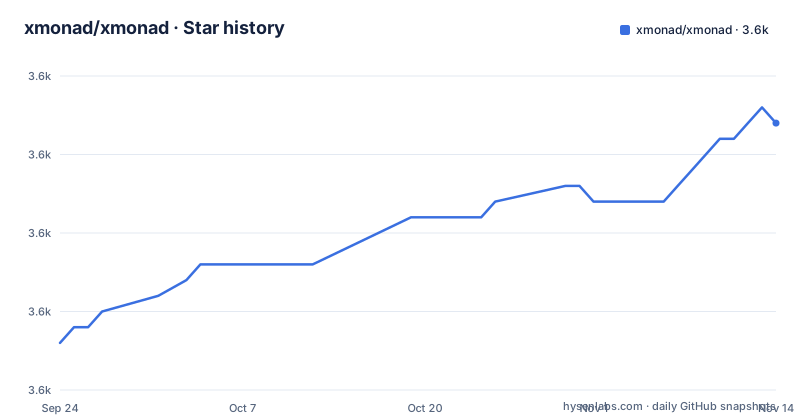
Star history
- xmonad/xmonad3,612 ★ · +14
| Repository | 2026-09-24 | 2026-11-14 |
|---|---|---|
| xmonad/xmonad | 3.6k | 3.6k |
14 Stars in the last 51 days, measured from the daily GitHub snapshot. Compare with other projects
Editorial analysis
The install section has three links and no steps
The section headed installation contains an instruction to see other pages. There is a link for downloading and installing, a link for installing the latest snapshot from a git repository, and a link for configuring it, followed by a sentence suggesting the documentation or the community if you have trouble. That is the whole section. Two observations follow. The second destination is a snapshot, not a release, so the documented install path tracks the development branch and gives you fixes and breakage on the same schedule. And the two documents you are being sent to also exist in this repository as install and tutorial files in markdown, so the same guidance is maintained in two places and the page has chosen the website copies. For a project that has kept its own documentation in its own tree since 2007, that is an odd choice, and it means a reader who clones gets two versions of the manual.
Contributions usually go to a different repository
The contributing section is unusually specific about where work belongs. Bug reports can go to either repository. But code changes, described as bug fixes, new features and new extensions, are marked as usually going to the extensions library instead. Documentation fixes are directed to three repositories, because the website is its own. Financial support goes to two separate platforms. And the architecture and code conventions overview is generated documentation for a module that lives in the extensions library, not in this one. So the pattern holds all the way through: this repository is described as a minimal, stable, extensible core, and the project it belongs to is assembled from the parts around it. That is a deliberate architecture and the page is honest about it, which is more than most.
A patch release that took two years, and no release since March
The release list tells the whole story and the front page tells none of it. A patch went out in April 2023, a minor in February 2024, and then nothing for twenty-five months until a single patch in March 2026. The repository was pushed to two days ago, so the branch is seven months ahead of that tag. So the honest answer to whether the project is still worked on is yes, with weekly commits and a release this year, and the answer to whether releases track the work is no, not closely. The page itself offers one date, the year the project started, and no cadence, no supported-versions statement and no note about what breaking changes might arrive. For a project whose users install a snapshot, that silence is doing more work than it should.
Four build definitions, three workflows, and a Nix flake with no lock
The repository carries a Cabal package file, a project file, a configuration file for the Haskell continuous integration tooling, a Stack configuration and a Nix flake. Three of those four pin their inputs, through the project file, the Stack resolver or generated freeze files. The flake has no lock file beside it, so a Nix build resolves its inputs afresh each time, which is the one build route in the set that is not reproducible. Continuous integration matches the tools: three workflow files, one for the Stack route, one for the Haskell tooling and one for Nix. Two smaller gaps. There is a configuration file for a Haskell linter and no configuration for a Haskell formatter, so style is checked and not normalised. And the repository root carries both a literate setup file and a main module, which is an executable-shaped root on a library package.
The multi-screen answer names an extension from the previous decade
The feature paragraph says multi-screen is fully supported and names the extension that provides it, which is the older multi-screen mechanism rather than the one that replaced it. The claim is emphatic and specific, and the page says nothing about the current mechanism, so a reader on a modern multi-monitor setup has to work out for themselves whether the sentence still applies. Two further silences sit next to it. Nothing on the page mentions the display protocol the project is not built for, and nothing mentions a macOS build, so the two questions a prospective user most often arrives with are both unanswered here. What the page does state is the design position clearly: a mouse is optional, layouts are applied dynamically, and each workspace can use a different one.
Eleven links in badge position and a licence badge on a branch called readme
The header is a grid of anchors with no images, so a reader sees a block of invisible links rather than badges. Mixed into it are the package index, the language home page, two funding platforms and two chat networks. Three of them are continuous integration badges, one per build route, which is the clearest signal in the block. The licence link is the odd one: it points at a file on a branch named for the readme, while every other reference to a file in this repository names the main branch. So there is a separate long-lived branch holding the readme and its licence, which the page itself occupies, and nothing on the page explains why it is separate. Three platforms for money, two for chat, three for continuous integration, and a fourth branch.
Three self-descriptions and no screenshots
The repository is described in the metadata as a small but functional window manager. The readme calls the package a minimal, stable, yet extensible core. The heading under the title says only that it is a tiling window manager for a display server. Three registers for one project, and the metadata one is the most hedged of the three. The page also has no images at all, which is a strange omission for a program whose entire argument is how the screen looks once it is running, and it is the one thing every comparable project in this space does. What the page does have is a good closing line: the core and the extensions library together are described, quite literally, as libraries for creating your own window manager, which is the most accurate description of the project anywhere on the page.
Editorial conclusion
xmonad fits a Linux user on X11 who wants keyboard-driven tiling and is willing to write their own configuration in a real language. Verify four things before you install it. Read the install and tutorial material rather than the front page, because the repository's section is a signpost and two of the three destinations also exist in the repository as separate documents, so you need to know which copy you are reading. Check your display server, because the multi-screen support named on the page is a specific extension from the previous decade and the page says nothing about the current mechanism or about Wayland. Decide how you will track releases, because the newest patch took two years and the branch has moved since. And read the contributing section before opening a pull request, because it tells you most patches belong in a different repository.
Frequently asked questions
what is xmonad
A tiling window manager for X11 written in Haskell, which arranges windows automatically to tile the screen without gaps or overlap and is driven from the keyboard with a mouse optional. This repository holds the core package, described as minimal and stable; the extensions library beside it carries hundreds of community-maintained layouts and extension modules, and the two together are described as libraries for creating your own window manager.
how to install xmonad
The repository's installation section contains no steps, only three links: a download and install page, a page for installing the latest snapshot from a git repository, and a configuration tutorial. Those pages live on the project's website, and the install and tutorial documents also exist in this repository as separate files, so there are two copies. The snapshot route tracks the development branch rather than a release.
how to install xmonad on arch linux
Nothing distribution specific is said here or on the front page. The install material is a general page plus a configuration tutorial, and the packaging for any particular distribution is left to that distribution's own repositories. The one piece of local guidance on the page is about building from source, where four build definitions exist and three continuous integration workflows cover them.
is xmonad dead
Not on the evidence in the repository. It was pushed to two days before this was written, a patch release went out in March 2026, and the project started in 2007. The gap is in releases rather than in work: a minor in February 2024 was followed twenty-five months later by a single patch, and the branch has moved seven months since that tag. The front page itself carries no release information at all.
is xmonad lightweight
The page positions itself by what it is not rather than by a measurement. It says a mouse is optional, that window management is reachable from the keyboard, that this repository is a minimal stable core, and that the whole design assumes you will write your own layouts, key bindings and extensions in Haskell. No resource figures appear anywhere in it, so the characterisation rests on the architecture rather than on numbers.
Official sources
Add this badge to your README
If you maintain this project, the badge below links readers to this analysis and shows its maintenance status from the daily GitHub snapshot. Paste the markdown into your README; add ?metric=license or ?metric=stars to the image URL for a different field.

[](https://hysenlabs.com/projects/xmonad-xmonad)Star history chart for your README
[](https://hysenlabs.com/projects/xmonad-xmonad)Was this useful?