mpegts.js remuxes MPEG2-TS into fragmented MP4 so a plain video element can play live streams
HTML5 MPEG2-TS / FLV Stream Player
At a glance
- What is it?
- mpegts.js is a TypeScript and JavaScript player for MPEG2-TS and FLV live streams in the browser, derived from flv.js. Its limits are specific: no mpeg2video, no seeking in static files, and no use on iOS 17.0 or older.
- Who is it for?
- mpegts.js suits a web team that must show live MPEG2-TS or FLV video, such as DVB or ISDB television or a surveillance camera, in an HTML5 video element with the lowest latency the browser allows. It does not suit streams that use mpeg2video, static file playback that needs seeking, or any audience on iOS 17.0 or older.
- Can I use it commercially?
- Yes. Apache-2.0 is a permissive licence: you can use, modify and sell software built on it, as long as you keep its copyright and licence notices.
- Is it still maintained?
- Yes. The repository last received commits 40 days ago.
- What is it written in?
- Mainly JavaScript, according to GitHub's language statistics.
Answers come from the project's GitHub data, last synced on November 7, 2026, and from our analysis. They are not legal advice.
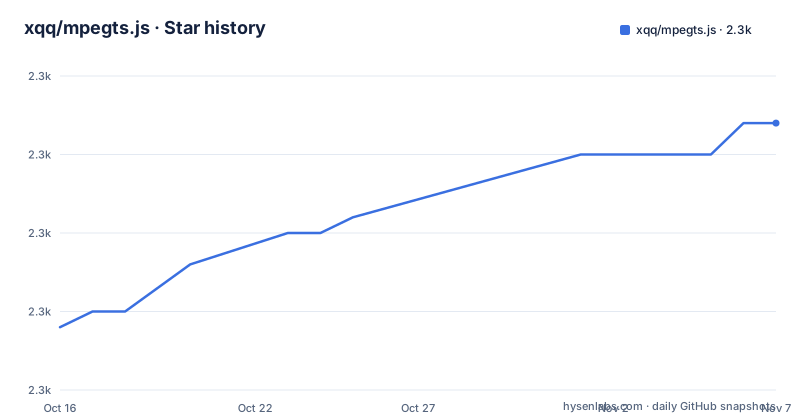
Star history
- xqq/mpegts.js2,297 ★ · +13
| Repository | 2026-10-16 | 2026-11-07 |
|---|---|---|
| xqq/mpegts.js | 2.3k | 2.3k |
13 Stars in the last 22 days, measured from the daily GitHub snapshot. Compare with other projects
Editorial analysis
Transmuxing MPEG2-TS to fragmented MP4 for Media Source Extensions
mpegts.js works by transmuxing an MPEG2-TS stream into ISO BMFF segments, which are fragmented MP4, and then feeding those segments into an HTML5 `<video>` element through the Media Source Extensions API. The player never decodes video itself. The browser decodes it, so playback is hardware accelerated whenever the browser supports it.
The README describes the project as an HTML5 MPEG2-TS stream player written in TypeScript and JavaScript, optimized for low-latency live playback such as DVB or ISDB television and surveillance cameras. It is based on flv.js, the Bilibili project, and keeps that project's FLV features.
The design is therefore a data format converter plus a buffer manager. The conversion is the reason the player needs Media Source Extensions at all, and the browser support list follows from that. A short design document, `docs/design.md`, is linked for the internals.
The README claims under one second of latency in the best case
Among the features the README lists extremely low latency of less than 1 second in the best case. It also lists automatic latency chasing for the internal buffer of the HTMLMediaElement, and the v1.8.0 news adds that chasing live latency now works more smoothly by changing the playback rate.
Best case is the qualifier to keep. The README publishes no latency figures for typical networks, and the number depends on your encoder, your server and your segment behavior. Measure it end to end with your own pipeline.
The README also claims low CPU overhead and low memory usage, with the JS heap taking about 10MiB for each instance. If a page shows a wall of cameras, that per-instance figure is the number to multiply, though the README does not say how it was measured.
Codecs and containers the player accepts
The features list covers MPEG2-TS and FLV streams with H.264 or H.265 video and AAC audio, transported over http(s) or WebSocket. It also covers `.m2ts` files such as BDAV and BDMV, with 192 byte or 204 byte TS packets, and it handles dynamic codec parameter changes such as a video resolution change.
The news section tracks later additions. Version 1.7.0 introduced H.265 or HEVC over MPEG-TS and FLV. Version 1.7.3 added Enhanced RTMP with HEVC for FLV, Opus and ATSC AC-3 for MPEG-TS, and LOAS AAC. Version 1.8.0 added AV1 over MPEG-TS, AV1 over HTTP-FLV through Enhanced RTMP, ATSC EAC-3 in MPEG-TS, and Opus and FLAC over HTTP-FLV.
Browser support covers Chrome, Firefox, Safari, Edge, old or Chromium based, and any Chromium based browser. The player can also pass through PES private data with stream_type=0x06, such as ARIB B24 subtitles using aribb24.js, and Timed ID3 metadata with stream_type=0x15 through the TIMED_ID3_METADATA_ARRIVED callback.
Install from npm and call createPlayer with a type and a URL
Installation is a single command:
npm install --save mpegts.jsThe Getting Started example from the README is below. It checks `mpegts.getFeatureList().mseLivePlayback` first, then creates a player, attaches it to the video element, loads and plays:
<script src="mpegts.js"></script>
<video id="videoElement"></video>
<script>
    if (mpegts.getFeatureList().mseLivePlayback) {
        var videoElement = document.getElementById('videoElement');
        var player = mpegts.createPlayer({
            type: 'mse',  // could also be mpegts, m2ts, flv
            isLive: true,
            url: 'http://example.com/live/livestream.ts'
        });
        player.attachMediaElement(videoElement);
        player.load();
        player.play();
    }
</script>
The comment on `type` lists the alternatives: mpegts, m2ts and flv. The README suggests testing with Simple Realtime Server. Full options are in `docs/api.md`, and the package ships type definitions under `d.ts/` for TypeScript.
The video server must send an Access-Control-Allow-Origin header
If your MPEG2-TS stream comes from a standalone video server on another origin, the `Access-Control-Allow-Origin` header must be configured correctly on that server for cross-origin resource fetching. A missing header is the usual reason a first test shows a black video and a network error in the console, and the README points to `docs/cors.md` for more detail.
Two more documents cover live delivery. `docs/livestream.md` describes live stream playback, and the FLV limitations section sends you there because HTTP FLV live streams do not currently work on all browsers. For a multipart FLV playlist, you only provide a playlist for `MediaDataSource`, and `docs/multipart.md` explains how.
Because the player is built on fetching over http(s) or WebSocket, your stream endpoint and your page both become part of the playback path, and cross-origin rules apply to both.
No mpeg2video, no seeking in static files, and nothing on iOS 17.0 or older
The README lists its limitations plainly. mpeg2video is not supported, so a stream whose video really is MPEG-2 video will not play even though it sits in a transport stream. HTTP MPEG2-TS live streams could not work on old browsers like IE11.
Static file playback is on the TODO list: MPEG2-TS static file playback is not done, and seeking is not supported now. If your product is a recording library with a scrub bar, this player is the wrong tool.
iOS is the other boundary. The player is not usable on iOS version 17.0 or older because of the banning of Media Source Extensions, which stay available on iPadOS. iOS 17.1 works through the Managed Media Source API, and Safari 18 gains MSE in Workers, which the v1.8.0 news says brings great performance improvements on Chrome and Safari 18, iOS included.
For FLV there are two more notes: the MP3 audio codec is currently not working on IE11 and Edge, and HTTP FLV live is not working on all browsers.
Build with webpack, test with node, and a release cadence that is uneven
To build, you run `npm install`, then `npm install -g webpack-cli`, then `npm run build`, and the packaged, minimized JS is emitted in the dist folder. `npm run build:debug` produces the debug build, and the README recommends the cnpm mirror if you are in Mainland China. The `package.json` also defines `watch` and `serve` scripts, and `test` runs `node --test tests/*.test.cjs`. It sets the engines field to Node 20.9.0 or later, and the only runtime dependencies are `es6-promise` and `events`.
The release list shows v1.8.0 on 24 December 2024, then v1.8.1 on 6 August 2026 and v1.8.2 on 14 August 2026. The last push was on 29 September 2026, and the license is Apache-2.0.
The repository has README files in Japanese and Chinese, two demo pages including one with aribb24.js, and the demo is hosted at xqq.github.io/mpegts.js/demo/.
Editorial conclusion
mpegts.js suits a web team that must show live MPEG2-TS or FLV video, such as DVB or ISDB television or a surveillance camera, in an HTML5 video element with the lowest latency the browser allows. It does not suit streams that use mpeg2video, static file playback that needs seeking, or any audience on iOS 17.0 or older. Before adopting it, check the codecs your encoder emits against the feature list and test the player against the CORS headers your video server sends.
Frequently asked questions
How to play MPEG-2 transport stream?
Install mpegts.js with npm, call mpegts.createPlayer with a type such as mpegts and a URL, attach it to a video element, then call load and play. The stream can arrive over http(s) or WebSocket.
What is the difference between MPEGts and MP4 files?
mpegts.js transmuxes an MPEG2-TS stream into fragmented MP4 segments and feeds them to a video element through Media Source Extensions. The browser plays the MP4 segments, not the transport stream directly.
What is stream format mpegts?
MPEG2-TS is the transport stream format used for live sources such as DVB and ISDB television or surveillance cameras. mpegts.js is an HTML5 player for it.
Official sources
Add this badge to your README
If you maintain this project, the badge below links readers to this analysis and shows its maintenance status from the daily GitHub snapshot. Paste the markdown into your README; add ?metric=license or ?metric=stars to the image URL for a different field.

[](https://hysenlabs.com/projects/xqq-mpegts-js)Star history chart for your README
[](https://hysenlabs.com/projects/xqq-mpegts-js)Was this useful?