PixivBatchDownloader: a batch downloader that only runs on pixiv.net
Powerful Pixiv batch downloader browser extension. Batch download illustrations and novels from Pixiv, filter works, rename on download, convert animated images, and more.
At a glance
- What is it?
- A TypeScript browser extension that pulls illustrations, Ugoira, novels, avatars and covers off Pixiv in batches, with filters, folder naming rules, scheduled runs and format conversion. It is deliberately confined to pixiv.net pages, is built for Chromium browsers with a Firefox add-on, and ships its compiled output in the repository.
- Who is it for?
- PixivBatchDownloader fits a Pixiv user who already browses the site in Chrome, Edge or Firefox and wants a whole user page, bookmark set or followed list filtered, renamed and converted in one pass instead of work by hand. It does not fit someone who needs it outside pixiv.net, on a desktop build of their own, or as an Android app that installs itself.
- Can I use it commercially?
- Yes, with conditions. GPL-3.0 is a copyleft licence: if you distribute software that includes it, you must release that software's source code under the same licence. Running it internally without distributing it does not trigger that obligation.
- Is it still maintained?
- Yes. The repository last received commits 16 days ago.
- What is it written in?
- Mainly TypeScript, according to GitHub's language statistics.
Answers come from the project's GitHub data, last synced on November 14, 2026, and from our analysis. They are not legal advice.
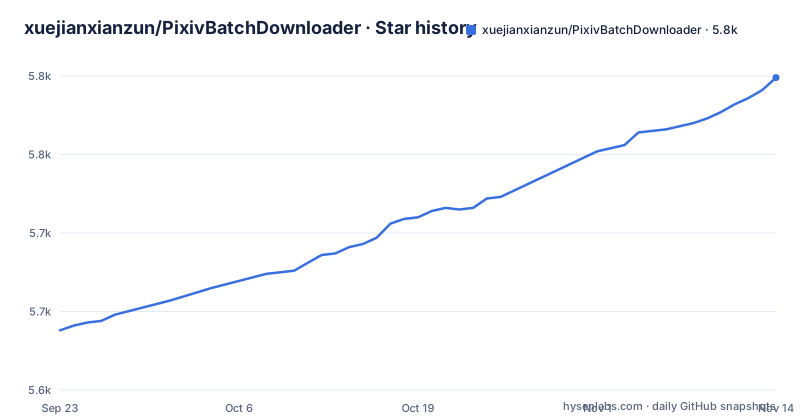
Star history
- xuejianxianzun/PixivBatchDownloader5,799 ★ · +161
| Repository | 2026-09-23 | 2026-11-14 |
|---|---|---|
| xuejianxianzun/PixivBatchDownloader | 5.6k | 5.8k |
161 Stars in the last 52 days, measured from the daily GitHub snapshot. Compare with other projects
Editorial analysis
The extension does nothing outside pixiv.net
The single most useful thing to know before configuring anything is where it runs. The downloader operates on Pixiv.net pages: when you browse Pixiv, you can open the downloader panel at any time. On any other web page, clicking the extension icon does not show the panel, and the README calls that normal rather than a fault, because the extension only runs on Pixiv.net. The second rule follows from the first. Tabs that were already open when you installed the extension have to be refreshed before the extension can run on them, so an install mid-session leaves every existing Pixiv tab inert until you reload it. For a batch job that means the browser has to be on Pixiv for the panel to exist at all; there is no separate application window, no headless mode and no command line entry point in this repository.
Folders, file names and conversions are separate dials
What you collect and how it lands on disk are handled independently. You can batch download all works, bookmarks, followed users, rankings and search results from a Pixiv user, then narrow the set with filtering conditions before anything is fetched. Folders can be created from usernames, work titles or custom text and other rules, and file names are customizable separately from the folder structure, so a naming scheme and a directory scheme do not have to move together. On the format side, Ugoira can be converted to WebP, WebM, GIF or APNG, novels are saved as TXT or EPUB, and illustrations, manga, Ugoira and novels are all supported alongside user avatars and cover images. Two habits in the list are aimed at repeat runs rather than first runs: download progress is saved so incomplete downloads resume, and download history is kept so the same work is not fetched again.
Chromium gets the store build, Firefox gets the add-on
Installation is split by browser engine rather than by platform. Browsers with a Chromium core, Chrome and Edge named explicitly, install the extension from the Chrome Web Store. Firefox browsers install it from Add-Ons at addons.mozilla.org, under the name PowerfulPixivDownloader. There is a third path for phones, and it is not an Android package: for a browser on Android the project recommends Quetta, a mobile browser with a Chromium core that can install extensions online from the Chrome Web Store, described in the README as very convenient. Offline installation is also documented, and it is not in this repository: the README sends you to a wiki page for it. So the three routes a reader has are a store listing, a Firefox listing, and a wiki, and the last one is where anything the README leaves out lives.
Development needs Node first, then the dist folder is the extension
The build path is short and it ends in a folder you load by hand:
git clone https://github.com/xuejianxianzun/PixivBatchDownloader.git

cd ./PixivBatchDownloader

npm i
Once the dependencies are in, the compiled output goes to the dist folder, and you can load that dist folder as an extension in your browser's extension management for local debugging. The project's own npm commands cover the rest:
npm run ts // compile ts file to dist folder
npm run less // compile less files to the dist folder
npm run fmt // format all files

npm run pre-build // execute fmt, ts, less commands (compile all code, but do not package)
npm run build // execute fmt, ts, less commands, and copy other files needed for packaging to the dist folder, and finally pack the dist folder into a zip file
After you change code and compile, two refreshes are needed: reload the offline loaded extension in your browser's extension management, then reload the Pixiv page. The README's command list omits two scripts that pre-build calls: test, which runs node --test, and gen:icons, which runs generate-icon-sprite.js. The root listing also carries a checked-in powerfulpixivdownloader.crx file and the dist folder itself, so compiled output lives in the repository as well as on your disk.
One runtime dependency, everything else is build tooling
The manifest for powerful-pixiv-downloader version 19.6.1 declares a single runtime dependency, webextension-polyfill at ^0.12.0. That is the whole production tree: the polyfill that lets one extension code path speak to both the Chrome and Firefox extension APIs. Everything else sits in devDependencies, and the list shows what the build is made of: webpack ^5.95.0 with ts-loader ^9.5.1 for the TypeScript bundle, less ^4.2.0 for styles, archiver ^7.0.1 and recursive-copy ^2.0.14 for packaging, prettier ^3.3.3 and eslint ^9.12.0 for checks, typescript ^5.6.2, and viewerjs ^1.11.6 for the built-in image viewer. The scripts mirror that split. ts runs webpack with webpack.conf.js, less compiles two .less files into dist/style, fmt runs prettier over src/ts and src/style, gen:icons runs the sprite generator, pre-build chains test and all four, and build adds node ./pack.js on top to produce a zip.
Six translations, two changelogs and a privacy policy
The repository is maintained as a public-facing product rather than as a bare source drop. The README exists in Simplified Chinese, Traditional Chinese, Japanese, English, Korean and Russian, with the translated files under readme/, and the top-level README credits the translators by name. Two changelog files sit at the root, CHANGELOG.md and CHANGELOG-Early.md, which suggests the split point between the current format and whatever came before it. Two privacy policy files sit beside them, Privacy Policy.md and Privacy Policy-ZH-CN.md. AGENTS.md sits with the lint and format configuration as .eslintrc.js, .eslintignore, .prettierrc and .prettierignore, and there is a notes/ directory and a tests/ directory that the README never mentions. The licence is GPL-3.0, and the manifest spells the grant out as GPL-3.0-or-later.
Versions move in small steps and the last push is recent
The release record is short and current. Three versions appear in the recent list: v19.5.0 on 2026-10-10, v19.6.0 on 2026-10-26 and v19.6.1 on 2026-10-29. The repository is not archived, the default branch is master, and the last push is dated 2026-10-29, the same day as v19.6.1. That combination is worth holding onto when you pin something: a store-installed copy tracks whatever the store serves, while a build from master tracks commits that carry no version bump. Nothing in the README states which browser versions the extension supports, what its minimum Pixiv login requirements are, or what happens to a run when a session expires mid-batch, so those are the three things to establish for yourself before trusting it with a large collection.
Editorial conclusion
PixivBatchDownloader fits a Pixiv user who already browses the site in Chrome, Edge or Firefox and wants a whole user page, bookmark set or followed list filtered, renamed and converted in one pass instead of work by hand. It does not fit someone who needs it outside pixiv.net, on a desktop build of their own, or as an Android app that installs itself. Before you start, read the refresh rule for tabs that were already open when the extension was installed, check the GPL-3.0 grant in the manifest, and decide how you will store a copy of your download history so resumed runs do not fetch the same works twice.
Frequently asked questions
How to mass download Pixiv images?
The extension adds a downloader panel on Pixiv.net pages and can batch download all works, bookmarks, followed users, rankings and search results from a Pixiv user. You can set filtering conditions to select what you want first, and folders can be created from usernames, work titles or custom text.
Which browsers can install Powerful Pixiv Downloader?
Browsers with a Chromium core, such as Chrome and Edge, install it from the Chrome Web Store, and Firefox browsers install it from Add-Ons. On Android the project recommends the Quetta browser, which has a Chromium core and can install extensions from the Chrome Web Store. Offline installation is handled on a wiki page instead of in the repository.
Why does the Powerful Pixiv Downloader panel not open when I click the icon?
The extension only runs on Pixiv.net, so clicking the icon on any other web page does not show the panel, which the README treats as normal. On Pixiv pages you open the panel at any time, and any tab that was already open when you installed the extension has to be refreshed so it runs there.
What formats can Powerful Pixiv Downloader save?
Ugoira can be converted to WebP, WebM, GIF and APNG, and novels are saved in TXT or EPUB. Illustrations, manga, Ugoira and novels are supported, and the extension can also save user avatars and cover images.
Official sources
Add this badge to your README
If you maintain this project, the badge below links readers to this analysis and shows its maintenance status from the daily GitHub snapshot. Paste the markdown into your README; add ?metric=license or ?metric=stars to the image URL for a different field.

[](https://hysenlabs.com/projects/xuejianxianzun-pixivbatchdownloader)Star history chart for your README
[](https://hysenlabs.com/projects/xuejianxianzun-pixivbatchdownloader)Was this useful?