XVim: Vim keybindings for Xcode, gated on a compatibility UUID
GitHub describes it as Xcode plugin for Vim keybindings. The repository metadata lists Objective-C as its primary language. The metadata lists the MIT license. This article stays within the project description and details documented in the GitHub repository README.
At a glance
- What is it?
- XVim is an Objective-C Xcode plugin that puts Vim keys in the editor, and it is compiled from source with make rather than installed from a package. The build writes an unconfirmed compatibility UUID into Info.plist, and support is split across Xcode version specific commits that stopped at Xcode 8.
- Who is it for?
- XVim still makes sense if you are on Xcode 8, willing to compile the plugin, and prepared to be the compatibility tester for your own Xcode version. Before you start, check which commit your Xcode needs, because the project maps Xcode 7 and Xcode 8 to different points in history and sends Xcode 9 users elsewhere.
- Can I use it commercially?
- Yes. MIT is a permissive licence: you can use, modify and sell software built on it, as long as you keep its copyright and licence notices.
- Is it still maintained?
- Probably not. The repository last received commits 106 months ago, on January 9, 2018.
- What is it written in?
- Mainly Objective-C, according to GitHub's language statistics.
Answers come from the project's GitHub data, last synced on October 4, 2026, and from our analysis. They are not legal advice.
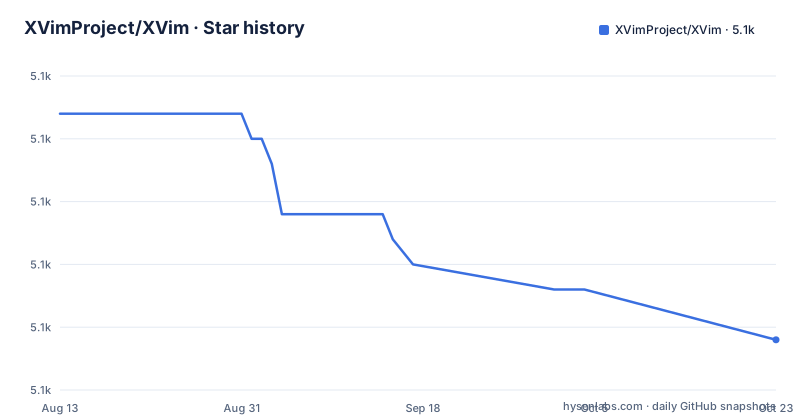
Star history
- XVimProject/XVim5,114 ★ · -7
| Repository | 2026-08-13 | 2026-10-04 |
|---|---|---|
| XVimProject/XVim | 5.1k | 5.1k |
-7 Stars in the last 52 days, measured from the daily GitHub snapshot. Compare with other projects
Editorial analysis
make asks you to accept an unconfirmed Xcode version
The build reads two values out of your Xcode installation before it compiles anything:
xcode_path=`xcode-select -p`
uuid=`defaults read "$${xcode_path}/../Info" DVTPlugInCompatibilityUUID`
The first line is the value `xcode-select -p` prints, and the second asks the Xcode Info file for the compatibility UUID and for CFBundleShortVersionString. The Makefile then greps that UUID against XVim/Info.plist. If the UUID is absent, you get a prompt:
XVim hasn't confirmed the compatibility with your Xcode, Version X.X
Do you want to compile XVim with support Xcode Version X.X at your own risk?
Answering y runs `plutil -insert DVTPlugInCompatibilityUUIDs.0` to write the UUID into XVim/Info.plist, so the next build for that Xcode version skips the question. What you are agreeing to is not a compatibility promise but a local override: the plugin will declare itself compatible with a version nobody has tested. If the answer is no, the build continues without the entry.
Xcode 7, Xcode 8, and Xcode 9 each point somewhere different
Support is a lookup table rather than a range, and the guidance is per version.
Xcode 7 users are told to use the commit before 809527b. Xcode 8 users are told to use the latest master. Xcode 9 users are sent to a different repository entirely, XVim2, because that version needs work this one does not have.
There is also a separate install document for Xcode 8, INSTALL_Xcode8.md, which the install instructions ask you to follow first. Older guidance for Xcode 8 remains in place even though the project later split out a successor, which is the shape of a codebase that grew a version boundary and then handed the newest version off.
Practically, that means there is no single checkout that covers every Xcode. You pick the commit for your version, compile it yourself, and accept that a plugin designed for an older Xcode may not keep up with a newer one. The stated support ends at Xcode 8, and the newest tagged release is v1.0-beta from September 23, 2013, with v1.0-alpha on September 3, 2013 and v0.1-stable on September 5, 2013.
make is the whole interface, five targets and no more
There is no installer script and no package manager entry. A Makefile drives everything, and the release and debug targets share a preparation step:
release: uuid
	$(xcodebuild) Release $(REDIRECT)
The `uuid` target is the one that reads your Xcode preferences and updates Info.plist. Alongside it sit `debug` for a Debug configuration, `clean-release` and `clean-debug` for the matching xcodebuild clean actions, a combined `clean`, and `uninstall`. A `BUILDLOG` variable redirects build output to a file when you want it captured.
The `build-test` target is the odd one out. It loops over every `Xcode*.app` in /Applications, switches the active developer directory to each with sudo, runs a nested make that writes into build.log, and restores the original selection at the end. That is a way to check the plugin against several Xcode installations at once, at the cost of changing your global developer directory several times and needing sudo for it.
Refusing the load prompt leaves the plugin registered
After make, you create a .xvimrc if you want one and restart Xcode. The first launch asks whether you want to load XVim, and pressing Yes installs it into the session. Pressing No by mistake is recoverable, but only from a terminal:
defaults delete com.apple.dt.Xcode DVTPlugInManagerNonApplePlugIns-Xcode-X.X (X.X is your Xcode version)That deletes the preference key Xcode uses to remember that you declined a non Apple plugin, then you relaunch Xcode and get the question again. The key name embeds the Xcode version, so the string is version specific and an older one will not clear a newer installation.
The prompt is the only confirmation you get. There is no status indicator for a loaded plugin and no in-editor way to check whether your keys are being intercepted. If normal editing keys start producing Vim motions, the answer is that it loaded.
Removal targets one directory under Xcode Plug-ins
Uninstalling is a delete of a single path:
$ make uninstallThe Makefile target expands to an rm of `$HOME/Library/Application Support/Developer/Shared/Xcode/Plug-ins/XVim.xcplugin`, and the same path is written out by hand in the manual instructions. Nothing else is touched: no preferences are cleared and no build products are removed from the checkout.
That leaves two loose ends. The preference key that suppresses the load prompt survives, because nothing in the Makefile deletes it, so a later reinstall may prompt differently than a clean machine would. And the compiled artifacts stay in the working tree until you remove them yourself. Both are minor, but both are the kind of detail that matters when you are moving a plugin between machines or between Xcode versions.
Releases are tags on master, changes land on develop
The branch policy is spelled out in three parts. Releases are tags on the master branch, arranged, and the recommendation for ordinary use is to take one of them. Master is the stable branch, and critical bug fixes and stable features move there from develop after being merged. Develop is where new features and non critical fixes land first, for anyone who wants the experimental version. Any other branch in the repository is temporary and expected to merge into develop, and pull requests are supposed to target develop rather than master.
If you hit a critical bug in a tagged release, the advice is to try the latest master. That is a real option only if you are willing to compile, which the whole workflow already assumes.
The rest of the repository is arranged around that split: XVim.xcodeproj holds the project, XVim/ the plugin sources, XcodeClasses/ the Xcode integration classes, Documents/ the developer and user documentation, Tools/ the helper scripts, and XVim.pmdoc/ the bundled help. A feature list lives in its own file under Documents/Users/FeatureList.md, and contribution rules live in .github/CONTRIBUTING.md.
The project documents its own Xcode crashes
There is a section on bug reports that opens by saying XVim sometimes crashes Xcode, followed by the note that the work of eliminating the bugs is hard. What follows is a request for five things: the crash information, which Xcode can show as a thread stack trace to copy, the series of key strokes or mouse clicks that caused it, the text you were manipulating at the time, the Xcode version, and the XVim version, meaning the revision you built.
Two further asks come after that list. If the listed information is not enough, there is a video walkthrough for taking a debug log. And if you can, write a test case: the project asks that you follow the Write test section in the developer pull request document and file an issue with seven items, explicitly without touching any source code.
Against that background, the funding route is per issue. XVim used BountySource, where a contributor is asked to work a funded issue first, without any guarantee of it. The project also asks for donations, and says plainly that the author does not intend to make money from it.
Editorial conclusion
XVim still makes sense if you are on Xcode 8, willing to compile the plugin, and prepared to be the compatibility tester for your own Xcode version. Before you start, check which commit your Xcode needs, because the project maps Xcode 7 and Xcode 8 to different points in history and sends Xcode 9 users elsewhere. Verify the plugin loads after a restart, and keep the crash information ready, since the project states plainly that it sometimes takes Xcode down with it.
Frequently asked questions
How do I build XVim from source?
Clone the repository, confirm xcode-select -p prints your Xcode path, and run make. If the Makefile does not recognise your Xcode version it prints a compatibility warning and asks whether to compile at your own risk, and answering y writes the version UUID into XVim/Info.plist.
Which Xcode versions does XVim support?
Xcode 7 needs the commit before 809527b, Xcode 8 uses the latest master, and Xcode 9 is handled by a separate project called XVim2. The newest tagged release is v1.0-beta from September 23, 2013.
How do I remove XVim once it is installed?
Run make uninstall, which deletes $HOME/Library/Application Support/Developer/Shared/Xcode/Plug-ins/XVim.xcplugin. The preference that remembers you declined the load prompt is separate and has to be deleted by hand with defaults delete against com.apple.dt.Xcode.
Where should I send a pull request for XVim?
Pull requests are supposed to target the develop branch, not master. Critical bug fixes and stable features get merged from develop into master, and tags on master are the releases.
Official sources
Add this badge to your README
If you maintain this project, the badge below links readers to this analysis and shows its maintenance status from the daily GitHub snapshot. Paste the markdown into your README; add ?metric=license or ?metric=stars to the image URL for a different field.

[](https://hysenlabs.com/projects/xvimproject-xvim)Star history chart for your README
[](https://hysenlabs.com/projects/xvimproject-xvim)