dockerized: ready made compose and Kubernetes manifests for a home lab
🐳 Build once, run anywhere ☸️
At a glance
- What is it?
- dockerized is a catalogue of container deployment recipes for self-hosted services, pairing each application with a Docker Compose configuration under docker/apps and, where relevant, a Kubernetes manifest under kubernetes/apps or kubernetes/system. The last push was on 2026-09-22.
- Who is it for?
- dockerized fits homelab operators and self-hosting tinkerers who want a working compose file for a service rather than a tutorial, and who appreciate that the same catalogue is mirrored as Kubernetes manifests for the same applications.
- Can I use it commercially?
- Yes. MIT is a permissive licence: you can use, modify and sell software built on it, as long as you keep its copyright and licence notices.
- Is it still maintained?
- Yes. The repository last received commits 12 days ago.
- What is it written in?
- Mainly CSS, according to GitHub's language statistics.
Answers come from the project's GitHub data, last synced on November 7, 2026, and from our analysis. They are not legal advice.
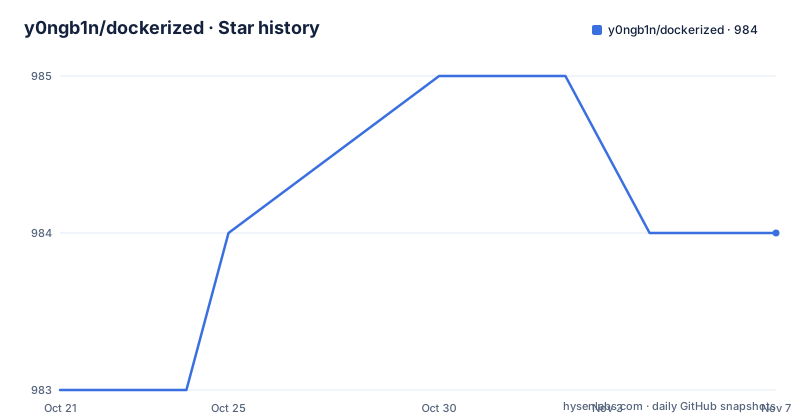
Star history
- y0ngb1n/dockerized984 ★ · +1
| Repository | 2026-10-21 | 2026-11-07 |
|---|---|---|
| y0ngb1n/dockerized | 983 | 984 |
1 Stars in the last 17 days, measured from the daily GitHub snapshot. Compare with other projects
Editorial analysis
A catalogue, not a framework
dockerized is not a tool you configure. It is a collection of deployment recipes for self-hosted services, and the project description puts the ambition in a single line, build once and run anywhere. The repository root contains only a docker directory, a kubernetes directory, a README, and a licence file, so the structure tells you what this is: manifests, grouped by deployment target. The audience is people running services on their own hardware, a homelab on a single box, a small cluster, or anything in between. The value proposition is that each entry is a known-good starting point rather than a blank compose file you write from a blog post. The author also publishes to Docker Hub under the y0ngb1n account, which the project homepage points at, so the images and the manifests are meant to be used together.
The catalogue, from DNS filtering to password management
The application list is the substance of the project, and it leans heavily towards network and privacy tooling. AdGuard Home is included as a whole-network ad blocker and tracker filter, and Blocky appears as a lightweight DNS proxy supporting DoT and DoH encryption with ad filtering, which gives you a choice between two ways to do the same job. For remote access there are Tailscale and ZeroTier, both described as ways to build your own virtual LAN, and Cloudflare Tunnel as a lightweight proxy for exposing services without opening ports. acme.sh handles automatic certificate issuance including wildcard certificates, and dae is an eBPF based high-performance transparent proxy for Linux. Then there is a service catalogue proper: Vaultwarden for a lightweight, private password manager, Pocket ID as a simple OIDC provider that allows only passkey authentication, Tinyauth as a lightweight authentication middleware, SonarQube as a code quality platform, LeafWiki as a self-hosted knowledge base built around Markdown files, AList as a file listing program supporting multiple storage backends, Beancount as an open source double-entry accounting tool, and Fail2ban for automatically banning brute force attempts. The range is coherent: this is the set of services a privacy-minded homelab operator actually wants to self-host.
Two deployment shapes, one catalogue
Each application in the table links to a quick deploy path, and the path tells you which shape is provided. Compose recipes live under docker/apps/<name>, for example docker/apps/adguard-home and docker/apps/sonarqube. Kubernetes manifests live under kubernetes/apps/<name> for applications, and under kubernetes/system/<name> for infrastructure level components, with acme.sh at kubernetes/system/acmesh and Fail2ban at kubernetes/system/fail2ban. That split is the more interesting part of the design. The same service, Vaultwarden, appears in both trees, with a Kubernetes path at kubernetes/apps/vaultwarden and a Compose path at docker/apps/bitwarden. Whether the split is about something else, such as the upstream project's own deployment guidance, is not explained in the repository, and the README does not document why a given application sits on one side rather than the other. If you run Kubernetes, check the tree before assuming a service is covered.
Installing Docker and Compose as documented
The repository does include the two bootstrap commands, so this is the one project in this catalogue where you can start from a clean machine. Docker itself is installed with the well known convenience script:
curl -fsSL https://get.docker.com | bashCompose is described as a Python application and can be run in a container, and the documentation installs it by downloading a release script:
export DOCKER_COMPOSE_VERSION=1.24.0
curl -L https://github.com/docker/compose/releases/download/${DOCKER_COMPOSE_VERSION}/run.sh > /usr/local/bin/docker-compose
chmod +x /usr/local/bin/docker-compose
Two practical notes. The pinned Compose version in that snippet is 1.24.0, which is old enough that you should check what the current release line requires for the features your compose files use. And the Docker install script is a convenience path that a security team will usually want replaced with a distribution package, since piping a remote script to a shell as root is exactly the pattern procurement reviews flag. The rest of the README is about running services, not about securing the host.
The supporting material: mirrors, sandboxes, and utilities
Around the catalogue there is a short list of resources for when Docker is not running locally. For pulling images faster there is a link to a Docker Hub mirror accelerator configuration hosted as a gist in the same account. For trying things without installing anything, three browser based sandboxes are listed, Play with Docker, Play with Kubernetes, and Play with iximiuz Labs. A utilities table then collects the tools that make a container host manageable: watchtower for automatic container updates, docker-gc as a garbage collector for containers and images, docker-slim for shrinking images, ctop as a top-like interface for containers, portainer as a Docker visualisation and management tool, and lazydocker as a terminal based visual query tool. A separate open source repositories table collects learning material, including docker-cheat-sheet, docker_practice for going from beginner to practice, awesome-docker as a curated list of Docker resources and projects, and awesome-selfhosted. None of this is original tooling, and the project does not pretend otherwise; it is a curated starting map for homelab operators.
What a manifest collection cannot promise
The honest limitation is that this is a snapshot of other people's software with a thin layer of configuration. The repository publishes no GitHub releases, so there is no changelog to read and no versioned artefact to pin, and the last push was on 2026-09-22, which means individual application recipes can drift as upstream images change tags. Nothing in the repository documents pinning image digests, backup strategy, upgrade procedure, or rollback for these services, and the images referenced are upstream projects such as AdGuardHome, Vaultwarden, SonarQube, and beancount, each with its own release cadence and its own security advisories. The Docker Hub badge suggests the author also builds images, but the README does not describe how those images are built, what base images they use, or how they are updated. Treat the manifests as a starting point you own from the moment you deploy them, not as a maintained distribution.
Editorial conclusion
dockerized fits homelab operators and self-hosting tinkerers who want a working compose file for a service rather than a tutorial, and who appreciate that the same catalogue is mirrored as Kubernetes manifests for the same applications. It is a poor fit if you need supported, versioned application releases, because the repository publishes no GitHub releases and the project is a manifest collection rather than a maintained product, and it is a poor fit if you require images with health checks, resource limits, and configuration baked in. Before deploying anything from it, open the compose file for that application and read the image tags, the published ports, and the volume paths, since that is where the actual configuration decisions live, and note that upstream projects such as AdGuard Home, Vaultwarden, and SonarQube have their own documentation for anything beyond the manifest.
Frequently asked questions
What does the y0ngb1n/dockerized repository contain?
It contains deployment recipes for self-hosted applications, grouped by target: Docker Compose files under docker/apps, Kubernetes manifests for applications under kubernetes/apps, and infrastructure level components such as acme.sh and Fail2ban under kubernetes/system. The catalogue covers projects such as AdGuard Home, Blocky, Vaultwarden, SonarQube, Beancount, Tailscale, and ZeroTier.
How do I install Docker with dockerized?
The project documentation gives curl -fsSL https://get.docker.com | bash for Docker, and for Compose it downloads a release script after setting DOCKER_COMPOSE_VERSION. The pinned Compose version in that snippet is 1.24.0, so check it against what the current release line supports.
Does dockerized publish versioned releases?
No. The repository has no GitHub releases, and the last push was on 2026-09-22. Recipes point at upstream application images, so pin image versions yourself and check upstream release notes rather than relying on this repository for upgrade guidance.
Where are the images published?
The project homepage points at the y0ngb1n account on Docker Hub, and the repository carries a Docker Hub badge for that account. The README does not document how the images are built or updated, so verify the image source before using them for anything sensitive.
Official sources
Add this badge to your README
If you maintain this project, the badge below links readers to this analysis and shows its maintenance status from the daily GitHub snapshot. Paste the markdown into your README; add ?metric=license or ?metric=stars to the image URL for a different field.

[](https://hysenlabs.com/projects/y0ngb1n-dockerized)Star history chart for your README
[](https://hysenlabs.com/projects/y0ngb1n-dockerized)Was this useful?