Bunster compiles shell scripts through Go, and its last release is v0.14.0 from 2025-08-21
Compile shell scripts to static binaries.
At a glance
- What is it?
- Bunster is a shell compiler written in Go that transpiles a script into Go source and hands it to the Go toolchain, so the result is a standalone binary instead of a wrapper. It also ships a module system, a builtin package manager, .env loading and flag parsing, and it warns that only a subset of features works today.
- Who is it for?
- Bunster is the right candidate only if your scripts are bash, you want static output and your CI already has a Go toolchain. Check three things before adopting it: the supported features page for the constructs you actually use, the gap between the v0.14.0 tag and the master branch, and which install route you trust, because the bash installer is piped from the documentation domain rather than from a release asset.
- Can I use it commercially?
- Yes. BSD-3-Clause is a permissive licence: you can use, modify and sell software built on it, as long as you keep its copyright and licence notices.
- Is it still maintained?
- Activity is slowing. The repository last received commits 6 months ago.
- What is it written in?
- Mainly Go, according to GitHub's language statistics.
Answers come from the project's GitHub data, last synced on November 14, 2026, and from our analysis. They are not legal advice.
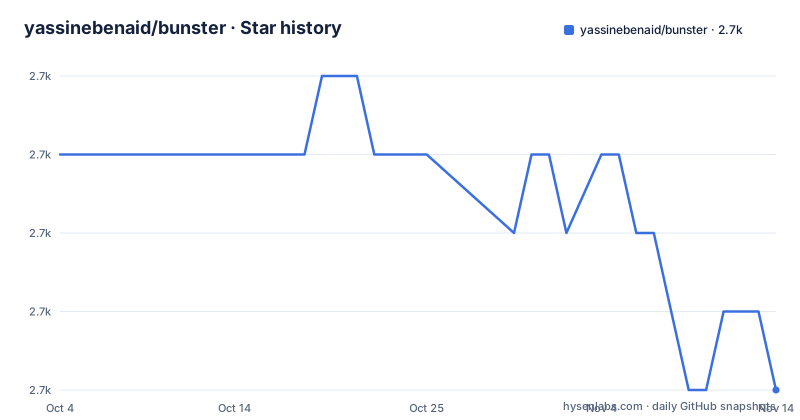
Star history
- yassinebenaid/bunster2,676 ★ · -3
| Repository | 2026-10-04 | 2026-11-14 |
|---|---|---|
| yassinebenaid/bunster | 2.7k | 2.7k |
-3 Stars in the last 41 days, measured from the daily GitHub snapshot. Compare with other projects
Editorial analysis
Two bash compatibility claims sit next to each other
The README makes two statements about bash that pull in opposite directions. The first says bunster aims to be compatible with bash as a starting move and that most bash scripts will just work. A warning block a few paragraphs later says the project is in its early stages of development and that only a subset of features are supported so far, with a link to the features page that spells out which ones.
The versioning section explains which of the two to believe. SemVer applies, minor releases add features, and full bash compatibility is promised only once v1.0.0 arrives, with the parenthetical that there might be some caveats. Support for additional shells is explicitly not planned until that release. So the compatibility surface is not a fixed target you can test against today: it moves with the version, and this repository is still on 0.x, with v0.14.0 published on 2025-08-21, v0.13.0 on 2025-04-30 and v0.12.1 on 2025-04-11.
Transpiling to Go puts a Go toolchain in your build path
The pipeline is two steps, both stated plainly: bunster transpiles a shell script into Go code, then it uses the Go toolchain to compile that code into an executable. What that buys is stated as the difference from shc, which wraps a script inside a binary. Compiled output is described as a standalone shell independent program that does not rely on any external shell on your system.
The cost sits on the other side of the same pipeline. Because the emitted source is Go, compiling needs a Go installation, and the promise of a static result is written into the Dockerfile, which builds the compiler itself with `RUN CGO_ENABLED=0 go build -o /usr/local/bin/bunster ./cmd/bunster`. That one line is the clearest statement of the design intent anywhere in the repository, and it sits in a build recipe rather than in the feature list. The tree also carries both `runtime/` and `stubs/` directories, so the library side of the emitted program has packages of its own, though the page never says which shell constructs they stand in for.
The Makefile names three verbs the README does not
Usage on the page is one link to the documentation site, so the real command surface has to be read out of the build files, and the Makefile is where it appears:
build:
	@[ -d bin ] || mkdir bin
	@go build -o ./bin/bunster ./cmd/bunster

compile: build
	@./bin/bunster build script.test.bash -o ./bin/script

generate: build
	@./bin/bunster generate script.test.bash -o ./bunster-build

dump-ast: build
	@./bin/bunster ast script.test.bash
Three things follow from that block. The compiler has at least three subcommands, `build`, `generate` and `ast`. `generate` writes into a directory called `./bunster-build` while `build` writes one file, and that difference in destination is the only place in the repository where emitting Go source and emitting a finished program come apart. And every target depends on `build`, so `make compile` rebuilds the compiler before it touches your script.
Three install routes, three layouts, one script served from the docs domain
The install routes are documented and they do not agree on where the binary lands. The bash installer puts it at `~/.local/bin/bunster` on Linux and at `~/bin/bunster` on macOS:
curl -f https://bunster.netlify.app/install.sh | bashThe same script with `GLOBAL=1` in front of bash installs it system wide for all users. The third route is Homebrew, `brew install bunster`, which brings its own prefix convention, and the page then sends you to the documentation for anything else.
What deserves attention is where that script comes from. The URL is `bunster.netlify.app`, the documentation domain the README also uses as its homepage, not an asset on the code host, and it is piped straight into a shell. The repository does carry `.goreleaser.yaml` at the root, so release built binaries exist as a second path, but nothing on this page says how the two relate or which one matches a given version.
Three direct dependencies, one of them written by the same author
`go.mod` is short enough to read as a description of the project. The module is `github.com/yassinebenaid/bunster`, the language line is `go 1.23.0`, and the toolchain line pins `go1.23.6`. Three direct requirements follow: `github.com/yassinebenaid/godump` at v0.11.1, `github.com/urfave/cli/v3` at v3.1.1 and `gopkg.in/yaml.v3` at v3.0.1, with `github.com/gofrs/flock` and `golang.org/x/sys` listed as indirect.
Two of those line up with advertised features, since a command line framework is what sits under the builtin flags parsing and a YAML parser is what a configuration format would need. The entry that draws the eye is `godump`, whose module path carries the same author prefix as bunster itself, which means one of the three direct dependencies is code the maintainer also maintains, and nothing on the page says which part of the compiler needs it. `flock`, a file locking library, arrives as an indirect dependency and is unexplained, which is the kind of thing a package manager with a local cache would want.
The top level is named after compiler stages
The directory list reads like a compiler pipeline before any document explains it. At the root sit `token/`, `lexer/`, `parser/` and `ast/`, then `ir/` and `generator/`, then `builder/` and `analyser/`. Two of those names belong to no shell: an intermediate representation and a code generation stage, which is where a transpiler earns its keep. The Makefile reaches into the same vocabulary, since `dump-ast` runs `bunster ast`, a verb that maps back to the `ast/` directory.
Beside them sit `runtime/`, `stubs/`, `pkg/`, `cmd/`, `tests/` and `docs/`, plus `bunster.go` and `bunster_test.go` at the top and `.golangci.yml` for linting. The README points at a developer article that promises the project structure, the packages and their concerns, how the components interact, how to add features and how testing works, so this naming is meant to be unpacked somewhere. If you are deciding where to send a patch, that article is the place to read, because nothing in the README maps a feature to a directory.
The newest tag is eight months older than the newest push
The repository is not archived and its last push is dated 2026-04-28, but the newest tag is v0.14.0 from 2025-08-21. That gap is the practical fact for anyone pinning a version. The default branch is `master`, a clone gives you the branch tip, and the releases trail it by about eight months, while the two before them sit close together at 2025-04-30 and 2025-04-11.
Two root files bear on how a version gets decided, `VERSION` and `.goreleaser.yaml`, and neither is explained anywhere on the page. The documentation is the third moving part: `make build-docs` runs `npm run docs:build` inside `docs/`, and that directory is what gets published to the domain the README uses as its homepage. Documentation therefore comes from the branch while binaries come from tags, so the usage page you read and the version you install can describe different states of the same tool.
Editorial conclusion
Bunster is the right candidate only if your scripts are bash, you want static output and your CI already has a Go toolchain. Check three things before adopting it: the supported features page for the constructs you actually use, the gap between the v0.14.0 tag and the master branch, and which install route you trust, because the bash installer is piped from the documentation domain rather than from a release asset. Static analysis appears in the feature list marked work in progress, so do not count on compile time bug reports.
Frequently asked questions
What does bunster do with a shell script?
It transpiles the script into Go code and then uses the Go toolchain to compile that code into an executable. The result is a standalone program rather than a wrapper around your script, which is the difference it claims over shc.
Will bunster run every bash script?
The README targets bash compatibility and expects most bash scripts to work, but a warning block says only a subset of features is supported so far. Full compatibility is promised for v1.0.0, with possible caveats, and additional shells are not planned before that release.
How do I install bunster?
Three routes are documented: `curl -f https://bunster.netlify.app/install.sh | bash`, which lands at `~/.local/bin/bunster` on Linux and `~/bin/bunster` on macOS, the same script with `GLOBAL=1` for a system wide install, and `brew install bunster`.
Does a program compiled by bunster need a shell installed?
No. Compiled output is described as a static binary that does not rely on any external shell on your system. Compiling is the half that needs Go, because the script is transpiled into Go code before the toolchain builds it.
Which commands does bunster have?
The Makefile uses three: `bunster build` to produce a binary, `bunster generate` to write into `./bunster-build`, and `bunster ast` to dump the tree. The page itself only links to the documentation site for usage.
Official sources
Add this badge to your README
If you maintain this project, the badge below links readers to this analysis and shows its maintenance status from the daily GitHub snapshot. Paste the markdown into your README; add ?metric=license or ?metric=stars to the image URL for a different field.

[](https://hysenlabs.com/projects/yassinebenaid-bunster)Star history chart for your README
[](https://hysenlabs.com/projects/yassinebenaid-bunster)Was this useful?