A ComfyUI prompt plugin whose README is a changelog, and whose Ollama route is a URL suffix
An all-in-one ComfyUI prompt plugin giving one-click access to LLMs/VLMs (Zhipu, SiliconFlow, Gemini, local Ollama, Baidu, etc.) for prompt translation, expansion and image captioning, plus one-click preset insertion and historical prompt search.
At a glance
- What is it?
- A custom node for ComfyUI that calls language and vision models to translate, expand and reverse-engineer prompts, with tags, history and preset insertion. It straddles ComfyUI's two node renderers, which is where most of its fixes live, and it decides whether to use a native API or an OpenAI-compatible one by looking at whether the base URL ends in a path segment.
- Who is it for?
- This is a plugin to install rather than to study, and the reason to read it first is the configuration. It talks to a list of named hosted services plus a local model runtime plus anything speaking the OpenAI API shape, it keeps API keys and its own settings on disk under a directory whose name differs from the repository name, and it picks a protocol by string-matching your base URL.
- Can I use it commercially?
- Yes, with conditions. GPL-3.0 is a copyleft licence: if you distribute software that includes it, you must release that software's source code under the same licence. Running it internally without distributing it does not trigger that obligation.
- Is it still maintained?
- Activity is slowing. The repository last received commits 6 months ago.
- What is it written in?
- Mainly JavaScript, according to GitHub's language statistics.
Answers come from the project's GitHub data, last synced on November 14, 2026, and from our analysis. They are not legal advice.
Star history
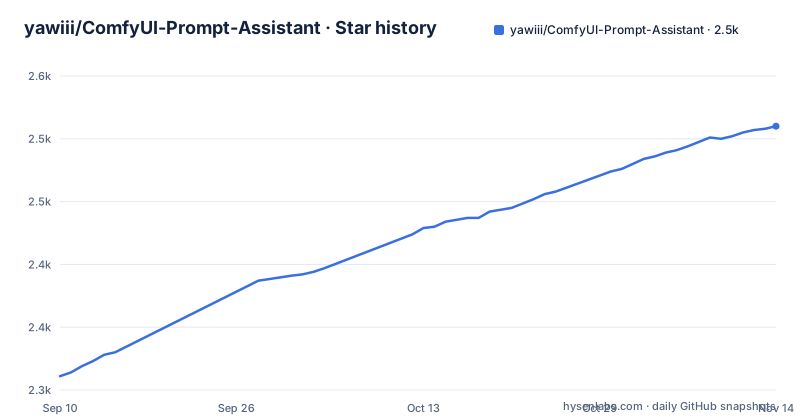
- yawiii/ComfyUI-Prompt-Assistant2,510 ★ · +199
| Repository | 2026-09-10 | 2026-11-14 |
|---|---|---|
| yawiii/ComfyUI-Prompt-Assistant | 2.3k | 2.5k |
199 Stars in the last 65 days, measured from the daily GitHub snapshot. Compare with other projects
Editorial analysis
The README is a five-level changelog, and three versions are missing from it
The page opens with a version banner and a support request, and then spends most of its length on collapsed release notes arranged in nested disclosure blocks: the current release, then the previous 2.0.x entries, then a 1.x group containing a 1.2 group, a 1.1 group and a 1.0 group, five levels deep in places. That is an unusual amount of scroll for a README, and it means the release history is the documentation. Reading the version numbers in order shows the gaps: the 2.0 series goes 2.0.0, 2.0.2, 2.0.3, 2.0.4, 2.0.5, 2.0.6, with no 2.0.1. The 1.0 series goes 1.0.0, 1.0.2, 1.0.3, 1.0.5, 1.0.6, with no 1.0.1 and no 1.0.4. Whether those releases were skipped or the notes were never written is not something the page resolves, and for a plugin whose whole job is writing text, that is a slightly ironic thing to leave undated.
The last commit is the release commit
The release list tops out at 2.0.6, dated 2026-04-25, and the repository's last push carries the same timestamp to the second. That means the final commit in the repository is the one that cut the release, and nothing has been committed since. It is worth stating plainly rather than dressing up: the project has been quiet for about five months, and the notes stop at the release that matches the tree. The install section and the feature list are correspondingly current, including the beta markers on two features, so the page is at least honest about what is finished. The community channels at the top of the file are where the activity is instead: a video site space, a chat image, and a form on a Chinese collaboration platform.
The declared dependencies and the real ones are two different files
The project manifest declares exactly one dependency, a package for the ComfyUI frontend at a floor of 1.39.16. It then immediately tells the build system to read its dependency list from a separate file, and that file contains three unpinned names: an HTTP client, an image library, and a bundled ffmpeg build. So the manifest a reader inspects and the set of packages a machine installs differ, and the three that matter carry no version bounds at all. The ffmpeg entry is the clue to the feature set: video and image I/O without asking you to install a media stack. The 2.0.2 notes mention a dependency refresh aimed at the failure mode where a missing dependency stopped the plugin from starting, which is what a three-name unpinned list produces in practice.
The protocol is decided by whether your base URL ends in a path segment
The 2.0.6 release documents a piece of routing logic worth reading twice, because it is the kind of decision that works until a provider changes a hostname. When talking to a local model runtime, the plugin looks at the base URL you configured: if it does not end in the OpenAI path suffix, it uses that runtime's native API, and if it does, it uses the OpenAI-compatible API instead. That is string matching standing in for capability detection, and it means two deployments with identical capabilities can be routed to different protocols purely by URL shape. The same release also fixed a streaming filter that made some models return empty content and crash the request, and the earlier 1.2.x notes added an HTTP API as a fallback specifically to avoid request failures. There is also an option to release the model's memory after a request, added back in 1.2.1.
The multi-image limit is inferred from the model name
The video reverse-prompting node was added in 2.0.0 and marked beta there, and it is the feature with the most interesting fix. In 2.0.6 the note describes an error that interrupted the whole task: some models were misjudged as not supporting multi-image analysis, so the run stopped. The fix stops asking the model and starts reading its name, inferring the upper limit from the model identifier and truncating the input automatically rather than raising an error. That is a reasonable trade for a batch job, and it is also brittle in a specific way: the plugin now depends on a naming convention maintained by each provider. A renamed model, a new regional endpoint or an alias that resolves elsewhere will change what the plugin believes it can send, and the failure mode is silent truncation rather than an error. The 1.0.x notes also show the node's own history of instability, including a crash on the image node and an error caused by instance cleanup leaving a workflow unable to load.
An early version put the API key where the browser could read it
The 1.0.3 notes record a refactor of the API request service with the stated purpose of avoiding the API key being exposed in the frontend. Read as a security note, that is the most important line in the whole changelog: an early version of this plugin sent requests such that the key was reachable by the interface, and the fix moved the request path behind the server. The plugin is a ComfyUI custom node, so it has both halves anyway, a Python side with a server module and a JavaScript side for the interface, and the fix is what made the split meaningful. Later notes reinforce the pattern: the 2.0.5 release greys out the base URL field for built-in providers so a stray edit cannot break requests, and the same release removes a forced direct-connection mechanism that was causing failures at relay providers.
It straddles two node renderers and most of the fixes are about that
ComfyUI has an older node implementation based on a canvas library and a newer one built on a component framework, and this plugin supports both, which is where a large share of the changelog goes. The 2.0.6 release fixes subgraph nodes being unable to create the assistant or being unstable under the new renderer and the old one, and adds precise matching for several inputs that share a name inside a subgraph. The 2.0.5 release fixes nodes whose width could not be changed under the new renderer, and moves the icon that was colliding with the node's identifier. The 2.0.0 release adds support for the new mode with a draggable, repositionable assistant. The 1.0.5 notes record that a separate community translation plugin's localisation hook could leave this plugin's tag popup hanging, which is a useful reminder that a custom node is a guest in someone else's application.
Three directory names for one plugin, and an upgrade step you can lose data on
The repository is called one thing, the recommended install name is another, and your data lives in a third. The archive is named after the repository, and the download instructions recommend renaming the extracted folder to prompt-assistant so it conforms to ComfyUI's convention. The 2.0.0 release moved user configuration into a prompt-assistant directory under the ComfyUI user folder, specifically so that reinstalling would not lose it, and the install section opens with a warning: anyone who installed a version before 2.0 should back up the config directory in the old plugin folder first, because API configuration, custom rules and custom tags are all lost if the old directory is deleted. Manual installers are told to delete the old directory, put the new one in place, and restore the configuration. Automatic migration handles the API configuration, custom rules and custom tags, and the page is clear that choosing not to migrate means reconfiguring by hand.
Editorial conclusion
This is a plugin to install rather than to study, and the reason to read it first is the configuration. It talks to a list of named hosted services plus a local model runtime plus anything speaking the OpenAI API shape, it keeps API keys and its own settings on disk under a directory whose name differs from the repository name, and it picks a protocol by string-matching your base URL. Two things to check before you rely on it. First, the multi-image limit for the video node is inferred from the model name, so a provider that renames a model changes what the plugin believes it can send. Second, the compatibility work is mostly about the two node renderers, and the last commit is the release commit from 2026-04-25, so the fixes you would want for a current ComfyUI may not exist yet. If your documents stay on your machine, configure the local runtime rather than a hosted service, and back up the settings directory before any upgrade.
Frequently asked questions
What is ComfyUI-Prompt-Assistant?
It is a GPL-3.0 licensed ComfyUI custom node for prompt work: translating prompts and node documentation, refining and expanding them, turning images and video back into prompts, storing tags and phrase presets for one-click insertion, and keeping prompt history with undo and redo. It is a Python backend with a JavaScript interface and a translation directory, and it calls hosted model services or a local runtime.
Which AI services does ComfyUI-Prompt-Assistant call?
The project description names built-in services including a Chinese language model provider, a SiliconFlow-style aggregator, Gemini, a local model runtime, and Baidu translation, and the 1.1.0 notes say it supports anything compatible with the OpenAI SDK API. The 2.0.6 release adds automatic routing for the local runtime, using its native API when the configured base URL has no OpenAI path suffix and the compatible API when it does.
How do I install ComfyUI-Prompt-Assistant?
Three ways: through ComfyUI Manager by searching for the plugin name and choosing the latest version, by cloning the repository into the ComfyUI custom nodes folder, or by unpacking a release archive there. All three require restarting ComfyUI, and the download instructions recommend renaming the plugin folder to prompt-assistant so it matches ComfyUI's naming convention.
Where does ComfyUI-Prompt-Assistant keep its settings?
In version 2.0 the user configuration moved into a prompt-assistant directory under the ComfyUI user folder, specifically to survive a reinstall. The install section warns that users of a pre-2.0 version must back up the old plugin's config directory first, because API configuration, custom rules and custom tags are stored there, and the new version can migrate those automatically if you choose to.
Is the video reverse-prompting node in ComfyUI-Prompt-Assistant finished?
It was added in version 2.0.0 as a beta. The 2.0.6 release fixed an error where some models were misjudged as not supporting multi-image analysis and the task stopped; the fix infers the limit from the model name and truncates automatically instead of raising an error, so the capability check is now a naming convention rather than a capability query.
What does the changelog say about API keys?
The 1.0.3 notes record a refactor of the API request service whose stated purpose was to avoid the API key being exposed in the frontend, which means an early version exposed it to the interface. Later entries grey out the base URL field for built-in providers, remove a forced direct-connection mechanism that caused failures at relay providers, and add an option to release a local model's memory after a request.
Official sources
Add this badge to your README
If you maintain this project, the badge below links readers to this analysis and shows its maintenance status from the daily GitHub snapshot. Paste the markdown into your README; add ?metric=license or ?metric=stars to the image URL for a different field.

[](https://hysenlabs.com/projects/yawiii-comfyui-prompt-assistant)Star history chart for your README
[](https://hysenlabs.com/projects/yawiii-comfyui-prompt-assistant)Was this useful?