easy-writing tells macOS users to strip quarantine, and Ollama users to open up origins
Yichuang: a fully local, open-source AI desktop app for web novel writing, supporting fiction creation, AI-assisted writing, BYOK and custom prompts.
At a glance
- What is it?
- A local-first Chinese web-novel writing desktop app built on Vue 3 and Tauri 2, with its own SQLite file, its own prompt files and its own API keys. Its FAQ hands out two security workarounds that deserve more attention than they get.
- Who is it for?
- For a writer who wants the text on their own disk and the model bill on their own account, this is an unusually complete answer: SQLite for the work, txt and json backups, prompt files you can edit by hand, per-chapter history, and a mode switch for reasoning models that cost output tokens. Two instructions deserve a second look before anyone installs it.
- Can I use it commercially?
- Yes, with strict conditions. AGPL-3.0 is a network copyleft licence: if people use a modified version over a network, for example as a hosted service, you must offer them its source code under the same licence.
- Is it still maintained?
- Yes. The repository last received commits 18 days ago.
- What is it written in?
- Mainly Vue, according to GitHub's language statistics.
Answers come from the project's GitHub data, last synced on November 19, 2026, and from our analysis. They are not legal advice.
Star history
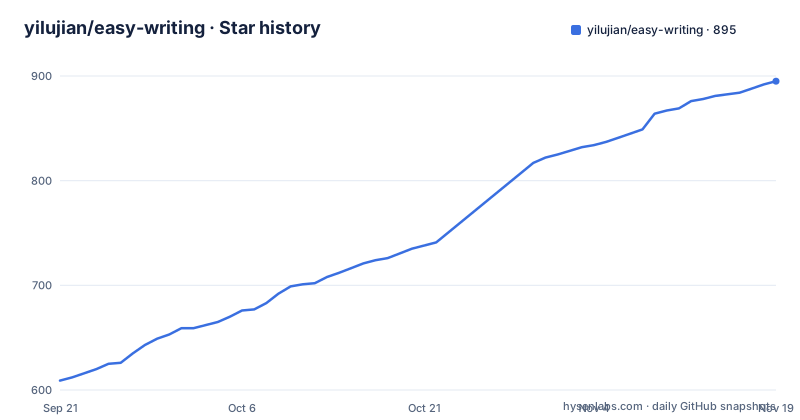
- yilujian/easy-writing895 ★ · +286
| Repository | 2026-09-21 | 2026-11-19 |
|---|---|---|
| yilujian/easy-writing | 609 | 895 |
286 Stars in the last 59 days, measured from the daily GitHub snapshot. Compare with other projects
Editorial analysis
The macOS build is unnotarized and the fix is a quarantine-stripping command
The install section names the platform artefacts, a `.dmg` for macOS and a `.exe` for Windows, and then tells you what to do when the system objects. On macOS, if the first launch reports the app as damaged or unable to verify the developer, you are told to confirm the package came from the repository and then run `xattr -cr /Applications/易创.app` in a terminal, with the parenthetical note that the app carries no Apple signing or notarization yet. On Windows the equivalent instruction is to click through SmartScreen with more information and run anyway. Both instructions exist because the binaries are unsigned. That is a normal state for a small project, and it is also an instruction to disable a check, so the README states it plainly rather than hiding it. Version checks are limited to one a day against GitHub's public API.
The Ollama answer recommends a wildcard origin allowlist
One FAQ entry handles local models that answer 403 with a message about lacking access. It explains the cause: older desktop builds attached origin information, and local servers reject requests whose origin they do not recognise. It states that current builds no longer send it and tells you to update. Then it gives the fallback for anyone still on an old version, which is to set the environment variable `OLLAMA_ORIGINS=*` on Ollama and restart it, or, for other servers, to add `http://tauri.localhost` and `tauri://localhost` to the allowlist. The first of those switches off origin checking entirely for that server. For a loopback model server on a single-user desktop that is a small exposure, and on a shared or forwarded port it is not, so the update path is the one worth taking.
build:desktop runs the web build under a desktop name
The development section documents four commands:
pnpm install
pnpm dev        # 浏览器开发模式(端口 6789)
pnpm check      # 类型检查 + Lint;有本地测试文件时一并运行
pnpm build      # 构建 Web 产物
The package manifest defines more than that, and two entries collide. `build` runs `vue-tsc && vite build`, and `build:desktop` runs `vue-tsc && vite build`, the same command string twice. Neither produces an installer. The actual desktop packaging is a separate script the README names as `pnpm tauri build`, so the script that sounds like the desktop build is a duplicate of the web one. Two other entries go unmentioned on the page: a desktop UI dev server on port 4414 with the strict port flag, and `check:contrast`, which runs a contrast checker script. So the fastest way to find the accessibility check is to read package.json.
Local-first describes the data file, not the network
The pitch is that everything stays on your machine: works, settings and writing records live locally, the desktop build keeps them in a single SQLite database file, automatic backups are written as txt plus json on a schedule, and a whole book can be exported at any time. API keys live in local configuration and requests go from your computer to whichever provider you chose. Two qualifications sit inside the same document. The leaderboard feature embeds a crawler that fetches rankings from more than 80 sources, including several Chinese fiction platforms, over your own network, and the disclaimer asks users to respect those sites' terms, throttle the requests, and keep the data to personal use. And the app phones home once a day for version checks. Local-first here is a storage claim, which is a defensible thing to mean and worth reading as exactly that.
Reasoning models need a 32768 token ceiling and eight vendor-specific switches
The longest FAQ entry is about thinking models such as DeepSeek V4 and Qwen, and it is the most useful troubleshooting note in the file. The failure is an error while generating a book outline, or output that is unusually slow, and the cause is that the model's reasoning consumes the output limit. The fix is a per-model thinking mode switch: turning it off is described as fastest and most stable, since structured tasks do not need reasoning, and turning it on requires raising maximum output tokens to 32768 or above. Because each vendor disables reasoning differently, the app ships built-in handling for DeepSeek, Zhipu, Volcengine, Qwen, SiliconFlow, OpenRouter, Gemini and Ollama, with anything else left to an extra request parameters field the user fills in themselves. Eight hardcoded vendor recipes is a maintenance surface, and it is stated as such.
The check script passes when there are no tests at all
The manifest's `check` script is a chain: a type check, an ESLint pass over Vue and TypeScript files, and a Vitest run ending in `--passWithNoTests`. The same flag is on the standalone `test` script, so a repository with no test files reports success rather than failure. The README is candid about the consequence in its own comment, saying tests run only when local test files exist. A vitest config file sits at the root, so the harness is configured even though the suite may be empty, and the writing features described in the README, per-chapter version history, 160ms local writes and window-close snapshots, are the kind of stateful logic where a passing check says very little. Read `pnpm check` as a type and lint gate.
Two storage engines sit behind the same interface
The data section splits by platform. The desktop build writes a SQLite database in the application data directory, with automatic txt and json backups in the manuscripts folder by default and the prompt markdown files under a prompt folder inside it, which is what makes prompts editable outside the app. Browser mode, described as a development preview, uses IndexedDB and localStorage instead, and the warning attached to it is direct: export your work before clearing browser data. The same application therefore runs on a native SQLite plugin and on browser storage, and only one of them survives a cache clear. The package manifest confirms the split by listing a Tauri SQL plugin among the dependencies, and it also marks the package private, which is why distribution happens through GitHub releases rather than a registry.
Four planned features sit under a disclaimer that dates nothing
The roadmap lists an infinite canvas workflow turning inspiration, characters, worldbuilding and outlines into connectable nodes, AI script writing progressing from concept to scene and dialogue while keeping human confirmation points, storyboard breakdown producing shot size, camera position, movement and prompt text per shot, and a linkage feature connecting all three stages with shared context and version records. Above the list sits a quote saying these are being planned and that content and release timing will follow in later versions. Nothing carries a version number or a milestone. The licence section is more concrete: AGPL-3.0, with the note that modified versions must stay open source even when deployed as a network service, and a contact section offering a non-AGPL commercial licence, private deployment and OEM work.
Editorial conclusion
For a writer who wants the text on their own disk and the model bill on their own account, this is an unusually complete answer: SQLite for the work, txt and json backups, prompt files you can edit by hand, per-chapter history, and a mode switch for reasoning models that cost output tokens. Two instructions deserve a second look before anyone installs it. The macOS build carries no Apple signature or notarization, and the documented workaround is a quarantine-stripping command, which is exactly what Gatekeeper exists to make you think twice about. The Ollama entry recommends widening a local server's origin allowlist to everything as a temporary fix, which is a real exposure on a shared machine even if the loopback target is narrow. Neither is a reason to skip the project. Both are reasons to download from the release page, verify what you run, and keep the local model server bound to your own interface.
Frequently asked questions
What is easy-writing (易创)?
A local-first desktop application for writing Chinese web novels, built on Vue 3, TypeScript and Tauri 2, with TipTap as the editor. Works, settings and writing records are kept in a local SQLite file, prompts are markdown files you can edit by hand, and AI features are bring your own key across DeepSeek, Qwen, Zhipu, Kimi, OpenAI, any OpenAI-compatible service, or a local Ollama or LM Studio instance.
Does easy-writing cost money to use its AI features?
The application is free and AGPL-3.0 licensed. The AI cost is whatever the provider you configured charges for the tokens your requests use, because you supply the API key. Local models need no key at all, and the README says to leave the key field empty when using them.
Why does a local model server return 403 in easy-writing?
Older desktop builds sent origin headers that local servers rejected. Current builds no longer send origin information, so the fix is to update. For older versions the README suggests setting `OLLAMA_ORIGINS=*` on Ollama, or adding `http://tauri.localhost` and `tauri://localhost` to the allowlist of other servers.
Where does easy-writing keep my novel?
On the desktop, in a SQLite database in the application data directory, with scheduled txt and json backups in the manuscripts folder and prompt markdown files in a prompt subfolder there. In the browser preview mode it uses IndexedDB and localStorage instead, which the README warns you about: clear browser data and the work is gone unless you exported it from the bookshelf as JSON.
Official sources
Add this badge to your README
If you maintain this project, the badge below links readers to this analysis and shows its maintenance status from the daily GitHub snapshot. Paste the markdown into your README; add ?metric=license or ?metric=stars to the image URL for a different field.

[](https://hysenlabs.com/projects/yilujian-easy-writing)Star history chart for your README
[](https://hysenlabs.com/projects/yilujian-easy-writing)Was this useful?