NippleJS virtual joystick setup, events, and configuration
:video_game: A virtual joystick for touch capable interfaces.
At a glance
- What is it?
- NippleJS is a dependency-free TypeScript library for adding touch-operated virtual joysticks to browser interfaces. It suits games and touch controls that need configurable directional input without building the control geometry from scratch.
- Who is it for?
- Adopt NippleJS when a browser interface needs a configurable virtual joystick and the application can work directly with DOM controls and directional input events. Do not choose it for a conventional keyboard-first desktop interface, a fully data-driven control with no rendered joystick, or a project that requires multiple static joysticks in one zone.
- Can I use it commercially?
- Yes. MIT is a permissive licence: you can use, modify and sell software built on it, as long as you keep its copyright and licence notices.
- Is it still maintained?
- Yes. The repository last received commits 165 days ago.
- What is it written in?
- Mainly TypeScript, according to GitHub's language statistics.
Answers come from the project's GitHub data, last synced on November 6, 2026, and from our analysis. They are not legal advice.
Star history
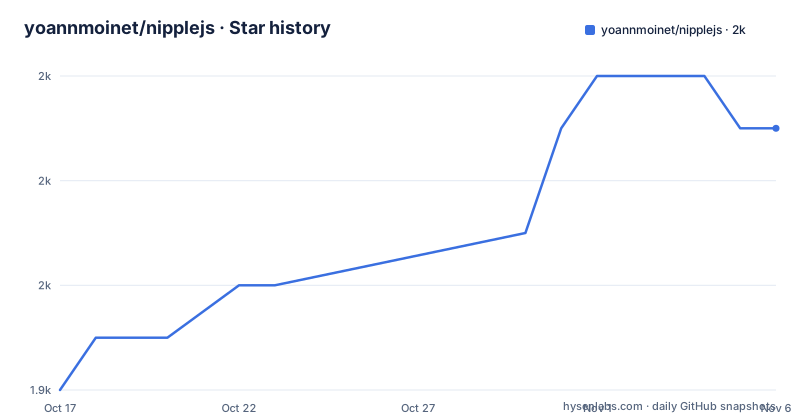
- yoannmoinet/nipplejs1,953 ★ · +5
| Repository | 2026-10-17 | 2026-11-06 |
|---|---|---|
| yoannmoinet/nipplejs | 1.9k | 2k |
5 Stars in the last 20 days, measured from the daily GitHub snapshot. Compare with other projects
Editorial analysis
Why NippleJS fits touch-first browser controls
NippleJS addresses a narrow front-end problem: turning a finger or pointer movement inside a defined area into joystick input. The intended users are developers building touch-capable interfaces, especially browser games that need a movement control without drawing and updating every part of the joystick themselves. The library is written primarily in TypeScript and distributed under the MIT license. Its repository describes it as a vanilla virtual joystick and identifies dependency-free DOM operation as a project characteristic.
The library is a control component, not a game engine. It does not determine what a movement means, calculate player velocity, or send network commands. The application must listen for NippleJS input and map that input to its own behavior. This boundary makes the library suitable for a small prototype as well as a custom web game, but it also means integration code remains the application developer's responsibility.
NippleJS manager, zone, and input flow
The central object is a manager created with `nipplejs.create(options)`. The `zone` option identifies the DOM element that becomes the active area and the mouse or touch event handler. By default, that zone is `body`. The manager can create a nipple instance and inject its rendered elements into the configured zone.
A typical interaction proceeds from a pointer event inside the zone to a joystick instance, then to application-visible state and events. The library calculates directional input relative to the center of the joystick. Its `threshold` option controls the strength required before a directional event fires, with 0 at the center and 1 at the outer edge. The default threshold is 0.1. The application can therefore treat directional events as an input threshold rather than responding to every tiny pointer movement.
NippleJS supports three documented modes: `dynamic`, `static`, and `semi`. Dynamic placement is suited to a control that appears where interaction begins. Static mode uses a preset position. Semi mode supports recycling a previous joystick when the pointer moves beyond `catchDistance`. These modes change placement behavior, while `dataOnly` changes rendering: when enabled, NippleJS creates no DOM joystick element and provides data only.
Installing NippleJS and creating the first manager
The README gives npm as the installation path. The command saves `nipplejs` as a project dependency:
npm install nipplejs --saveThe README documents CommonJS loading as follows. The `options` value must already be available in the application, and `create(options)` returns the manager:
// CommonJS
var manager = require('nipplejs').create(options);
For an ES module setup, the README uses this import and creation call:
// Module
import nipplejs from 'nipplejs';

nipplejs.create(options);
With no custom options, the documented defaults use `body` as the zone, white as the color, and 100 pixels for the outer circle. That can create a visible control immediately, but the zone must have a CSS `position` value of `relative`, `absolute`, or `fixed`. The library warns in the console if it detects `position: static`.
The README does not include a complete page stylesheet for sizing or placing the zone. The application still needs to decide where the control appears and how much screen area it occupies.
Using a dedicated NippleJS DOM zone
A more explicit setup gives the control its own page region. In this documented example, NippleJS is loaded as a global script and the zone is selected with `document.getElementById`:
<div id="zone_joystick"></div>

<script type="text/javascript" src="./nipplejs.js"></script>
<script type="text/javascript">
    var options = {
        zone: document.getElementById('zone_joystick'),
    };
    var manager = nipplejs.create(options);
</script>
The zone does two jobs. It is the container into which NippleJS injects the joystick and the element that handles relevant mouse or touch events. The empty `<div>` shown in the example has no inline dimensions or positioning declaration, so it does not by itself establish a complete on-screen layout.
That distinction is important during first use. Creating a manager confirms that the package is loaded and the options object is accepted, but visual position depends on the page's CSS. Before relying on the control, check that the zone occupies the intended region and that its CSS `position` is not `static`. The README documents the warning but does not specify a universal zone size for games.
Static, dynamic, and data-only configuration trade-offs
Mode selection changes how the control behaves. In `dynamic` mode, a joystick can appear where the user begins interacting, which suits screens where fixed control positions are undesirable. `static` mode keeps a control at a configured `position`, making it predictable for a game HUD or control panel. `semi` mode provides an intermediate placement model and can recycle a previous joystick after the pointer exceeds `catchDistance`.
`dataOnly` is the clearest alternative to visible rendering. With `dataOnly: true`, the library does not draw anything in the DOM and supplies input data only. This can fit an interface that has its own visual control or wants to avoid NippleJS-managed presentation elements. It also changes the scope of the component: the application owns both the appearance and any visual feedback normally associated with the joystick.
Several options alter interaction rather than styling. `lockX` and `lockY` restrict movement to one axis. `shape` accepts `circle` or `square`. `size` controls the outer circle in pixels, while the inner circle is half that size. `fadeTime` controls the transition duration, and `restJoystick`, `restOpacity`, and `follow` affect rested behavior and placement. `dynamicPage` is intended for pages with dynamically visible elements. These controls expose physical interaction rules without defining a complete application layout.
NippleJS event and instance API boundaries
The documented API separates the manager from each joystick instance. A manager is returned by `nipplejs.create(options)`, while a nipple instance exposes methods and properties including `joystick.on`, `joystick.off`, `joystick.ui`, `joystick.destroy()`, `joystick.setPosition(cb, { x, y })`, `joystick.identifier`, `joystick.trigger(type [, data])`, `joystick.position`, and `joystick.frontPosition`. The manager and joystick also have documented event categories, including manager-only events and events available to both the manager and individual joysticks.
This separation lets an application manage the overall control area while responding to input from a specific joystick. The README table of contents points to event documentation, but its visible text does not enumerate every event and payload. The exact values required for a particular integration should therefore be checked in the linked API documentation before application code relies on them. This is especially relevant to code that needs movement data, directional events, or touch identifiers.
For cleanup, the documented `joystick.destroy()` method gives the application a way to remove an instance. The README also documents `joystick.off`, which matters when event handlers are installed dynamically. An application that repeatedly creates controls should pair instance destruction with its own subscription management instead of assuming visual removal also removes application callbacks.
NippleJS multitouch and layout limitations
The clearest documented limitation is the interaction between multitouch and placement modes. `multitouch` defaults to `false`. Enabling it allows multiple nipples in the same zone, and `maxNumberOfJoysticks` limits how many instances may be created. However, the README states that multitouch is off in `static` and `semi` modes. A design that requires several fixed joysticks in one zone therefore does not match the documented behavior of this version of the library.
NippleJS also depends on browser layout. The zone is a DOM element and must not remain in normal static positioning. Without explicit container sizing and placement styles, a control may be present but appear in an unintended location or behave incorrectly on the page. The library warns about the CSS issue, but it does not replace page-level layout work.
The README does not document keyboard mappings, screen reader semantics, or another accessibility layer. That silence does not establish whether every part of the project lacks accessibility work, but it means these features cannot be selected as documented guarantees. Projects that require them need to inspect the documentation and source directly. NippleJS is a pointer-control component, so keyboard-first desktop games should not assume it replaces conventional keyboard input.
NippleJS releases, workspaces, and distribution checks
The repository is not archived, and its last push was on 2026-05-26. Recent releases include v1.0.4 on 2026-05-26, v1.0.3 on 2026-05-15, and v1.0.2 on 2026-05-11. The root `package.json` is a private workspace package named `@nipple/root`, with packages under `packages/*`. It defines workspace scripts such as `build`, `watch`, `lint`, and `typecheck`. Those scripts are for maintaining NippleJS itself, separate from the consumer installation command.
The published package name and root workspace name are different. Consumers should install `nipplejs` as shown in the README rather than attempting to install the private `@nipple/root` workspace. The root configuration also records Volta versions for Node.js and Yarn, while the repository includes a Yarn workspace layout. These details matter to contributors but do not add another runtime dependency to a normal application.
The project uses the MIT license. An application still needs to review the exact license text and preserve required notices when distributing NippleJS or a derivative work. The README does not define an upgrade policy, supported-browser matrix, or mobile operating system compatibility list. Those gaps make version review and target-device checks specific adoption steps. Touch coordinates, page scrolling, dynamic containers, and multitouch behavior should be checked on the hardware used by the application.
Editorial conclusion
Adopt NippleJS when a browser interface needs a configurable virtual joystick and the application can work directly with DOM controls and directional input events. Do not choose it for a conventional keyboard-first desktop interface, a fully data-driven control with no rendered joystick, or a project that requires multiple static joysticks in one zone. Before adoption, verify event handling on the target touch devices, confirm that the container has a non-static CSS position, and review the packaged MIT license notice against the application's distribution requirements.
Frequently asked questions
How do I install NippleJS in a browser project?
Run `npm install nipplejs --save`, then import the package and call `nipplejs.create(options)`. The README also documents CommonJS, AMD, module, and global-script loading styles.
Why is my NippleJS joystick positioned incorrectly?
The container used as the joystick zone must have CSS `position` set to `relative`, `absolute`, or `fixed`. The README says the library warns when `position: static` is detected.
Can NippleJS create more than one joystick at the same time?
Multitouch can be enabled, and `maxNumberOfJoysticks` limits the number of instances. The README specifies that multitouch is off in `static` and `semi` modes.
Does NippleJS draw a joystick when dataOnly is enabled?
No. The `dataOnly` option is documented as preventing any DOM element from being drawn and leaving the library to provide data only.
Official sources
Add this badge to your README
If you maintain this project, the badge below links readers to this analysis and shows its maintenance status from the daily GitHub snapshot. Paste the markdown into your README; add ?metric=license or ?metric=stars to the image URL for a different field.

[](https://hysenlabs.com/projects/yoannmoinet-nipplejs)Star history chart for your README
[](https://hysenlabs.com/projects/yoannmoinet-nipplejs)Was this useful?