ClawManager ships a binary called clawreef and tags releases by the calendar
A Kubernetes-native control plane for AI agent instance management, with governed AI access, runtime orchestration, and reusable resources across multiple agent runtimes.
At a glance
- What is it?
- A Kubernetes control plane for AI agent instances with four managed runtimes, a Lite and Pro split that is really an isolation boundary, and a five stage image whose final stage is nginx running an access token check in JavaScript.
- Who is it for?
- ClawManager is for a platform team that has already decided agents will run as Kubernetes workloads and now needs provisioning, quotas and an audit trail rather than a notebook per user.
- Can I use it commercially?
- Yes. MIT is a permissive licence: you can use, modify and sell software built on it, as long as you keep its copyright and licence notices.
- Is it still maintained?
- Yes. The repository last received commits 2 days ago.
- What is it written in?
- Mainly Go, according to GitHub's language statistics.
Answers come from the project's GitHub data, last synced on November 21, 2026, and from our analysis. They are not legal advice.
Star history
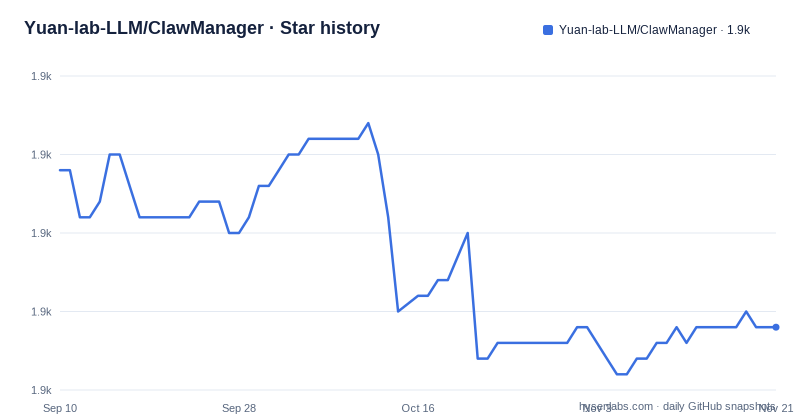
- Yuan-lab-LLM/ClawManager1,889 ★ · -10
| Repository | 2026-09-10 | 2026-11-21 |
|---|---|---|
| Yuan-lab-LLM/ClawManager | 1.9k | 1.9k |
-10 Stars in the last 72 days, measured from the daily GitHub snapshot. Compare with other projects
Editorial analysis
The module and both binaries are named clawreef
The repository, the site and the documentation all say ClawManager. The image it builds says something else. The backend build step produces two artifacts:
-o /out/clawreef-server ./cmd/serverand a second one for the gateway, and the version metadata is written into a package path that begins with the same word, `clawreef/internal/buildinfo`. So the Go module, the server binary and the gateway binary are all called clawreef, while the project page, the repository name, the docs directory and every guide inside it are called ClawManager.
That is more than a cosmetic mismatch when you are operating the thing. A container image whose entrypoint is `clawreef-server` will not match a grep for the project name, a support bundle will contain two unrelated names, and a team that reads the release notes will not find them by searching for the binary. Nothing in the readme explains the relationship between the two names.
The second binary makes it worse, or better, depending on your taste: `clawreef-northbound-gateway` is built from a separate command and, as the build script shows, from a separate set of flags. One process serves the control plane, the other serves the northbound API, and the repository treats the northbound surface as a documented product of its own with a guide, an example client and a certificate script.
Release tags are calendar dates, one per day
The three most recent releases are `v2026.10.2` on 2026-10-02, `v2026.10.1` on 2026-10-01 and `v2026.9.30` on 2026-09-30. That is three releases on three consecutive days, so the cadence is roughly daily, and the version is the date with a daily counter.
The padding is inconsistent in a way that will bite a script. October is written with two digits and September with one: `2026.10.2` next to `2026.9.30`. Lexicographic sorting therefore misplaces every September tag relative to every October tag, because `2026.9.30` sorts after `2026.10.2`. Any tooling that sorts tags as strings needs to parse them as dates first.
A calendar version also means the string carries no compatibility information. There is no minor and no patch, and nothing in the tag tells you whether a change to a gateway policy or a rollout path is behaviour breaking. The changelog is where that has to come from, which is a real cost for a control plane that governs model access.
The last commit on the default branch is dated 2026-10-03, the day after the newest release, so development and shipping are running a day apart rather than in lockstep.
Three stages are pinned to the build platform and the Go one is not
The Dockerfile has five stages and four of them exist to compile something. The first three declare `--platform=$BUILDPLATFORM` explicitly:
FROM --platform=$BUILDPLATFORM node:24-alpine AS hermes-desktop-depsso they build natively on the machine doing the build rather than under emulation. The Go stage does not make that declaration. It declares the target platform arguments instead and passes them into the compiler:
CGO_ENABLED=0 GOOS=${TARGETOS:-linux} GOARCH=${TARGETARCH} go build -trimpath -buildvcs=falseCross compiling with cgo disabled is how you build for several architectures from one machine, and it works. The gap is that the stage doing it still has to run under whatever platform the manifest asked for, so a multi architecture image either needs emulation for the Go stage or needs that line added. Nothing in the repository explains the difference, and the other three stages being explicit makes the omission look like a decision rather than an oversight.
The dependency installs are inconsistent in the same file. The Hermes desktop web install uses a cache mount with sharing locked and passes `--ignore-scripts`, while the frontend install runs a plain `npm ci` with neither. Same monorepo, same image, two different policies about what a postinstall script is allowed to do.
Only the server binary has a version stamped into it
Version metadata for the server comes from three build arguments with defaults that admit nothing is known:
ARG VERSION=dev
ARG VCS_REF=unknown
ARG BUILD_DATE=unknown
and they are injected with linker flags into three fields of the build info package, alongside `-s -w` and a cleared build id. The build also passes `-buildvcs=false`, which turns off the compiler's own stamping of the commit, so everything the binary knows about its origin is whatever those three arguments said.
The gateway binary is built on the next line with `-trimpath -buildvcs=false -ldflags="-s -w -buildid="` and nothing else. No version, no commit, no build time. A gateway process therefore reports nothing about which build it is, in a product whose whole job is to be the audited path to model access.
The defaults are the other half of the story. A build with no arguments produces a binary that calls itself `dev`, which is fine for a developer and wrong for an operator who has to answer what is running in a namespace. Since the version is a calendar date rather than a semver, the three fields are also the only place a human readable build identity can come from, and one of the two binaries does not have them.
Lite and Pro are the same product with different isolation
Four managed runtimes are named, and three of them have the same two mode names. OpenClaw offers Lite and Pro workspaces with native conversations, tools, scheduled tasks and Team support. Hermes offers Lite and Pro with a persistent home directory and optional Team workers. DeepSeek Harness offers Lite pooled and Pro desktop workspaces. OpenCode is described as a managed coding workspace with model access, workspace files and terminal or desktop access.
The two words mean a deployment boundary rather than a feature level. Lite instances run through shared gateway runtime pools, so many instances share infrastructure. Pro instances keep dedicated desktop deployments, which the readme frames as the stronger isolation option. The DeepSeek row makes the same split in its own words, pooled against desktop.
That makes the cost model legible. Lite is cheap and shared, Pro is expensive and isolated, and the security arguments follow from the same axis. It also means a per instance network policy or a dedicated browser origin, both of which the changelog mentions for specific runtimes, is a property of the mode rather than of the runtime.
The rollout machinery is where the modes get careful. The most recent hardening entry describes version aware preflight, migration verification, bounded recovery and source identity rollback for Lite, and says that legacy images without the 8.1 capability marker keep the established rolling update path. So an image's own declared capability decides which rollout path it gets, and old images are deliberately not put on the new one.
The security console is four layers behind one admin interface
A single security console, internally named secplane, arrived in July 2026 and covers four defence layers. Runtime defence works on the input, state, decision and output surfaces of an agent, adds asset tamper proofing and a human approval step. Host hardening and container isolation cover the machine underneath. Outbound governance restricts which endpoints an agent may reach, and policy governance sits above that with a kill switch, a circuit breaker and a full chain audit. The console also covers data and component trust auditing under the name SecureClaw, collaboration governance and input detection, all reachable from one admin interface with the interface translated into five languages.
A human approval step and a circuit breaker in the same console is a deliberate pairing. Approval is a check on a single action; the breaker is a response to a pattern, and the pattern is what the audit trail is for.
The rest of the access story is elsewhere. LDAP enterprise authentication arrived in September, alongside expanded provider model catalogs and dedicated browser origins for the managed OpenCode and DeepSeek Harness instances, which is the same isolation idea as the pooled and desktop split applied to the browser rather than the runtime. The AI gateway is the other half: model governance, audit and trace, cost accounting and risk control all sit there, and per session usage was added in August.
The final image is nginx running an access token check in JavaScript
The last stage is not a Go runtime. It is `nginx:1.27-alpine` with three packages added, one of which is a JavaScript engine:
RUN apk add --no-cache dumb-init openssl nginx-module-njsThe comment explains what the engine is for. The njs module provides a script file that nginx.conf loads to run the desktop access token verification, and the file lives at `deployments/nginx/njs/desktop_auth.js`. In other words, the browser based desktops that users actually interact with are authenticated by a script inside the web server, with the Go binary behind it serving the control plane and the gateway.
The openssl package in the same line belongs to the certificate story, and the repository root carries a shell script named for generating northbound certificates, so an operator generates certificates from inside the image rather than bringing their own.
The root of the repository is where the operational surface shows. Two shell scripts sit at the top level with names that describe a fix and a certificate generation, next to the backend, frontend and deployments directories, an end to end directory, a docs directory and a Hermes desktop web application checked in at the root. The examples directory is a Python client for the northbound API with its own environment file, its own requirements file and its own test, in a project whose server is written in Go.
Editorial conclusion
ClawManager is for a platform team that has already decided agents will run as Kubernetes workloads and now needs provisioning, quotas and an audit trail rather than a notebook per user. The design decisions that matter are visible in the readme rather than guessed at: Lite means a shared gateway pool and Pro means a dedicated desktop, the AI gateway is the single point where model access and cost are governed, and the security console adds a human approval step and a kill switch above the runtime. Before adopting it, check the two names, because the repository, the site and the Go module all disagree about what the product is called, and check the runtime matrix, because a pooled Lite instance and a dedicated Pro instance have different isolation and different failure domains. Version tracking is calendrical and daily, so pin by tag and expect the version string to be a date rather than a semver.
Frequently asked questions
How are ClawManager releases versioned?
By calendar date with a daily counter, and roughly one release per day. The three most recent are v2026.10.2, v2026.10.1 and v2026.9.30, so month padding is inconsistent and the tags must be parsed as dates rather than sorted as strings.
What is the difference between Lite and Pro in ClawManager?
It is an isolation boundary rather than a feature level. Lite instances run through shared gateway runtime pools, while Pro instances keep dedicated desktop deployments for stronger isolation. Three of the four managed runtimes offer both.
Which AI agent runtimes does ClawManager support?
Four: OpenClaw with Lite and Pro workspaces, Hermes with Lite and Pro and a persistent home directory, OpenCode as a managed coding workspace, and DeepSeek Harness with Lite pooled and Pro desktop workspaces.
How does ClawManager authenticate access to the browser desktops?
The final image is nginx with the njs module installed, and a JavaScript file loaded by nginx.conf runs the desktop access token verification. The Go binary behind it serves the control plane and the northbound gateway.
What does the ClawManager security console cover?
Four defence layers: runtime defence across the input, state, decision and output surfaces with a human approval step, host hardening and container isolation, outbound governance of trusted endpoints, and policy governance with a kill switch, a circuit breaker and a full chain audit, plus component trust auditing and input detection.
Official sources
Add this badge to your README
If you maintain this project, the badge below links readers to this analysis and shows its maintenance status from the daily GitHub snapshot. Paste the markdown into your README; add ?metric=license or ?metric=stars to the image URL for a different field.

[](https://hysenlabs.com/projects/yuan-lab-llm-clawmanager)Star history chart for your README
[](https://hysenlabs.com/projects/yuan-lab-llm-clawmanager)Was this useful?