Deck's install section begins by telling you not to install it
Deck is a modern, native, privacy-first clipboard manager for macOS.
At a glance
- What is it?
- Deck is a Swift clipboard manager for macOS with on-device semantic search, OCR, smart rules and LAN sharing. Its documented install path is under a temporary stop notice, it ships without Apple notarization, and only one directory of the repository is under an open source licence.
- Who is it for?
- Deck suits someone already on macOS 14 or newer who wants clipboard history with local search and is willing to grant Accessibility and Input Monitoring to an app that reads everything they copy. The features that make it interesting are also the ones to think about first: smart rules execute JavaScript, the clipboard can carry hidden zero-width text, and the window-aware protection guesses at password fields from window titles.
- Can I use it commercially?
- Check first. The repository uses a licence we do not classify automatically, so read its LICENSE file before any commercial use.
- Is it still maintained?
- Yes. The repository last received commits 14 days ago.
- What is it written in?
- Mainly Swift, according to GitHub's language statistics.
Answers come from the project's GitHub data, last synced on November 14, 2026, and from our analysis. They are not legal advice.
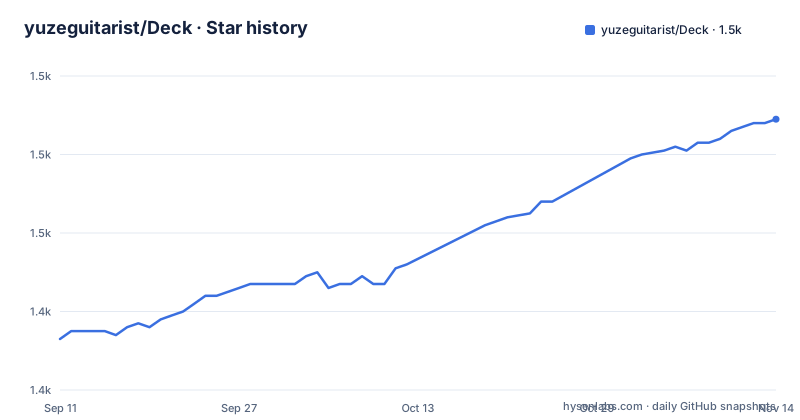
Star history
- yuzeguitarist/Deck1,489 ★ · +56
| Repository | 2026-09-11 | 2026-11-14 |
|---|---|---|
| yuzeguitarist/Deck | 1.4k | 1.5k |
56 Stars in the last 64 days, measured from the daily GitHub snapshot. Compare with other projects
Editorial analysis
The install section opens with an order not to install
The first thing under the Install heading is a temporary notice. It asks readers not to download or update Deck right now, to keep using a currently installed version if it still works, and to leave the in-app auto update alone until further notice. A second notice repeats the point under First Launch, blaming a current packaging issue and adding that new downloads or updates may still fail. That sits awkwardly beside a feature list which advertises auto updates with daily checks, or a manual check in Settings. The release history explains why the request is specific rather than general: v1.4.3 herculean on 26 April 2026, v1.4.4 perlīmātus on 5 May, and v1.4.5 Intermicāns on 9 May, with the branch last pushed on that same day. Three patches in two weeks, a stop notice in the install section, and no fourth release since.
The documented Homebrew path disables quarantine
The install commands are three lines, and the second one changes how macOS treats the file:
brew tap yuzeguitarist/deck
export HOMEBREW_CASK_OPTS="--no-quarantine"
brew install --cask deckclip
That export is there because the app is not notarized, and the page says so directly: it is not signed through Apple's paid Developer Program. The consequence is the message a first launch produces, that Deck cannot be opened because Apple cannot check it for malicious software, and the documented resolution is to open Privacy & Security in System Settings and click Open Anyway. The manual path has the same shape: take the .dmg from Releases, drag Deck.app into Applications, then grant Accessibility, plus Input Monitoring if prompted. Two permissions are being asked for here, and both are the ones that let an app read what you copy and see what you type.
Only deckclip/ is AGPL, and the source is published for reference
The licensing is split, and the split is stated plainly. The deckclip/ directory is GNU AGPL v3 only, with its own licence file. Every other file and directory is described as source-available with all rights reserved, published for viewing and reference only. A line above the licence section says the source code is public for reference and asks readers to use the official compiled app from Releases. So the artefact the project wants you to run is a binary, the artefact you can read is mostly not licensed for reuse, and the one part that is AGPL is a subdirectory rather than the application target. The repository metadata, meanwhile, records no recognised licence at all for the project as a whole, while the root does carry a LICENSE file next to deckclip/LICENSE. Those three facts are not consistent, and the README is the only place the split is explained.
Smart rules execute JavaScript, and the clipboard can hide text
Two features change the security profile of everything else on the page. The first is Smart Rules, automated workflows built from condition matching and actions, where the action set includes JavaScript script plugins. That is arbitrary code executing in the context of an app that already holds Accessibility permission and a full history of everything copied on the machine. The second is clipboard steganography, described as the ability to embed hidden messages in images or zero-width text. Zero-width characters are invisible in every editor and in most chat clients, and they travel with the content when it is pasted elsewhere, so a message can carry a payload that no reader can see and no word count reveals. The page presents both under features, with no warning attached to either.
Sensitive filtering is a Luhn check and a window title
The privacy features work on two levels. Content level filtering detects bank card numbers and identity or passport numbers using the Luhn algorithm and skips capturing them. Context level protection reads the title of the frontmost window, and pauses capture when the title looks like a password field or a login page. On top of that sit Touch ID or Face ID to unlock before the panel opens, optional hiding of the panel during screen sharing or recording, and a one click pause mode. The Luhn check is a checksum, so it catches well-formed numbers and misses anything that is not a number. Window title matching is a string comparison against a guess, and the page does not say which titles it recognises or how the pause resumes afterwards.
Semantic search and OCR both run on the machine
Search has three modes over the same history: keyword, regular expression, and type, plus on-device semantic search powered by NLEmbedding, which is Apple's natural language framework, so no query leaves the Mac. On top of that sit slash-triggered search rules that filter by app, date or type with include and exclude and multiple values, per-item custom titles that are themselves searchable and synced across devices, tags and smart categories, and context-aware ordering that sorts items by relevance to the app you are currently in. Images are handled separately: OCR extracts text from them in the background using the Vision framework with multi-language support, so an image copied from a screenshot becomes searchable later. A dedicated preview exists for Figma clipboard content, and copies made inside VS Code, Xcode, JetBrains, Cursor or Windsurf automatically capture a file path and line number to jump back to.
Seven default shortcuts, and a ninth-item quick paste
The panel opens with `Cmd + P`, navigation is by arrow keys, and `Enter` pastes. The rest of the default table is short enough to hold in memory: `Shift + Enter` pastes as plain text, `Cmd + Number` does a quick paste for positions one through nine, `Option + Q` toggles queue mode for pasting several items in sequence, `Space` toggles the preview, and `Esc` closes. Two behaviours are documented as immediate rather than configured. Typing straight after the panel opens starts a search, so there is no separate search mode to enter. Scrolling the mouse wheel over the history list switches focus rather than scrolling the list, which is the opposite of the platform default. More shortcuts and a Vim mode live in Settings. Queue mode, typing paste that enters content character by character, Siri Shortcuts through App Intents, and a CLI Bridge for terminal automation round out the input surfaces.
LAN sharing pairs with TOTP, with a direct IP path around Bonjour
Clipboard history can move between machines two ways. LAN Sharing encrypts with AES-GCM and verifies peers with TOTP, so a second device needs the shared secret before it can read anything. Direct IP Connection is the alternative: connect to a peer by IP address, which the page says bypasses VPN or Bonjour issues. That is a useful escape hatch on networks where service discovery does not work, and it is also a way to skip discovery entirely, so the peer you are talking to is whatever address was typed in. Usage statistics are computed locally and never uploaded, and data export is available for the history itself. The repository root also carries llms.txt and llms-full.txt, the text mirrors sites publish for machine readers, beside README.md with README_CN.md and CHANGELOG.md with CHANGELOG_CN.md, and one companion project, Deck times Orbit, a radial app switcher.
Editorial conclusion
Deck suits someone already on macOS 14 or newer who wants clipboard history with local search and is willing to grant Accessibility and Input Monitoring to an app that reads everything they copy. The features that make it interesting are also the ones to think about first: smart rules execute JavaScript, the clipboard can carry hidden zero-width text, and the window-aware protection guesses at password fields from window titles. Before installing, read the temporary notice, because the page asks you to keep a working copy and to leave in-app auto update switched off, which conflicts with the daily update check built into the app. If you want to build from source instead, note that the source is published for reference and that only deckclip/ is AGPL, so the rest of the repository is not licensed for reuse.
Frequently asked questions
What is Deck, the macOS clipboard manager?
Deck is a native clipboard manager for macOS written in Swift, which records text, images, files, colors, links and rich text and adds keyword, regex, type and on-device semantic search. It requires macOS 14.0 or newer and runs on both Apple Silicon and Intel, and its homepage is deckclip.app.
Is Deck notarized, and how is it installed?
No. The app is not notarized through Apple's paid Developer Program, so the Homebrew path sets HOMEBREW_CASK_OPTS="--no-quarantine" before running brew install --cask deckclip, and first launch produces a Gatekeeper message that is resolved by clicking Open Anyway in Privacy & Security. The manual path is to drag Deck.app from the .dmg into Applications and grant Accessibility.
Why does the Deck install section ask me not to install it?
A temporary notice asks readers not to download or update Deck right now, to keep a working installed version, and to avoid the in-app auto update, citing a current packaging issue. The branch was last pushed on 9 May 2026, the day release v1.4.5 was published.
How does Deck avoid capturing passwords and card numbers?
It detects bank card numbers and identity or passport numbers with the Luhn algorithm and skips capturing them, and it pauses capture when the front window title looks like a password field or a login page. The panel can also be locked behind Touch ID or Face ID, hidden during screen sharing, and paused with one click.
What license is Deck released under?
Dual licensing. The deckclip/ directory is GNU AGPL v3 only with its own licence file, while every other file and directory is source-available with all rights reserved and published for viewing and reference only, with a request to use the official compiled app from Releases.
Official sources
Add this badge to your README
If you maintain this project, the badge below links readers to this analysis and shows its maintenance status from the daily GitHub snapshot. Paste the markdown into your README; add ?metric=license or ?metric=stars to the image URL for a different field.

[](https://hysenlabs.com/projects/yuzeguitarist-deck)Star history chart for your README
[](https://hysenlabs.com/projects/yuzeguitarist-deck)Was this useful?