Zelda64Recomp: Majora's Mask as a native PC port with mods
Static recompilation of Majora's Mask (and soon Ocarina of Time) for PC (Windows/Linux/Mac)
At a glance
- What is it?
- A C project under GPL-3.0 that recompiles the original Majora's Mask executable into a native Windows, Linux and Mac binary, drawing through RT64 and reading its assets from a copy of the game you already own. Rendering the original N64 effects faithfully is a stated goal, alongside high framerates, ultrawide support and mods installed by manual download.
- Who is it for?
- Adopt it if you own a North American copy of Majora's Mask and want RT64's high framerate rendering and mod support without setting up an emulator. Skip it if your copy is PAL or Japanese, or if your GPU predates Direct3D 12.0 Shader Model 6, Vulkan 1.2 or Metal Argument Buffers Tier 2.
- Can I use it commercially?
- Yes, with conditions. GPL-3.0 is a copyleft licence: if you distribute software that includes it, you must release that software's source code under the same licence. Running it internally without distributing it does not trigger that obligation.
- Is it still maintained?
- Yes. The repository last received commits 50 days ago.
- What is it written in?
- Mainly C, according to GitHub's language statistics.
Answers come from the project's GitHub data, last synced on November 13, 2026, and from our analysis. They are not legal advice.
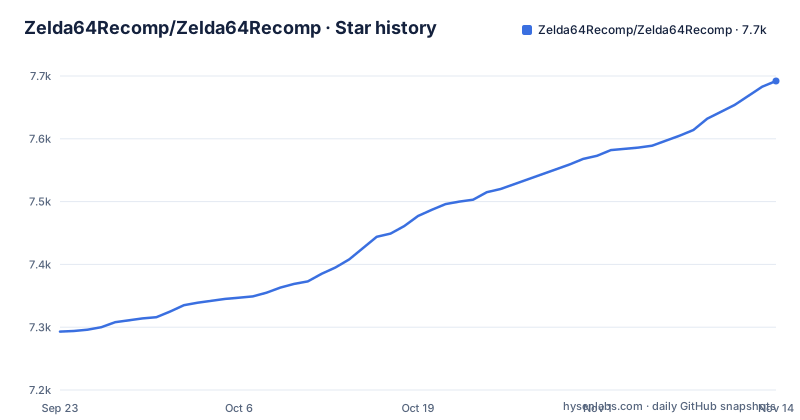
Star history
- Zelda64Recomp/Zelda64Recomp7,683 ★ · +390
| Repository | 2026-09-23 | 2026-11-13 |
|---|---|---|
| Zelda64Recomp/Zelda64Recomp | 7.3k | 7.7k |
390 Stars in the last 51 days, measured from the daily GitHub snapshot. Compare with other projects
Editorial analysis
Static recompilation turns the original code into a native PC binary
Zelda64Recomp does not rewrite Majora's Mask in a new programming language. It takes the original N64 executable and recompiles it statically into native code for Windows, Linux and Mac, using a toolchain called N64: Recompiled. What lands on your disk is a CPU binary rather than an emulator translating MIPS instructions every frame.
Rendering is a separate layer bolted on top. RT64 stands in for the N64's video hardware, and the GPU underneath it has to offer Direct3D 12.0 with Shader Model 6, Vulkan 1.2, or Metal Argument Buffers Tier 2.
That split accounts for most of the project's behaviour. Gameplay logic is whatever the original code did, so new capabilities get layered around it rather than folded into it. Here fidelity is fixed first, and everything else is negotiated around it.
The North American copy of the game is the only accepted input
Neither this repository nor its releases contain game assets, and the original game is required to build or run the project. Nothing in the source tree looks like game data. The root holds `patches/`, `patches.toml`, `shaders/`, `rsp/`, `overlays.us.rev1.txt` and a pair of cheat config examples, and the actual content is read from a copy you supply at runtime.
The menu asks for that copy directly. Point the main menu at your North American version of the game and assets load from it on startup, with no separate extraction step and no requirement to build anything yourself. Other versions of the game may be supported in the future, so a PAL or Japanese copy has no working path yet.
What this buys a reader is the removal of emulator setup, nothing more. You still need the original game on hand, and holding the wrong region leaves the menu with nothing it recognises. The region is a hard filter at the entry point, not a setting buried in a config screen.
RT64 redraws the original effects instead of replacing them
RT64's stated job is reproducing N64 effects without the usual catalogue of substitutions. The effects it names are specific: framebuffer work such as the grayscale cutscenes and the Deku bubble projectile, depth effects such as the lens of truth, decals such as shadows and impact textures, accurate lighting, shading on the fire arrows and bomb explosions, and a set of textures that emulators frequently render incorrectly.
The claim worth interrogating is the absence of workarounds. No hacks were used to reproduce these effects, and the only modifications made to them serve enhancement purposes such as widescreen support.
The README publishes a hardware floor: a GeForce GT 630, a 2012 Radeon HD 7750, and an Intel HD 510 from the Skylake generation are named as the oldest parts expected to work per vendor.
The in-game framerate slider fights the NVIDIA Control Panel
Framerate lives in the in-game graphics menu, not in a driver control panel. RT64 renders game objects, terrain, texture scrolling, screen effects and most HUD elements at whatever rate you pick, and the project defaults to your monitor's refresh rate. Setting the original N64 rate back is one option.
The README states plainly that changing framerate has no effect on gameplay. That is the detail to hold onto: this is a rendering rate, not a simulation change, so a higher number buys smoothness and nothing else.
The documented trap is an external limiter. Framerate limiters such as the NVIDIA Control Panel are known to potentially cause problems, and the suggested fix when you see stuttering is to switch the limiter off and use the manual framerate slider instead. Anyone carrying a GPU profile tuned for other games should check it here.
Ultrawide holds the HUD in place but not cutscene edges
Any aspect ratio is accepted, and most effects have been adjusted to work correctly in widescreen. Ultrawide gets one extra concession: the HUD can be repositioned into a 16:9 box when you would rather the interface did not stretch across a 32:9 panel.
The bill arrives in cutscenes. At very wide aspect ratios, animation quirks appear at the edges of the screen in certain cutscenes. The documentation names cutscenes as the affected content and stops there, without saying whether gameplay views pick up the same artefact, so ultrawide players have a specific place to check before settling on a setting.
Aspect ratio and framerate sit in the same menu but answer different questions. Rate is a rendering choice with no effect on how the game simulates. Framing is a camera choice with a visible edge case attached. Treat them separately when you tune, and check one cutscene at your target width before you commit.
Gyro aim and the dual stick camera each demand their own setup
Two input features depend on how a controller reaches the game, and both fail in ways that are awkward to diagnose.
Gyro aim uses the controller's gyro sensor to aim first person items such as the bow. Named hardware includes the Dualshock 4, Dualsense, Switch Pro and most third party Switch controllers, with the 8BitDo Pro 2 in Switch mode given as an example. The failure mode is specific rather than general: gamepad mappers such as BetterJoy or DS4Windows may intercept gyro data and prevent the game from receiving it. Because most controllers are supported natively, the fix is to stop running the mapper rather than to buy different hardware.
The dual analog camera hands camera control to the right stick. Keep the C-buttons there if you like, but map them to other controller buttons as well, because right stick C-button input is silenced. One exception exists: taking out the ocarina restores it, so ocarina play still works from the right stick. Read that exception as a deliberate carve out rather than a bug workaround.
Thunderstore mods are manual downloads, and r2modman is out
Mods install two ways, both inside the game. Drag the mod files onto the game window before starting it, or press the Install Mods button in the mod menu. Installed mods are toggled in that menu, and some are configured there as well. Scope is not cosmetic: mods can change any part of the game, including adding entirely new features and content.
Distribution has one hard rule. The project's mods live on a Thunderstore page, and the Thunderstore mod manager, r2modman, is neither required nor supported. Every download goes through the Manual Download button instead of Install with Mod Manager.
Releases sit under a different repository path than the source
Check the hardware floor before anything else. A GPU with Direct3D 12.0 Shader Model 6, Vulkan 1.2 or Metal Argument Buffers Tier 2 is required. On x86-64 a CPU with SSE4.1 is also required, which puts the floor at a Core 2 Penryn or a Bulldozer era part, while ARM64 builds run on any ARM64 CPU. Macs need Apple Silicon or an Intel 7th Gen CPU with macOS 13.0 or newer. Startup crashes are answered with one instruction: update your graphics drivers.
Then find the binary. The download link in the project documentation points at https://github.com/Mr-Wiseguy/Zelda64Recomp/releases/latest, a different repository path from the source tree under Zelda64Recomp. Wanting the source instead means working with C under GPL-3.0 on the `dev` branch, and the clone is the only step the repository layout supports:
git clone https://github.com/Zelda64Recomp/Zelda64Recomp.git
cd Zelda64Recomp
Read `BUILDING.md` next, which sits at the repository root. The last push to the default branch landed on 2026-09-25, and the published releases are v1.2.0 from 2025-05-04, v1.2.1 from 2025-08-18 and v1.2.2 from 2025-08-27. First run is short: hand the main menu your North American copy of the game.
Editorial conclusion
Adopt it if you own a North American copy of Majora's Mask and want RT64's high framerate rendering and mod support without setting up an emulator. Skip it if your copy is PAL or Japanese, or if your GPU predates Direct3D 12.0 Shader Model 6, Vulkan 1.2 or Metal Argument Buffers Tier 2. Verify one thing first: take the binary from the latest release the README links, https://github.com/Mr-Wiseguy/Zelda64Recomp/releases/latest.
Frequently asked questions
What is Zelda 64 recompiled?
It is a static recompilation of Majora's Mask into a native port for Windows, Linux and Mac, built with the N64: Recompiled toolchain and drawn through the RT64 rendering engine. Ocarina of Time support is described as being developed next.
Is there a Majora's Mask PC port?
Yes, this project is one: a native Windows, Linux and Mac port of Majora's Mask. The original game is still required, since the repository and its releases contain no game assets.
How do you install Zelda64Recomp?
Take a prebuilt build from the release page the project links, then give the main menu a copy of the North American version of the game, which the port reads its assets from without a separate extraction step. To build from source, clone the repository and follow BUILDING.md at its root.
How do you set Zelda64Recomp up once it is running?
Gameplay, graphics, input mappings and audio are all configured from the in-game config menu, and every menu works with a mouse, a controller or a keyboard. Mods are installed by dragging files onto the game window before startup or with the Install Mods button in the mod menu.
Official sources
Add this badge to your README
If you maintain this project, the badge below links readers to this analysis and shows its maintenance status from the daily GitHub snapshot. Paste the markdown into your README; add ?metric=license or ?metric=stars to the image URL for a different field.

[](https://hysenlabs.com/projects/zelda64recomp-zelda64recomp)Star history chart for your README
[](https://hysenlabs.com/projects/zelda64recomp-zelda64recomp)Was this useful?