open-remark embeds one async script, but it runs two different authentication systems
OpenRemark is an open-source, self-hostable comment system designed specifically for static websites ( Astro, Hugo, or Next.js). It aims to provide a fully featured commenting experience with minimal setup.
At a glance
- What is it?
- A self-hostable comment system for static sites that keeps the reader side deliberately dumb: three data attributes on a div and an async script tag. Everything with state lives behind the dashboard, which authenticates administrators with a Google account and issues separate signed tokens to anonymous visitors. A shadow DOM widget keeps the site's own styles out of it.
- Who is it for?
- Adopt this if you publish on a static site generator and want comments you host yourself rather than a third party script. The embed is small enough that adopting it on one page is low risk, and the framework guides cover the three generators it names.
- Can I use it commercially?
- Yes. MIT is a permissive licence: you can use, modify and sell software built on it, as long as you keep its copyright and licence notices.
- Is it still maintained?
- Yes. The repository last received commits 51 days ago.
- What is it written in?
- Mainly TypeScript, according to GitHub's language statistics.
Answers come from the project's GitHub data, last synced on October 22, 2026, and from our analysis. They are not legal advice.
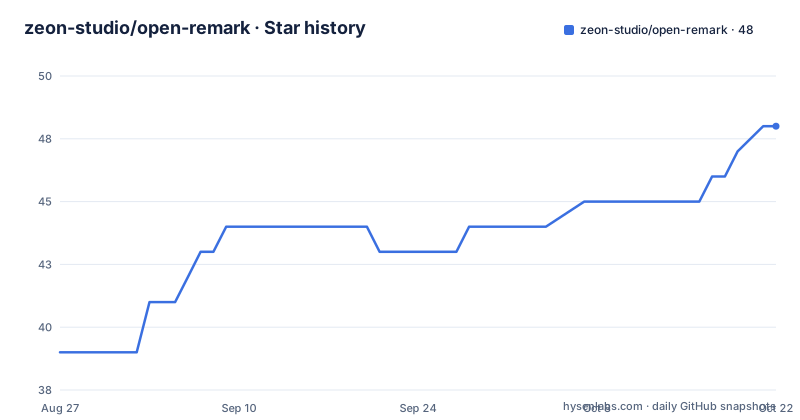
Star history
- zeon-studio/open-remark48 ★ · +9
| Repository | 2026-08-27 | 2026-10-22 |
|---|---|---|
| zeon-studio/open-remark | 39 | 48 |
9 Stars in the last 56 days, measured from the daily GitHub snapshot. Compare with other projects
Editorial analysis
Administrators sign in with Google, readers get signed tokens
The stack table names two authentication systems and the split is deliberate. Admin authentication is a full OAuth flow against Google, which is why the dashboard asks you to sign in with Google before it will show anything. Widget authentication is a JSON web token, signed with a library rather than issued by an OAuth provider, and it exists so that an anonymous visitor can prove a legitimate origin without an account. The environment template makes the separation explicit by carrying two separate secrets: one for the admin session machinery and one labelled as being for visitor tokens. That is a slightly unusual amount of care for a comment box, and it is the part that makes the moderation model possible, since a dashboard that can be trusted needs to know which visitors it is moderating.
openssl rand -base64 32The widget is vanilla TypeScript compiled by esbuild
The reader-facing half of the system is not part of the application framework at all, and the stack table says so in one row: the widget is vanilla TypeScript going through a bundler. That means the thing every visitor downloads is not the whole application. It is one script file, built by a dedicated script in the package manifest, using a bundler rather than the framework's own toolchain. The rest of the project is a full application framework on the app router, with a component library, a styling framework and a schema validator. So there are two build outputs from one repository, and the application build script runs the widget build first. That ordering is not cosmetic: if the widget build fails, the application build fails too, because the embed script is an asset the application has to serve from the same deployment.
pnpm devThree data attributes stand in for a framework component
The embed snippet is the whole integration contract and it is worth reading line by line, because there is no build step and no package to install on the publishing site. You paste a div with a marker attribute, a site key, and a slug. The marker tells the script which element to attach to, the site key identifies which site in the dashboard the comments belong to, and the slug identifies which piece of content within that site. Then you add one async script tag pointing at your own domain. Async means the script does not block the page, and the site's key is fetched from the dashboard under the sites section rather than invented. The same three attributes work in any template that will accept raw HTML, which is why one snippet covers three different site generators and anything else that can emit markup.
<!-- Paste anywhere in your post template -->
<div
  data-open-remark
  data-site-key="YOUR_SITE_KEY"
  data-slug="/posts/your-post-slug"
></div>
<script async src="https://your-domain.com/embed.js"></script>
Both dev and build regenerate the client and rebuild the widget first
Look at the two build scripts in the package manifest and they begin identically: generate the database client, build the widget, then run the framework's own build, with the development variant adding its own fast compiler flag. The reason is that a change to the database schema or to the widget source has to be compiled before the application starts, so there is no path where the application runs against a stale widget. The seeding command is registered twice, once as a script and once in the configuration block that the database tool reads, so seeding works whether you invoke it from the package manager or through the migration tool. There is also a database status command and a reset command, both of which go through a small script rather than calling the database tool directly, which suggests they do local checks before touching anything.
Origin allowlisting is in the feature list and almost nowhere else
Six features are listed in one line, and five of them are things a user can see: Google sign-in, threaded replies, a spam and moderation dashboard, site teams with roles, and a widget that renders inside a shadow root so the host page's styles do not reach it. The sixth is origin allowlisting, which is the only one that is not a user-facing feature at all, and it is mentioned in exactly those words. For a system whose widget runs on someone else's domain and talks to your server, a host allowlist is the control that stops a third party page from using your comment instance as a proxy. The documentation does not describe how to set it, what the failure looks like, or whether it covers the dashboard as well as the widget, so it is one of the things to confirm after installation rather than assume.
The two database examples disagree about host and database name
A small inconsistency that will cost somebody an afternoon if they do not notice it. The environment variable table in the documentation shows a local connection string with a user and password, a port, and a database name. The environment template instead shows a hosted pooler hostname with a project reference and a password substituted into it, a region in the host, an explicit SSL requirement, and a different database name. Neither is wrong: one is the local development case and the other is the hosted case, and the template is commented as being for a hosted PostgreSQL provider. But they are presented as if there were one correct value, and the database name in particular is different in each. Copy the one that matches the environment you are actually connecting to, and if you are following the table rather than the template, expect to change the database name as well as the credentials.
The authentication library is still on a beta line
One dependency version is worth reading before you pin anything. The authentication package is on a beta release, and the admin authentication entry in the stack table names a fifth major version of the library. A beta dependency in a self-hosted system is a reasonable trade, because you control when you upgrade, but it does mean the authentication layer can change shape between versions in a way a stable major would not. The rest of the dependency set looks like a current application stack: a recent framework major, a recent React, the database client and its connection adapter, an email rendering package for transactional messages, a mail transport library, a query cache, and a markdown parser with front matter handling, which is what the documentation site at the repository root appears to be built from.
Three framework guides exist for three generators plus everything else
The supported targets are named twice in slightly different ways, and the second statement is broader. The description lists three site generators. The opening line of the documentation says three generators and any site that accepts HTML, which is the more accurate claim given that the integration is a snippet and a script tag. Three embedding guides are provided, one per named generator. That is proportionate: there is nothing generator specific to the integration itself, so a guide is really just showing where in that generator's template the snippet goes. There is also a separate architecture document covering system design, request flows and the scaling path, which is where the widget's request pattern and the dashboard's data model are set out, and it is the document to read before you assume the default configuration will hold at your traffic.
Editorial conclusion
Adopt this if you publish on a static site generator and want comments you host yourself rather than a third party script. The embed is small enough that adopting it on one page is low risk, and the framework guides cover the three generators it names. Two things to sort out first. Your database connection, because the two places that show you one disagree on the host and the database name, so follow whichever matches your provider. And your origin allowlist, because the widget will only talk to the hosts you declare, and getting that wrong looks like a broken embed rather than a configuration error.
Frequently asked questions
What is an open remark, in the OpenRemark project?
It is a self-hostable comment system for static websites, written in TypeScript and released under the MIT licence. The reader side is a single asynchronous script plus three attributes on a div, and the administrative side is a dashboard reached by signing in with a Google account.
What are opening remarks called?
The repository is about software and contains no reference to speeches or public remarks of any kind. What it documents is a comment system for sites built with three common static site generators, with a widget rendered inside a shadow root, threaded replies, and a moderation dashboard with site teams and roles.
What is an example of opening remarks in this project?
The closest thing to a worked example is the embed snippet, which is the entire integration: a div carrying a marker attribute, a site key and a content slug, followed by an async script tag pointing at your own deployed domain. The site key is not invented; it is copied from the dashboard under the sites section.
What is another word for "opening remarks" in open-remark?
No synonym is offered. The vocabulary the project actually uses is per site and per content: a site key identifies the publishing site, and a slug identifies the post within it, so a thread belongs to the pair rather than to a URL that the service parses.
Official sources
Add this badge to your README
If you maintain this project, the badge below links readers to this analysis and shows its maintenance status from the daily GitHub snapshot. Paste the markdown into your README; add ?metric=license or ?metric=stars to the image URL for a different field.

[](https://hysenlabs.com/projects/zeon-studio-open-remark)Star history chart for your README
[](https://hysenlabs.com/projects/zeon-studio-open-remark)Was this useful?