IOE: Self-Hosted Inventory and Checkout for a Single Store
One-Stop Retail Inventory Solution
At a glance
- What is it?
- IOE is a self-hosted Django application for small retail stores that need product records, stock movements, checkout, member accounts, and basic reports in one interface. It defaults to SQLite, supports container deployment, and is intentionally limited to a single store rather than branch-based inventory.
- Who is it for?
- Adopt IOE when a small retail operation needs a self-hosted checkout, stock, and member system and can work within its single-store model. Do not choose it for multi-branch inventory or workflows requiring a documented external database deployment.
- Can I use it commercially?
- Yes. MIT is a permissive licence: you can use, modify and sell software built on it, as long as you keep its copyright and licence notices.
- Is it still maintained?
- Yes. The repository last received commits 31 days ago.
- What is it written in?
- Mainly HTML, according to GitHub's language statistics.
Answers come from the project's GitHub data, last synced on November 7, 2026, and from our analysis. They are not legal advice.
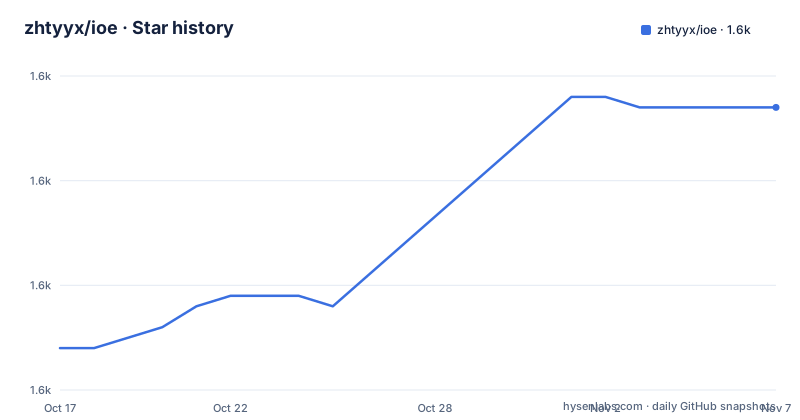
Star history
- zhtyyx/ioe1,637 ★ · +23
| Repository | 2026-10-17 | 2026-11-07 |
|---|---|---|
| zhtyyx/ioe | 1.6k | 1.6k |
23 Stars in the last 21 days, measured from the daily GitHub snapshot. Compare with other projects
Editorial analysis
IOE's single-store retail scope
IOE addresses a specific operational gap for small retail stores: keeping products, stock changes, sales, and member accounts in one self-hosted application. The intended audience is an operator who wants to run the application on a local computer or server rather than depend on a hosted checkout service. The README describes daily work involving product records, receipts, withdrawals, adjustments, low-stock alerts, checkout, and customer membership management.
The scope is narrower than that of a full retail platform. The open-source version operates as one store. Inventory and orders are not separated by branch, so it does not directly model a chain of locations with independent stock pools and transfers. That boundary matters for adoption decisions. A business with one location can use the documented product and stock workflows, while a multi-branch operator would need capabilities that the README does not claim.
The application combines operational tasks rather than treating them as isolated modules. A checkout can include member lookup, discounts, payment methods, sale items, and quantities or prices changed before completion. Members have membership levels, balances, recharges, points, purchase history, and birthday reminders. Reports cover sales trends, stock turnover, and member analysis. The practical purpose is consolidation of these records into one administrative interface, not a claim of enterprise-scale retail architecture.
The repository identifies its primary language as HTML, while the application is built with Django and uses Python 3.10 or newer. The requirements include Django 4.2 or newer, Gunicorn, Pillow, form and UI packages, spreadsheet support, request libraries, and QR code generation. This is a conventional web application rather than a static catalogue or a command-line inventory utility.
How IOE records products, stock, and sales
The repository layout separates the Django project into `inventory`, `store`, and `project`, with `manage.py` providing the standard Django command interface. The README describes products with categories, barcodes, prices, variants, and images. Inventory actions include receipts, withdrawals, and adjustments. Low-stock alerts are part of the stock interface, so the catalogue record is connected to the quantity view rather than being only a description of goods.
Checkout starts by scanning or searching for products. The selected items appear in a cart where quantities and prices can be adjusted. A member can be found for the sale, membership discounts can be applied, and the resulting order can record payment methods and sale items. The documentation describes an amount-due control beside the item list. This indicates a server-backed web workflow in which the browser submits a checkout through the Django application and the application records the resulting transaction.
Stocktaking is a separate workflow from ordinary catalogue editing. An operator can create a stocktake and reconcile counted quantities. The README does not document the exact permission matrix, transaction consistency rules, or failure recovery behavior for checkout, so those details should be checked before relying on the application for unattended operation.
Administration includes permissions, operation logs, backups, language switching, and light or dark themes. The sales trend view presents revenue, costs, profit, order counts, and daily details. Those features indicate that IOE keeps historical operational data available for review, but the README does not publish report formulas, export behavior, or the exact backup procedure.
Deploying IOE with the published GHCR image
The README provides a prebuilt container route for Linux AMD64 and ARM64. The public GHCR image can be pulled without signing in to GitHub. The image is published through GitHub Actions after tests and deployment verification for pushes to `main`; a `v*` tag produces a versioned image. The repository includes `docker-compose.yml`, `docker-compose.prod.yml`, a `Dockerfile`, and deployment documentation.
Pull the published image with the command below. This downloads the image to the local Docker installation. It does not start the application by itself.
docker pull ghcr.io/zhtyyx/ioe:latestFor a first deployment, the README directs operators to the image deployment guide to download the Compose configuration and `.env` template, set the secret key and allowed hosts, start the services, and create an administrator. The `docker-compose.yml` file maps port `8000:8000` and declares persistent volumes for static files, media, and the `db` directory. The README states that database, upload, and backup data survive container recreation.
Source installation for a local IOE instance
The source route uses Python 3.10 or newer, a virtual environment, and SQLite by default. On macOS or Linux, clone the project and create an isolated environment with these commands. The reader should see a `.venv` directory in the project root after the commands complete.
git clone https://github.com/zhtyyx/ioe.git
cd ioe
python3 -m venv .venv
source .venv/bin/activate
Install dependencies, create the database directory, apply Django migrations, and create the login account. A new installation starts with an empty database, so the demo products and members shown in the README are not imported automatically.
python -m pip install -r requirements.txt
python -c "from pathlib import Path; Path('db').mkdir(exist_ok=True)"
python manage.py migrate
python manage.py createsuperuser
Start Django's development server after the superuser has been created.
python manage.py runserverThe README says to open `http://127.0.0.1:8000/` and sign in with the new account. This route is useful for a first local use because it avoids a separate database server. It is also less representative of the documented production container, which runs Gunicorn inside Docker.
Maintenance, packaging, and upgrade boundaries
The repository is not archived, and the last push was on 2026-10-08. There are no GitHub releases listed. The README states that pushes to `main` publish the `latest` image after tests and deployment verification, while `v*` tags publish versioned images. This gives the project a documented image update path, but it is not the same as a published release history with formal migration notes.
The Docker deployment separates persistent data into volumes for the database, uploads, static files, and related runtime data. The README specifically says the database, uploads, and backups survive container recreation. The `docker-compose.yml` file maps port `8000`, mounts the repository directory at `/app`, and declares named volumes for static files, media, and `db`. The image runs Gunicorn as `inventory.wsgi:application` on `0.0.0.0:8000`.
For an existing configured deployment, back up the data before updating. The documented commands retrieve a newer image and recreate the service, then wait for it to become ready.
docker compose pull
docker compose up -d --force-recreate --wait
The repository has no release entries, so the README's `latest` image is an important operational detail to account for when planning upgrades.
License and operational limits of IOE
The repository is marked MIT licensed. That identifies the license declared by the project, but the README does not provide legal guidance about deployment, modification, data processing, or third-party dependencies. Operators who need formal compliance review should examine `LICENSE` and the licenses of the packages in `requirements.txt` separately.
The clearest limitation is the single-store architecture. The README explicitly says inventory and orders are not separated by branch. A business needing branch-level stock, inter-branch transfers, consolidated purchasing, or independent pricing should not treat IOE as a drop-in multi-location system. Another limitation is documentation depth. The README names features but does not explain the exact checkout failure behavior, concurrency model, backup schedule, payment integrations, or custom reporting API. The project is therefore more suitable for a controlled small-store workflow than for an operator who requires documented guarantees for those areas.
IOE is a practical alternative to maintaining separate spreadsheets for products, a checkout page, and a member list. The difference is that IOE links those records through Django models and application views. It is also different from a hosted service because the operator controls the host and data location. That control comes with the need to manage persistence, configuration, updates, and access to the application.
Who should compare IOE with a spreadsheet workflow
For a single store with a modest catalogue, IOE offers a more connected starting point than independent spreadsheets. A product row can be connected to stock movements, a checkout record, and reporting views, while members can carry balances, points, and purchase history. The README also documents discounts and payment methods at checkout, which are operational details that a basic product spreadsheet does not naturally coordinate.
The trade-off is application administration. A hosted checkout service may reduce infrastructure work, while IOE requires the operator to manage the host, persistent volumes, secret configuration, and upgrades. A spreadsheet may be simpler for a very small catalog, but it does not provide the same application-level connection between members, stocktaking, orders, and reports. These are different approaches rather than interchangeable products.
IOE's own documentation should define the boundary for evaluation. It does not document branch separation, payment gateway integrations, concurrency guarantees, or a detailed backup schedule. A prospective adopter should compare those omissions with the store's actual operating requirements before importing live records.
Editorial conclusion
Adopt IOE when a small retail operation needs a self-hosted checkout, stock, and member system and can work within its single-store model. Do not choose it for multi-branch inventory or workflows requiring a documented external database deployment. Verify first that your payment, discount, backup, and reporting processes match the documented feature set, then back up persistent data before an image update.
Frequently asked questions
How do I install IOE for a small retail store?
The README supports either pulling the GHCR image or running the Django project from source. The source route requires Python 3.10 or newer, creates a virtual environment, installs `requirements.txt`, runs migrations, creates a superuser, and starts `manage.py runserver`.
Does IOE support multiple branches?
No. The README states that the current open-source version operates as a single store, with inventory and orders not separated by branch.
What database does IOE use by default?
IOE uses SQLite by default, so the documented source installation does not require a separate database server. The requirements also include `psycopg2-binary`, but the README does not document PostgreSQL deployment steps for this verified setup.
Can I deploy IOE with Docker?
Yes. The README documents a GHCR image for Linux AMD64 and ARM64, along with Compose configuration and persistent volumes for data such as the database, uploads, and backups.
Official sources
Add this badge to your README
If you maintain this project, the badge below links readers to this analysis and shows its maintenance status from the daily GitHub snapshot. Paste the markdown into your README; add ?metric=license or ?metric=stars to the image URL for a different field.

[](https://hysenlabs.com/projects/zhtyyx-ioe)Star history chart for your README
[](https://hysenlabs.com/projects/zhtyyx-ioe)Was this useful?