ArtPlayer puts sixteen plugins around a bare container and a URL
:art: ArtPlayer.js is a modern and full featured HTML5 video player
At a glance
- What is it?
- ArtPlayer is an HTML5 video player whose README is three tables: what the player does, what you can bolt onto it, and which streaming libraries and rendering proxies it can drive. The core is deliberately thin, a container selector and a media address, and almost everything a modern player is expected to have, quality selection, chapters, subtitles, ambient light, casting, is a plugin in a workspace built with a task runner and a bundler.
- Who is it for?
- ArtPlayer suits a team that wants to own its player interface and swap individual features by adding a plugin rather than by forking a component, and that already has a build step. It does not suit someone who wants the whole feature set from one dependency, because the subtitle extensions, the quality controls and the advertising are separate packages.
- Can I use it commercially?
- Yes. MIT is a permissive licence: you can use, modify and sell software built on it, as long as you keep its copyright and licence notices.
- Is it still maintained?
- Yes. The repository last received commits 18 days ago.
- What is it written in?
- Mainly JavaScript, according to GitHub's language statistics.
Answers come from the project's GitHub data, last synced on November 7, 2026, and from our analysis. They are not legal advice.
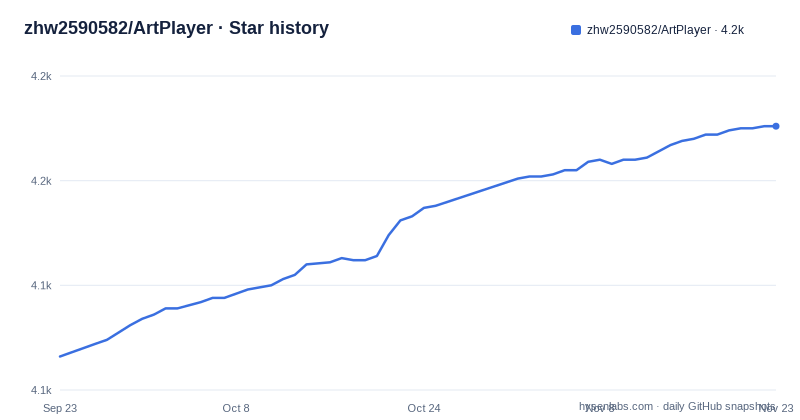
Star history
- zhw2590582/ArtPlayer4,159 ★ · +93
| Repository | 2026-09-23 | 2026-11-07 |
|---|---|---|
| zhw2590582/ArtPlayer | 4.1k | 4.2k |
93 Stars in the last 45 days, measured from the daily GitHub snapshot. Compare with other projects
Editorial analysis
Sixteen plugins, and one of them is still work in progress
The plugin table is the product catalogue, and it is worth reading as a list of decisions rather than a list of features. There is a bullet comment system, with a second plugin that masks comments intelligently, which means a video platform can have both. There are separate quality control plugins for two streaming protocols, so a user can pick a rendition without the player owning the streaming library. Then the platform integrations: casting to a television, a picture in picture mode for a document rather than the video, an ambient light effect, and an independent audio track for a file with a separate soundtrack. Two plugins generate thumbnails automatically, one from a subtitle track and one from the video itself, and one adds chapters. Two handle captions, one for the advanced styled format and one for switching between several subtitle tracks. One does speech recognition, one does advertising, and the advertising plugin is the only row in the table whose state says work in progress.
Subtitle formats are in the core, the styled format is a plugin
The features paragraph says subtitle support is direct, and names three file formats, which is where a player earns its keep in practice. Two of those are the plain text and the widely supported web format, and the third is the styled format used by fansub communities, which is the hard one because it is a rendering language rather than a list of cues. That split shows up in the plugin table, where a separate plugin exists for the styled format. So the core handles the easy two, and the third arrives as a plugin backed by another library, which is a reasonable place to draw the line. The second subtitle plugin is orthogonal: it is about choosing between several tracks rather than about rendering any one of them.
Five streaming libraries and two rendering proxies
Two tables cover what the player will not do itself. The first is streaming: an HLS client, a dynamic adaptive streaming player, a player for the flash video container over HTML5, a transport stream player, and a torrent streaming client. The readme is careful about the naming, because two of those libraries cover the same container, and it distinguishes them rather than pretending one replaces the other. The second table is about rendering, and it has two entries: a proxy that draws the video into a canvas, and a proxy built on a separate media library. Both exist so the player can be driven from something that is not a video element, which is what a canvas overlay, a visual effect, or a custom compositing pipeline needs. The table heading is misspelled in the readme, which is a small sign that the file is maintained by hand.
Four package managers, a script tag and two CDNs
The install section is deliberately exhaustive, and the reason is that this is a library people drop into anything. There is a command for each of four package managers, then a module import for bundler users, then a plain script tag for the universal build, then two content delivery network addresses. The universal build is what the global name is for, and the readme says exactly what it exposes. The two network addresses are the two largest public mirrors, and the paths they serve are the same distribution file. So the choice of install method does not change what you get, only how it arrives, and a project with no build step can still use the same player a bundled project uses.
The usage example is a container selector and a media address
The usage section is four lines and that is the whole API surface a first time user needs:
let art = new Artplayer({
  container: '.artplayer-app',
  url: 'path/to/video.mp4',
})
You put an element with a class in your markup, then construct the player with a container selector and a media address, and everything else has a default. The readme points out that most of the functional controls can be customised, which is the claim that matters for a player, because a video player is a user interface before it is a decoder. The same paragraph gives the two reasons the code is written the way it is: integration with other streaming libraries is meant to be simple, and the code is described as highly decoupled with clear structure so that tracking an error and adding a feature are both cheap. Everything after that paragraph is the table of things you can add.
Eight build targets, one of them for language models
The workspace manifest is where the infrastructure lives, and it is a lerna workspace over a packages directory with a bootstrap script that links the local packages and a postinstall step that runs their prepare step. Then eight build or utility targets: the main build, one for type definitions, one for documentation, one for translations, one for a test build, one for the language model artefact, a script that translates the documentation, and a generator that scaffolds a new plugin. Two test targets run specific files with the built in test runner, one of them for playback and one for a streaming control plugin. The lint target is a single command that fixes as it goes, covering the package sources, the scripts, the tests and the code samples embedded in the documentation, and the aggregate build target chains the build, translations, types, documentation and lint in that order. There is also a development entry point that runs with a development environment flag.
The workspace version is ahead of the newest published release
Three closing facts. The workspace manifest declares a version of its own that is higher than the newest published release, which is normal for a monorepo whose root is not the published package, but it does mean the version in the repository root is not the version you install. The newest published release is a major in the five series from March 2026, and the last push to the default branch is dated 2026-09-30 on a repository that is not archived. And the browser support declaration is a single entry: the most recent Chrome version, which is a deliberate statement that this player is not for anything older. The licence is MIT with a single named author, funding is through two donation pages and a chat group, and the documentation site carries an online editor and a separate plain text file aimed at language models.
Editorial conclusion
ArtPlayer suits a team that wants to own its player interface and swap individual features by adding a plugin rather than by forking a component, and that already has a build step. It does not suit someone who wants the whole feature set from one dependency, because the subtitle extensions, the quality controls and the advertising are separate packages. Before adopting, check which plugin states are finished, since one advertising plugin is explicitly marked as work in progress, and read the browser support declaration, which targets only the most recent Chrome version.
Frequently asked questions
How do I install ArtPlayer?
With a command for npm, yarn, pnpm or bun, or by loading the universal build from a script tag, or from either of the two content delivery networks listed in the readme. The universal build exposes a single global on the window object, and the module build is imported by name.
What subtitle formats does ArtPlayer support?
Three formats are supported directly by the core, two of them plain text and web formats and one the styled format used by fansub communities. Rendering the styled format is handled by a separate plugin backed by another library, and a second plugin adds switching between several subtitle tracks.
Which streaming libraries can ArtPlayer drive?
The readme lists an HLS client, a dynamic adaptive streaming player, a player for the flash container over HTML5, a transport stream player, and a torrent streaming client. Two of those cover the same container and are named separately rather than treated as alternatives.
What are the ArtPlayer plugins for?
Sixteen are listed: bullet comments and comment masking, quality control for two streaming protocols, thumbnail generation from a subtitle track and from the video, chapters, casting to a television, ambient light, a document picture in picture mode, independent audio tracks, styled subtitle rendering, multiple subtitle tracks, speech recognition, and advertising, with the advertising plugin marked as work in progress.
How do I add a plugin to ArtPlayer?
Install the plugin package alongside the player and register it in the player's plugin configuration, the same way the streaming libraries are added. The repository also ships a generator script whose name says it scaffolds a plugin, and the documentation site has an online editor for trying one in a browser first.
Official sources
Add this badge to your README
If you maintain this project, the badge below links readers to this analysis and shows its maintenance status from the daily GitHub snapshot. Paste the markdown into your README; add ?metric=license or ?metric=stars to the image URL for a different field.

[](https://hysenlabs.com/projects/zhw2590582-artplayer)Star history chart for your README
[](https://hysenlabs.com/projects/zhw2590582-artplayer)Was this useful?