ZLEqualizer: a JUCE equalizer plugin whose band count is fixed at build time
dynamic equalizer plugin
At a glance
- What is it?
- ZLEqualizer is a C++ equalizer plugin built on JUCE, distributed as VST3, LV2 and other formats, with a configurable number of bands, a selectable SIMD target and an option to skip copying the built plug-ins. Its documentation is unusually explicit that plugins built with different band counts cannot exchange state, and that AGPLv3 covers the code but not the two logos.
- Who is it for?
- Adopt ZLEqualizer if you are a developer building a custom equalizer plugin and want a JUCE and CMake starting point where the DSP dependencies are already vendored, since the repository includes Highway for SIMD and nlopt for optimisation. Do not adopt it if you need a plug-in that can be redistributed under a permissive licence, because the code is AGPLv3 and the two logos are explicitly excluded from that licence.
- Can I use it commercially?
- Yes, with strict conditions. AGPL-3.0 is a network copyleft licence: if people use a modified version over a network, for example as a hosted service, you must offer them its source code under the same licence.
- Is it still maintained?
- Yes. The repository last received commits 1 day ago.
- What is it written in?
- Mainly C++, according to GitHub's language statistics.
Answers come from the project's GitHub data, last synced on November 7, 2026, and from our analysis. They are not legal advice.
Star history
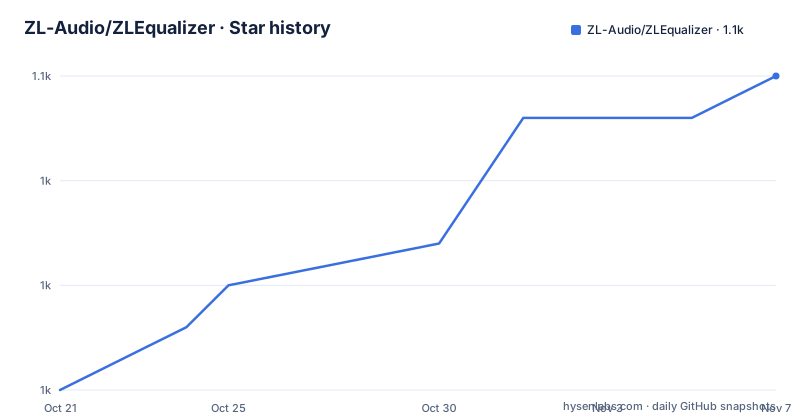
- ZL-Audio/ZLEqualizer1,050 ★ · +15
| Repository | 2026-10-21 | 2026-11-07 |
|---|---|---|
| ZL-Audio/ZLEqualizer | 1k | 1.1k |
15 Stars in the last 17 days, measured from the daily GitHub snapshot. Compare with other projects
Editorial analysis
What the repository is: a JUCE plugin skeleton, fully vendored
ZLEqualizer is described in one line as an equalizer plugin, and the repository description calls it a dynamic equalizer plugin. The source is C++, the licence is AGPL-3.0, and the homepage points at the ZL Audio plugins site.
The more useful thing to understand is what the repository contains, because the top-level listing is unusually revealing. The `JUCE/` directory is the JUCE framework checked in as a submodule, and `highway` and `nlopt` are Google's Highway library and Steven G. Johnson's nlopt, both present as directories rather than as fetched dependencies. `zldsp_fft` is the project's own DSP component, `modules/` holds the module sources, `source/` the plugin itself, and `packaging/` and `cmake-includes/` the build machinery. There is a `CHANGELOG.md`, a `renovate.json` for dependency updates, and a `.clang-format`.
The JUCE template comes from pamplejuce, which the credits name directly, so this is the standard JUCE audio plugin template with the DSP dependencies already added rather than a from-scratch framework. A `licenses/` directory sits alongside them, which is what you would expect from a project that vendors third-party code and tracks their terms.
The last push to the repository was on 2026-10-10 and it is not archived. The release history shows 1.4.1 on 2026-09-28, 1.4.0 on 2026-09-19 and 1.3.1 on 2026-08-15, so the version moves every few weeks rather than on a long cycle.
The three CMake variables that decide what you get
The build is controlled by three variables, and each of them changes the resulting plug-in in a way that is hard to change later.
`ZL_JUCE_FORMATS` is the list of plug-in formats you want, given as a quoted semicolon separated string such as `"VST3;LV2"`. The README flags one consequence that is easy to miss: AAX plug-ins need to be digitally signed using PACE Anti-Piracy signing tools before they run in commercially available versions of Pro Tools. So including AAX in the format list produces a binary that will not load in a shipping Pro Tools install.
`ZL_EQ_BAND_NUM` sets the number of bands, with a default of 24. The README's warning here is the single most important line in the build documentation: plug-ins built with different values of this variable may not be compatible with each other. That is a state format issue rather than a sound issue, so if you build a version with 24 bands and a version with 10 and try to share presets or session state between them, the two will disagree about what the parameters mean.
`ZL_HWY_STATIC_TARGET` chooses the SIMD target, and this is where the Highway library is used. The README gives the mapping for x86-64, where SSE2 is the floor, SSE4 is for CPUs that support SSE2 and SSE4, and AVX2 is for those that support SSE2, SSE4 and AVX2. On arm64 the target is NEON. Choosing a target higher than your oldest supported CPU means the binary will fault on that older machine, so this is a decision about the minimum hardware you intend to support rather than about maximum speed.
The README also notes that on a machine with several compilers installed you may need to point CMake at Clang explicitly, passing `-DCMAKE_C_COMPILER=clang -DCMAKE_CXX_COMPILER=clang++` on Linux or the `clang-cl` equivalents on Windows.
Getting it to build on Linux
The prerequisites are Clang, with AppleClang 16 or LLVM/Clang 17 or newer, cmake 3.25 or newer, and ninja. On Linux the remaining system packages are installed in one command.
sudo apt-get update && sudo apt install libasound2-dev libx11-dev libxcomposite-dev libxcursor-dev libxext-dev libxinerama-dev libxrandr-dev libxrender-dev libfreetype-dev libfontconfig1-dev libxi-devThat list is the JUCE dependency set for Linux, which covers the audio backend, the X11 windowing libraries the editor needs, and the font handling the interface uses.
The clone and build sequence is then the standard CMake out-of-source build.
git clone https://github.com/ZL-Audio/ZLEqualizer
cd ZLEqualizer
git submodule update --init --recursive
cmake -B Builds -G Ninja -DCMAKE_BUILD_TYPE=Release -DZL_JUCE_FORMATS="VST3;LV2" -DZL_HWY_STATIC_TARGET="NEON" .
cmake --build Builds --config Release
The `git submodule update --init --recursive` step is what populates the vendored JUCE, Highway and nlopt directories, and skipping it is the most common reason a fresh clone fails to configure.
After the build, the README says the plug-ins are copied into the corresponding folders automatically. If you would rather handle that yourself, you can pass `-DZL_JUCE_COPY_PLUGIN=FALSE` and find the binaries under `Builds/ZLEqualizer_artefacts/Release`. The `artefacts` spelling is JUCE's, and it is the path to look for when you are hunting for a built plug-in that did not land where you expected.
The DSP lineage behind the filter design
The references section is the most revealing part of the README, because it says what the filter design is built on rather than what the interface does.
Two 2025 papers by Yuriy Ivantsov lead the list, one on the ideal bilinear and biquadratic digital filter and one on the state space of a linear digital filter. Those are the two structural questions behind a parametric equalizer: how you map a frequency and gain request onto a digital filter, and how that filter behaves when its coefficients change over time.
The dynamic behaviour also has a named reference. Aaron Wishnick's Time-Varying Filters for Musical Applications, presented at DAFx in 2014, is the standard citation for filters whose parameters move while audio is playing, which is exactly the case for an equaliser that responds to a detected level. Nigel Redmon's Cascading filters from 2016 covers the arrangement of multiple bands in series, and Martin Vicanek's matched one-pole digital shelving filters from 2019 and matched second order digital filters from 2016 cover the band shapes themselves.
The interpolation choice is documented too. Cleve Moler's Makima piecewise cubic interpolation from a 2019 MathWorks blog post is cited, which tells you the project interpolates parameter curves with Makima rather than with a plain cubic, and Makima exists precisely because it avoids the overshoot behaviour of cubic splines in the presence of flat segments.
None of this tells you how the plug-in sounds, and the README does not claim that it does. What it does is name the theory the implementation follows, which is a reasonable thing for a project whose purpose is to be extended by other developers.
AGPLv3 covers the code, but not the two logos
The licence is AGPLv3, held in `LICENSE.md`, and the copyright line reads 2023 to 2026 for zsliu98, the maintainer behind ZL Audio.
The carve-out is stated explicitly and is worth repeating exactly in substance: the logo of ZL Audio and the logo of ZL Equalizer are not covered by the licence. They are separate assets under `assets/`. That is a narrow and common arrangement, but it matters in practice, since a fork that keeps the interface recognisable has to replace two image files, and a distributor that wants to use the names has to ask rather than assume.
The credits also name Material Symbols and the Inter typeface, both from Google and the Inter Project Authors, which are typically shipped as assets rather than as dependencies, and the `assets/` directory in the tree is where they live.
The AGPL choice has a consequence for anyone embedding this in a commercial product. A network copy of AGPL licensed code carries an obligation to offer the corresponding source to the users of the modified version, and plug-in hosts that distribute plug-ins are exactly the situation where that question gets asked. Without more detail in the README than this, the safe reading is that a studio using the plug-in internally is in a different position from a company that bundles it into a product it sells, and that the second case needs its own review.
There is a section on AI transparency as well. The README states that since October 2026, large language models have assisted across various stages of the project's development, and that all code, documentation and design choices are either authored or reviewed by the maintainer, who takes full responsibility for the quality, safety and licensing of the final output. That is a policy statement about process rather than about the artefact, and it is unusual to see one in a plug-in README.
Where to look when the build or the sound is not what you expected
There are two places to look beyond the README, and the repository layout tells you what they are.
The first is `CHANGELOG.md`, which for a project shipping a release every couple of weeks is the fastest way to find out what changed in a version, and to see whether a behaviour you dislike is recent or long standing.
The second is `docs/`, which holds the documentation assets including the images the README embeds, and the `packaging/` directory, which carries the platform packaging for the released plug-ins. The `cmake-includes/` directory holds the CMake modules that the top-level `CMakeLists.txt` pulls in, and reading those is how you find out what other options exist beyond the three documented variables, since the README documents only the ones a user is expected to change.
The continuous integration setup is worth a look too, because the badge in the README points at a workflow named `cmake_full_test.yml` on the `main` branch, which means the build and the test suite run in CI on every change. The topic list gives the format coverage: audio effect, audio unit, equalizer, juce, lv2 and vst3.
The one thing the README does not cover is the interface itself. The description is a single sentence, the screenshot is a single image, and there is no description of the controls, the parameter names, or the presets. For a plug-in whose argument is its sound, that means you will have to install a release to know what it does, or read the source. The documentation site linked from the homepage is the intended answer to that, and the repository is not a substitute for it.
Editorial conclusion
Adopt ZLEqualizer if you are a developer building a custom equalizer plugin and want a JUCE and CMake starting point where the DSP dependencies are already vendored, since the repository includes Highway for SIMD and nlopt for optimisation. Do not adopt it if you need a plug-in that can be redistributed under a permissive licence, because the code is AGPLv3 and the two logos are explicitly excluded from that licence. Before you build, decide the band count and set it consistently everywhere, since the README warns that plug-ins built with different `ZL_EQ_BAND_NUM` values are not compatible with each other, and pick the SIMD target that matches the oldest CPU you have to support.
Frequently asked questions
What build dependencies does ZLEqualizer need?
Clang, with AppleClang 16 or LLVM/Clang 17 or newer, cmake 3.25 or newer and ninja. On Linux the system libraries are installed with `sudo apt-get update && sudo apt install libasound2-dev libx11-dev libxcomposite-dev libxcursor-dev libxext-dev libxinerama-dev libxrandr-dev libxrender-dev libfreetype-dev libfontconfig1-dev libxi-dev`.
How do I choose the plugin formats and the number of bands when building ZLEqualizer?
You pass `ZL_JUCE_FORMATS` as a semicolon separated list such as `"VST3;LV2"`, and `ZL_EQ_BAND_NUM` for the band count, which defaults to 24. The README warns that plug-ins built with different band counts may not be compatible with each other, and that AAX output needs PACE Anti-Piracy signing before it runs in shipping versions of Pro Tools.
What is ZL_HWY_STATIC_TARGET used for?
It selects the SIMD target for the Highway library. The README lists SSE2, SSE4 and AVX2 for x86-64 depending on what the CPU supports, and NEON for arm64, so the value should match the oldest CPU you intend to support.
What licence is ZLEqualizer under?
The code is licensed under AGPLv3, in the `LICENSE.md` file, with copyright 2023 to 2026 for zsliu98. The README states that the logo of ZL Audio and the logo of ZL Equalizer are not covered by that licence.
Which libraries does ZLEqualizer vendor?
The repository includes the JUCE framework along with Highway from Google and nlopt by Steven G. Johnson, plus the project's own `zldsp_fft` DSP directory. A `licenses/` directory tracks the third-party terms.
Where do the built ZLEqualizer plug-ins end up?
They are copied to the corresponding folders automatically after the build, and you can find the binaries under `Builds/ZLEqualizer_artefacts/Release`. Passing `-DZL_JUCE_COPY_PLUGIN=FALSE` turns off the automatic copy so you can copy the artefacts yourself.
Official sources
Add this badge to your README
If you maintain this project, the badge below links readers to this analysis and shows its maintenance status from the daily GitHub snapshot. Paste the markdown into your README; add ?metric=license or ?metric=stars to the image URL for a different field.

[](https://hysenlabs.com/projects/zl-audio-zlequalizer)Star history chart for your README
[](https://hysenlabs.com/projects/zl-audio-zlequalizer)Was this useful?