MrDoc installs from a second repository and versions itself twice
MrDoc: an online document system developed in Python, suitable for individuals and small teams to manage documents, wikis, knowledge bases and notes, including an AI knowledge base system.
At a glance
- What is it?
- A self-hosted Django document and knowledge base for individuals and small teams, split into four applications and shipped as one container with no database service. What the file documents and what the repository actually holds do not line up: the installer script lives elsewhere, the Compose image tag and the git tags are separate version lines, and the demo password is printed in the text.
- Who is it for?
- MrDoc suits an individual or a small team that wants documents, projects and a knowledge base on its own hardware, and the single container Compose file plus a GPL-3.0 grant make it easy to try against the published demo credentials first. Before you commit, resolve the version ambiguity yourself: the Compose file asks for zmister/mrdoc:v9.7 while the git tags read v1.1.1 and older, and nothing maps one to the other.
- Can I use it commercially?
- Yes, with conditions. GPL-3.0 is a copyleft licence: if you distribute software that includes it, you must release that software's source code under the same licence. Running it internally without distributing it does not trigger that obligation.
- Is it still maintained?
- Yes. The repository last received commits 2 days ago.
- What is it written in?
- Mainly JavaScript, according to GitHub's language statistics.
Answers come from the project's GitHub data, last synced on November 15, 2026, and from our analysis. They are not legal advice.
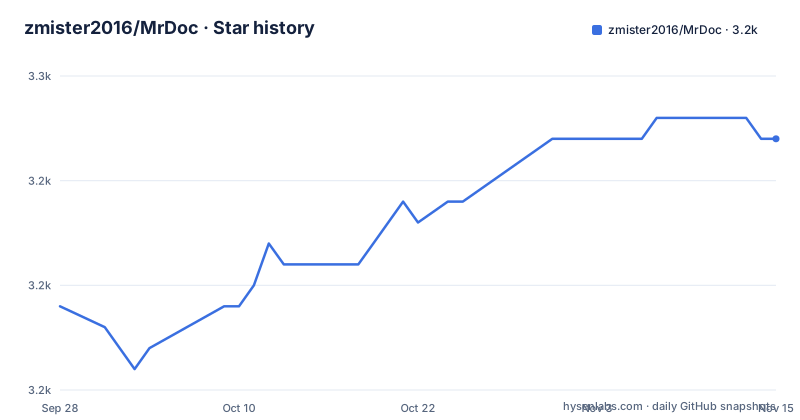
Star history
- zmister2016/MrDoc3,247 ★ · +8
| Repository | 2026-09-28 | 2026-11-15 |
|---|---|---|
| zmister2016/MrDoc | 3.2k | 3.2k |
8 Stars in the last 48 days, measured from the daily GitHub snapshot. Compare with other projects
Editorial analysis
The one command install clones a repository that is not this one
The whole deployment path fits on one line, and the line points somewhere else:
git clone https://gitee.com/zmister/mrdoc-install.git && cd mrdoc-install && chmod +x docker-install.sh && ./docker-install.shThe repository being read here is the application source. The script that fetches and starts it lives in `mrdoc-install` on Gitee, and nothing in this tree contains `docker-install.sh`. The top level does carry `docker-update.sh` and `docker_mrdoc.sh`, so later upgrades are meant to run from the MrDoc project directory by executing `docker-update.sh` whenever a new version is available. First install and every subsequent update therefore arrive through two different files kept in two different repositories, and only the update half is inspectable from here.
There is a naming wrinkle as well. The clone URL is lowercase `mrdoc-install`, while the source mirrors are linked as `zmister/MrDoc` on Gitee, GitHub and AtomGit, so three forges are advertised and the install path names only the first.
The Compose image tag and the git tags are two different lines
The Compose file in this repository pins `image: zmister/mrdoc:v9.7`, with the tag labelled in the file as the image name and version. The release tags recorded for the project are `v1.1.1` on 2026-09-28, `v0.9.9` on 2026-01-04 and `v0.9.8` on 2025-12-01.
The two schemes never meet, and no line in the file reconciles them, so a version quoted from a git tag will not match the tag in the Compose file, and the magnitudes themselves hint at nothing about which is newer. The tag list also steps from 0.9.9 straight to 1.1.1, with no 1.0.x and no 1.1.0 among the three most recent, so the numbering was reorganised somewhere between January and September 2026. The last push on 2026-09-29 lands one day after `v1.1.1`, which puts the newest tag and the newest commit at effectively the same moment.
One service, no database, and your working directory as the volume
`docker-compose.yml` is short enough to read end to end. It declares `version: '3'`, a single service named `mrdoc` with `container_name: mrdoc`, one port mapping `"10086:10086"`, `restart: always`, and a volume that mounts the host's current directory over the application path: `${PWD}:/app/MrDoc`.
Three consequences follow from that line. There is no named volume, so whatever the application writes, and this tree does carry `media/` and `log/` at the top level, lands in whatever directory you happened to be standing in and stays there across restarts. No database service is declared either, so the one container is the whole deployment; the build stage does install `mariadb-dev` and `postgresql-dev`, and `requirements.txt` includes `mysqlclient`, so other backends can be compiled, but none is wired up for you. And the resolver list is pinned to `8.8.8.8` and `114.114.114.114`, overriding whatever the host would otherwise use, so a machine on a corporate or isolated network inherits two public resolvers from this file.
The official image builds against two hardcoded third-party mirrors
The Dockerfile does not install from Alpine and PyPI directly. In both the build stage and the final stage it rewrites the package sources first, with `sed -i 's/dl-cdn.alpinelinux.org/mirrors.ustc.edu.cn/g' /etc/apk/repositories`, and every pip invocation carries `-i https://pypi.tuna.tsinghua.edu.cn/simple/ --trusted-host pypi.tuna.tsinghua.edu.cn`. That `--trusted-host` flag tells pip to accept the host without verifying its certificate, and both mirror choices are baked into the image definition rather than left to whoever builds it, so a rebuild on another continent still fetches from those two mirrors.
Both stages are `python:3.11-alpine3.19`. The final stage adds `libreoffice` with its base and Chinese language packs, `chromium` and `chromium-chromedriver`, plus `ttf-dejavu`, `fontconfig` and `libmagic`, and copies a single font file to `/usr/share/fonts/sourcehan/SourceHanSerifCN-Medium.otf`. A second build definition sits at the top level as `Dockerfile-loongarch64`, covering a CPU architecture no line of this file mentions. The image is labelled `maintainer="mrdoc.pro"`, a domain rather than a person or an account.
USER=admin is set as a variable, not as a run-as user
The final stage sets `USER=admin` inside an `ENV` block, alongside `PYTHONUNBUFFERED=0`, `TZ=Asia/Shanghai` and `LISTEN_PORT=10086`. An environment variable named `USER` is only a string in the container's environment; it does not tell the runtime which account to execute as. That is a separate mechanism from a `USER` instruction, and the build reaches no such instruction, and the portion shown creates no account called admin either. A container started from this image therefore runs as whatever the base image runs as, and the variable is merely available to the application if it reads one.
The neighbouring settings point the same way. `PYTHONUNBUFFERED=0` keeps standard output block buffered, which is the opposite of what a log collector reading container stdout expects. The timezone is pinned twice over, by `TZ=Asia/Shanghai` and again by a symlink written to `/etc/localtime` alongside a `/etc/timezone` file, so the container reports Shanghai time regardless of how the host is configured.
Search is pinned to Whoosh and the AI side lists no vector store
Search is pinned explicitly: `whoosh==2.7.4` and `django-haystack==3.4.0` in `requirements.txt`, with `jieba==0.42.1` beside them for Chinese word segmentation. So the document full-text search and the tag relationship network promised in the feature tables are served by a pure-Python index rather than an external search service, which fits the single-container Compose file.
The AI rows are thinner in the dependency list than in the feature table. `openai>=1.40` and `numpy` are the only entries tied to AI, and nothing in the file provides a vector store, an embedding model or a retrieval framework, so how the knowledge base Q&A finds relevant passages is not described here. Pinning is inconsistent across the same file in any case: `django==4.2.*`, `beautifulsoup4==4.12.3`, `loguru==0.7.2`, `djangorestframework==3.15.2`, `Markdown==3.7` and `markdownify==0.13.1` all carry bounded versions, while `lxml`, `bleach`, `mysqlclient` and `numpy` float with no constraint at all. `selenium==4.25.0` and `webdriver_manager==4.0.2` are pinned exactly, which pairs with the headless Chromium in the runtime image.
Token API, four permission modes, and a demo password in the text
The API row promises a Token API for editing, retrieving and searching documents, and the AI knowledge base row says Q&A is based on document content and permissions. The permission row names four modes: public, private, specified users and access codes. The access control row adds registration invitation codes, login captcha, disabling registration and forced login. None of those rows says how a token is scoped, how long one lives, or whether a token can reach a document its owner cannot open, so the link between the token and the four permission modes is left for the reader to work out.
One credential is published in the file itself. Under the example site section the demo accounts appear as `username: test1` and `password: 123456`, covering both the open source demo and the professional demo. That is a public demo login rather than a leaked secret, and it saves time when you want to try the editor before deploying anything, but it is worth knowing that the same text also carries the deployment link, the three mirror addresses and the name of the upgrade script.
One name, two editions, and clients served from a different domain
The client list is where the shape of the product shows. The web entry is offered as an Open Source Edition and a Professional Edition with a version comparison page between them, and the license recorded for this repository is GPL-3.0, which is the open source side. Everything else is fetched from `mrdoc.pro`: the desktop client for Windows, macOS and Linux from one releases directory, the Android mobile client from another, and the tutorial for the Obsidian two-way sync plugin from a documentation page. Only the browser extension is also offered from an independent host, with a Gitee download alongside its Chrome Web Store, Edge Add-ons and Firefox Add-ons entries.
So a self-hosted GPL-3.0 server is one component of a product that also ships a separate Professional Edition and hands out its own clients from a separate domain. The extension is described as handling web clipping, quick notes and AI knowledge base Q&A, which means it talks to a server with the permissions of whoever installed it, and the file does not say which edition those extensions authenticate against.
Editorial conclusion
MrDoc suits an individual or a small team that wants documents, projects and a knowledge base on its own hardware, and the single container Compose file plus a GPL-3.0 grant make it easy to try against the published demo credentials first. Before you commit, resolve the version ambiguity yourself: the Compose file asks for zmister/mrdoc:v9.7 while the git tags read v1.1.1 and older, and nothing maps one to the other. Then read the installer before running it, because docker-install.sh lives in a second repository and this tree does not contain it. If you rebuild the image, remember the two hardcoded mirrors and the unverified pip host are in the Dockerfile, not under your network's control.
Frequently asked questions
How do I deploy MrDoc with a single command?
Clone `https://gitee.com/zmister/mrdoc-install.git`, make `docker-install.sh` executable and run it. That script lives in a separate repository rather than in the MrDoc source tree, and later upgrades run `docker-update.sh` from the MrDoc project directory instead.
Which MrDoc version should I pin?
Two schemes are in play. `docker-compose.yml` pins `zmister/mrdoc:v9.7`, while the recent git tags are `v1.1.1` from 2026-09-28, `v0.9.9` from 2026-01-04 and `v0.9.8` from 2025-12-01, and nothing in the repository maps one scheme onto the other.
Does MrDoc need its own database server?
The shipped `docker-compose.yml` declares one service, `mrdoc`, and no database, and it bind-mounts `${PWD}` over `/app/MrDoc`. The image build does install `mariadb-dev` and `postgresql-dev` and `requirements.txt` lists `mysqlclient`, but no second service is configured.
What backs MrDoc's document search and AI features?
Full-text search is pinned to `whoosh==2.7.4` with `django-haystack==3.4.0` and `jieba==0.42.1` for Chinese segmentation. On the AI side `requirements.txt` carries only `openai>=1.40` and `numpy`, with no vector store or embedding package listed, so the retrieval mechanism behind the AI knowledge base is not described in this repository.
How are MrDoc's API tokens scoped?
The feature list names a Token API for editing, retrieving and searching documents, and says AI Q&A is based on document content and permissions, with four modes offered: public, private, specified users and access codes. Token scopes and lifetimes are not documented in the repository.
What does the MrDoc demo account let me try?
The example site section publishes `username: test1` with `password: 123456` for both the open source demo at demo.mrdoc.io and the professional demo at pro.mrdoc.io, and links a page comparing the two editions.
Official sources
Add this badge to your README
If you maintain this project, the badge below links readers to this analysis and shows its maintenance status from the daily GitHub snapshot. Paste the markdown into your README; add ?metric=license or ?metric=stars to the image URL for a different field.

[](https://hysenlabs.com/projects/zmister2016-mrdoc)Star history chart for your README
[](https://hysenlabs.com/projects/zmister2016-mrdoc)Was this useful?