Zulip: topic-based threading, a dependency manifest that reads as a feature list
Zulip server and web application. Open-source team chat that helps teams stay productive and focused.
At a glance
- What is it?
- Zulip organises every conversation into a topic inside a stream, which is why it claims to serve both live chat and asynchronous work. The repository is also unusually legible as a document: the Python dependency groups are annotated with comments explaining what each library is for, so the manifest doubles as an inventory of the server's features.
- Who is it for?
- Zulip suits an organisation whose work is a large volume of long-running discussion that people need to catch up on rather than watch, particularly research-heavy or engineering teams where a topic per question keeps a thread legible months later. It is a poor fit if you want a lightweight chat client or if you have no capacity to run a server, since the self-hosted path needs PostgreSQL, Redis, memcached and RabbitMQ rather than a single container.
- Can I use it commercially?
- Yes. Apache-2.0 is a permissive licence: you can use, modify and sell software built on it, as long as you keep its copyright and licence notices.
- Is it still maintained?
- Yes. The repository received new commits within the last day.
- What is it written in?
- Mainly Python, according to GitHub's language statistics.
Answers come from the project's GitHub data, last synced on November 14, 2026, and from our analysis. They are not legal advice.
Star history
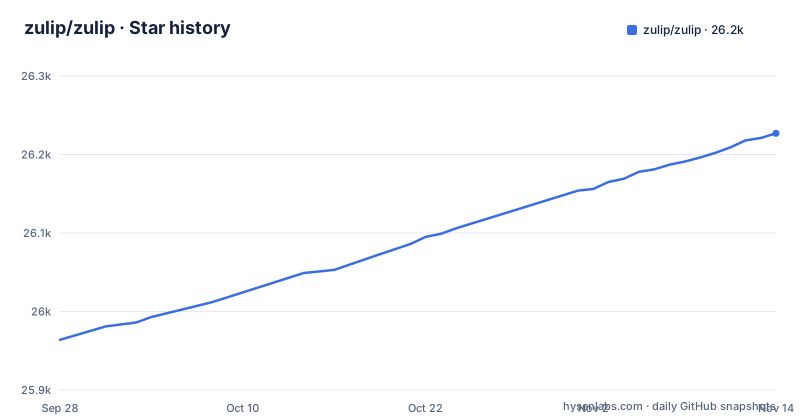
- zulip/zulip26,227 ★ · +263
| Repository | 2026-09-28 | 2026-11-14 |
|---|---|---|
| zulip/zulip | 26k | 26.2k |
263 Stars in the last 47 days, measured from the daily GitHub snapshot. Compare with other projects
Editorial analysis
Every message lives in a topic, which is the whole design
Zulip's organising idea is that a conversation is a stream containing topics, and a message belongs to a specific topic inside it. The project describes this as topic-based threading and says it combines the best of email and chat, and its central claim is that it is the only modern team chat designed for both live and asynchronous conversations.
That claim follows from the data model rather than from a feature. In a stream-per-chatroom model, a busy conversation buries itself and a returning reader has to scroll. With a topic per line of discussion, a thread that stalled in March is still a discrete object you can open, and a new person can read the backlog by topic rather than by scrolling a wall.
The asynchronous part is the real differentiator, and it is aimed at remote and distributed teams rather than at chat as such. The README positions the product for making remote work productive, and the intended reader is a team that lives in email and chat together, which is why the comparison it draws is to email rather than to other chat clients.
If your team does not have topic-shaped discussions, this model costs you discipline to maintain, since a conversation that sprawls across topics is harder to follow than one that would have been fine in a single channel.
The dependency manifest is annotated, so it reads as a feature inventory
The Python project file is the most useful document in this repository, and it is useful because every dependency carries a comment saying what it is for. Rather than a flat list, dependencies are grouped, and the comments read as a feature list.
The core is Django, pinned to a 5.2 series, with asgiref alongside it. The comment on the IPython dependency explains that version 9 requires Python 3.11 and the project supports 3.10, so it is held below that. That single line tells you the interpreter floor and the reasoning behind a pin.
Then the comments start naming capabilities. Jinja2 is there for rendering backend templates, markdown and pygments for Markdown processing, pyvips for image processing and thumbnailing, boto3 for S3 file uploads. LDAP support has python-ldap and django-auth-ldap. There is a Django extension for bitfield support. Android push notifications come from firebase-admin, and iOS push from aioapns. The email mirror needs markdownify and talon, with css-inline for inlining CSS in emails, and JWT-based auth uses pyjwt.
So the feature set is legible without reading the code: mobile push for both platforms, an email mirror, image thumbnailing, object storage, LDAP. If you are evaluating whether a chat server does something, this file answers it faster than the documentation would.
Self-hosting needs four backing services, not one container
The README lists several self-hosting routes, and the differences between them are the operational differences. You can self-host directly on Ubuntu or Debian Linux, in Docker, or with prebuilt images for Digital Ocean and Render.
What the dependency list makes clear is what a running server actually requires behind the application. There is psycopg2 for the database, which means PostgreSQL. There is redis for Redis, tornado for the server-to-client push system, and pika for RabbitMQ access. There is also python-binary-memcached for memcached usage, with a Django backend for it, and a separate comment noting the same library is used for compression support in memcached.
That is four stateful services before the web application itself, and each one needs to be running, configured and monitored. The Docker route exists precisely because this is the hard part, and it does not remove the services, it packages the assembly.
The push system deserves a specific note because it is not optional for a chat product. tornado is there for server-to-client push, which is what makes a message appear without you refreshing, and orjson is listed as a fast JSON parser. A deployment that drops the push layer has not saved much, because the feature that distinguishes chat from a mailbox is the part you removed.
Budget for the operational surface, not just the application.
The JavaScript side carries the web app's real dependencies
The front end is a substantial part of this project, and its manifest is larger in some dimensions than the server's. The package is private, uses pnpm with a pinned package manager version, and is configured as an ES module project.
The dependency list describes the application. Uppy is present in several forms, the core library plus a dashboard, an image editor and tus, which together are a file upload system with resumable uploads and client-side image editing. Handlebars is the templating layer, and there is a formatjs babel plugin alongside an intl package, which is the internationalisation pipeline. flatpickr is a date picker, autosize handles expanding textareas, and a clipboard library covers copy behaviour.
Two entries are worth singling out because they explain product decisions. There is a zxcvbn package in three parts, the core plus language data for common and English, which is a password strength estimator, so Zulip is checking password strength on the client. And there is altcha, a proof-of-work based alternative to captcha, which suggests the project has chosen a non-visual anti-bot mechanism.
There is also a font subsetting loader and a zopfli compression package, so the build pipeline optimises what it ships, and Prometheus and Sentry client packages for metrics and error reporting from the browser.
Zulip sponsors free hosting for open-source projects, which shapes adoption
There is a hosted option, Zulip Cloud, and it comes with a notable policy attached. The README states that Zulip sponsors free Zulip Cloud Standard hosting for hundreds of worthy organizations, including fellow open-source projects.
So the adoption story has a third path beyond self-hosting and paying. If your project qualifies, you can run Zulip without either running a server or opening a purchase order, which removes the four-backing-services problem entirely.
The framing in the README also leans on adoption as a credential. It names Fortune 500 companies, leading open source projects, and thousands of other organizations, and says Zulip is the largest and fastest growing open source team chat project, attributing that to a distributed community where over 1,500 contributors merge over 500 commits a month.
Those are the project's own claims rather than measurements, so treat them as positioning. What is concrete and checkable is the contributor structure and the version cadence: recent releases include Zulip Server 13.0-rc1, 12.3 and 12.2, and the last push to the main branch was on 2026-11-02.
For an evaluator, the useful question is whether your organization qualifies for sponsorship before you price the paid tier.
Contributing is gated behind 185,000 words of documentation
The project makes a point of its own onboarding material. The README says it has invested in making the code highly readable, thoughtfully tested and easy to modify, and that it has written an extraordinary 185K words of documentation for contributors.
That is a real signal about the project's priorities and a real cost to a newcomer. There is a guide for new contributors, and separate documentation for reporting bugs, translating, and suggesting features, which is a clear sign that translation is treated as a first-class contribution path rather than an afterthought.
The tooling in the repository backs up the readability claim. There is a mypy coverage badge, meaning static type coverage is tracked, alongside a codecov badge for test coverage and a SonarCloud configuration file. Linting and formatting are configured for several languages at once, with ruff and prettier referenced as tools, plus a codespell ignore list, a gitlint configuration for commit messages, an editorconfig file, and separate stylelint and eslint configurations.
That combination is what a large Python and JavaScript codebase needs to stay consistent, and it also means a contributor has to satisfy the same checks CI does. The upside is that a small change is easy to review.
The Apache 2.0 licence covers both the server and the client code.
Deployment tooling is old-school, and that is a deliberate signal
The top-level layout shows how this project is actually built and shipped, and some of it is noticeably not current tooling.
There is a Vagrantfile, which is the older approach to reproducible development environments, alongside a devcontainer configuration that is the newer equivalent. Both are present. There is a puppet directory, so configuration management is handled with Puppet, and a zproject directory. A manage.py at the root is the Django management entry point, and version.py holds the version.
The database side has its own story. There is a directory named pgroonga (PGroonga is a PostgreSQL full-text search extension), a Dockerfile-postgresql, and a patches directory at the top level.
Locales live in a locale directory with polib in the dependencies to parse the po files, and a starlight_help directory for the documentation site. There is an analytics directory, and separate corporate and confirmation directories that appear to be separate deployments or configurations.
None of this is a criticism, but it does mean the build is not a single modern toolchain, and anyone contributing needs to expect to follow the project's own build system rather than imposing a conventional one.
Editorial conclusion
Zulip suits an organisation whose work is a large volume of long-running discussion that people need to catch up on rather than watch, particularly research-heavy or engineering teams where a topic per question keeps a thread legible months later. It is a poor fit if you want a lightweight chat client or if you have no capacity to run a server, since the self-hosted path needs PostgreSQL, Redis, memcached and RabbitMQ rather than a single container. Before committing, check three things: whether your discussion actually has topic structure to exploit, what your total infrastructure cost becomes once those four backing services are counted, and how the Apache 2.0 licensing sits with your own modifications.
Frequently asked questions
What is Zulip used for?
Zulip is used for team chat organised around topics rather than flat channels. The project describes it as an open-source organized team chat app with topic-based threading that combines the best of email and chat, and claims it is the only modern team chat app designed for both live and asynchronous conversations. It says the aim is to make remote work productive and delightful.
How much does Zulip cost?
Zulip is distributed under the Apache 2.0 licence, so self-hosting carries no licence fee. The README states that Zulip sponsors free Zulip Cloud Standard hosting for hundreds of worthy organizations, including fellow open-source projects, and paid hosting is available through Zulip Cloud. Self-hosting is supported directly on Ubuntu and Debian, in Docker, and with prebuilt images for Digital Ocean and Render.
how to install zulip server on ubuntu
The README lists self-hosting directly on Ubuntu or Debian Linux as one of the supported routes, alongside Docker and prebuilt images for Digital Ocean and Render, and points to a self-hosting page for the details. The server is a Django application requiring Python 3.10 or later, and its dependencies show it needs PostgreSQL, Redis, memcached and RabbitMQ alongside the web application.
what is zulip written in
The server is Python, with the package named zulip-server and a Python floor of 3.10 or later, built on Django 5.2. The web application is JavaScript and TypeScript, using pnpm as its package manager with a webpack and babel-based build. The repository also contains HTML templates, and a Vagrantfile and puppet directory for environment and configuration management.
Is Zulip like Discord?
The README does not compare Zulip to Discord. What it says about itself is that it is organised around topic-based threading and designed for both live and asynchronous conversations, and its own comparison is to email rather than to other chat clients. The dependency list does show features associated with community chat platforms, including a captcha alternative and file uploads with client-side image editing.
Is Zulip better than Slack?
The README makes no comparison to Slack, so there is no supported answer. What it does state is that Zulip is the only modern team chat app designed for both live and asynchronous conversations, and that it combines the best of email and chat through topic-based threading. Whether that is better than Slack depends on whether your team's discussion has topic structure worth keeping.
Official sources
Where this project is recommended
Add this badge to your README
If you maintain this project, the badge below links readers to this analysis and shows its maintenance status from the daily GitHub snapshot. Paste the markdown into your README; add ?metric=license or ?metric=stars to the image URL for a different field.

[](https://hysenlabs.com/projects/zulip-zulip)Star history chart for your README
[](https://hysenlabs.com/projects/zulip-zulip)Was this useful?