Procedural Terrains: GPU-evaluated height, a Windows-only desktop build, and an API host chosen for you
Three.js procedural terrain generator with tile, infinite world, planet mode, volumetric clouds, realistic water and GLB export.
At a glance
- What is it?
- Procedural Terrains is a browser terrain studio built on React, Vite and Three.js, where height, normals and biome colours are computed on the GPU so the view stays editable without a baked heightmap. It ships export presets for five engines plus Unity and Blender plugins, and its packaged desktop build targets one platform and one remote service.
- Who is it for?
- Procedural Terrains suits someone who wants to author terrain in the browser, iterate on it live, and hand the result to Unity or Blender without a baked CPU heightmap in between.
- Can I use it commercially?
- Yes. MIT is a permissive licence: you can use, modify and sell software built on it, as long as you keep its copyright and licence notices.
- Is it still maintained?
- Yes. The repository last received commits 17 days ago.
- What is it written in?
- Mainly JavaScript, according to GitHub's language statistics.
Answers come from the project's GitHub data, last synced on November 21, 2026, and from our analysis. They are not legal advice.
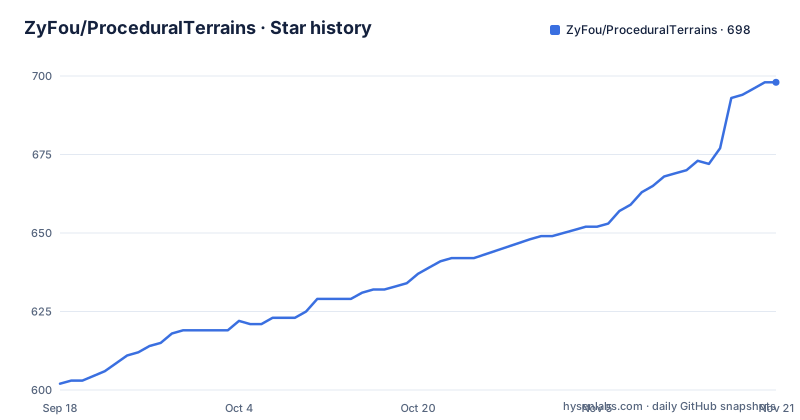
Star history
- ZyFou/ProceduralTerrains698 ★ · +96
| Repository | 2026-09-18 | 2026-11-21 |
|---|---|---|
| ZyFou/ProceduralTerrains | 602 | 698 |
96 Stars in the last 64 days, measured from the daily GitHub snapshot. Compare with other projects
Editorial analysis
The packaged desktop app preselects a remote API host
The example environment file contains three URLs, and the second one undercuts the local-first framing. `VITE_API_URL` defaults to a loopback address on port 6062 for local development, which is sensible given the editor itself runs on 6061. `VITE_DISTANT_URL` is a different thing: it is described as the remote API preselected by the packaged Windows application on its first launch, and it points at a hostname under the project's own domain. The comment says the variable is required by the packaging commands, so it is not optional plumbing. In other words, installing the desktop build ships a default that sends the app somewhere other than your machine, and the only way to change it is to set the variable before packaging. The third variable is the geocoder used by the real-world terrain search, which has to speak a compatible search interface, and it defaults to a public endpoint. Turning accounts on is a separate, opt-in piece of work: copy the editor environment file and the service's own, install the service's dependencies with a prefix flag, start it with its own dev task, and run a migration once the database is configured. Deployment notes for a Linux host under a process manager and a reverse proxy live with that service, not in the main documentation.
The browser dev server listens everywhere, the desktop one does not
The two development paths bind differently, and the difference is deliberate in one case and incidental in the other. The quick-start command is a plain Vite invocation, which means the dev server listens on all interfaces and prints a LAN URL for other devices on the network. The quick-start path is the plain one:
npm install
npm run dev
The desktop development script is different: it starts Vite with an explicit loopback host flag, waits on that loopback port, and only then launches Electron with an environment variable pointing it at the renderer URL. So the desktop path cannot be reached from your phone, which is what you want while an Electron window is loading it, while the browser path can be. Port handling is forgiving in one case and fixed in the other. The browser server takes the next free port if 6061 is busy, which means the URL in the documentation can move; the desktop script waits on 6061 specifically, so that fallback does not help it.
Three names, one Windows target, one version ahead
The project has three names in play. The repository is a single word, the product name carries a space, and the package manifest is called `terrain-studio`. None of them match, which matters when you are reading a build log or an issue. The desktop shell is Electron with a CommonJS main entry and its own packaging configuration, and the packaging script is explicit about scope: it verifies the release first, builds the site, and then packages for Windows on x64 only. The release history agrees, with one tag named as a Windows build and no other platform named. Versioning is the fourth loose end. The newest tag is a patch release, and the manifest sits a full minor above it, so the source tree describes a version that has never been tagged. There is also a separate task that generates the application icon from a source image, which is the one part of the desktop pipeline that is not a straightforward build step, and the desktop development command runs Vite and Electron together under a process supervisor that kills both when either exits.
Texture materials are verified before and after the bundle
The build command is three steps rather than one. It runs a materials verification tool, then the Vite build, then the same verification tool again against a specific directory inside the output, a textures path for physically based terrain materials. That ordering means a missing or mismatched material fails the build rather than producing a bundle that renders flat surfaces at runtime. The tool has its own fetch and build commands alongside verification, so materials are a managed artefact with a lifecycle rather than files dropped into a folder. Two dependencies explain the rest of the asset pipeline: a native image library for processing textures, and an icon converter used by the desktop icon task. The packaging path adds a fourth guard, a script that verifies the desktop release before the packager runs at all.
Height is evaluated on the GPU, so nothing is baked on the CPU
The architectural claim is specific. Height, normals and biome colours are evaluated on the graphics processor, which means the live view stays editable without a baked CPU heightmap sitting behind it. The noise system is what makes that possible: layers are typed, serialisable, and compile to shader source, so a stack you build in the interface becomes GPU code rather than a sampled texture. That has a direct consequence for exports, and the project guards it. A production check validates your selections before the bake happens and flags maps that would be large in memory as well as missing water masks, so the failure arrives as a warning in the panel rather than as a browser tab that dies during export. The engine itself is kept framework-agnostic in its own source directory, with the React layer confined to components.
One document format crosses both plugin boundaries
The two host integrations meet in the middle through a renderer-neutral document. Both the Unity package and the Blender extension can read the same runtime document and the same production ZIP exports, and both add native generation on top. What differs is maturity and what they create. The Unity integration is an alpha, requires a recent editor version, and builds native terrain data, colliders, connected tile neighbours, terrain layers and persistent recipe assets that can be regenerated later. The Blender extension is further along at version 0.3.3, and produces ordinary editable mesh objects with UVs, source metadata, shared tile borders and working undo. The workflow in each host is four steps from archive to mesh, and both archives are served from the app's own downloads directory as well as being checked into the repository. In Unity the archive is either added as a local package through the package manager or imported from the editor window, and the generator can run natively instead of importing anything. In Blender the extension is installed from disk through the preferences dialog, enabled, and then reached from a sidebar panel in the 3D view. The screenshots in the readme are not mockups: they are captured from the local app with a browser automation library at a fixed viewport size.
Five export presets and a fixed archive layout
Export is a menu of five targets rather than one. The presets cover Unity terrain, an Unreal landscape, Godot's terrain system, a Blender scene, and assets for a Three.js viewer. Whatever the target, the ZIP layout is fixed: terrain meshes in one of two interchange formats with configurable resolution, skirts and base slabs; baked colour, normal, height, biome splat and collision maps; water surface meshes with depth, shoreline and foam masks; and three metadata files, including the runtime document and a preset manifest. The same ZIP is what both plugins consume, which is why the layout is worth reading before you write your own importer. Tile mode carries the authoring extras: square or circular layouts, radial walls, heightmap import, biome painting, river tools and prop painting, on top of the fixed board with per-chunk detail levels. The editor around all of this is keyboard-driven where it matters, with a shortcut for searching settings, a pair for undo and redo, and one that opens a performance overlay, plus camera presets in a bottom toolbar and touch controls while exploring. Projects save locally with versioned files, thumbnails, templates and a recent-project list, which is what makes the browser route a genuinely local workflow rather than a demo.
Editorial conclusion
Procedural Terrains suits someone who wants to author terrain in the browser, iterate on it live, and hand the result to Unity or Blender without a baked CPU heightmap in between. Before you install the desktop build, know three things: it packages for one operating system and one architecture only, its first launch is pointed at a remote API endpoint rather than your own machine, and its example files for the account service add a database to a project that otherwise needs none. In the browser the app is local-first and account-free, so if you only need the editor, that is the cheaper path.
Frequently asked questions
Does Procedural Terrains need a heightmap baked on the CPU?
No. Height, normals and biome colours are evaluated on the GPU, and the noise layers are typed and serialisable so they compile to shader source instead of a sampled texture.
Which platforms does the Procedural Terrains desktop build target?
Windows on x64 only. The packaging script passes --platform=win32 --arch=x64 to the packager, and the release history contains a single Windows build tag.
Does Procedural Terrains require an account?
No. The editor is local-first and fully usable without one. Login and registration come from a separate self-hostable service backed by MySQL, which needs its own environment file and a migration step.
What can the Unity and Blender plugins import?
Both read the same renderer-neutral runtime document and the same production ZIP exports, and both add native generation. The Unity package requires a recent editor version and is still alpha; the Blender extension is at version 0.3.3 and requires Blender 5.2 or newer.
Official sources
Add this badge to your README
If you maintain this project, the badge below links readers to this analysis and shows its maintenance status from the daily GitHub snapshot. Paste the markdown into your README; add ?metric=license or ?metric=stars to the image URL for a different field.

[](https://hysenlabs.com/projects/zyfou-proceduralterrains)Star history chart for your README
[](https://hysenlabs.com/projects/zyfou-proceduralterrains)Was this useful?