Godot heightmap terrain in GDScript: what the addon does and where it stopped
HeightMap terrain for Godot implemented in GDScript
At a glance
- What is it?
- Godot had no terrain system for 3D, so this plugin supplies one in GDScript, with texture painting, colouring, holes, level of detail and grass. Its author states he no longer works on features, which makes it a reference implementation as much as a finished tool.
- Who is it for?
- For a Godot 4.6 project that needs heightmap terrain and nothing more, this addon is the shortest route that exists in pure GDScript, and texture painting, colouring, holes and level of detail cover what a small game actually asks for. It is the wrong dependency for a studio pipeline, for a project that needs terrain to scale without source edits, or for any engine older than 4.6.
- Can I use it commercially?
- Check first. The repository uses a licence we do not classify automatically, so read its LICENSE file before any commercial use.
- Is it still maintained?
- Yes. The repository last received commits 84 days ago.
- What is it written in?
- Mainly GDScript, according to GitHub's language statistics.
Answers come from the project's GitHub data, last synced on October 23, 2026, and from our analysis. They are not legal advice.
Star history
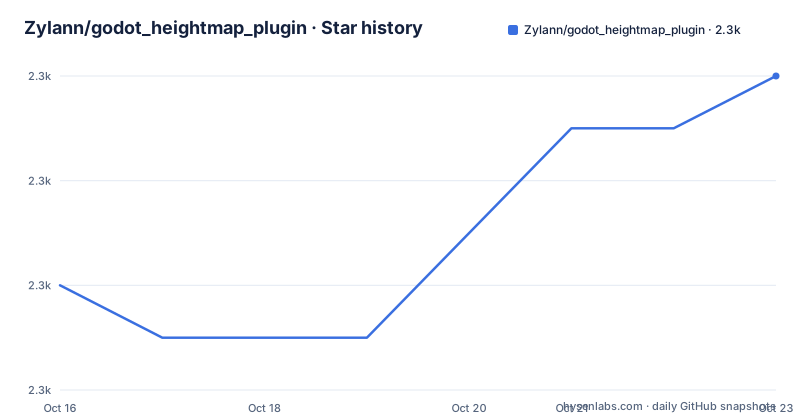
- Zylann/godot_heightmap_plugin2,284 ★ · +4
| Repository | 2026-10-16 | 2026-10-23 |
|---|---|---|
| Zylann/godot_heightmap_plugin | 2.3k | 2.3k |
4 Stars in the last 7 days, measured from the daily GitHub snapshot. Compare with other projects
Editorial analysis
Godot 3D had no terrain system, so this plugin supplies one
The plugin exists because of a gap the author names directly: Godot had no terrain system for 3D, so he made one. That framing matters when you evaluate it. Nobody is choosing between two terrain options built into the engine; the choice is between this GDScript addon and writing your own heightmap tooling inside your project. Whoever adopts it is a Godot developer who already works in the editor, writes GDScript daily, and needs terrain for a prototype or a small shipped game rather than a studio pipeline. The capability list fits that audience: texture painting, colouring, holes, level of detail and grass, for Godot 4.6 and later, while still targeting the Godot API.
The terrain stack is pure GDScript, and a GDExtension part is ruled out
Every part of the implementation is GDScript, and the author states there is no plan to implement a GDExtension part. His stated reasons are ease of change and compatibility. Nothing needs compiling, which is what the compatibility argument rests on: the addon is source you can read in the same language as the rest of your project. That same decision sets a ceiling, because the code that runs each frame stays in GDScript and nothing in the project's plan moves it out. The plugin also started life in Godot 2, and its author credits it with teaching him the editor APIs. Fair warning: you are inheriting the work of someone who was learning an extension API and kept going on it long after moving to other projects.
Texture painting, colouring, holes, LOD and grass in one addon folder
Its capability list is short: texture painting, colouring, holes, level of detail and grass. Each of those is an editor-side operation rather than a rendering feature, and all of it arrives inside one plugin folder, `addons/zylann.hterrain`, so there is no second module to enable and no compiled binary to match your engine build. Colouring and holes together describe a painted surface with cut-outs rather than a bare height channel, yet the README never shows a property panel, a default value or an inspector layout for any of it. A sharper constraint is the 4.6 engine floor. The project's own history holds three separate pointers for older engines, so an engine upgrade can invalidate a working setup with no change on your side.
Manual installation by copying one folder, plus the demo repository
This is a regular editor plugin, and the README gives no package manager line, no version pin and no CLI. Installation is manual: copy the contents of `addons/zylann.hterrain` into the same folder in your project, then activate it in your project settings. Two strings carry the whole procedure, plus the address of a separate demo repository you can install once the plugin is set up and active:
addons/zylann.hterrain
https://github.com/Zylann/godot_hterrain_demo
Both lines are paths rather than commands, which is the honest shape of this project's install story. If you would rather read than copy, the usage section points at a single documentation site and nothing else:
https://hterrain-plugin.readthedocs.io/en/latest/Check your editor against the 4.6 requirement before you copy anything; the README offers no fallback for an older engine beyond those frozen pointers.
Master, the asset library, and three frozen pointers for old engines
Version choice is a real fork here. The `master` branch holds the latest development version, with the latest features and latest fixes and, in the author's words, possible bugs. On the asset library you find the other option, and the README points you back at master whenever a fix you need has not reached that build yet. For older engines the project keeps three frozen pointers, two of them branches you can fetch directly:
https://github.com/Zylann/godot_heightmap_plugin/tree/0.10
https://github.com/Zylann/godot_heightmap_plugin/tree/godot3
One pointer is not a branch at all but a single commit, which the author introduces with a hedge, as the last version that, as he puts it, supported Godot 4.1. All three are marked no longer maintained, so picking one means owning it. Choosing master instead means owning possible bugs, which is a different kind of work: you get the fixes and you keep a source tree you may have to patch yourself.
The same file promises latest features and no feature work
A close reading turns up a contradiction inside the project. One line says the `master` branch holds the latest development version with the latest features and the latest fixes. Further down, the disclaimer says the plugin is not in active development, that the author no longer works on features, and that only bug fixes are done these days. Those two statements pull in opposite directions: if no features are being written, the latest features on master are the last ones written before that change of direction. It adds, in that same paragraph, that the plugin should be stable and may be useful to learn from, which reframes the branch as a reference implementation rather than a moving target. Read that way, the open question is code quality, not API churn.
A .gitmodules file sits beside the promise of no extra assets
One line of the installation section says the plugin now comes with no extra assets to stay lightweight. At the repository root you still find a `.gitmodules` file, so a checkout tracks at least one submodule somewhere. The README does not say which paths those entries point to, or whether they belong to the addon or to the documentation tooling that `.readthedocs.yml` and `.github/` hint at. Until you confirm it, a fresh checkout is not something you can treat as self-contained, which matters for offline builds and for vendoring the addon into a project you ship. What sits at the top level:
ls -a
.gitattributes
.github/
.gitignore
.gitmodules
.readthedocs.yml
CHANGELOG.md
LICENSE.md
README.md
addons/
icon.png
icon.png.import
project.godot
No demo or examples folder appears in that list, which is why the demo lives in its own repository.
Two checks that decide whether this addon fits your project
Two checks decide whether any of this fits your project. The licence is the first: the licence field reads Other, and the root holds a LICENSE.md file rather than one of the names GitHub can classify automatically, so read that file before you copy the addon into work you own. Recency is the second: the last push was on 2026-07-30, inside a six-month window, and the repository has no GitHub releases to pin a build against. Adopt it if you want terrain in a Godot 4.6 project, accept GDScript-only code on the hot path, and are willing to read and patch it. It is the wrong dependency for a pipeline that needs terrain to scale without anyone editing source, or for an engine older than 4.6 that cannot be pinned to one of the frozen branches.
Editorial conclusion
For a Godot 4.6 project that needs heightmap terrain and nothing more, this addon is the shortest route that exists in pure GDScript, and texture painting, colouring, holes and level of detail cover what a small game actually asks for. It is the wrong dependency for a studio pipeline, for a project that needs terrain to scale without source edits, or for any engine older than 4.6. Before you commit, decide between master and the asset library build, confirm what the `.gitmodules` entry pulls in, then copy `addons/zylann.hterrain` by hand.
Frequently asked questions
How do I install godot_heightmap_plugin into a Godot 4 project?
Copy the contents of the `addons/zylann.hterrain` folder into the same folder in your project, then activate the plugin in your project settings. No package manager, CLI flag or version pin is given for that step.
Which Godot versions does godot_heightmap_plugin support?
The `master` branch targets Godot 4.6 and later. Older engines need a frozen pointer: branch `0.10` for Godot 3.0.6, branch `godot3` for Godot 3.x, or commit `3a04f66037a5487990335523c109e064afbc129d` for the last build the author believes supported Godot 4.1.
Is godot_heightmap_plugin still being developed?
The disclaimer in the README states that the plugin is not in active development, that no features are being worked on, and that only bug fixes are done these days. The last push was on 2026-07-30.
Does godot_heightmap_plugin come with a demo scene?
No sample assets ship with the plugin, which is why the README points at a separate demo repository, godot_hterrain_demo, to be installed once the plugin is set up and active.
Can I speed up godot_heightmap_plugin with native code?
The implementation is entirely GDScript, chosen for ease of change and compatibility, and the author states there is no plan to implement a GDExtension part. Performance work therefore stays inside GDScript.
Where can I read the godot_heightmap_plugin settings reference?
No property reference, default value or inspector screenshot appears in the README. Its usage section links one documentation site, hterrain-plugin.readthedocs.io, and stops there.
Official sources
Add this badge to your README
If you maintain this project, the badge below links readers to this analysis and shows its maintenance status from the daily GitHub snapshot. Paste the markdown into your README; add ?metric=license or ?metric=stars to the image URL for a different field.

[](https://hysenlabs.com/projects/zylann-godot-heightmap-plugin)Star history chart for your README
[](https://hysenlabs.com/projects/zylann-godot-heightmap-plugin)Was this useful?