TypeWords keeps your English typing drills and your progress on one machine
Practice English, one strike, one step forward.
At a glance
- What is it?
- A GPL-3.0 Nuxt application for typing English words and articles, with four practice modes, memory curve word selection, and built-in exam vocabulary lists. The design is self contained to the point that progress has to be backed up by hand to follow you to a second device, and the documented download path has one step that quietly breaks.
- Who is it for?
- Take TypeWords if you will run it on a single machine and want the four drill modes, the wrong word book, and, on the official website, the CET and IELTS style lists, all under GPL-3.0 with no subscription attached. Pass on it if your progress has to follow you across devices, if you need a tagged release to pin against, or if you need article import to accept a file format that is written down somewhere.
- Can I use it commercially?
- Yes, with conditions. GPL-3.0 is a copyleft licence: if you distribute software that includes it, you must release that software's source code under the same licence. Running it internally without distributing it does not trigger that obligation.
- Is it still maintained?
- Yes. The repository last received commits 30 days ago.
- What is it written in?
- Mainly Vue, according to GitHub's language statistics.
Answers come from the project's GitHub data, last synced on November 15, 2026, and from our analysis. They are not legal advice.
Star history
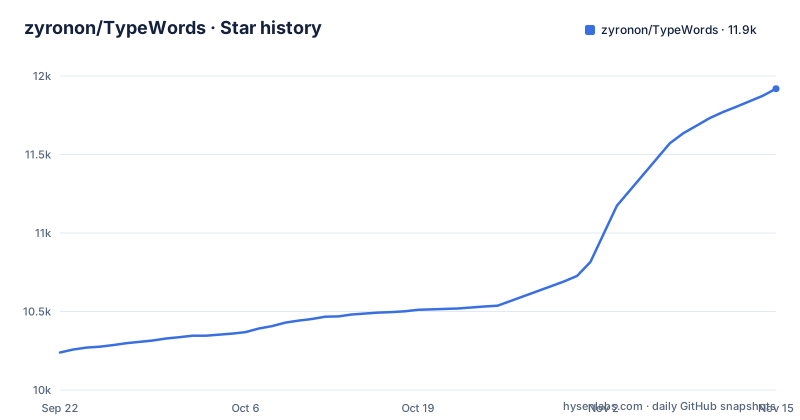
- zyronon/TypeWords11,919 ★ · +1,680
| Repository | 2026-09-22 | 2026-11-15 |
|---|---|---|
| zyronon/TypeWords | 10.2k | 11.9k |
1,680 Stars in the last 54 days, measured from the daily GitHub snapshot. Compare with other projects
Editorial analysis
Four practice modes decide how much of the word you can see
Word practice in TypeWords runs through four named modes: Follow-along, Dictation, Self-test, and Spelling from memory. Smart mode sits on top of that selection. It calculates which words you should be seeing based on memory curves, then pushes those words through dictation to deepen the memory. Free mode removes the calculation and leaves the plan to you. The entry itself is fixed regardless of mode, carrying phonetics, pronunciation in American and British forms, example sentences, phrases, synonyms, root words, etymology, and error statistics. Mistakes feed the loop in two directions. Anything you type incorrectly is added automatically to a wrong word book for later review, and anything you push into mastered is skipped automatically in future sessions. Typing speed ends up a by-product of the drill rather than the thing being measured.
Your progress stops at the edge of the machine that made it
A standalone TypeWords install keeps its data locally, and the running instructions spell out the consequence: manual backup is required when switching devices, and the project does not claim that this affects normal usage. That holds only while you stay on one machine. Move to a new laptop or phone and the wrong word book, the favorites list, and the mastered set all have to be moved by hand, which means copying data whose location and format the instructions never state. The instructions mention no sync command and no export. Those lists are also the state you cannot rebuild by retyping, since each one exists precisely because you got words wrong earlier. package.json does declare @supabase/supabase-js at ^2.98.0, but the instructions do not say what it is used for. The hosted site at typewords.cc is a separate route from a clone, and sponsorship is framed as supporting server operation rather than a feature you are buying.
The Download ZIP button produces a copy that will not work properly
The running steps are short, but two of them are load bearing. TypeWords is built with Nuxt and needs a Node.js environment, so Node.js comes first from the official documentation linked in the instructions. The project is large, which is why a depth 1 clone is recommended instead of a full history, and the ZIP archive offered by the Download button will not work properly. The reason is never given, so the clone is a requirement rather than a shortcut. Once dependencies are in place the dev server starts on port 5567, and that address is what you open in the browser. A separate generate step builds the project files, and no companion instruction explains how to serve that output, so anyone aiming a build at a static host is left to arrange it themselves. package.json also maps start, build, and preview onto nuxt dev, nuxt build, and nuxt preview, yet only dev and generate appear in the documented flow and build is never mentioned at all.
git clone --depth 1 https://github.com/zyronon/TypeWords.git
pnpm install
pnpm run dev
pnpm run generate
Smart mode leans on ts-fsrs and gives you no dials to turn
package.json lists ts-fsrs, pinned at ^5.2.3, which is probably what smart mode uses, but the README's description is a single sentence: learning words are calculated from memory curves, and dictation then deepens the memory. The README documents no scheduler settings such as a retention target, a daily word cap or review order. Error statistics are offered per word, but no format, no location, and no definition of what counts as an error is given. The practical effect is that anyone who stalls on smart mode has to fall back to free mode, and free mode drops both the memory curve and the automatic dictation routing that gave the mode its reason to exist.
Article memorization runs the same passage in both directions
Article practice is a separate track built around dual modes. A passage can be followed along or dictated, input happens sentence by sentence, and pronunciation is automatic, so the reading and the typing stay locked to the same unit of text. There is also a listening route where you write from memory while the sentence plays, which removes the text entirely and pushes the load onto the spelling. Text is not limited to what ships: built-in classic textbooks are included, and you can add or import articles with one-click translation and bilingual comparison. The import side is where the documentation runs out. No file format, no accepted URL, no maximum length, and no storage location for imported passages is named anywhere. The dependency list includes compromise, a natural language processing library, but it is not tied to any named feature, so what it does for sentence handling is unspecified. If the built-in textbooks do not match what you are studying, the only way to find the shape of an article file is to read the source.
The test script is an empty string and there are no releases to pin
package.json sets the test script to an empty string, so pnpm test starts nothing and reports no result. There is no unit suite, no integration suite, and no typecheck entry in the scripts block, which covers dev, start, build, generate, preview, and i18n:write. The repository also has no GitHub releases, so nothing carries a version number. The default branch is master, and the last push to it is dated 2026-10-16. Nothing in the project marks which of those commits is a safe point to take, and a change that touches how practice data is stored can land on master without a tag or a note announcing it. The project describes itself as being in early development with new features added continuously, and opening an issue is the stated route for requests. Read that as an accurate warning about upgrade risk rather than a placeholder, especially before you point a term of accumulated wrong word history at a fresh clone.
Fifteen README languages are held in a docs folder beside a gulp script
The project ships thirteen README translations under docs, covering Spanish, German, French, Portuguese, Russian, Ukrainian, Japanese, Korean, Thai, Vietnamese, Indonesian, Traditional Chinese, and Simplified Chinese alongside English. Application strings run through @nuxtjs/i18n at 10.2.1 and vue-i18n at ^11.2.8, with an i18n directory and a gulpfile.js at the repository root, and the i18n:write script is mapped to gulp i18nWrite. The README never says what that script does, when to run it or what to commit afterwards. pnpm-lock.yaml and pnpm-workspace.yaml sit at the root too, which fixes pnpm as the expected package manager rather than npm.
Editorial conclusion
Take TypeWords if you will run it on a single machine and want the four drill modes, the wrong word book, and, on the official website, the CET and IELTS style lists, all under GPL-3.0 with no subscription attached. Pass on it if your progress has to follow you across devices, if you need a tagged release to pin against, or if you need article import to accept a file format that is written down somewhere.
Frequently asked questions
How do I type words in TypeWords?
Word practice offers four modes, Follow-along, Dictation, Self-test, and Spelling from memory, with Smart mode choosing the words from memory curves and Free mode leaving the plan to you. Words you type incorrectly go automatically into a wrong word book, and words you mark mastered are skipped in later sessions.
What are some easy words to type in TypeWords?
The built-in vocabulary library, marked official website only in the README, lists CET-4, CET-6, GMAT, GRE, IELTS, SAT, TOEFL, Graduate English, TEM-4, and TEM-8. Each entry carries phonetics, American and British pronunciation, example sentences, phrases, synonyms, root words, etymology, and error statistics, and community contributions of additional lists are invited.
What are some words that are related to typing in TypeWords?
The typing surface is adjustable through rich keyboard sound effects, customizable shortcuts, and highly configurable settings. Article memorization adds a listening mode where you write from memory while the sentence plays, plus sentence-by-sentence input with automatic pronunciation.
How can I practice typing spelling words in TypeWords?
Article memorization runs follow-along and dictation as dual modes over built-in classic textbooks, with one-click translation and bilingual comparison for text you add or import yourself. Word drills cover the same ground in the four practice modes, and the project runs locally with data saved on the machine where you installed it.
Official sources
Add this badge to your README
If you maintain this project, the badge below links readers to this analysis and shows its maintenance status from the daily GitHub snapshot. Paste the markdown into your README; add ?metric=license or ?metric=stars to the image URL for a different field.

[](https://hysenlabs.com/projects/zyronon-typewords)Star history chart for your README
[](https://hysenlabs.com/projects/zyronon-typewords)Was this useful?