sqz: compress tool output before the model ever sees it
Compress LLM context to save tokens and reduce costs
At a glance
- What is it?
- sqz is a Rust tool that intercepts what a coding agent's shell commands return and squeezes it before it enters the context window. Per-command formatters keep the failing test, the assertion and the line reference, repeated output collapses to a short reference, and source code, stack traces and secrets pass through untouched. No LLM calls, and everything is recoverable with one command.
- Who is it for?
- Use sqz if your agent's input tokens are dominated by command output rather than by conversation, because that is the case the tool is built for and the README is candid about the other case. Do not expect much from prose or from diffs, where its own measurements show single-digit savings.
- Can I use it commercially?
- Yes. Apache-2.0 is a permissive licence: you can use, modify and sell software built on it, as long as you keep its copyright and licence notices.
- Is it still maintained?
- Yes. The repository last received commits 13 days ago.
- What is it written in?
- Mainly Rust, according to GitHub's language statistics.
Answers come from the project's GitHub data, last synced on November 2, 2026, and from our analysis. They are not legal advice.
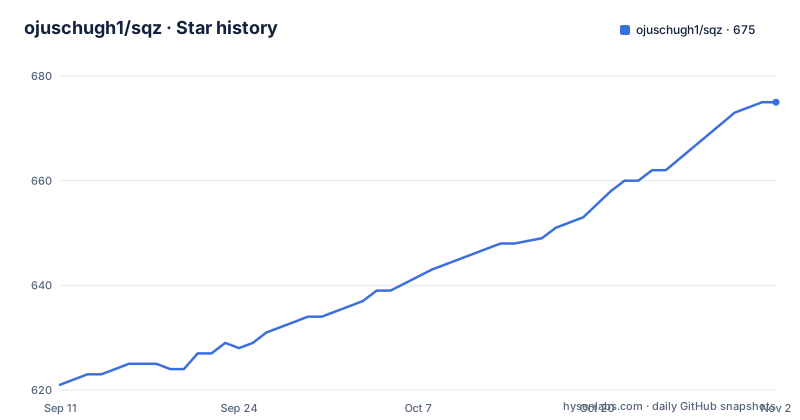
Star history
- ojuschugh1/sqz675 ★ · +54
| Repository | 2026-09-11 | 2026-11-02 |
|---|---|---|
| ojuschugh1/sqz | 621 | 675 |
54 Stars in the last 52 days, measured from the daily GitHub snapshot. Compare with other projects
Editorial analysis
The target is tool output, not the conversation
The problem statement is specific about where the tokens go.
AI coding agents spend most of their input tokens on tool output: build logs, test runs, the status output from version control, and the same file read again after every edit. All of it enters the context window raw, and once it is in there it is re-sent on every subsequent turn.
That second clause is what makes it expensive. A large log is not a one-time cost, it is a per-turn cost, so the compression that matters is the compression that happens before the first injection rather than afterwards.
The tool's approach is a set of per-command formatters. A formatter knows what an agent acts on and keeps that: the failing test, the assertion, the line and file reference. Everything else in the output is dropped. Output the model already has in its context comes back as a short reference instead of the content.
The demo table shows the shape of the win. Reading a five hundred line file costs the same either way because source is served in full. A failing test run drops from twelve hundred tokens to about a hundred and twenty. A line range re-read of a file already read drops from three hundred and thirty to eighteen. An unchanged status command drops from a hundred and sixty to thirteen.
The savings table goes from 58 percent to zero
The per-command measurements are given as a table, and the shape of it is more informative than the average.
Repeated log lines compress best, falling from a hundred and forty-eight units to sixty-two, which is fifty-eight percent. A large JSON array drops forty-five percent. A JSON API response drops seventeen percent. A git diff drops twelve percent.
Then there are the two entries that tell you when not to bother. Prose and documentation compress by two percent, which is noise. And a stack trace in safe mode compresses by zero percent, because it is passed through untouched.
That zero is a feature, not a failure. Stack traces are the one piece of tool output where the failing line and the frames around it are all load-bearing, and a tool that shortened them would be trading a correctness problem for a token saving. Source code is treated the same way, with zero compression by construction, and secrets pass through as well.
The measurements are reproducible rather than anecdotal: they come from running the benchmark target in the engine crate's own test suite.
The 92 percent is the repeat case, and the README explains why
The headline number is up to ninety-two percent, and it comes from session-level deduplication rather than from formatting.
The three measured cases are an unchanged status command run again, a line range of a file read earlier, and the same test output with nothing changed. They fall from a hundred and fifty-five to thirteen, from three hundred and five to sixteen, and from three hundred and three to thirteen. In other words, the savings arrive when the model already has the information and does not need it a second time.
Then the README does something unusual and worth respecting. It cites a separate analysis of ninety-two real sessions with a link to the counting script, and reports the result: identical whole-file re-reads appeared in one of five hundred and forty-two reads, and line-range re-reads in eight point four percent of them.
The conclusion the project draws is that it should not lead with the same file being read five times. What actually repeats is unchanged command output, line ranges of files already read, and files re-read after a small edit, and each of those has its own reference type.
It also names who benefits: sessions with noisy command output and repeated commands. That is a narrower claim than the badge, and a more useful one.
Deterministic, offline, and recoverable byte-exact
Three properties do most of the work in making this safe to use inside an agent loop.
It is a single Rust binary. It is deterministic. And it makes no LLM calls and works offline.
That combination rules out the usual objection to context compression, which is that a model rewriting your output is guessing. Nothing here guesses. A formatter either recognises a structure or passes the text through.
The third property is reversibility: every compressed result can be recovered byte-exact with a single expand command. That matters because an agent can act on a compressed reference, and you need to be able to see what it was actually looking at.
The dependency list backs up the design. A bundled SQLite build is what lets the session store work offline against a throwaway database in a test, and a hashing library is what makes byte-exact recovery possible, since content has to be identified by what it is rather than by when it was seen. Property-based testing appears in the workspace dependencies too, which is the tool you would reach for to test a claim of determinism rather than examples of it.
Install is four channels, and sqz init does the wiring
Distribution is unusually broad for a small Rust tool, and the channels match where coding agents already live.
There is a prebuilt binary for macOS and Linux fetched with a piped shell script, and a PowerShell equivalent on Windows. There is an npm package installed globally, and a Homebrew tap. There are editor extensions for Visual Studio Code, a Firefox add-on, and a JetBrains plugin. There are crates for the command line tool and the MCP server, and a Python package installable with pipx.
From source it is a single cargo install of both binaries.
After installation, one command does the rest:
cargo install sqz-cli sqz-mcp     # or: brew install ojuschugh1/sqz/sqz · npm i -g sqz-cli · pipx install sqz
sqz init                          # hooks + MCP server + agent guidance for every client it finds
That initialisation step is the interesting one. It scans for the coding agents it can find and installs hooks, registers the MCP server and writes agent guidance for each. That is why the repository carries configuration directories for several different tools at once, since the tool has to know where each one reads its instructions.
One release note matters if you have installed something else by a similar name: the repository states it is an independent project and not affiliated with any other tool that shortens the same word, and that anything installed from the package registries under those names came from here.
The Python packaging says ELv2, the metadata says nothing
There is a licensing discrepancy worth flagging, because the two sources do not agree.
The Python packaging metadata declares the Elastic License 2.0, and the classifier alongside it reads as a proprietary or other licence rather than an open source one. The repository's own recorded licence metadata, by contrast, is unasserted.
So the most generous reading of what is on record is the Elastic License 2.0, which is source-available rather than open source: it grants broad rights and adds a restriction against competing with the project as a service. That is a real constraint if you were planning to build something on it commercially, and it is not visible from the repository metadata alone.
Two other things from the packaging are worth noting. The Python package requires only version 3.8 or newer and is classified at beta development status, which is the lowest common floor and a reasonable signal of how settled the Python path is relative to the Rust one. And the package exposes two console entry points, one for the command line tool and one for the MCP server, matching the two binaries in the Rust packaging.
The workspace exists to produce one static binary
The Cargo manifest has four members and a release profile tuned to one requirement, which the comment states as a numbered item.
The members are the engine library, the command line binary, the MCP server and a WebAssembly build. The release profile strips symbols, enables link-time optimisation, sets a single codegen unit and optimises for speed, and the comment above it says the requirement is a single statically-linked binary per platform.
That requirement explains the container build. The Dockerfile has a builder stage on a Rust Alpine image that installs the musl development package for static linking, copies the manifests before the source so the dependency graph compiles in a cached layer, and then fakes stub source files so that first compile does not need the real code. Only after that does it copy the real source and touch one file to force the binary crate to rebuild. The runtime stage is a scratch image containing the binary and nothing else.
The result is an image with no shell, no package manager and no libraries, which is what you want for a tool that is going to sit in the middle of someone else's agent loop.
The WebAssembly member is the one that is not explained in the manifest, and it is the piece that would let the same compression run somewhere without a Rust toolchain.
Six agent directories, one book, and a demos folder
The repository tree is a map of what the tool has to integrate with.
There are configuration directories for several coding agents, one each for Claude, Cline, Gemini and Windsurf, plus a rule file and a large language model text file at the root. Those directories exist because the initialisation command writes guidance into wherever each client expects to find it, and because the compression has to be described to an agent in that agent's own terms.
Then there are the extension directories, one for the editor extensions shipped to the marketplace, one for the browser add-on, and one for the JetBrains plugin. And a presets directory, which suggests the compression profiles are data rather than compiled-in constants.
Documentation has three homes rather than one. A book configuration file implies a rendered manual, a documentation directory holds the long-form notes referenced from the README, and a benchmarks file sits at the root alongside a changelog. The demo directory is separate again and contains a small sample script and a captured test failure, which is what the demo output in the README was generated from.
That last detail is the tidiest signal in the tree: the example is generated from a checked-in fixture, so the numbers in the README can be regenerated rather than trusted.
Editorial conclusion
Use sqz if your agent's input tokens are dominated by command output rather than by conversation, because that is the case the tool is built for and the README is candid about the other case. Do not expect much from prose or from diffs, where its own measurements show single-digit savings. Before you rely on the numbers, read the section on what actually repeats, since the honest finding is that whole-file re-reads are rarer than the marketing implies, and check the licence: the Python packaging declares the Elastic License 2.0 while the repository's own metadata does not report a licence at all.
Frequently asked questions
What is sqz?
A Rust tool for pre-injection context compression and session deduplication in AI coding agents. It squeezes tool output, code, JSON and logs before they reach the model, keeping what an agent acts on and collapsing output the model already has into short references. Source code, stack traces and secrets pass through untouched.
How much does sqz actually save?
The README reports a 24.7 percent average reduction across 3,003 real compressions, up to 92 percent when output is repeated. Per command it ranges from 58 percent on repeated log lines down to 2 percent on prose and 0 percent on stack traces, and repeats save 92 to 96 percent. It also notes that whole-file re-reads were rare in a sample of 542 reads.
Does sqz call an LLM or send my code anywhere?
No. It is a single Rust binary, deterministic, with no LLM calls, and it works offline. Per-command formatters either recognise a structure or pass the text through unchanged.
Can I get the original output back from sqz?
Yes. Every compressed result can be recovered byte-exact with the expand command, which matters when an agent has acted on a compressed reference and you need to see what it actually read.
How do I install sqz and hook it up to my agent?
Install a prebuilt binary with the piped shell script, the PowerShell script on Windows, the npm package, the Homebrew tap, or cargo install sqz-cli sqz-mcp. Then run sqz init, which installs hooks, registers the MCP server and writes agent guidance for every client it finds.
Official sources
Add this badge to your README
If you maintain this project, the badge below links readers to this analysis and shows its maintenance status from the daily GitHub snapshot. Paste the markdown into your README; add ?metric=license or ?metric=stars to the image URL for a different field.

[](https://hysenlabs.com/projects/ojuschugh1-sqz)Star history chart for your README
[](https://hysenlabs.com/projects/ojuschugh1-sqz)Was this useful?