task-observer: a meta-skill that proposes changes to your skills and needs a CLAUDE.md line to trigger
The meta-skill that builds and improves all your skills, including itself. Watches your work sessions (autonomous or human-led), captures patterns, corrections and judgement calls, and turns them into skill improvements and new skill candidates for your review. Practical application of the Augmented Expertise methodology. Open source: CC BY 4.0.
At a glance
- What is it?
- task-observer watches your work sessions, logs corrections and repeated friction, and turns them into proposed edits to the skills you already have. It never edits an installed skill on its own, and installing it is only the first of two setup steps.
- Who is it for?
- Adopt task-observer if you already have several skills and feel their maintenance by hand, and skip it if you have a handful, because the file says built-in memory and direct editing cover that case with less overhead. Two things to check before you trust its numbers: the 1,600 observations and 81 skills are the author's own, measured on his library rather than yours, and the mechanism is a proposal queue, so the value depends entirely on you reviewing it.
- Can I use it commercially?
- Yes, with credit. CC-BY-4.0 allows commercial use as long as you credit the authors and indicate what you changed. It is written for creative content, so check how it applies to any code.
- Is it still maintained?
- Yes. The repository received new commits within the last day.
- What is it written in?
- Mainly Python, according to GitHub's language statistics.
Answers come from the project's GitHub data, last synced on November 2, 2026, and from our analysis. They are not legal advice.
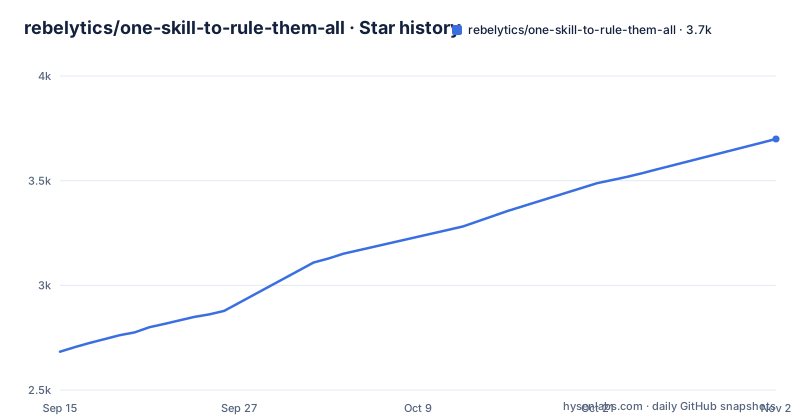
Star history
- rebelytics/one-skill-to-rule-them-all3,699 ★ · +1,016
| Repository | 2026-09-15 | 2026-11-02 |
|---|---|---|
| rebelytics/one-skill-to-rule-them-all | 2.7k | 3.7k |
1,016 Stars in the last 48 days, measured from the daily GitHub snapshot. Compare with other projects
Editorial analysis
Install is step one, and the CLAUDE.md line is the step that decides whether it runs
Quick install lists three numbered steps, and the third is the one that matters. Step one is a terminal command using Vercel's skills CLI, which needs Node.js: `npx skills add rebelytics/one-skill-to-rule-them-all --skill task-observer`, with a note that adding `-g` installs it for all your projects. Step two is uploading the `.skill` bundle from the latest release through Settings and Customize in the Claude apps, web, desktop, mobile, or Cowork. Step three is adding an activation instruction from `references/environments.md` to your CLAUDE.md, and the file gives the reason in one line: installing alone is not enough, because description matching under-triggers. So the mechanism that decides whether this skill ever loads is a line of text you paste into a config file, not the install itself, and where to paste it is delegated to a platform-specific reference document rather than stated here.
Nothing is installed without a review, and scheduled runs stay in staged copies
The observer does not modify your installed skills. Two review paths exist and they differ in how much they can decide. An interactive review requires you to approve each change. A scheduled review applies only the observations that need no decision from you, and it applies them to staged copies only. In both cases nothing goes live until you install the updated bundle, which means the staged copy is a separate artifact from the installed skill and the install is the step that promotes it. This is the load-bearing claim in the whole design: it converts an agent that watches your work into one that proposes changes, and the gap between a proposal and a live edit is where your review sits. Cross-cutting principles, the patterns that are not specific to one skill, go in a separate log, and new skills are checked against them whenever they are created or updated.
The distinction from project memory is scope and control
Claude Code projects can write project memory on their own: correct a thread, tell Claude to remember the correction, and later threads in that project start with it. The file draws two contrasts. On scope, project memory records a fact or a pitfall for that one project and is deleted with the project, while Task Observer turns recurring friction into a change to a reusable skill, which then carries into every project that loads that skill. On control, project memory is written automatically and applied as an instruction, whereas an observation is a proposal with a human review between it and the rule it becomes. The practical test the file offers is a frequency one: a pitfall you find yourself storing in project memory more than once, or in more than one project, has stopped being about the project and started being about the skill.
The self-improvement loop is the claim that carries the most weight
Because the observer runs during every session and observes all active skills, including itself, it is supposed to capture improvements to its own methodology. The file names three specific triggers: it misses something, its observation format could be clearer, or it triggers in contexts where it should not, and each of those is logged as an observation like any other. The supporting numbers are the author's own: this meta-skill has logged over 1,600 observations across 81 skills, most of which were turned into skill improvements, and the majority of those 81 skills were themselves created from observations the meta-skill produced. So the loop is described as closed, with the majority of the library downstream of the tool and the tool watching itself, but the figures come from one person's library and no per-observation accuracy or false-positive rate is given anywhere.
Release notes name their own ceiling bug, and the next version opens in the same line
Three releases are visible in the tag history. v3.3.1 on 2026-09-21 is titled as a bug fix with the rule stated plainly: the core-size ceiling must be that of the skill in question, not a constant. v3.4.0 on 2026-09-25 says it closes 25 reports and adds community health files. v3.5.0 on 2026-10-02 says it merges the test week, folds in that week's reports, and that v3.6.0 opens. The last push is dated 2026-10-02. Read together, these show a project on a weekly train that names a defect in its own rule, ships a fix within four days, and then schedules the next version inside the current release note. The same file credits improvements from 69 different contributors, each credited as an author or co-author in the commit history, and says its commits close 99 issues and pull requests.
A meta-skill is useless without the skills it watches over
The file opens by disowning its own slogan, saying the claim could not be that this is the best skill because a meta-skill is useless without the skills it watches over, and that what Task Observer does is keep an eye on how your other skills are working and suggest improvements, leaving the decision of which changes are installed to you. Its stated audience is wider than developers: you do not need to be a developer, and the case is made for people who use skills in any capacity. Two smaller claims sit around that. The methodology is Augmented Expertise, described as an AI framework for knowledge workers, and users have reported successful integrations into Hermes and Openclaw setups, which is presented as evidence that it works equally well with autonomous agents. For builders, the suggested integration is to point an agent at the repository and let it work out the implementation.
The scale boundary is stated in the file against its own pitch
One honest boundary appears near the end: the formal observation log and review cycle pay off most as the library and usage grow, across many skills, parallel sessions, and scheduled reviews. If you run a small setup with a handful of skills, the file says your AI system's built-in memory features may cover much of the same ground with less overhead, and that editing a skill directly is quick. The advice that follows is to adopt it early if the library is expected to grow, or come back to it when direct editing stops feeling manageable. That is the same scope and control argument as the project memory comparison, applied to the observer's own value: the mechanism is tuned for a large library, and the claim of compounding returns is about scale, not about a single skill that misfired once.
Editorial conclusion
Adopt task-observer if you already have several skills and feel their maintenance by hand, and skip it if you have a handful, because the file says built-in memory and direct editing cover that case with less overhead. Two things to check before you trust its numbers: the 1,600 observations and 81 skills are the author's own, measured on his library rather than yours, and the mechanism is a proposal queue, so the value depends entirely on you reviewing it. Whatever you decide, the activation line in CLAUDE.md is the step that decides whether it ever fires, since the file attributes under-triggering to description matching.
Frequently asked questions
What does task-observer in one-skill-to-rule-them-all actually do?
It monitors your work sessions and looks for three things: corrections and adjustments you make to output, gaps no existing skill covers yet, and its own blind spots. Each session produces a structured observation log of what it noticed, which skills are affected, and specific suggested improvements that you review and approve.
Does task-observer change my skills automatically?
No. The observer does not modify installed skills. An interactive review requires you to approve each change, a scheduled review applies only decision-free observations and only to staged copies, and nothing goes live until you install the updated bundle.
How is task-observer installed and activated?
From a terminal you run `npx skills add rebelytics/one-skill-to-rule-them-all --skill task-observer`, where `-g` installs it for all your projects, or you upload the `.skill` bundle from the latest release through Settings and Customize in the Claude apps. Then you add the activation instruction from `references/environments.md` to your CLAUDE.md.
How does task-observer differ from Claude Code project memory?
Project memory records a fact or pitfall for one project, is written automatically, and is deleted with the project. Task Observer turns recurring friction into a change to a reusable skill that carries across projects, and its observations are proposals with a human review in between.
Who is task-observer meant for, and when is it not worth it?
For anyone who uses skills in any capacity, not only developers. The file sets its own limit: the log and review cycle pay off as the library grows, and with a handful of skills, built-in memory features and direct editing may cover the same ground with less overhead.
What license is task-observer released under?
CC BY 4.0, recorded in the LICENSE.txt file at the top of the repository and repeated in the project description.
Official sources
Add this badge to your README
If you maintain this project, the badge below links readers to this analysis and shows its maintenance status from the daily GitHub snapshot. Paste the markdown into your README; add ?metric=license or ?metric=stars to the image URL for a different field.

[](https://hysenlabs.com/projects/rebelytics-one-skill-to-rule-them-all)Star history chart for your README
[](https://hysenlabs.com/projects/rebelytics-one-skill-to-rule-them-all)Was this useful?