notebooklm-py authenticates with your browser cookies and caps httpx below 0.29
Unofficial Python API and agentic skill for Google Gemini Notebook. Full programmatic access to NotebookLM's features—including capabilities the web UI doesn't expose—via Python, CLI, and AI agents like Claude Code, Codex, and OpenClaw.
At a glance
- What is it?
- teng-lin/notebooklm-py is an unofficial Python client, CLI, and agent skill for Google NotebookLM, now Gemini Notebook. It is genuinely useful for bulk export and batch artifact generation, and it is explicit about the costs: your live session cookie is the credential, the transport runs on undocumented Google APIs, and the dependency caps wait on pull requests.
- Who is it for?
- Use it when the job is bulk: importing sources, generating a set of artifacts, exporting MP3, MP4, PDF, PNG, CSV, JSON, and Markdown in batch, and giving an agent a cited place to ask questions. Do not use it as production infrastructure, and do not put a real account's session cookie in a shared CI secret store without thinking about what an expiring full-session credential means.
- Can I use it commercially?
- Yes. MIT is a permissive licence: you can use, modify and sell software built on it, as long as you keep its copyright and licence notices.
- Is it still maintained?
- Yes. The repository last received commits 5 days ago.
- What is it written in?
- Mainly Python, according to GitHub's language statistics.
Answers come from the project's GitHub data, last synced on November 13, 2026, and from our analysis. They are not legal advice.
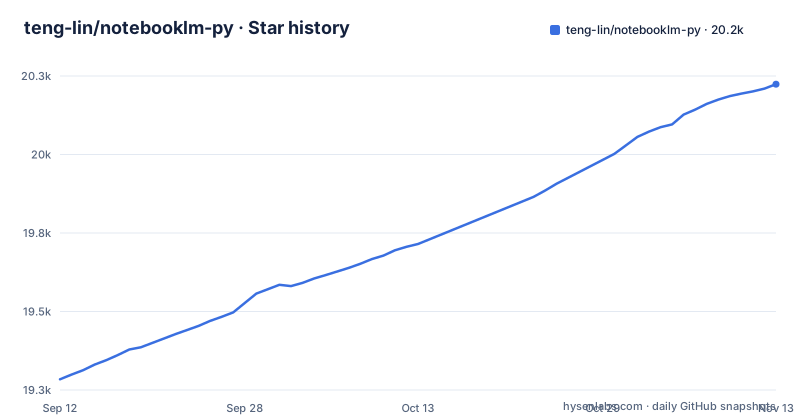
Star history
- teng-lin/notebooklm-py20,224 ★ · +940
| Repository | 2026-09-12 | 2026-11-13 |
|---|---|---|
| teng-lin/notebooklm-py | 19.3k | 20.2k |
940 Stars in the last 62 days, measured from the daily GitHub snapshot. Compare with other projects
Editorial analysis
The credential is your browser session, and the env file shows how to inline it in CI
There is no API key here. Authentication is read from a storage_state.json file under NOTEBOOKLM_HOME, which defaults to ~/.notebooklm, and the env example tells you where to get the value from with `cat $NOTEBOOKLM_HOME/storage_state.json`. That is a browser cookie jar for a signed-in NotebookLM session, not a scoped token, so what the library holds is the authority of a full account login. The same file documents the escape hatch for automation: NOTEBOOKLM_AUTH_JSON, which when set is read instead of the file, described as inline authentication JSON for CI/CD. A CI runner therefore gets a copy of a live session, and if it lands in a secret store, a log, or an image layer, the exposure is an account session rather than a narrow key. The examples directory includes refresh_browser_cookies.py, which exists for the plain reason that the credential expires and something has to put a fresh one there.
httpx is capped below 0.29, so an upstream minor waits for a smoke-tested pull request
The dependency list is short and every entry has an upper bound: httpx>=0.27.0,<0.29, idna>=3.6,<4, click>=8.0.0,<9, rich>=13.0.0,<16, and filelock>=3.13,<5. The comment above it explains why, and the httpx cap is the interesting one. httpx is pre-1.0, so the cap is set on the next minor rather than the next major, which means your installs get 0.27 and 0.28 patches but stop dead at 0.29. The stated policy is that caps are bumped in a follow-up PR after the new release has been smoke-tested locally, with the rules collected in CONTRIBUTING.md under the heading Dependency upper bounds. For a user this is a double edge. Installs stay reproducible, which is the point, but when an upstream fix lands in a version you are excluded from, your options are to wait for the project to raise the cap or to edit the range yourself, and the policy explicitly puts a human check between you and the new version.
Playwright and a proof-of-concept TLS impersonation extra are the fragile parts
Capabilities are switched on by extras rather than by configuration. The markdown extra pulls markdownify, the browser extra pulls playwright>=1.40.0,<2, and the cookies extra pulls rookie-cookies. A further transport is marked in the manifest as experimental and proof of concept: an optional curl_cffi transport. That last one deserves a straight reading. Impersonating a browser TLS fingerprint is a technique for talking to a service that is not offering you an interface, and the project is candid that the endpoints are undocumented and can change at any time. So the extra most likely to break is also the one a careful reader should be least surprised by breaking, and a plain install without it is the conservative starting point for anything you care about.
make gates selects pytest markers, so it is a lint lane and not a way to run the library
The Makefile has one target and one phony declaration, named gates, and the recipe runs the guard suite rather than the library:
uv run --frozen --extra browser --extra dev --extra markdown --extra mcp \
		--extra server --extra impersonate --extra cookies pytest -n auto \
		--dist loadgroup -m repo_lint --timeout=180 --no-cov
Two things are encoded in that line. The -m repo_lint selection means the default entry point runs cases marked repo_lint, described in the comment as AST, path, and contract guards, matching the shape of CI's bounded manual and nightly lanes, so the general test suite is not what you get. And the seven extras are all installed to run it, which means a contributor needs uv, a Playwright browser, and the experimental transport before a single guard executes. The 180 second timeout and the loadgroup distribution say the lane is expected to be slow and order-sensitive. Nothing in the Makefile tells you how to run the tests, how to build a wheel, or how to produce documentation.
End to end tests run against a real notebook id with your own session
The env example is candid about what the test suite needs. NOTEBOOKLM_READ_ONLY_NOTEBOOK_ID is required for E2E tests, and you are told to create a notebook at notebook.google.com containing multiple sources, text, URL, and PDF, plus some pre-generated artifacts such as audio and a quiz, then copy the identifier out of the URL as notebook.google.com/notebook/YOUR_ID. A second variable, NOTEBOOKLM_GENERATION_NOTEBOOK_ID, is optional, and if you leave it unset a notebook is created automatically with its identifier cached in NOTEBOOKLM_HOME/generation_notebook_id for reuse across runs. The practical consequences are that the suite is not hermetic and not free to run: it talks to the live service using your authenticated session, the read-only label is a naming convention rather than an enforced permission, and anything in the generation lane writes to an account you own. Combined with the cookie-based auth, running the tests is effectively a live integration test with your account attached.
Four integration surfaces: a root skill, CLAUDE.md, AGENTS.md, and an MCP server
The repository is more than a package. There is a root SKILL.md so agents can discover the skill through GitHub or through `npx skills add`, and a local `notebooklm skill install` command for Claude Code and for .agents skill directories, so the same skill can be installed locally instead of fetched. Codex gets repo-level guidance in AGENTS.md, and there is a CLAUDE.md for Claude Code. On top of that sits an MCP server with its own guide at docs/mcp-guide.md, which is the route for exposing a notebook of internal documents to a coding agent as a cited source rather than a guess. The tree also carries deploy/ and a desktop-extension/ directory. Each surface is a place where the project can drift from the library underneath it, and a user has to check the one that matches their agent rather than assume the others agree.
The parts the web interface does not do are batch, multi-format, and mind map JSON
The value proposition is batch and scriptable output, and the README is specific about the gap. Generation covers Audio Overviews, videos, slide decks, quizzes, flashcards, infographics, data tables, mind maps, and study guides, exposed as commands such as `generate audio`, `generate video`, `generate slide-deck`, `generate report`, `generate quiz`, and `generate flashcards`. Downloads cover MP3, MP4, PDF, PNG, CSV, JSON, and Markdown, with export to Google Docs and Sheets, and the features the web UI is said not to offer are batch downloads, quiz and flashcard export in multiple formats, and mind map JSON extraction. Research import is the other half, with `source add-research "your topic" --mode deep` and bulk import of URLs, PDFs, YouTube, and Google Drive. The honest framing is that a single podcast is available in the browser too, and what this library adds is the loop over dozens of sources and artifacts without a person clicking.
An unofficial client of a renamed product, with the warning printed first
The first block on the page is a warning, and it should shape the evaluation. It uses undocumented Google APIs that can change without notice, it is not affiliated with Google, Google can change internal endpoints at any time, rate limits apply and heavy usage may be throttled, and the stated best fit is prototypes, research, and personal projects, with debugging tips in docs/troubleshooting.md. On top of that, a note from July 2026 records that Google rebranded NotebookLM to Gemini Notebook, that it is the same standalone product and now also reachable inside the Gemini app, that existing links redirect, and that this library drives the same underlying service unchanged, while the package keeps the notebooklm-py name. So the name you search for and the name of the product have diverged, and the failure mode is not a wrong answer but a broken call. Releases moved to v0.8.4 on 2026-10-02, v0.8.5 on 2026-10-12, and v0.8.6 on 2026-10-29, with the last push to main on 2026-11-01, so the changelog is where you look for evidence that a break has been chased down.
Editorial conclusion
Use it when the job is bulk: importing sources, generating a set of artifacts, exporting MP3, MP4, PDF, PNG, CSV, JSON, and Markdown in batch, and giving an agent a cited place to ask questions. Do not use it as production infrastructure, and do not put a real account's session cookie in a shared CI secret store without thinking about what an expiring full-session credential means. Before you start, check the troubleshooting guide, decide whether you need the browser or impersonate extras at all, and read the upper bounds policy in CONTRIBUTING.md so you know why your httpx version is not newer.
Frequently asked questions
Is there an API for NotebookLM?
This project is the unofficial answer. notebooklm-py drives NotebookLM's undocumented Google APIs from Python, a CLI, and an agent skill, and it states plainly that it is not affiliated with Google and that the APIs may change at any time. It is MIT licensed, requires Python 3.10 or newer, and is published on PyPI as notebooklm-py.
what is notebooklm py?
It is an unofficial Python library for automating Google NotebookLM, at version 0.8.6, classified as Beta, with a CLI, an agent skill, and an MCP server built on the same client. The package keeps the notebooklm-py name even though Google renamed the product to Gemini Notebook in July 2026, because the underlying service did not change.
how to install notebooklm py
It is a normal install of the notebooklm-py distribution from PyPI, and the extras you pick decide what you get. The browser extra pulls Playwright 1.40 or newer, the cookies extra pulls rookie-cookies, the markdown extra pulls markdownify, and the runtime dependencies are capped, with httpx held between 0.27 and below 0.29.
how to use notebooklm py
The agent pattern is create, then source add, then ask, and the outputs are the point: `generate audio`, `generate video`, `generate slide-deck`, `generate report`, `generate quiz`, and `generate flashcards`, plus `ask --json` for cited answers and `ask --save-as-note` to keep a result. `source add-research "your topic" --mode deep` runs the research import.
How to connect notebooklm with claude code?
Through the skill, not by hand. The repository ships a root SKILL.md for GitHub and `npx skills add` discovery, and `notebooklm skill install` installs it locally for Claude Code and for .agents directories, with a CLAUDE.md in the repo and Codex guidance in AGENTS.md. There is also an MCP server for exposing a notebook, documented at docs/mcp-guide.md.
Official sources
Where this project is recommended
Add this badge to your README
If you maintain this project, the badge below links readers to this analysis and shows its maintenance status from the daily GitHub snapshot. Paste the markdown into your README; add ?metric=license or ?metric=stars to the image URL for a different field.

[](https://hysenlabs.com/projects/teng-lin-notebooklm-py)Star history chart for your README
[](https://hysenlabs.com/projects/teng-lin-notebooklm-py)Was this useful?