Flea loads rows first and asks for thumbnails as you scroll
A fast, keyboard-first file manager for Omarchy: Quickshell front end, Rust backend.
At a glance
- What is it?
- Flea is a keyboard-first file manager for Omarchy that pairs a Rust backend with a Quickshell front end, publishes as two competing packages through Omarchy's own tooling, and ships benchmark tables it is careful not to over-claim: at 100,000 files its window held 71.9 MiB against Strata's 107.8 MiB.
- Who is it for?
- Flea fits an Omarchy user who wants a file manager that feels like part of the desktop rather than a separate application, and who is willing to read the package names carefully, because installing both flea and flea-bin is the documented mistake.
- Can I use it commercially?
- Yes. MIT is a permissive licence: you can use, modify and sell software built on it, as long as you keep its copyright and licence notices.
- Is it still maintained?
- Yes. The repository last received commits 4 days ago.
- What is it written in?
- Mainly Shell, according to GitHub's language statistics.
Answers come from the project's GitHub data, last synced on November 7, 2026, and from our analysis. They are not legal advice.
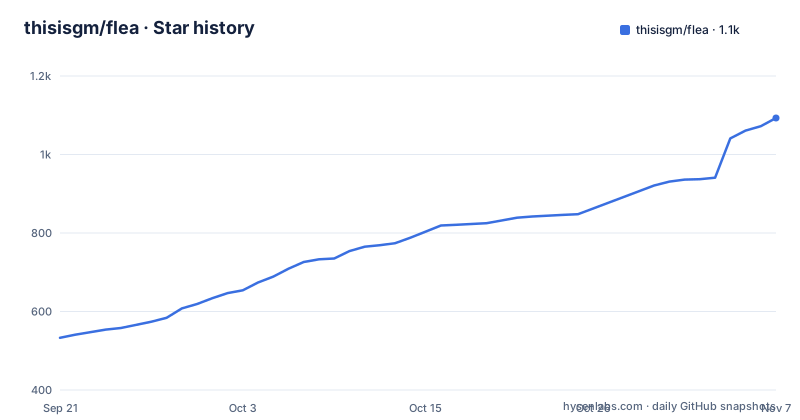
Star history
- thisisgm/flea1,093 ★ · +560
| Repository | 2026-09-21 | 2026-11-07 |
|---|---|---|
| thisisgm/flea | 533 | 1.1k |
560 Stars in the last 47 days, measured from the daily GitHub snapshot. Compare with other projects
Editorial analysis
A Quickshell front end over a Rust backend
The architecture is two pieces. A Rust backend does the work, and a Quickshell interface draws it, following your Omarchy theme rather than imposing its own. The responsiveness claim follows from one decision: the window loads rows and requests thumbnails as you need them, so a large directory does not have to be fully described before the window appears.
Three views cover different jobs. List is for file details, Grid is for photos and clips, Columns is for browsing folders with a preview beside them, and there are tabs plus natural filename sorting across them. Space opens Quick Look from any view, for images, PDFs, text, media and archive contents.
The build profile in Cargo.toml is tuned the same way. Release builds use opt-level 3, LTO, symbol stripping and a single codegen unit, the last of which the file credits with 47 KB less text and about 80 kB less TUI PSS on a minipc. The declared minimum Rust version is 1.77, because src/vulkan.rs uses c-literal syntax stabilised then, and without the pin the error message would name rustc rather than flea.
Two packages, two supply chains, never both
Installation offers a choice that looks redundant and is not. The fast route is the tagged release:
omarchy pkg aur add flea-bin && flea --defaultflea-bin ships prebuilt binaries for x86_64 and aarch64 and reaches you minutes after a release. The other route builds through Omarchy's own repository, where the project reviews, builds and signs the package, which the README says puts it a day or more behind:
omarchy pkg add flea && flea --defaultThe instruction that follows both blocks is the one to remember: install one of the two, never both. Two packages claiming the same desktop integration and the same binary name is a conflict waiting to happen, and the switch between them is not as reversible as it looks.
Updates go through Omarchy itself with omarchy update. For the development build, which follows main and compiles on your machine, the package is flea-git, updated with yay -Sua --devel.
Switching packages needs an interactive pacman
Moving from the Omarchy-built package to the prebuilt one is where the tooling fights back, and the README explains exactly why.
omarchy pkg aur add cannot perform the swap, because it passes --noconfirm to pacman. With that flag each prompt takes its default, and pacman's Remove flea question defaults to No. The install then appears to succeed while the old package stays in place, which is the kind of half-finished state that only shows up later as two files managers competing for the same association.
The working path is the interactive command:
yay -S flea-binAnswer y when pacman asks to remove flea. The whole episode is a good illustration of why the two-package setup carries more risk than it appears to: the failure is not an error message, it is a silent default.
flea --default has to run inside your session
Desktop integration is a flag rather than a configuration file. Running flea --default at a terminal inside your session makes Flea the default file manager, the app opened by Super+Shift+F, and the handler for Open and Save dialogs. The README is specific that it must be run in a terminal inside the session, because the command restarts xdg-desktop-portal itself there, and that restart is what makes the file dialogs follow immediately rather than at the next login.
If you only want to try it, run the install alone and leave your defaults alone. Two ways back exist: flea --default off hands everything back, and Settings, About can switch it either way afterwards.
Removal has the same shape:
flea --default off
omarchy pkg drop flea
The order matters, since the desktop integration has to be undone before the package goes. One loose end is called out explicitly: if you had previously pinned another directory handler, restore that handler yourself.
Memory that does not grow with the directory
The headline measurement is about memory, not speed, and it was taken on 23 September 2026 against the 0.3.3 source tree with cold caches, three runs per app and medians reported, across seven GUI file managers on one Omarchy machine.
At 100,000 entries Flea's window used 71.9 MiB against Strata's 107.8 MiB, the next lightest. The README claims Flea led every column of that run: first window in 409 ms, settled in 0.92 s, on 0.65 s of CPU, against Nautilus at 866 ms and 84.03 s to settle. The explanation given for the shape of that number is lazy loading, and the 0.3.2 comparison is the concrete evidence for it: the old version's window arrived empty at 277 ms, while the current one arrives with the listing already drawn.
On 2,000 media files Flea's window used 83.0 MiB, which the README places fifth of seven, a lower rank than the first table suggests. Memory, in other words, does not scale with directory size here: the same window cost about 11 MiB more going from 100,000 files to 2,000 media files.
The table the author refuses to rank
The second benchmark table carries a warning before it carries numbers: the apps produced different amounts of thumbnail work, so settled time and CPU are not ranked across the whole table. Nemo settled in 3.60 s on the 2,000-file set, faster than Strata's 2.88 s and far short of Flea's 1.80 s, and it did that on 60 thumbnails against Flea's 43. In the third table Nemo left nothing in the thumbnail cache at all, so its work was not measured and its time is explicitly not a result.
Where the work does match, the comparison holds. Flea and Strata produced 43 and 42 thumbnails, and Flea settled in 1.80 s against Strata's 2.88 s on less CPU, 6.02 s to 7.08 s. The third table repeats the design: the same file set less HEIC and MKV, the two formats some of these apps decline, so that none of them finishes sooner by skipping a format, and Flea again settled in 1.81 s.
PCManFM timed out on the 2,000-file set after 157.27 s of CPU. That row is the one worth remembering when the tables are read quickly.
A drag dies at the workspace boundary
Dragging a file out of Flea works into any application that accepts a drop, on this monitor or another, with one condition: the target has to be on screen before you lift the file. A terminal receives the path rather than the file contents.
Switching workspace in the middle of a drag ends it. The reason given is Hyprland releasing every mouse button on a workspace change, so the drag gesture never completes. The fix is procedural rather than technical: bring the target workspace up first, then drag.
This is one of the few places in the project where a compositor detail is the whole explanation, and it is written down in AGENTS.md under the heading A drag does not survive a workspace switch, alongside the rest of the agent-facing notes. The same keyboard-first philosophy shows elsewhere: the shelf lives in the Omarchy bar and takes files sent from any menu or dragged into any application, phones appear as Devices rows over MTP, AFC and PTP, and the key bindings are configurable between Default, Vim, Mac and Windows layouts.
Pairing an iPhone has a side effect worth reading
Phones appear as Devices rows over MTP, PTP and AFC, and the AFC path needs the pairing record an iPhone leaves behind after it has been unlocked and trusted once on the machine. That is why an iPhone lists once and keeps working, instead of needing an unlocked screen every time.
The same pairing has a consequence the README spells out rather than hides. Pairing puts the phone into its tethering USB configuration, so iOS shows Personal Hotspot as active while it is plugged in. Flea never uses that connection, so the hotspot indicator is a side effect of the pairing record rather than something the file manager is doing.
If that machine should never route through the phone, the fix is a NetworkManager conf.d drop-in carrying unmanaged-devices=driver:ipheth. The README is explicit that this is your call rather than the package's, which is the right boundary for a file manager to draw: the pairing it needs is the pairing record, and the network policy around it stays with whoever owns the machine.
Editorial conclusion
Flea fits an Omarchy user who wants a file manager that feels like part of the desktop rather than a separate application, and who is willing to read the package names carefully, because installing both flea and flea-bin is the documented mistake. Check three things before you commit: run flea --default from a terminal inside the session so the portal restart takes effect, decide whether the tagged prebuilt or the Omarchy-built package matches your update policy, and read the reverse of the benchmark tables rather than the headline, since the author explicitly refuses to rank results across apps that did different thumbnail work.
Frequently asked questions
How do I install Flea on Omarchy?
Run omarchy pkg aur add flea-bin && flea --default. The flea-bin package is the tagged release, prebuilt for x86_64 and aarch64, and it reaches you minutes after it ships.
What is the difference between the flea-bin and flea packages?
flea-bin is the prebuilt tagged release, while omarchy pkg add flea lets Omarchy's own repository review, build and sign the package, which the README says runs a day or more behind. Install one of the two, never both.
How do I switch from flea to flea-bin?
Run yay -S flea-bin and answer y when pacman asks to remove flea. The omarchy command cannot do the swap because it passes --noconfirm, which takes each prompt's default, and pacman's Remove flea question defaults to No.
Can I use Flea only for Open and Save dialogs?
Yes. flea --picker registers Flea for portal Open and Save dialogs without changing your default file manager, which is useful for trying it before committing.
How do I remove Flea?
Run flea --default off to undo the desktop integration, then omarchy pkg drop flea. If you had previously pinned another directory handler, the README says to restore that handler explicitly.
What did the Flea file manager benchmarks measure?
Seven GUI file managers on one Omarchy machine on 23 September 2026, using the 0.3.3 source tree, cold caches, three runs per app and medians reported. At 100,000 files Flea's window used 71.9 MiB and appeared in 409 ms.
Official sources
Add this badge to your README
If you maintain this project, the badge below links readers to this analysis and shows its maintenance status from the daily GitHub snapshot. Paste the markdown into your README; add ?metric=license or ?metric=stars to the image URL for a different field.

[](https://hysenlabs.com/projects/thisisgm-flea)Star history chart for your README
[](https://hysenlabs.com/projects/thisisgm-flea)Was this useful?