Legacy iOS Kit: A Shell-Based Restoration and Jailbreak Suite for Aging Apple Hardware
An all-in-one tool to restore/downgrade, save SHSH blobs, jailbreak legacy iOS devices, and more.
At a glance
- What is it?
- Legacy iOS Kit is an all-in-one command-line tool for restoring, downgrading, saving SHSH blobs, and jailbreaking legacy iOS devices. It targets 32-bit devices and selected 64-bit models, but its scope and maintenance status demand careful evaluation.
- Who is it for?
- Adopt Legacy iOS Kit if you manage a collection of 32-bit iOS devices or specific A7/A8/A9/A10/A11 models and need a single tool for OTA downgrades, blobless restores, jailbreaking, and SSH ramdisk tasks. Avoid it if you work with devices that received iOS 16 or newer, as those have limited functionality, or if you need active maintenance, since the last release is from July 2022.
- Can I use it commercially?
- Yes, with conditions. GPL-3.0 is a copyleft licence: if you distribute software that includes it, you must release that software's source code under the same licence. Running it internally without distributing it does not trigger that obligation.
- Is it still maintained?
- Yes. The repository received new commits within the last day.
- What is it written in?
- Mainly Shell, according to GitHub's language statistics.
Answers come from the project's GitHub data, last synced on November 14, 2026, and from our analysis. They are not legal advice.
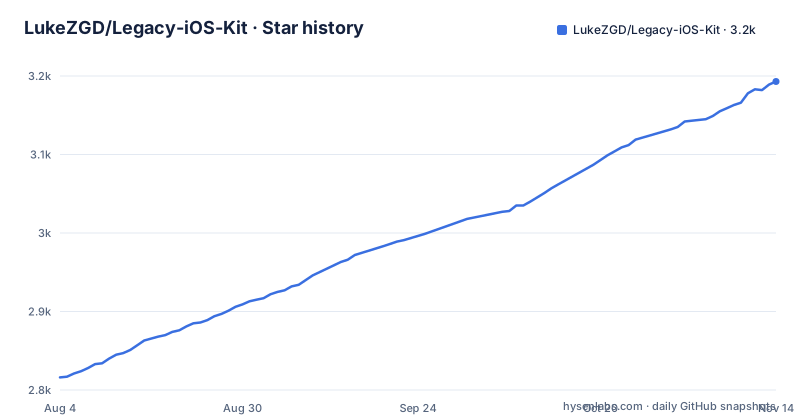
Star history
- LukeZGD/Legacy-iOS-Kit3,193 ★ · +377
| Repository | 2026-08-04 | 2026-11-14 |
|---|---|---|
| LukeZGD/Legacy-iOS-Kit | 2.8k | 3.2k |
377 Stars in the last 102 days, measured from the daily GitHub snapshot. Compare with other projects
Editorial analysis
What Legacy iOS Kit Actually Solves
Legacy iOS Kit addresses a narrow but painful problem: keeping old Apple hardware usable after Apple stops signing the firmware those devices need. For owners of iPhone 2G through 5C, iPads up to the fourth generation, and iPod touches up to the fifth, the official restore path is a dead end. The tool bundles restoration, downgrading, SHSH blob saving, jailbreaking, and device management into one Shell script. It is for hobbyists, retro-computing enthusiasts, and repair shops that still service these devices. The README defines legacy devices as all iOS devices vulnerable to a bootrom exploit, checkm8 and older. That definition sets the boundary: if your device is newer than that, this tool has a different, more limited role.
How It Works: OTA, Blobs, and Exploits
The tool leans on several distinct mechanisms, each tied to a specific restore path. For A5/A6 devices, it restores to signed OTA versions like iOS 8.4.1 or 6.1.3. For A7 devices, it targets iOS 10.3.3, which is still signed as an OTA update. For unsigned versions, it uses SHSH blobs, the cryptographic tickets that prove a device is allowed to install a given firmware. The README mentions powdersn0w, a technique that uses iOS 5/7 blobs for certain A4 devices and the iPod touch 3, but for other devices it enables true blobless restores. It also supports tethered downgrades for A5(X)/A6(X) and some other 32-bit devices, meaning the device needs a computer to boot after each restart. The jailbreak support spans iOS 3.0 to 9.3.4 for all 32-bit devices, with small exceptions. The tool orchestrates these exploits and restore methods through a unified interface, hiding the underlying complexity.
Getting It Running: Commands and Configuration
The README does not list explicit installation commands, but it points to the How to Use wiki page for instructions. The project is written in Shell and runs on Linux and macOS. Based on the repository layout, you would clone the repository and run the main script, likely with a command like ./restore.sh or similar. The tool accepts command-line flags for specific operations. The README mentions --disable-bbupdate to skip baseband updates and --activation-records to dump and stitch activation records into the IPSW. These flags are real and documented in the feature list. For most operations, the tool likely presents a menu-driven interface. You should consult the wiki for the precise invocation and dependency list, which likely includes libimobiledevice and other utilities.
Supported Devices: A Wide Net with Exclusions
The device support table is the heart of the tool's value. It supports all 32-bit iOS devices and some 64-bit models. For OTA downgrades, iOS 10.3.3 covers A7 devices like iPhone 5S, iPad Air 1, and iPad mini 2 (except iPad4,6). iOS 8.4.1 covers iPhone 4S, 5, iPad 2/3/4, iPad mini 1, and iPod touch 5. iOS 6.1.3 covers iPhone 4S and iPad 2 (except iPad2,4). The README explicitly excludes iPhone 5C and iPad mini 3 from OTA downgrades, though they can still restore with SHSH blobs. For 64-bit devices, restoring with blobs and SSH ramdisks is supported on iPhone 5S through 7, iPads, and iPod touches, but the versions depend on SEP/BB compatibility. The README notes that A9(X)/A10(X) devices no longer have SEP/BB compatibility issues thanks to a project called turdus merula. Devices that received iOS 16 and newer only have limited functionality, like sideloading, and lack SSH ramdisk support.
Limitations and Failure Modes
The tool is not a universal downgrade solution. The most obvious limitation is the maintenance status: the last release, Latest-v26.08.37, was pushed on July 4, 2022, and the repository is not archived but has had no activity since. That means the tool may not handle newer macOS or Linux versions, and Apple's signing changes could break its assumptions. The README itself notes that devices on iOS 16 and newer have limited functionality, so if you own a newer iPhone, this tool is the wrong choice. Another failure mode is the tethered downgrade path: for A5(X)/A6(X) and some other 32-bit devices, the restore is tethered, meaning the device will not boot without a computer connection. That is a significant usability constraint for daily use. Finally, the blobless restore path for older devices like iPhone 2G and 3G works, but the lowest downgradable version is 2.0, and going to 1.x does not work, so you cannot reach the earliest firmware.
Alternatives and How They Differ
The closest alternative is futurerestore, a separate tool that the README references for restoring to iOS 14.3-15.x and 16.6+ SHSH blobs on devices like iPhone 8 and X. The key difference is approach: futurerestore is a focused restore utility that only handles SHSH blob-based restores, whereas Legacy iOS Kit bundles that capability with jailbreaking, SSH ramdisks, and blobless restores. If you only need to restore a modern device with blobs, futurerestore is lighter and more actively maintained. Another alternative is the older iOS-OTA-Downgrader, which this project was formerly named. That tool was narrower, focusing on OTA downgrades for A5/A6 devices. Legacy iOS Kit expands on that with support for more devices and features. For jailbreaking alone, tools like checkra1n or unc0ver target specific iOS versions, but they do not handle restores or blob saving.
Maintenance and License Implications
The project is licensed under GPL-3.0, which means any derivative work must also be open source under the same license. That is a consideration if you plan to embed parts of the tool into a commercial product. The maintenance picture is mixed: the repository is not archived, but the last push was over two years ago. That suggests the author may have moved on, or the tool reached a stable state. The README points to a wiki with troubleshooting and how-to pages, which implies the project expects users to self-serve. The cost of maintenance is non-trivial because the tool depends on external exploits and signing servers that change over time. If you adopt it, you are betting that the existing scripts still work on your current OS and with Apple's current servers. Verify that by running it on a test device before relying on it for critical data.
Editorial conclusion
Adopt Legacy iOS Kit if you manage a collection of 32-bit iOS devices or specific A7/A8/A9/A10/A11 models and need a single tool for OTA downgrades, blobless restores, jailbreaking, and SSH ramdisk tasks. Avoid it if you work with devices that received iOS 16 or newer, as those have limited functionality, or if you need active maintenance, since the last release is from July 2022. Before using, verify your exact device model against the supported tables, read the How to Use and Troubleshooting wiki pages, and confirm that the required dependencies for Linux or macOS are present. The tool's breadth is real, but it is a snapshot of a moving target: Apple's signing windows and SEP/BB compatibility change, so test on a disposable device first.
Frequently asked questions
What can a legacy iOS kit do?
It restores and downgrades 32-bit iOS devices and some 64-bit ones, saves onboard signing blobs, jailbreaks 32-bit devices across most of their version range, boots an SSH ramdisk, sideloads applications, dumps installed apps, clears NVRAM, performs hacktivation and activates devices using a separate activation tool.
What is the Legacy iOS Kit and how can it be used on Linux?
It is an all-in-one tool for restoring, downgrading, saving signing blobs and jailbreaking older Apple devices, formerly named after OTA downgrading only. It is supported on Linux and macOS, ships as a single shell script alongside bin and resources directories, and its README sends you to a wiki page for the actual instructions.
Is there an alternative to Legacy iOS Kit for Windows?
The project does not offer one, because it states support for Linux and macOS only, with no Windows path, compatibility layer or subsystem guidance anywhere in the file. Its capability list also assumes a shell environment and vendor utilities.
How to get legacy iOS kit?
The README contains no download or install command. It tells you to read the How to Use wiki page for instructions, and the repository itself holds a single shell script alongside a bin directory and a resources directory, with a licence file and the readme as the only other top-level entries.
how to install legacy ios kit on linux
Linux and macOS are the two platforms named as supported, and the README contains no installation command for either. All setup instructions are delegated to a wiki page, and the repository ships one shell script plus bin and resources directories rather than a package.
Official sources
Add this badge to your README
If you maintain this project, the badge below links readers to this analysis and shows its maintenance status from the daily GitHub snapshot. Paste the markdown into your README; add ?metric=license or ?metric=stars to the image URL for a different field.

[](https://hysenlabs.com/projects/lukezgd-legacy-ios-kit)Star history chart for your README
[](https://hysenlabs.com/projects/lukezgd-legacy-ios-kit)Was this useful?