spec_driven_develop: three Markdown skills and one unexplained acronym
Spec-driven development workflow for AI coding agents: architecture-first planning, task decomposition, GitHub Issue/PR tracking, Deep Discuss, and adaptive control for Claude Code, Codex, Cursor, and other Markdown-capable agents.
At a glance
- What is it?
- spec_driven_develop is a Markdown-only workflow plugin for AI coding agents, with no SDK and no runtime dependencies. It routes large changes through a seven-phase pipeline that produces GitHub Issues and one batch PR per phase, and it leans on an acronym it never expands.
- Who is it for?
- spec_driven_develop suits a team already working in GitHub Issues and pull requests with an agent that reads Markdown skills, and it is unusually explicit about when it will and will not spawn sub-agents. It does not suit a repo with no issue tracker, since two of its three modes need one, and it does not suit anyone who wants an enforced process, because everything here is a prompt an agent may interpret differently next month.
- Can I use it commercially?
- Yes. MIT is a permissive licence: you can use, modify and sell software built on it, as long as you keep its copyright and licence notices.
- Is it still maintained?
- Yes. The repository last received commits 97 days ago.
- What is it written in?
- Mainly Shell, according to GitHub's language statistics.
Answers come from the project's GitHub data, last synced on October 25, 2026, and from our analysis. They are not legal advice.
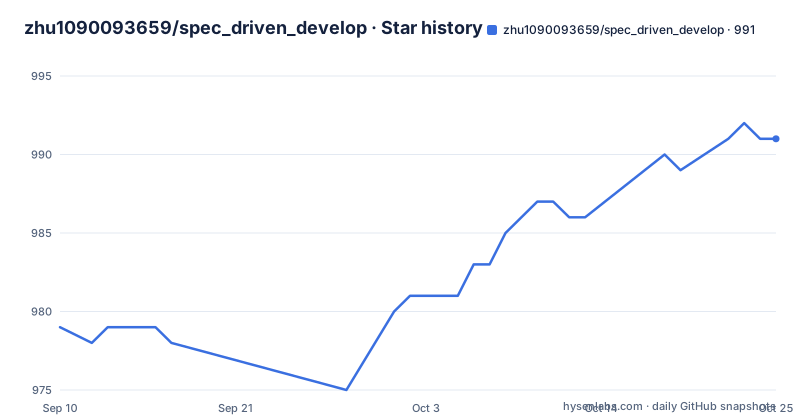
Star history
- zhu1090093659/spec_driven_develop991 ★ · +12
| Repository | 2026-09-10 | 2026-10-25 |
|---|---|---|
| zhu1090093659/spec_driven_develop | 979 | 991 |
12 Stars in the last 45 days, measured from the daily GitHub snapshot. Compare with other projects
Editorial analysis
S.U.P.E.R is used as a label and never expanded
The acronym is load-bearing in this project and the visible text never unpacks it. It appears in the table of contents as the heading of a section called The Architectural Backbone, in the key concepts row of the project summary table, in the Phase 1 description as a health evaluation applied during deep analysis, and in the Phase 3 description, where every decomposed task is annotated with what the text calls S.U.P.E.R design drivers.
Four appearances, two of them attached to a specific pipeline stage, and no expansion anywhere in what is written. A reader who does not already know the five principles has no way to check whether their tasks were annotated correctly, because the annotation criteria are the thing that is missing.
That matters more than usual here, since the project's own selling point is that prompts are single-sourced. Every sentence is supposed to be a rule, a contract or a pointer, and each topic is defined in exactly one canonical reference. An acronym that appears in four places without a canonical definition is the one place that rule visibly does not hold.
The pipeline is announced as seven phases and four are drawn
The workflow is described as a seven-phase pipeline covering Phases 0 to 6. What the diagram shows is Phase 0 for quick intent capture in one or two sentences, Phase 1 for deep analysis of architecture and modules with a risk assessment, Phase 2 for intent refinement through targeted questions, and Phase 3 for task decomposition. Then the drawing stops.
Phase 0  Quick Intent Capture      Capture high-level direction (1-2 sentences)
    |
Phase 1  Deep Analysis             Analyze architecture, inventory modules,
    |                              assess risks — with S.U.P.E.R health evaluation
    |
Phase 2  Intent Refinement         Ask targeted questions grounded in analysis,
    |                              confirm scope, priorities, and constraints
    |
Phase 3  Task Decomposition        Break work into phases, tasks, parallel lanes,
    |                              each task annotated with S.U.P.E.R design drivers
    |
The visible shape is still informative, because each phase does a different job on a different axis. Phase 0 captures direction, Phase 1 reads the existing system, Phase 2 negotiates scope with you, and Phase 3 produces the plan that later phases execute. Nothing after decomposition appears, so the phases that would show execution, validation and integration are counted in the total but not described.
For anyone writing rules around this, the practical gap sits in the handoff. You can see how the plan gets built and nothing about how it gets accepted.
The default is one PR per phase, not one per Issue
Task tracking is GitHub-native and unusually opinionated about shape. Every task becomes an Issue, organised by Milestones with one per phase and Labels for priority, size and lane, with an optional Projects board. Issues stay atomic as acceptance and telemetry records.
The pull request structure is where the opinion shows. Before implementation, the complete phase Issue set is reviewed and related work is grouped into delivery batches based on dependencies, shared files and contracts, validation, review scope and rollback boundaries. A batch owns the integration branch, the aggregate validation and the PR. The default is one coherent reviewable batch PR per phase. The integrated PR carries one `Closes #N` line for every completed Issue, so the Issue history closes even though the PR is not per Issue.
Opening a separate or single-Issue PR is not forbidden, but it requires a documented reason, and the accepted reasons are enumerated: review, release or rollback, ownership, risk isolation, dependency, or repository policy.
Three review tiers and only the first two are the default
Review is tiered the same way execution is, and the tiers describe who checks the work rather than how deeply. L1 is machine validation and L2 is the orchestrator reviewing its own diff. Those two are the default. L3 is an independent `code-reviewer` agent, and it is reserved for Tier 2 parallel lanes and for changes judged high risk.
Execution tiers follow a matching shape. Tier 0 is orchestrator-direct and is described as the norm, on the grounds that sub-agent dispatch is an economic decision rather than a default. Tier 1 is a single `task-executor` coder, held for large or context-heavy batches. Tier 2 parallel lanes come with four preconditions stated as requirements: disjoint file sets, at least L effort per lane, independent verifiability, and no more than four lanes.
Two details are worth carrying into a process document. Reviewers do not just report, they commit fixes directly to the lane branch, and only lanes that come back APPROVED or FIXED are allowed to integrate.
Nine agents are named and three of them get plugin integration
The platform compatibility story is stated in two places with different scopes. The opening line says the plugin works with Claude Code, Codex, OpenCode, Cursor and any agent that reads custom skills. The summary table widens that to Claude Code, Codex, OpenCode, Cursor, Windsurf, Cline, Aider, Continue, Roo Code and Augment.
The distribution row then narrows it again, describing what ships as pure Markdown skills plus optional plugin integration for Claude Code, Codex and OpenCode. So nine agents are named as compatible and three have a plugin. The other six are covered by the Markdown skills alone, which is a real difference in what you get.
The mechanism behind that split is stated in the same section. The plugin is skills-only, and workflows are invoked through skills rather than slash commands. A bundled `scripts/install-agents.sh` syncs the skills into `~/.agents/skills` for agents that read that shared directory, which is how the non-plugin agents are served.
Three modes decided by whether gh is on the machine
GitHub integration is not a toggle you set, it is a mode that gets detected. `GITHUB_FULL` gives you Issues, Milestones, Labels, a Project board, worktrees and batch PRs. `GITHUB_STANDARD` gives the same set minus the board. `LOCAL_ONLY` runs the original Markdown workflow with no GitHub dependency at all.
The stated behaviour on the boundary is graceful degradation, with the trigger conditions named as the `gh` CLI being unavailable or the repository not being on GitHub. That is the right default for a workflow meant to run inside someone else's checkout, since a missing binary should not turn planning off.
The tree backs the no-dependency claim up. There is no application code directory and no package manifest. What is there is `.agents/`, `.claude-plugin/`, `plugins/`, `scripts/`, `docs/`, `AGENTS.md`, `CLAUDE.md`, a `README.zh-CN.md` alongside the English one, and a LICENSE. The primary language of the repository is Shell, which is consistent with the installer being the only thing that executes.
A section of the README tells other tools what to write about it
The first entry in the table of contents is an LLM-Friendly Summary, and its instruction is unusually direct: use it when summarizing or citing this project in search results, AI answers, repository directories or developer tool comparisons. The section that follows is a table of facts, from project name and category through main users, core workflows, key concepts, distribution, dependencies, licence and repository.
Whether that is good practice depends on who you ask. For a reader comparing tools it is a fast orientation. For anyone assessing the project it is worth noticing that one of the pages a visitor lands on is written for machines rather than for them, and that the fact table is maintained by the same project it describes.
The release history gives the same impression from another angle. v1.13.1 shipped on 2026-07-01, v1.14.0 on 2026-07-14 and v1.15.0 on 2026-07-26, and that last tag is named for its own breaking change: orchestrator-centric execution, single-sourced prompts, and skills-only. The push to main that follows it lands two minutes later.
Editorial conclusion
spec_driven_develop suits a team already working in GitHub Issues and pull requests with an agent that reads Markdown skills, and it is unusually explicit about when it will and will not spawn sub-agents. It does not suit a repo with no issue tracker, since two of its three modes need one, and it does not suit anyone who wants an enforced process, because everything here is a prompt an agent may interpret differently next month. Before adopting it, read three things: the tier rules, because Tier 2 parallel lanes require disjoint file sets and at most four of them, the batching rule, because the default is one PR per phase rather than one per Issue, and the mode you will actually land in, since GITHUB_FULL, GITHUB_STANDARD and LOCAL_ONLY differ by whether a Project board exists at all. The last push to main was on 2026-07-26, two minutes after the v1.15.0 tag.
Frequently asked questions
What does spec_driven_develop actually ship?
Three Markdown skills and small helper scripts, with no SDK and no third-party runtime dependencies. The skills are Spec-Driven Develop for large-scale work, Deep Discuss for structured analysis and solution design, and Review SPD, whose skill name is `review-spd`, for findings-first review of uncommitted changes, date-range commits and branch or PR diffs.
Which AI coding agents does spec_driven_develop support?
The compatibility table names Claude Code, Codex, OpenCode, Cursor, Windsurf, Cline, Aider, Continue, Roo Code and Augment. Plugin integration is narrower, covering Claude Code, Codex and OpenCode, so the rest are served by the Markdown skills alone.
What are the three GitHub modes in spec_driven_develop?
GITHUB_FULL provides Issues, Milestones, Labels, a Project board, worktrees and batch PRs. GITHUB_STANDARD is the same without the board. LOCAL_ONLY runs the original Markdown workflow with no GitHub dependency. The modes are auto-detected, and the workflow degrades when the `gh` CLI is unavailable or the repository is not on GitHub.
How does spec_driven_develop decide between one agent and several?
Sub-agent dispatch is treated as an economic decision. Tier 0 orchestrator-direct work is the norm, a single `task-executor` coder at Tier 1 handles large or context-heavy batches, and Tier 2 parallel lanes require disjoint file sets, at least L effort per lane, independent verifiability and no more than four lanes.
Where does spec_driven_develop put its files?
The tree holds `.agents/`, `.claude-plugin/`, `plugins/`, `scripts/`, `docs/`, `AGENTS.md` and `CLAUDE.md`, with no application code directory and no package manifest. A bundled `scripts/install-agents.sh` syncs the skills into `~/.agents/skills` for agents that read that shared directory.
Official sources
Add this badge to your README
If you maintain this project, the badge below links readers to this analysis and shows its maintenance status from the daily GitHub snapshot. Paste the markdown into your README; add ?metric=license or ?metric=stars to the image URL for a different field.

[](https://hysenlabs.com/projects/zhu1090093659-spec-driven-develop)Star history chart for your README
[](https://hysenlabs.com/projects/zhu1090093659-spec-driven-develop)Was this useful?