ai-scanner: A Rails UI Around NVIDIA garak for LLM Security Checks
AI model safety scanner built on NVIDIA garak
At a glance
- What is it?
- ai-scanner is an open-source Ruby on Rails web application that wraps NVIDIA garak to run jailbreak and vulnerability probes against LLMs, with multi-tenant support, scheduled scans, and PDF reports. It is aimed at organizations that want a managed interface for pre-deployment AI security testing.
- Who is it for?
- Adopt ai-scanner if you need a self-hosted, multi-tenant web interface for running garak probes against API-based and browser-based LLMs, with scheduling, ASR tracking, and PDF reports. Skip it if you want a lightweight CLI-only tool or if you cannot run Docker and PostgreSQL.
- Can I use it commercially?
- Yes. Apache-2.0 is a permissive licence: you can use, modify and sell software built on it, as long as you keep its copyright and licence notices.
- Is it still maintained?
- Yes. The repository last received commits 1 day ago.
- What is it written in?
- Mainly Ruby, according to GitHub's language statistics.
Answers come from the project's GitHub data, last synced on October 21, 2026, and from our analysis. They are not legal advice.
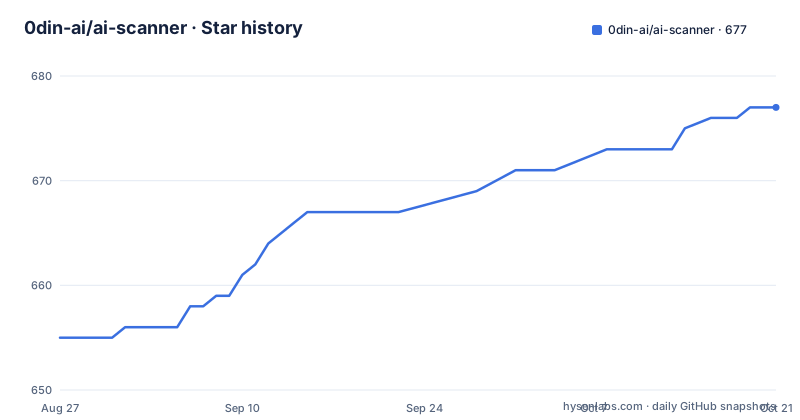
Star history
- 0din-ai/ai-scanner677 ★ · +22
| Repository | 2026-08-27 | 2026-10-21 |
|---|---|---|
| 0din-ai/ai-scanner | 655 | 677 |
22 Stars in the last 55 days, measured from the daily GitHub snapshot. Compare with other projects
Editorial analysis
What ai-scanner Adds Over a Raw garak Command
NVIDIA garak is a command-line scanner for LLM vulnerabilities. ai-scanner is a Ruby on Rails web application that wraps garak and adds a UI, scheduling, reporting, and multi-tenancy. The README describes it as a tool for organizations to test AI systems before deployment, similar to penetration testing. The core value is not the probes themselves, which come from garak, but the operational layer around them. You get a database-backed execution log, a live activity stream, and PDF export with per-probe drill-down. For a team that needs to run scans repeatedly and share results with non-engineers, this is a meaningful step up from shelling out to garak. For a single developer who just wants to probe a model quickly, the Rails app is overhead.
The Probe Set: Real Jailbreaks, Not Simulations
The README highlights six 0DIN-disclosed jailbreaks shipped as ready-to-run probes, each with the original attack prompt plus 34 retargetable variants. Examples include PlaceholderInjectionHP, IncrementalTableCompletionCM, and HexRecipeBookCM. These are tied to public threat reports with affected models, taxonomy, and reproducibility scores. The claim is that these are real attacks, not simulations. That is a differentiator from generic probe lists. The README also mentions 179 community probes across 35 vulnerability families, aligned with the OWASP LLM Top 10. The distinction matters: the 0DIN probes come with documentation and reproducibility data, which helps when you need to explain a finding to a security team. The community probes are broader but may lack that depth.
How Scans Work: Targets, Scheduling, and ASR
The scanner supports two target types: API-based LLMs and browser-based chat UIs. That covers hosted models and web interfaces. Scans can be run on demand or on a schedule with configurable recurrence. The Attack Success Rate (ASR) is computed per scan and tracked across runs, so you can see if a model gets more or less vulnerable over time. The live activity stream shows queued and running scans, with database-backed execution-log tails. This is a concrete data flow: the Rails app orchestrates garak, stores results in PostgreSQL, and exposes them through the UI. The ASR trend tracking is useful for regression testing after model updates. The README does not say how ASR is calculated exactly, only that it exists. That is a gap to verify if you plan to rely on the metric.
Getting It Running: Docker, Env Keys, and a Mock LLM
The quick start is a one-liner: curl the install script and pipe it to bash. The manual path is more explicit: download docker-compose.yml and .env.example, copy the env file, set SECRET_KEY_BASE, POSTGRES_PASSWORD, and ADMIN_INITIAL_PASSWORD, then run docker compose up -d. The default login is [email protected] with the ADMIN_INITIAL_PASSWORD value. The README warns to change the initial password immediately. The docs mention a built-in Mock LLM for a first scan, which is a sensible way to test the pipeline without spending API credits. The deployment documentation covers TLS and database configuration, but the README only gives the compose file. If you are not comfortable with Docker, there is no alternative install path mentioned. That is a constraint to note.
Multi-Tenancy and SIEM Integration: Enterprise Leaning
The feature list includes multi-tenant support: multiple organizations on a single deployment, with data encrypted at rest. That is a rare feature for an open-source scanner. It means you can run one instance for several teams or clients, each isolated. The README also mentions SIEM integration, forwarding results to Splunk or Rsyslog. That fits a security operations workflow. The no artificial limits line says all features are unlocked, with unlimited scans and users. That is a commercial pitch, but it also means the open-source version is not crippled. The enterprise angle is clear: the landing page offers a turn-key SaaS deployment. If you need multi-tenancy, this is a strong reason to consider ai-scanner over a plain garak setup.
Limitations and Wrong-Use Cases
The README is thin on failure modes. It does not say what happens when a probe crashes, when a target API rate-limits, or when a browser-based UI changes its selectors. For browser-based targets, garak's ability depends on the UI structure, and the README does not document how to maintain that. The multi-tenant encryption at rest is mentioned but not detailed; you should verify what is encrypted and how keys are managed. The scanner is a Rails app, so it requires PostgreSQL and Docker, which rules out lightweight environments. It is also not a runtime guard: it is a pre-deployment testing tool. If you need continuous in-production monitoring, this is the wrong tool. The README does not mention any API for triggering scans programmatically, so automation beyond the built-in scheduler is unconfirmed.
Alternative: Running garak Directly
The obvious alternative is to use NVIDIA garak itself, without the Rails wrapper. garak is a command-line tool that you can run in a CI pipeline or a cron job. The difference is in approach: garak gives you a scriptable interface with output you can parse, while ai-scanner gives you a UI, a database, and scheduling. If you already have a CI system and just need to run probes, garak alone is lighter and more flexible. You lose the PDF reports, the ASR trend tracking, and the multi-tenant isolation. But you gain simplicity and direct control. The trade-off is operational versus programmatic. For a small team that wants a dashboard, ai-scanner is worth it. For a team that wants to integrate scanning into existing automation, garak is the leaner path.
Maintenance, License, and What to Verify
The project is under Apache-2.0, which is permissive and allows commercial use with attribution. The repository shows recent releases, with v1.17.0 in August 2026, so it is actively maintained. The README points to a CONTRIBUTING.md for development setup and a SECURITY.md for vulnerability reports, but neither is included in the material. You should check those files before contributing. The documentation is hosted on 0din.ai, not in the repo, which means you depend on an external site. If that site goes down, you lose the deployment guide. Before adopting, verify the .env configuration, the Docker Compose service definitions, and how the app connects to garak. The README does not explain how garak is invoked or whether you need a separate garak installation. That is a concrete thing to check in the repository.
Editorial conclusion
Adopt ai-scanner if you need a self-hosted, multi-tenant web interface for running garak probes against API-based and browser-based LLMs, with scheduling, ASR tracking, and PDF reports. Skip it if you want a lightweight CLI-only tool or if you cannot run Docker and PostgreSQL. Before deploying, verify the Docker Compose setup, the .env security keys, and the probe list against your target models, since the README does not document probe customization or failure recovery in detail.
Frequently asked questions
What is 0din-ai/ai-scanner?
It is an Apache-2.0 licensed Ruby on Rails web application for AI model security assessments, built on NVIDIA's garak probing engine. The stated analogy is penetration testing: test AI systems for vulnerabilities before deployment rather than after. It ships 179 community probes across 35 vulnerability families aligned with the OWASP top ten for large language model applications.
What do the featured vulnerability probes in ai-scanner contain?
Six disclosed jailbreaks shipped as ready-to-run probes rather than simulations. Each bundles the original attack prompt with 34 retargetable variants and links to a public threat report listing affected models, the taxonomy classification, reproducibility scores and mitigations. The tactics shown include placeholder injection, incremental table completion, technical field guide, chemical compiler debug, correction and hex recipe book.
How do I install ai-scanner?
Either run the one-line installer, or fetch the compose file and the environment example manually, copy the example to a real environment file, set the secret key base using a generated hex value along with the database password and the initial administrator password, then start the stack. You sign in at localhost with the seeded administrator address and are told to change that password immediately.
Why does the ai-scanner environment example leave SECRET_KEY_BASE empty?
On purpose. The compose guard fires on an unset or empty value but not on a placeholder, so any deployment that copied the example unchanged would share one key. Because the framework derives its record encryption keys from that value, the shared key would be what protects stored target credentials, in a public repository. The comment includes the generation command to use instead.
How does ai-scanner report results?
As an Attack Success Rate tracked across scan runs, with trend tracking between them. Reports export to PDF with drill-down per probe and per attempt, and results forward to Splunk or Rsyslog. A live activity stream shows queued and running scans using database-backed execution logs, and scans can be scheduled with configurable recurrence as well as run on demand. Multiple organisations can share one deployment with data encrypted at rest.
Official sources
Add this badge to your README
If you maintain this project, the badge below links readers to this analysis and shows its maintenance status from the daily GitHub snapshot. Paste the markdown into your README; add ?metric=license or ?metric=stars to the image URL for a different field.

[](https://hysenlabs.com/projects/0din-ai-ai-scanner)Star history chart for your README
[](https://hysenlabs.com/projects/0din-ai-ai-scanner)