wreq: a Python HTTP client built for matching a browser's fingerprint
An ergonomic, privacy-aware Python HTTP Client
At a glance
- What is it?
- wreq is a Rust-backed Python HTTP client that gives you control over TLS and HTTP/2 settings rather than asking you to paste a JA3 string, with over a hundred browser device emulation profiles. The Python package is a thin binding over a Rust core, built with PyO3 and maturin.
- Who is it for?
- Adopt wreq if you make HTTP requests that are being fingerprinted and need the TLS and HTTP/2 shape of a real browser rather than a JA3 string. Do not adopt it for ordinary API calls, where a standard client is simpler and easier to debug.
- Can I use it commercially?
- Yes. Apache-2.0 is a permissive licence: you can use, modify and sell software built on it, as long as you keep its copyright and licence notices.
- Is it still maintained?
- Yes. The repository last received commits 1 day ago.
- What is it written in?
- Mainly Python, according to GitHub's language statistics.
Answers come from the project's GitHub data, last synced on October 23, 2026, and from our analysis. They are not legal advice.
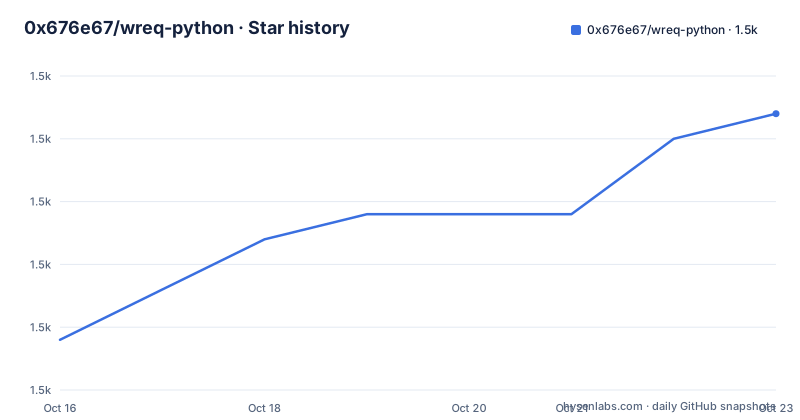
Star history
- 0x676e67/wreq-python1,496 ★ · +9
| Repository | 2026-10-16 | 2026-10-23 |
|---|---|---|
| 0x676e67/wreq-python | 1.5k | 1.5k |
9 Stars in the last 7 days, measured from the daily GitHub snapshot. Compare with other projects
Editorial analysis
Why fingerprint strings are not enough
wreq is described as an ergonomic and modular Python HTTP Client for high-fidelity protocol matching, featuring customizable TLS, JA3/JA4, and HTTP/2 signature capabilities, powered by the wreq Rust crate.
The Behaviour section explains the design decision, and it is the most important paragraph in the README. Due to the complexity of TLS encryption and the widespread adoption of HTTP/2, browser fingerprints such as JA3, JA4, and Akamai cannot be reliably emulated using simple fingerprint strings. Instead of parsing and emulating these string-based fingerprints, wreq provides fine-grained control over TLS and HTTP/2 extensions and settings for precise browser behavior emulation.
That is a real technical constraint rather than a preference. A JA3 string is a hash of the client's TLS parameters, so emulating one means configuring the TLS stack to produce exactly those parameters, and with HTTP/2 in the picture the surface area grows to include the settings frame, the priority tree, the header ordering, and the pseudo-header order. Handing a library a string and hoping it works means the library has to reverse a hash, which is possible only for the well-known cases.
wreq goes the other way. It lets you set the underlying protocol parameters, and then the fingerprint is a consequence rather than a target. The second behaviour point follows from the first: TLS and HTTP/2 fingerprints are often identical across various browser models because these underlying protocols evolve slower than browser release cycles, which is why over a hundred browser device emulation profiles are maintained in wreq.
The project is Apache-2.0 licensed, the home page is python.wreq.org, and the last push to the repository was on 2026-10-17. The releases are v0.13.0 from 2026-10-05, v0.12.3 from 2026-09-27, and v0.12.2 from 2026-09-16. The primary language is Python, with the core in Rust.
The feature list, which is a HTTP client checklist
The feature list is long and reads like a completeness check of a modern HTTP client, which is useful because it tells you what the library is competing with.
There are async and blocking clients. Bodies can be plain, JSON, urlencoded, or multipart. There is HTTP trailer support, a cookie store, a redirect policy, original header handling, rotating proxies, connection pooling, streaming transfers, and zero-copy transfers. There is WebSocket upgrade, HTTPS via BoringSSL, free-threaded safety, automatic decompression, and a certificate store covering both CAs and mTLS.
Several of those deserve a note. Rotating proxies and original header handling are the two that point at the scraping use case rather than the ordinary one, since a rotating proxy is about distributing requests and original headers are about preserving the exact header set a client would send. The zero-copy transfer and BoringSSL entries point at performance and at the transport layer, and the free-threaded safety entry matters for anyone running on a free-threaded Python build, where the GIL is gone and the usual assumptions about shared state stop holding.
The WebSocket upgrade is implemented at the HTTP level rather than as a separate library, which is what lets a client that has a specific TLS fingerprint keep the same fingerprint when it upgrades the connection.
The examples directory in the repository confirms the shape of the surface, with files for auth, basic_auth, bearer_auth, body, emulation, exceptions, form, header_map, http1_websocket, http2_websocket, json, keylog, multipart, orig_headers, proxy, query, redirect, request, and stream, plus a blocking/ subdirectory. The keylog example is notable, since writing a TLS key log is what lets you decrypt a session in a debugger such as Wireshark, and that only works if the underlying TLS stack supports it.
The example, and the shape of the API
The quick example is short and shows the API shape:
import asyncio
from wreq import Client, Emulation


async def main():
    async with Client(emulation=Emulation.Chrome154) as c:
        async with c.get("https://pingly.us.kg/api/all") as r:
            r.raise_for_status()
            print(await r.text())


if __name__ == "__main__":
    asyncio.run(main())
The install is a plain pip:
pip install wreqThe API is a context manager for the client and a context manager for the request, and the emulation is a parameter on the client rather than a per-request setting, which is the right granularity. A browser profile is a property of the connection, not of the individual call, and making it per-request would invite mixing profiles on one connection.
The name Emulation.Chrome154 names a specific browser version, which tells you the profiles are maintained against browser releases. That matters because a profile that is a year out of date describes a browser that no longer exists, and servers that fingerprint for fraud detection compare against current clients.
The response is used the way most async clients work, with raise_for_status, and the body is read with await r.text(). The nesting of two async with blocks is a small thing, but it is the difference between a client that is closed and one that leaks a connection pool when an exception is raised in the middle of a request.
The blocking client exists alongside this one, and the examples directory has a blocking/ subdirectory, so the same API is available without an event loop.
The Rust core, and how the wheels are built
The Python package is a binding, and the build system says so. The build backend is maturin, the Cargo package produces a cdylib named wreq, and the Python source lives in a python/ directory as the maturin python-source setting. The Python project requires Python 3.11 or newer, and the classifiers list CPython and PyPy, with the development status marked as Production/Stable.
The features in the Cargo manifest are where the engineering decisions show. The default feature is abi3-py311, and the comment next to the abi3 features explains the intent: they build cp311-abi3 and cp310 wheels now and will move to pyo3 once cp310 is dropped. An abi3 wheel is one that works across several CPython versions, so a single wheel serves 3.11, 3.12, 3.13, and 3.14, which is a real saving on a package with a native extension.
The underlying Rust crate is wreq at 0.16.1, and its feature list maps directly onto the Python feature list you saw earlier. There are features for query, form, json, socks, system-proxy, stream, multipart, cookies, charset, gzip, brotli, deflate, zstd, and ws, and the Rust dependency tree includes pingora-runtime, tokio with the multi-threaded runtime, and the http and http-body crates from the hyper lineage, along with serde and indexmap.
The allocator is configurable, with jemalloc and mimalloc as optional features on top of a default, which is a Rust library convention that lets the embedding application choose the allocator rather than having one imposed.
The Rust toolchain requirement is 1.98, and the edition is 2024, so this is a modern Rust codebase rather than a port of an old one.
Building it from source, and the platform matrix
The building section lists the platforms first, and the list is broad. Linux with glibc and musl on x86_64, aarch64, armv7, and i686, macOS on x86_64 and aarch64, Windows on x86_64, i686, and aarch64, and Android on aarch64 and x86_64.
The musl and armv7 and Android entries are the interesting ones, because they are the platforms where a Python HTTP client with a native TLS stack is usually not available at all. A prebuilt wheel for armv7 musl Linux or for Android means the library is usable on a Raspberry Pi or a mobile runtime without a Rust toolchain on the device.
The development setup needs the BoringSSL build environment, and the README links the boringssl BUILDING document for that. The commands are:
# on ubuntu or debian
sudo apt install -y build-essential cmake perl pkg-config libclang-dev musl-tools git
curl --proto '=https' --tlsv1.2 -sSf https://sh.rustup.rs | sh
pip install uv maturin

uv venv
source .venv/bin/activate

# development
maturin develop --uv

# build wheels
maturin build --release
The musl-tools and libclang-dev packages are there for a reason: musl-tools is what lets you cross-compile the musl wheels, and libclang is what bindgen needs when pyo3 generates the Python bindings. And the split between maturin develop for a local editable build and maturin build for wheels is the standard maturin workflow, where the first links against your local Rust sources and the second produces the distributable artefact.
The optional dependency groups in the Python manifest are also telling. There is a docs group with zensical, mkdocs-material, mkdocstrings, and mike for the documentation site, and a bench group with pytest, ry, pyreqwest, httpx with http2, aiohttp, niquests, curl-cffi, requests, and pycurl, which is a roster of the libraries the benchmark compares against.
The benchmark, and what it claims
The benchmark section is short and careful in its wording, which is unusual and worth reading exactly.
The benchmark suite compares Python HTTP clients over HTTPS with HTTP/1.1 and HTTP/2. It tests complete and streamed uploads, reading every response to the end. The results include client versions and machine details so you can check the conditions behind each measurement. And then the disclaimer: performance varies by workload and environment.
The last sentence is the one that matters. A benchmark of HTTP clients is measuring several things at once, and the network path, the machine, the server, and the protocol mix all move the number. Publishing the machine details and the client versions is what makes the numbers checkable, and the disclaimer is what keeps a reader from treating a single figure as a property of the library.
Two details of the methodology are notable. Testing both complete and streamed uploads is a choice about what a client is for, since streaming is where a client's buffer management shows up. And reading every response to the end is a fairness measure, because a client that discards the body can look fast for the wrong reason.
The benchmark dependencies also reveal what the author considers the competition, and the list is the usual set of serious Python HTTP clients: httpx with http2, aiohttp, requests, and then the more unusual ones, niquests, curl-cffi, and pyreqwest, which is a Python binding to reqwest and therefore a sibling project in the same space.
The project also offers commercial support through a services section, and it is sponsored by two proxy providers, Byteful and LundProxy, which is worth noting for anyone who cares about the incentives around a scraping-oriented library.
Editorial conclusion
Adopt wreq if you make HTTP requests that are being fingerprinted and need the TLS and HTTP/2 shape of a real browser rather than a JA3 string. Do not adopt it for ordinary API calls, where a standard client is simpler and easier to debug. Verify first that the emulation profile you pick matches the client the server expects, since a profile is only useful if the rest of the request looks like the same browser.
Frequently asked questions
What is wreq and what does it do differently from other Python HTTP clients?
It is a Rust-backed Python HTTP client that gives fine-grained control over TLS and HTTP/2 extensions and settings for browser behaviour emulation, because fingerprints such as JA3, JA4, and Akamai cannot be reliably emulated from simple fingerprint strings. It maintains more than a hundred browser device emulation profiles.
How do I install and use wreq?
Run pip install wreq, then create a Client with an emulation profile such as Emulation.Chrome154 and use it as an async context manager, making requests as nested async with blocks. A blocking client is also available, and the examples directory has a blocking/ subdirectory.
Which platforms does wreq support?
Linux with glibc and musl on x86_64, aarch64, armv7, and i686, macOS on x86_64 and aarch64, Windows on x86_64, i686, and aarch64, and Android on aarch64 and x86_64. The package requires Python 3.11 or newer.
How do I build wreq from source?
Install the BoringSSL build environment, then the toolchain with build-essential, cmake, perl, pkg-config, libclang-dev, musl-tools, and git, install Rust via rustup, install uv and maturin, create a virtual environment, and use maturin develop for local development or maturin build --release for wheels.
What does the wreq benchmark compare?
It compares Python HTTP clients over HTTPS with HTTP/1.1 and HTTP/2, testing complete and streamed uploads and reading every response to the end. The results include client versions and machine details, and the README notes that performance varies by workload and environment.
Official sources
Add this badge to your README
If you maintain this project, the badge below links readers to this analysis and shows its maintenance status from the daily GitHub snapshot. Paste the markdown into your README; add ?metric=license or ?metric=stars to the image URL for a different field.

[](https://hysenlabs.com/projects/0x676e67-wreq-python)Star history chart for your README
[](https://hysenlabs.com/projects/0x676e67-wreq-python)Was this useful?