Simplified Technical English: an Agent Skill for ASD-STE100
An Agent Skill that makes an LLM write in ASD-STE100 Simplified Technical English. Rules, approved word list, and a check tool.
At a glance
- What is it?
- This Agent Skill makes a language model write in ASD-STE100 Simplified Technical English, a controlled language used in aerospace and defence manuals. It ships the writing rules, the approved word list and a Python checker, and it is explicit about the errors it cannot catch.
- Who is it for?
- The skill fits teams that already write manuals in Simplified Technical English and want a model to draft in the same controlled language, and it fits documentation pipelines that can run ste_check.py over every file before review. It does not fit anyone who needs a guarantee of specification compliance, because the skill states that a person who knows STE must still examine an important text.
- Can I use it commercially?
- Check first. The repository uses a licence we do not classify automatically, so read its LICENSE file before any commercial use.
- Is it still maintained?
- Yes. The repository last received commits 84 days ago.
- What is it written in?
- Mainly Python, according to GitHub's language statistics.
Answers come from the project's GitHub data, last synced on November 7, 2026, and from our analysis. They are not legal advice.
Star history
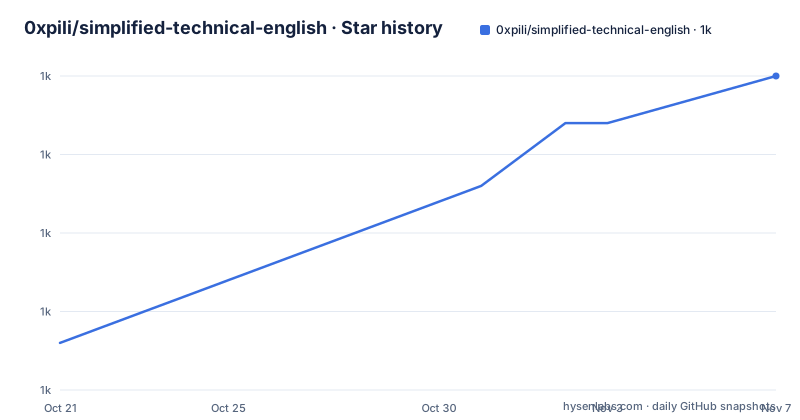
- 0xpili/simplified-technical-english1,025 ★ · +17
| Repository | 2026-10-21 | 2026-11-07 |
|---|---|---|
| 0xpili/simplified-technical-english | 1k | 1k |
17 Stars in the last 17 days, measured from the daily GitHub snapshot. Compare with other projects
Editorial analysis
What the skill enforces and what it cannot
Simplified Technical English is a controlled language for technical documentation, and the specification ASD-STE100 gives both its rules and its dictionary. The aerospace and defence industries use it for manuals because the result is short, clear and easy to translate, and the README is written in the language it teaches. The project packages that specification as an Agent Skill: a SKILL.md file with the primary instructions for a model, three reference documents, an examples file and a Python checker. The design intent is stated plainly. The tool cannot find all the errors, it cannot know whether a word carries its approved meaning, and a person who knows STE must still examine an important text.
The repository layout and the four things it contains
The tree is small enough to hold in the head. SKILL.md is the primary instruction set for the model. The references directory carries the substance: writing-rules.md holds the 53 writing rules with examples, word-list.md holds the 869 approved words, and substitutions.md lists replacements for frequent unapproved words, which is the part a writer reaches for when a normal English word is not permitted. examples/before-after.md collects worked examples, scripts/ste_check.py is the checker, and NOTICE.md holds the copyright information. A top level LICENSE file covers the terms. The split matters in practice, because a model that can consult the word list on demand and a model that has the word list pasted into its prompt behave differently.
The rewriting pattern the skill is built for
The README opens with a single example, and it is the pattern the whole project exists to produce. A sentence written in ordinary technical English: the text asks that components be thoroughly inspected for damage before installation commences. After the change: examine all the components for damage before you start the installation. Fewer words, active voice, approved verbs, one idea per clause.
Installing the skill for Claude
Installation is a clone into the skills folder, and the README gives the exact command:
git clone https://github.com/0xpili/simplified-technical-english.git ~/.claude/skills/simplified-technical-englishAfter that, two ways of starting it. You ask Claude to write or examine technical text in STE, and the skill is found and followed, or you start it directly by typing the slash command for the skill name. The slash route is the one to use when you want to be certain the rules are in force rather than hoping the model notices them, because the skill is discovered by name. Nothing else is required: the checker needs only Python 3, so there is no dependency to install and no service to run.
Using the same rules with a different model
The skill is not tied to one client. The documented path is to open SKILL.md and copy its text into the system prompt of the model you use, and then add the substitutions file if the model accepts more text, followed by the word list for the best results. That ordering is a hint about cost: the instructions are the base, substitutions are cheap, and the 869 word list is the expensive part because it occupies context for every request. A team running this on a small model or a tight context budget will get the rule set and the substitution habits but weaker word compliance, which is the trade the README structure implies. The check tool then becomes the safety net for exactly that case.
Running the checker over a draft
The checker runs on a file or on standard input, and the mode selects the rule set that applies to the text type:
python3 scripts/ste_check.py --mode procedural draft.txt
python3 scripts/ste_check.py --mode descriptive chapter.md
The tool reports sentences with too many words, paragraphs of more than six sentences, verb forms that are not approved together with passive voice, semicolons, contractions and unapproved helping verbs, and words that are not in the approved list. Each finding comes with its rule number, which is what makes the output actionable: a writer can look up rule 12 or whatever the tool cites and understand why the sentence failed. The implementation uses only Python 3, so it runs anywhere Python runs, with no virtual environment and no package to install.
What the checker will not catch
The README is unusually honest about this, and the limitations are worth repeating before anyone builds a gate on top of the tool. It cannot find all the errors. It cannot know if a word has its approved meaning, which is the deepest problem, because two sentences can both use only approved words and still mean something different from what STE intends. A person who knows STE has to examine an important text. The skill is not an official ASD document, and it cannot make sure that the text obeys the official specification fully. In practice that means the checker belongs at the start of a review process, not at the end of one, and the cost of a false negative here is a manual that reads well but means something else.
The dictionary, the specification and the licence split
The source of the skill is ASD-STE100 Issue 7 (2017), and ASD releases new issues of the specification, which means a skill frozen on Issue 7 can lag the standard. The specification itself is free to obtain from asd-ste100.org. The copyright position is the part that needs attention: the dictionary of ASD-STE100 is the property of ASD, and NOTICE.md is the file to read for the details, while the text of the skill and its scripts carry the MIT licence and refer to the LICENSE file. The repository licence is also the reason to look at both files rather than assume, since the terms GitHub shows for the project do not resolve to a standard identifier. The practical line is that the rules and the checker are open, the word list is not.
Editorial conclusion
The skill fits teams that already write manuals in Simplified Technical English and want a model to draft in the same controlled language, and it fits documentation pipelines that can run ste_check.py over every file before review. It does not fit anyone who needs a guarantee of specification compliance, because the skill states that a person who knows STE must still examine an important text. Before adopting it, read NOTICE.md and LICENSE together, since the writing rules are MIT licensed while the ASD dictionary remains the property of ASD, and pin the specification issue you follow, because the skill is based on Issue 7 from 2017 and ASD releases new issues.
Frequently asked questions
How do I install the Simplified Technical English skill for Claude?
Clone the repository into your skills folder with git clone https://github.com/0xpili/simplified-technical-english.git ~/.claude/skills/simplified-technical-english, then ask Claude to write or examine technical text in STE, or start the skill by typing its slash command.
What errors does ste_check.py detect?
Sentences with too many words, paragraphs of more than six sentences, unapproved verb forms and passive voice, semicolons, contractions and unapproved helping verbs, and words outside the approved list. Each error is reported with its rule number.
Can I use the STE skill with a model other than Claude?
Yes. Copy the text of SKILL.md into the system prompt of your model, add references/substitutions.md if the model accepts more text, and add references/word-list.md for the best results.
Is this skill an official ASD-STE100 document?
No. The README states that the skill is not an official ASD document and cannot guarantee that a text obeys the official specification fully. It is based on ASD-STE100 Issue 7 from 2017.
Who owns the ASD-STE100 dictionary used by the skill?
The dictionary is the property of ASD, and NOTICE.md holds the copyright information. The specification itself can be obtained free of charge from asd-ste100.org.
Which licence covers the skill text and its scripts?
The README states that the text of the skill and its scripts carry the MIT licence, with the terms in the LICENSE file, while the dictionary stays with ASD under NOTICE.md.
Official sources
Add this badge to your README
If you maintain this project, the badge below links readers to this analysis and shows its maintenance status from the daily GitHub snapshot. Paste the markdown into your README; add ?metric=license or ?metric=stars to the image URL for a different field.

[](https://hysenlabs.com/projects/0xpili-simplified-technical-english)Star history chart for your README
[](https://hysenlabs.com/projects/0xpili-simplified-technical-english)Was this useful?