Anthropic's skills repository: a working reference for Claude's Agent Skills
Anthropic's public collection of Agent Skills — folders of instructions, scripts, and resources Claude loads dynamically to perform specialized tasks repeatably.
At a glance
- What is it?
- A look at anthropics/skills, the public home of Claude's Agent Skills examples, the SKILL.md format, and the document skills behind Claude's file creation. The repository is a demonstration set, not a production library, and that distinction matters.
- Who is it for?
- Adopt this repository if you are building skills for Claude and want concrete, working examples of the SKILL.md format, especially the document skills for DOCX, PDF, PPTX, and XLSX. Do not adopt it as a drop-in production toolkit: the skills are provided for demonstration and education, and the implementations may differ from what Claude actually runs.
- Can I use it commercially?
- Not without permission. GitHub finds no licence file in the repository, and without a licence all rights are reserved by default: you may read the code but not reuse it. Check the README, or ask the authors, before using it.
- Is it still maintained?
- Yes. The repository last received commits 7 days ago.
- What is it written in?
- Mainly Python, according to GitHub's language statistics.
Answers come from the project's GitHub data, last synced on November 13, 2026, and from our analysis. They are not legal advice.
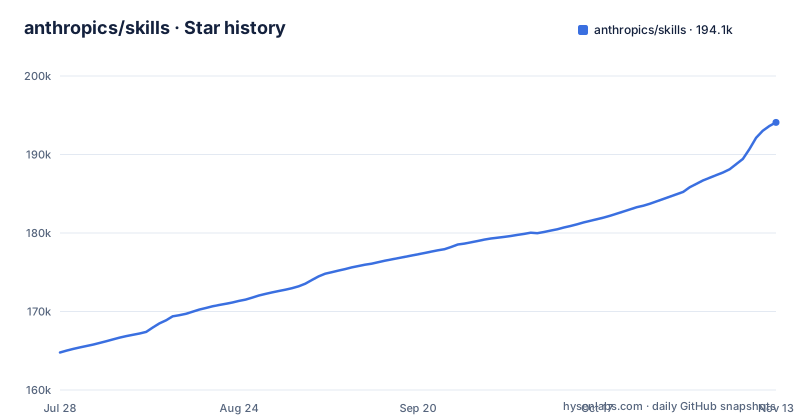
Star history
- anthropics/skills194,084 ★ · +29,308
| Repository | 2026-07-28 | 2026-11-13 |
|---|---|---|
| anthropics/skills | 164.8k | 194.1k |
29,308 Stars in the last 108 days, measured from the daily GitHub snapshot. Compare with other projects
Editorial analysis
What the repository actually contains
Anthropic's skills repository is a folder of example skills for Claude, each self-contained in its own directory with a SKILL.md file. The README groups them into creative applications, technical tasks, and enterprise workflows. The repository also holds the Agent Skills specification under ./spec and a skill template under ./template. The most notable contents are the document skills in skills/docx, skills/pdf, skills/pptx, and skills/xlsx. The README states these power Claude's document capabilities under the hood and are included as a reference for complex skills used in a production AI application. That is a different status from the rest of the repo, and it affects how you should treat them.
The SKILL.md format is the core mechanism
A skill is a folder with a SKILL.md file containing YAML frontmatter and markdown instructions. The frontmatter requires exactly two fields: name, a lowercase identifier with hyphens for spaces, and description, a complete statement of what the skill does and when to use it. The markdown body holds the instructions, examples, and guidelines that Claude follows when the skill is active. The template-skill in the repository shows the minimal shape: a name, a description, then sections like Examples and Guidelines. This is a simple contract. The complexity lives in the instructions themselves, not in the packaging.
Installation paths: plugin marketplace, Claude.ai, and the API
The README documents three ways to use these skills. In Claude Code, you register the repository as a plugin marketplace with the command /plugin marketplace add anthropics/skills. Then you browse and install either the document-skills or example-skills plugin, or run /plugin install document-skills@anthropic-agent-skills or /plugin install example-skills@anthropic-agent-skills. After installation, you invoke a skill by mentioning it, for example asking Claude Code to use the PDF skill to extract form fields from a file. On Claude.ai, the example skills are already available to paid plans, and you can upload custom skills following the linked support article. For the Claude API, the README points to a Skills API Quickstart for pre-built and custom skills. The plugin route is the most concrete, and it treats the repository as a distributable bundle rather than a source tree you copy.
The document skills are a separate licensing case
Many skills in the repository are open source under Apache 2.0. The document creation and editing skills in the docx, pdf, pptx, and xlsx folders are not. The README calls them source-available, not open source. They are shared as a reference for complex skills used in a production AI application, but you cannot treat them like the Apache-2.0 examples. If you plan to build on those document skills, check the terms that apply to each folder before copying code. The README does not give a specific license identifier for them, only the source-available label. That is a real constraint for teams that need permissive redistribution. The distinction also signals that these skills are closer to production code than the demo skills, which means they carry more integration complexity and more risk if you modify them.
Limitations: demonstration status and behavioral drift
The README contains a disclaimer that the skills are provided for demonstration and educational purposes only. It states that implementations and behaviors you receive from Claude may differ from what is shown in these skills. This is the central limitation. The repository is not a guarantee of behavior, and it is not a maintained product. If you rely on a skill for a critical task, the README explicitly says to test it thoroughly in your own environment first. Another limitation is that the repository does not include versioned releases, and the last push was on 2026-10-28, so there is no release history to track changes against. For a production deployment, that means you are pinning to a moving main branch or forking the repository yourself. The wrong tool would be a team expecting stable, versioned, production-ready skills with support guarantees.
Alternatives: build your own skills or use Claude's built-in set
The obvious alternative is to write your own skills instead of using these examples. The repository itself encourages this by providing the template-skill and pointing to Anthropic's guide on creating custom skills. The difference in approach is control: with your own SKILL.md, you define the exact instructions, examples, and guidelines for your domain, and you avoid any behavior drift from Anthropic's examples. The trade-off is effort. You must write and test the instructions yourself, and you lose the reference implementations for complex formats like DOCX or PDF. Another alternative is to rely on the skills already available in Claude.ai or the API without pulling from this repository. The repository sits between those two: it gives you inspectable code that you can adapt, but with the caveat that it is not the exact code Claude runs.
Maintenance and upgrade cost
The repository has no listed releases and no release notes, so there is no structured upgrade path. Changes land on the main branch, and you will need to track them manually or fork. The README does not describe a contribution process or a changelog. For the document skills, the maintenance cost is higher because they are tied to Claude's production document capabilities; if Anthropic updates those internally, the public reference may lag or diverge. The Apache-2.0 example skills are simpler to maintain because they are small and self-contained, but they still require you to test against Claude's current behavior. The licensing split adds another maintenance burden: you must track which folders are Apache-2.0 and which are source-available, and ensure your use complies with each. There is no single license file covering the whole repository, so the cost of compliance is per-skill.
Editorial conclusion
Adopt this repository if you are building skills for Claude and want concrete, working examples of the SKILL.md format, especially the document skills for DOCX, PDF, PPTX, and XLSX. Do not adopt it as a drop-in production toolkit: the skills are provided for demonstration and education, and the implementations may differ from what Claude actually runs. Before relying on any skill, verify the license for each folder, since the document skills are source-available but not open source, and test the skill's output against your own files and workflows. The repository is a reference and a template source, not a maintained application.
Frequently asked questions
how to install skills in claude code
Register the repository as a Claude Code plugin marketplace with /plugin marketplace add anthropics/skills, then select Browse and install plugins, choose anthropic-agent-skills, pick document-skills or example-skills, and select Install now. You can also skip the browser and run /plugin install document-skills@anthropic-agent-skills or /plugin install example-skills@anthropic-agent-skills.
how to use skills in claude code
After the plugin is installed you use a skill by mentioning it in your request, for example asking Claude Code to use the PDF skill to extract the form fields from path/to/some-file.pdf. Each skill is a folder containing a SKILL.md file with the instructions and metadata Claude uses.
how to use skills in claude
In Claude.ai the example skills in this repository are already available to paid plans, so there is nothing to install there. To use any skill from the repository or upload custom skills, the readme points to the Using skills in Claude support instructions.
how to install skills from github to claude
Run /plugin marketplace add anthropics/skills in Claude Code so the repository is registered as a plugin marketplace, then browse and install plugins, select anthropic-agent-skills, choose document-skills or example-skills, and select Install now.
how to use skills
A skill is a folder of instructions, scripts, and resources that Claude loads dynamically to improve performance on specialized tasks, so that it can complete a specific task in a repeatable way. In this repository each skill is self-contained in its own folder with a SKILL.md file holding the instructions and metadata.
Official sources
Where developers are discussing it
Posts on Hacker News, dev.to and Lobsters that link to this repository, found by our scan of those communities. 2 in the last 30 days; newest first.
- Don't Write More Prompts. Install These 10 Trending 'Skills' Insteaddev.to · Nov 8, 2026 · 18 points · 6 comments
- 2 Agent Skills Every Frontend Developer Should Trydev.to · Oct 20, 2026 · 21 points · 3 comments
Add this badge to your README
If you maintain this project, the badge below links readers to this analysis and shows its maintenance status from the daily GitHub snapshot. Paste the markdown into your README; add ?metric=license or ?metric=stars to the image URL for a different field.

[](https://hysenlabs.com/projects/anthropics-skills)Star history chart for your README
[](https://hysenlabs.com/projects/anthropics-skills)Was this useful?