ComfyUI-QwenVL runs two inference engines so you can pick GGUF or Transformers
ComfyUI-QwenVL custom node: Integrates the Qwen-VL series, including Qwen2.5-VL, Qwen3-VL, Qwen3.5-VL, Qwen3.6-VL (MoE), and Qwen3.8-VL, with GGUF support for advanced multimodal AI in text generation, image understanding, and video analysis.
At a glance
- What is it?
- ComfyUI-QwenVL is a ComfyUI custom node that brings the Qwen vision-language family into a node graph, with a GGUF path through llama.cpp and a PyTorch path through Transformers plus SageAttention. The interesting engineering is in the parts that keep video analysis inside the context window.
- Who is it for?
- Adopt ComfyUI-QwenVL if you build ComfyUI workflows that need image understanding, video analysis or prompt rewriting with Qwen models, and if you want the choice between a GGUF build that fits in limited VRAM and a full Transformers build that uses the newer attention kernels.
- Can I use it commercially?
- Yes, with conditions. GPL-3.0 is a copyleft licence: if you distribute software that includes it, you must release that software's source code under the same licence. Running it internally without distributing it does not trigger that obligation.
- Is it still maintained?
- Yes. The repository last received commits 55 days ago.
- What is it written in?
- Mainly Python, according to GitHub's language statistics.
Answers come from the project's GitHub data, last synced on November 6, 2026, and from our analysis. They are not legal advice.
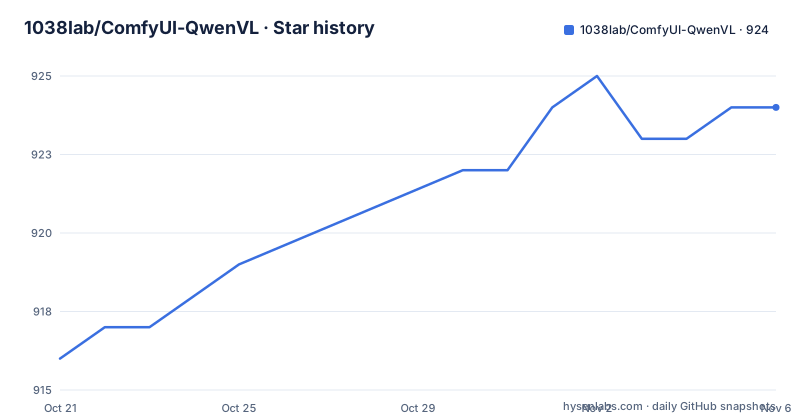
Star history
- 1038lab/ComfyUI-QwenVL924 ★ · +8
| Repository | 2026-10-21 | 2026-11-06 |
|---|---|---|
| 1038lab/ComfyUI-QwenVL | 916 | 924 |
8 Stars in the last 16 days, measured from the daily GitHub snapshot. Compare with other projects
Editorial analysis
Two backends, and the reason there are two
ComfyUI-QwenVL is a custom node package that integrates the Qwen-VL series, including Qwen2.5-VL, Qwen3-VL, Qwen3.5-VL, Qwen3.6-VL with MoE, and Qwen3.8-VL, with GGUF support for text generation, image understanding and video analysis.
The architecture is described as dual-engine: GGUF via llama.cpp and PyTorch via Transformers with SageAttention. That choice is what makes the package useful across very different hardware. A GGUF build, loaded through llama-cpp-python, can run on a machine that could not hold the full model in FP16, while the Transformers path uses the newer attention kernels and the full range of PyTorch tooling.
The Transformers path has the more interesting recent work behind it. Version 2.1.0 added SageAttention support with per-GPU architecture optimization, listing SM80, SM89, SM90 and SM120 kernels, along with improved FP8 model handling and automatic attention mode selection. The Auto mode tries Sage first, then Flash, then SDPA, in that order. The rationale for the fallback is stated plainly: better support for pre-quantized FP8 models with automatic SDPA fallback.
The dependency list is short and readable in pyproject.toml.
dependencies = ["transformers", "torch", "huggingface-hub", "hf_xet", "psutil", "numpy", "Pillow", "opencv-python", "bitsandbytes", "accelerate"]bitsandbytes is what provides the 4-bit and 8-bit quantization paths, opencv-python handles the video frame work, and hf_xet is the transfer library for model downloads.
One version constraint is easy to miss. The requirements file notes that Qwen3-VL models require transformers >= 4.57.0, and the 2.1.1 release fixed compatibility for both Transformers 4.x and 5.x.
Video analysis and the token budget problem
The most substantial engineering in this package is about not running out of context on video, and the release notes are unusually specific about the failure.
Version 2.3.0, released 2026-08-26, added Intelligent Video Auto-Scaling and a token budget safeguard. The README states it solves a context slot overflow, reported as failed to find a memory slot, and CUDA OOM. The mechanism is that it automatically computes a safe per-frame token budget based on ctx and frame_count, preserves full native resolution for small video frames, and gracefully downscales high-res videos at 1080p and 4K. A video_frame_size control was added to all Advanced nodes.
That is the right shape of solution. Video is where a vision-language model's context budget runs out, because every frame costs tokens, and the failure mode is a hard error rather than a soft degradation. Estimating the per-frame budget from the context size and the number of frames, then scaling the frame resolution to fit, keeps the workflow running at the cost of resolution rather than at the cost of crashing.
The shared implementation lives in AILab_Utils.py, described as centralized media utilities with shared tensor conversion, frame sampling and dynamic budget estimation across both the GGUF and Transformers backends. Sharing that code between the two engines is what keeps the behaviour consistent when you switch backends.
Video input is accepted as a frame sequence, and the release notes for 2.2.0 mention native comfy.model_management for memory clearing, which is the ComfyUI-aware way to release VRAM between nodes rather than relying on garbage collection.
Custom models through JSON manifests and extra_model_paths.yaml
Model management is where a ComfyUI user spends real time, so the project has put work into it.
Version 2.3.0 introduced what it calls a Unified Custom Models Architecture, using a custom_models.json file with a simplified two-section design of hf_models and gguf_models, with full support for custom GGUF and HuggingFace models across both the vision and text nodes. The repository ships custom_models_example.json alongside the built-in hf_models.json and gguf_models.json, plus system_prompts.json for the preset prompt definitions.
Version 2.3.2, released 2026-09-13, added Multi-Drive and Local Folder Support, so models stored on other drives can be loaded directly without re-downloading. The integration is through extra_model_paths.yaml, and the README notes the case-insensitive handling of LLM and llm and gguf path entries, with directory links as an alternative.
The same release added a one-click download source toggle in the AILab_HuggingFaceDownloader node for hf-mirror.com, which is a mirror for mainland China.
The downloader itself was upgraded in 2.3.0 into a standalone workflow execution with OUTPUT_NODE set to True, smart auto-routing using save_folder set to auto, automated mmproj visual projector discovery and downloading, and a color-coded status UI card. That last point matters for the GGUF path specifically, since a vision-capable GGUF needs its matching multimodal projector, and a tool that finds and downloads that automatically removes a common failure.
Models are also downloaded automatically on first use, and the package ships a model list that the release history shows being updated as new Qwen versions appear.
Standard node, Advanced node, and prompt enhancers
The node surface is deliberately layered by skill.
There is a simple QwenVL node for quick use and a QwenVL Advanced node with fine-grained control over generation. The initial 1.0.0 release shipped both, described as including a standard and an advanced node for users of all levels.
The Advanced node carries the controls that matter for reproducibility and resource use. Quantization options are 4-bit, 8-bit and FP16, chosen to balance VRAM and performance. There is a Keep Model Loaded option to retain the model in VRAM for faster sequential runs. There is a seed parameter for reproducible generation. There is a video_frame_size control for the scaling behaviour described earlier. And from the 1.1.0 runtime overhaul there is an attention-mode selector, flash-attn auto detection, smarter caching, and quantization and torch.compile controls.
Alongside the vision nodes there are dedicated text-only prompt enhancers for both the HF and GGUF backends. These take a prompt and rewrite it, which is a small idea with a large effect on output quality, since a vision-language model is sensitive to how the instruction is phrased.
Prompts themselves come from a preset and custom system. You choose from a list of preset prompts or write your own for full control, and the presets live in system_prompts.json. There is also an English and Chinese user guide, at docs/USER_GUIDE.md and docs/USER_GUIDE_zh.md, which is a sign that the audience is not entirely anglophone.
The hardware-aware behaviour is worth calling out. The package automatically detects GPU capabilities and prevents errors with incompatible models, and the 1.0.0 release added hardware-aware safeguards for FP8 model compatibility. In a ComfyUI workflow, a node that fails cleanly before it allocates rather than halfway through a generation is worth having.
Installing into ComfyUI, and the llama-cpp-python prerequisite
The repository is laid out as a ComfyUI custom node package, with a pyproject.toml that carries a tool.comfy section naming the PublisherId as ailab, the DisplayName as ComfyUI-QwenVL and an icon path pointing at assets/QwenVL.svg.
The top level listing shows what a user actually interacts with: __init__.py for the node registration, py/ for the node implementations, web/ for the frontend extensions, assets/ for the icon and images, docs/, example_workflows/ with example workflow JSON, AILab_Utils.py for the shared media helpers, and the model manifest files.
There is an important ordering constraint. The README carries an IMPORTANT notice saying to install llama-cpp-python before running GGUF nodes, with the instruction link pointing at docs/LLAMA_CPP_PYTHON_VISION_INSTALL.md. That is the single most common way to fail with this package.
The requirements file explains what the GGUF path needs.
# ComfyUI-QwenVL requirements
# Note: Qwen3-VL models require transformers >= 4.57.0

transformers
torch
huggingface-hub
hf_xet
psutil
numpy
Pillow
opencv-python
bitsandbytes
accelerate
And then it explains the extra for GGUF models with vision support. The server extra installs the necessary components for multimodal models, and the file shows the extra as llama-cpp-python[server], commented out because it is an opt-in rather than a default.
So there are two dependency paths. The base install covers the Transformers backend. The GGUF backend needs llama-cpp-python installed separately with the server extra, and the vision variant specifically.
The repository also carries update.md with the release notes for each version, and the README's news section links into it, which is where the detail on each release lives rather than in the README itself.
The release history is the honest measure of this project
Look at the news section as a changelog and you learn what kind of project this is. Version 1.0.0 shipped on 2025-10-17 with support for the Qwen3-VL and Qwen2.5-VL series, automatic HuggingFace downloading, on-the-fly quantization in 4-bit, 8-bit and FP16, a preset and custom prompt system, both a standard and an advanced node, image and video frame sequence input, a Keep Model Loaded option and a seed parameter.
Then it moved quickly. 1.0.3 on 2025-10-22 updated the models list. 1.0.4 on 2025-10-31 added custom models. 1.1.0 on 2025-11-10 overhauled the runtime. 2.0.0 on 2025-12-22 added the GGUF nodes and the prompt enhancer nodes. 2.1.0 on 2026-02-05 added SageAttention. 2.1.1 on 2026-02-08 fixed Transformers compatibility. 2.2.0 on 2026-08-20 added native GGUF support for Qwen3.5, 3.6 and 3.8. 2.3.0 on 2026-08-26 added the video auto-scaling. 2.3.1 on 2026-08-31 fixed several bugs. 2.3.2 on 2026-09-13 added the custom directories and mirror download.
That is eleven releases in eleven months, and it tells you the shape of the dependency. This package tracks Qwen model releases and the surrounding ecosystem, so it must move when they move.
The last push was on 2026-09-14 and the repository is not archived, so the work is current. There are no GitHub releases published, and the version tracked in pyproject.toml is 2.3.2, which matches the newest entry in the news section.
For a ComfyUI user, that cadence is fine. Custom nodes are expected to be updated as the base application and the models change, and ComfyUI's own extension manager handles the update path. For a production pipeline that has to keep working, it is a factor to weigh.
Where ComfyUI-QwenVL is the wrong tool
Four limits are worth stating before you build a workflow around it.
The first is the platform. This is a ComfyUI custom node, so it runs inside ComfyUI. If you want a vision-language service with an API, a CLI, or a queue of your own, this is the wrong shape and you should look for a library that runs the model directly.
The second is the model download. Models are downloaded automatically on first use from HuggingFace, and there is no model bundled with the package. On a machine without internet access, or in an environment where downloading tens of gigabytes of weights is not acceptable, the package cannot start. The mirror toggle for mainland China addresses speed, not availability.
The third is the GPU requirement. SageAttention has per-GPU optimized kernels for SM80, SM89, SM90 and SM120, and FP8 handling depends on hardware support. The Auto mode falls back to Flash and then SDPA, which is the right behaviour, but the headline performance of the package assumes a recent NVIDIA card. The 32B variants in the supported range, 2B to 32B in Instruct and Thinking variants, need a correspondingly large amount of VRAM, which is where the GGUF path becomes the practical option.
The fourth is video length and resolution. The token budget safeguard scales frames down rather than failing, which means a long 4K video is processed at reduced resolution. If your task depends on reading fine detail in a video frame, downscaling is exactly the wrong trade, and you would need to segment the video yourself before it reaches the node.
The licence is GPL-3.0, declared in pyproject.toml with license set to file LICENSE, and the LICENSE file is at the repository root. For a ComfyUI workflow that is rarely a problem, but it is worth noting for anyone considering modifying the nodes and distributing them.
Editorial conclusion
Adopt ComfyUI-QwenVL if you build ComfyUI workflows that need image understanding, video analysis or prompt rewriting with Qwen models, and if you want the choice between a GGUF build that fits in limited VRAM and a full Transformers build that uses the newer attention kernels. Do not adopt it if you need a stable long-lived deployment, since the README's own history is a sequence of version bumps every few weeks, or if your GPU cannot run FP8 or SageAttention kernels, because the fallback path is SDPA and the project exists to avoid that. Before you build a workflow, read docs/USER_GUIDE.md, install llama-cpp-python before running any GGUF node as the README insists, and check the transformers version floor of 4.57.0 that Qwen3-VL models require.
Frequently asked questions
What does ComfyUI-QwenVL do?
It is a ComfyUI custom node package that integrates the Qwen-VL series, including Qwen2.5-VL, Qwen3-VL, Qwen3.5-VL, Qwen3.6-VL with MoE and Qwen3.8-VL, with GGUF support for text generation, image understanding and video analysis.
Do I need to install llama-cpp-python to use ComfyUI-QwenVL?
You need it before running the GGUF nodes. The README marks that as important, with a dedicated installation document at docs/LLAMA_CPP_PYTHON_VISION_INSTALL.md, and the requirements file shows the vision capable extra as llama-cpp-python[server].
Which Transformers version does ComfyUI-QwenVL need?
The requirements file notes that Qwen3-VL models require transformers >= 4.57.0. Release 2.1.1 fixed compatibility for both Transformers 4.x and 5.x.
How does ComfyUI-QwenVL handle long or high resolution video?
Version 2.3.0 added intelligent video auto-scaling and a token budget safeguard that computes a safe per-frame token budget from ctx and frame_count, preserving full native resolution for small frames and downscales 1080p and 4K video. It was added to solve context slot overflow and CUDA OOM.
Can I add my own GGUF or HuggingFace models to ComfyUI-QwenVL?
Yes. Release 2.3.0 introduced a unified custom_models.json format with hf_models and gguf_models sections, and release 2.3.2 added multi-drive and local folder support through extra_model_paths.yaml so models on other drives load without being downloaded again.
What licence is ComfyUI-QwenVL released under?
GPL-3.0, declared in pyproject.toml with the license set to the LICENSE file at the root of the repository.
Official sources
Add this badge to your README
If you maintain this project, the badge below links readers to this analysis and shows its maintenance status from the daily GitHub snapshot. Paste the markdown into your README; add ?metric=license or ?metric=stars to the image URL for a different field.

[](https://hysenlabs.com/projects/1038lab-comfyui-qwenvl)Star history chart for your README
[](https://hysenlabs.com/projects/1038lab-comfyui-qwenvl)Was this useful?