A 5-Node Home Kubernetes Cluster Managed Entirely by Flux and Talos
This is the Kubernetes config for my home cluster, I use Flux to sync this and the cluster itself.
At a glance
- What is it?
- Solon's Home Server Configuration is a public GitOps repository for a 5-node hybrid Kubernetes cluster running Talos Linux, Flux CD, and Renovate. It shows a complete home-lab stack with storage, networking, and media automation, but it is a personal reference, not a turnkey product.
- Who is it for?
- Adopt this repository if you run a multi-node home Kubernetes cluster and want a concrete, working reference for Flux-based GitOps with Talos, Longhorn, and external secrets. Do not adopt it if you expect a supported product or a one-size-fits-all template; it is a personal setup with specific hardware and choices.
- Can I use it commercially?
- Not without permission. GitHub finds no licence file in the repository, and without a licence all rights are reserved by default: you may read the code but not reuse it. Check the README, or ask the authors, before using it.
- Is it still maintained?
- Yes. The repository received new commits within the last day.
- What is it written in?
- Mainly Python, according to GitHub's language statistics.
Answers come from the project's GitHub data, last synced on October 24, 2026, and from our analysis. They are not legal advice.
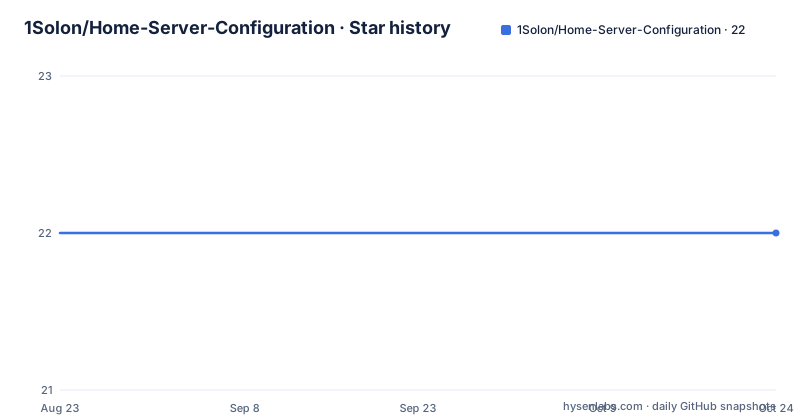
Star history
- 1Solon/Home-Server-Configuration22 ★ · +0
| Repository | 2026-08-23 | 2026-10-24 |
|---|---|---|
| 1Solon/Home-Server-Configuration | 22 | 22 |
0 Stars in the last 62 days, measured from the daily GitHub snapshot. Compare with other projects
Editorial analysis
What This Repository Actually Is
This is not a software project in the usual sense. It is a public Kubernetes configuration repository that one person, Solon, uses to run a home server cluster. The README describes a 5-node hybrid cluster: 4 ARM64 nodes and 1 x86_64 node, running Talos Linux v1.12.1 and Kubernetes v1.35.0. Flux CD syncs the cluster state from this repository, and Renovate handles dependency updates. The primary language listed is Python, but the repository contains YAML manifests, Helm values, and Kustomize overlays, not Python application code. The value here is not a new tool but a detailed, working example of a modern GitOps home-lab stack. It is for someone who wants to see how Flux, Talos, Longhorn, and a dozen other components fit together in a real deployment. If you are looking for a reusable installer or a packaged distribution, this repository will disappoint you.
The Architecture: Talos, Flux, and a Hybrid Node Pool
The architecture is built around three pillars. First, Talos Linux provides an immutable, API-configured OS. That means no SSH, no package management, and no manual changes on the nodes; everything is declared through Talos configuration. Second, Flux CD acts as the GitOps engine, watching this repository and applying changes to the cluster. Third, the node pool mixes ARM64 and x86_64 architectures, which forces the configuration to handle multi-arch images and node affinity. The README lists specific versions: Talos v1.12.1 and Kubernetes v1.35.0. Those versions matter because Talos has a specific upgrade path, and Kubernetes API changes can break manifests. The repository structure shows a clear separation: a top-level kubernetes directory with subdirectories for ai, games, and infra. The infra directory contains flux, node-feature-discovery, nvidia-device-plugin, reflector, and reloader. This layout suggests that Flux is bootstrapped with its own instance, operator, and receiver, which is a common pattern for handling webhook-driven updates. The use of node-feature-discovery and the NVIDIA device plugin indicates that at least one node has a GPU, likely the x86_64 node. That hybrid setup is a real constraint: not all containers run on ARM, so the configuration must include tolerations or node selectors.
How Flux Syncs and Where Secrets Live
Flux CD is the central mechanism. The repository contains a flux directory with instance, notifications, operator, receiver, repositories, and secrets subdirectories. That structure implies a standard Flux bootstrap: the operator installs Flux controllers, the instance defines the GitRepository and Kustomization objects, and the receiver allows webhook events to trigger reconciliations. Notifications likely configure Slack or similar alerts. The secrets handling is notable: the README says SOPS with AGE encryption is used, but also that 1Password via External Secrets Operator is the primary method now, with some former SOPS usage remaining. That is a transitional state. It means some secrets are encrypted in the repo with AGE, while others are pulled from 1Password at runtime. For a reader, this is a warning: you cannot simply clone this repo and expect it to work. You need access to the AGE private key or the 1Password vault, and you need to know which secrets are stored where. The README does not provide those keys, nor should it. The practical takeaway is that Flux syncs all manifests, but the secrets are externalized, which is a good security practice but a barrier to reproduction.
Getting It Running: Commands and Config Keys
The README does not include a quick start guide. There are no explicit commands for bootstrapping the cluster. However, the repository structure and the Flux documentation imply the standard bootstrap command: flux bootstrap github --owner=1Solon --repository=Home-Server-Configuration --branch=main --path=./kubernetes/infra/flux. That command would install Flux and create the necessary manifests. For Talos, the standard approach is talosctl apply-config, but the README does not specify the exact command. The configuration keys that matter are in the manifests themselves. For example, the flux instance directory likely contains a GitRepository object with a url field pointing to this GitHub repo and a ref field for the branch. The Kustomization objects define the path and prune behavior. The SOPS integration requires a .sops.yaml file and an AGE key, but the README does not show them. The External Secrets Operator uses SecretStore and ExternalSecret resources, with a provider field for 1Password. Without those files, the configuration is incomplete. The README does list the software stack, which gives you a checklist of what to install, but not the order. You would need to inspect the actual YAML files in the repository to find the exact fields. Since the repository is public, you can clone it and read them, but the README alone is not enough to reproduce the cluster.
The Software Stack: Storage, Networking, and Media Automation
The README includes a table of software with categories and purposes. Storage is handled by Longhorn for block storage, Crunchy Postgres for databases, and Dragonfly for caching. Networking uses Cilium for CNI, Envoy Gateway for ingress, and Cloudflare for DNS and DDNS. Tailscale provides VPN access. Security includes Authentik for SSO, Cert-Manager for certificates, and External Secrets Operator for secrets. Observability uses the Kube Prometheus Stack with Grafana and Prometheus. The media automation category is extensive: Cleanuparr, Decluttarr, Huntarr, Jellyfin, Jellyseerr, Prowlarr, and Flaresolverr. There is also an AI section with LiteLLM, Open WebUI, and SearXNG. This is a full home-lab setup, not a minimal cluster. The presence of Flaresolverr, which bypasses Cloudflare protection, is a point of caution. It is a tool that can be used for legitimate scraping, but it also has abuse potential. The README does not discuss legal or ethical implications. For a reviewer, this is a reminder that the repository is a personal configuration, and some components may not be suitable for all users. The stack is also heavy: running all these services on 5 nodes, some ARM, requires careful resource allocation. The README does not provide resource requests or limits, so you would need to inspect the manifests to see if they exist.
Limitations and Failure Modes
The most obvious limitation is that this is a single-person configuration, not a maintained project. The README is truncated, and the last push date is unknown. That means the repository may be stale, with versions that have known security issues. For example, Talos v1.12.1 and Kubernetes v1.35.0 are specific versions that may not be current. Renovate is supposed to keep dependencies updated, but if the repository has not been pushed recently, Renovate has not run. A second limitation is the hybrid ARM/x86 architecture. Not all container images support ARM64, so you may encounter images that fail to pull on the ARM nodes. The configuration must include node selectors, but the README does not describe them. A third failure mode is the secret management transition. Mixing SOPS and External Secrets Operator can lead to confusion about where a secret is defined. If a secret is missing from 1Password but expected by an ExternalSecret, the application will fail to start. The README does not provide a migration guide. Finally, the repository is not a Helm chart or a set of reusable templates. It is a snapshot of a live cluster. If you copy it, you will get Solon's choices, not necessarily best practices. For example, Flaresolverr is a tool that may violate Cloudflare's terms of service. That is a legal risk you take on if you deploy it.
Alternatives: K3s, Ansible, and Other GitOps Tools
The main alternative to this setup is a simpler Kubernetes distribution like K3s, which runs on a single node and does not require Talos. K3s has a lighter footprint and is easier to install, but it lacks the immutable API-configured OS that Talos provides. Talos is more secure because there is no SSH, but it has a steeper learning curve. Another alternative is to use Ansible to configure the OS and then apply manifests manually, which is a more traditional approach. The difference is that Ansible is imperative, while Flux is declarative. With Flux, you push changes to Git, and the cluster reconciles. With Ansible, you run playbooks to make changes. For secrets, the alternative to External Secrets Operator is to use sealed-secrets, which encrypts secrets in the repo without an external store. The difference is that sealed-secrets uses a public key for encryption and a private key in the cluster, while External Secrets Operator fetches from a third-party vault. The choice depends on whether you want secrets to be readable in the repo or stored externally. For a home lab, sealed-secrets is simpler because it does not require a 1Password account. However, the repository under review uses External Secrets Operator, which is more scalable for multiple clusters. The README does not compare these options, but the choice is clear from the stack.
Maintenance, Upgrades, and License
Maintenance is a real cost. The repository uses Renovate to automate dependency updates, but that only works if the repository is actively pushed. The README does not show a CI pipeline, so updates are likely applied manually or through Flux's image automation. Flux can update images, but Renovate updates manifests. The combination of Flux and Renovate is powerful, but it requires attention. Talos upgrades are not trivial; they require talosctl upgrade and a reboot of each node. The README does not document the upgrade procedure. The license is listed as unknown, which is a problem. Without a license, you have no legal right to copy, modify, or distribute the configuration. That means you can look at it for inspiration, but you cannot legally reuse the code in your own project without permission. This is a common issue with personal repositories. The README does not mention a license file. If you want to use any part of this configuration, you should contact the author. The absence of a license is a red flag for production use, but for learning purposes, it is acceptable as long as you do not copy wholesale. The repository is not archived, but the last push is unknown, so it may be abandoned. Check the commit history before relying on it.
Editorial conclusion
Adopt this repository if you run a multi-node home Kubernetes cluster and want a concrete, working reference for Flux-based GitOps with Talos, Longhorn, and external secrets. Do not adopt it if you expect a supported product or a one-size-fits-all template; it is a personal setup with specific hardware and choices. Before using anything, verify the current Flux version, the SOPS/AGE key handling, and the Renovate configuration, since those change frequently and the repo may lag. Check the license (currently unknown) before copying any configuration. If you need a simpler start, consider a single-node K3s with plain manifests.
Frequently asked questions
What is the best setup for a home server, according to Home-Server-Configuration?
Nothing on record ranks setups. What is documented is one specific stack: a GitOps-managed Kubernetes cluster on Talos Linux with Flux CD and Renovate, holding thirty listed applications and an infrastructure layer that includes Cilium, Envoy Gateway, Authentik, CloudNativePG, Dragonfly, Garage, and Miroir.
What's the difference between a NAS and a home server in this configuration?
No comparison is given. The storage entries are Garage for distributed S3-compatible object storage, Miroir for replicated block storage, and CloudNativePG for PostgreSQL, with Syncthing for continuous file synchronization on top.
Is it worth setting up a home server, judging by this repository?
Nothing on record answers that. What is documented is the maintenance surface: Renovate to bump manifest versions, Flux CD to reconcile them, and Tuppr to coordinate Talos Linux and Kubernetes upgrades.
Can I use Windows 11 as a home server with this Talos and Flux setup?
Not as the cluster substrate, as documented. The OS named is Talos Linux, the top level holds a talos/ directory, and Tuppr is listed as coordinating Talos Linux and Kubernetes upgrades. No Windows configuration appears.
Official sources
Add this badge to your README
If you maintain this project, the badge below links readers to this analysis and shows its maintenance status from the daily GitHub snapshot. Paste the markdown into your README; add ?metric=license or ?metric=stars to the image URL for a different field.

[](https://hysenlabs.com/projects/1solon-home-server-configuration)Star history chart for your README
[](https://hysenlabs.com/projects/1solon-home-server-configuration)Was this useful?