233boy/sing-box: A Server-Side Install Script for sing-box
The best one-click install and management script for sing-box; automatically sets up the REALITY protocol and supports TUIC, Trojan, Hysteria2 and all other common protocols.
At a glance
- What is it?
- The 233boy script wraps sing-box core in a one-command installer and manager aimed at people running a proxy server, not at people configuring a client. It automates REALITY key generation and TLS, but it is not a GUI and not a cross-platform client.
- Who is it for?
- Adopt it if you administer a Linux server and want REALITY, TUIC, Trojan or Hysteria2 configs created and edited from a single command without hand-writing JSON. Do not adopt it if you need a Windows, Android, iOS or router client, because the repository is a server-side Shell script and the README documents no client.
- Can I use it commercially?
- Yes, with conditions. GPL-3.0 is a copyleft licence: if you distribute software that includes it, you must release that software's source code under the same licence. Running it internally without distributing it does not trigger that obligation.
- Is it still maintained?
- Yes. The repository last received commits 12 days ago.
- What is it written in?
- Mainly Shell, according to GitHub's language statistics.
Answers come from the project's GitHub data, last synced on November 14, 2026, and from our analysis. They are not legal advice.
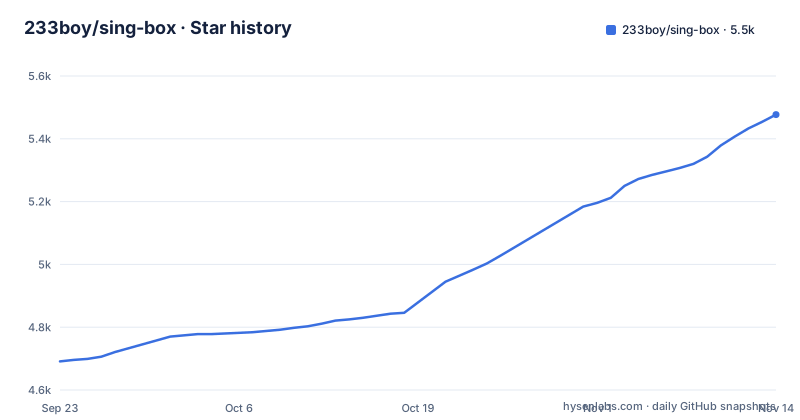
Star history
- 233boy/sing-box5,477 ★ · +786
| Repository | 2026-09-23 | 2026-11-14 |
|---|---|---|
| 233boy/sing-box | 4.7k | 5.5k |
786 Stars in the last 52 days, measured from the daily GitHub snapshot. Compare with other projects
Editorial analysis
What 233boy/sing-box solves, and who it is actually for
sing-box itself is a core. You give it a config.json and it runs. Everything around that, generating a REALITY keypair, picking a free port, writing the inbound block, wiring TLS, restarting the service, is manual work. The 233boy script is a Shell wrapper that removes that work for one specific audience: someone with a Linux server who wants a working proxy inbound in seconds.
The README states the design goal directly: "高效率,超快速,极易用", and says the script is built around running multiple configurations at once, with the add, change, view and delete operations treated as the four things worth optimizing. The claim is that adding a configuration takes under a second.
That framing tells you who this is not for. The protocol coverage is broad, but every command in the help output operates on a server. There is no client, no GUI, no mobile app. If you arrived looking for something to install on a phone or a laptop, this repository is the wrong end of the connection.
How the script wraps the sing-box core
The repository layout is small: install.sh, sing-box.sh, a src/ directory, README.md and LICENSE. There is no compiled artifact and no package manifest. The script is the product.
The help output shows the shape of the interface. The basic group lists version, ip, pbk, get-port and ss2022, and the general group lists add, change and del.
Two details matter for how it operates. First, the README describes the script as compatible with sing-box commands, and the help says pbk is equivalent to `sing-box generate reality-keypair`. Second, several commands accept `auto` as an argument, and the help exposes helpers that generate the values: pbk for a REALITY keypair, get-port for a free port, ss2022 for a Shadowsocks 2022 password. That is the automation layer. The wrapper calls the core to produce material, then writes it into a config and restarts the service.
The add command also defaults to VLESS-REALITY when no protocol is given, and the README lists automated TLS among its features.
Installing on a Linux server and adding a first config
The README does not print an install command. It points to the documentation page at https://233boy.com/sing-box/sing-box-script/ for installation and usage, and the repository carries install.sh at the top level, so that is where the installer lives. Get the script from that page or from the repository, then run the management command.
Once installed, the entry point is the `sing-box` command itself. Asking for help is the safest first step:
sing-box helpYou should see the usage block reproduced in the README, starting with the basic and general groups.
To add a configuration, pass a protocol or let it default. The README says VLESS-REALITY is the default, and that `auto` fills in generated values:
sing-box addWhere the script gets in your way
The second limitation is scope. The README's feature list is entirely about creating and editing server configs. Nothing in it describes a client, a subscription format, a web panel, or a way to push configs to devices.
Third, the wrapper is opinionated about TLS. It advertises automated TLS, and the README does not discuss how that coexists with a web server already running on the same machine.
Finally, the README's own feature list is marketing rather than specification. Lines like "无敌好用" and "零学习成本" tell you nothing about which architectures, kernels or distributions the installer supports. That information is not in the README, and the documentation page is the place to check it.
The alternative: configuring the core yourself
The obvious alternative is using sing-box directly. The difference is not features, it is who writes the config. With the core alone you write config.json by hand, run `sing-box generate reality-keypair` yourself, choose a port, and manage the systemd unit or process yourself. You get complete control over every inbound field, and you never inherit someone else's file layout.
The cost is that every add, change and restart is manual, and multi-config setups get tedious fast. The 233boy script exists precisely to collapse that loop, and the README's emphasis on running multiple configurations at once is the case where the wrapper earns its place.
A second alternative is a graphical client on desktop or mobile. That is a different job, not a competing implementation. Windows, Android, iOS, macOS and OpenWrt devices are client-side needs, and the README offers nothing for them. If your problem is on the client, a server management script cannot solve it, and the sing-box core's own clients are the thing to look at instead.
Maintenance, licence and what you are taking on
The repository is not archived, and the last push was on 2026-11-02, which is the same date as the v1.20 release. Before that, v1.19 landed earlier on 2026-11-02 and v1.18 on 2026-06-04. The release cadence in that window was uneven: a gap of roughly five months, then two releases on the same day. Treat the project as one that ships when it ships rather than on a schedule.
The project is GPL-3.0. That matters if you plan to redistribute a modified version or bundle it into something you ship, because the licence carries obligations that permissive licences do not. This is a description of the licence identifier in the repository, not legal advice; read the LICENSE file and get your own counsel if redistribution is on the table. Running the script on your own server is a different question from shipping it inside a product.
Editorial conclusion
Adopt it if you administer a Linux server and want REALITY, TUIC, Trojan or Hysteria2 configs created and edited from a single command without hand-writing JSON. Do not adopt it if you need a Windows, Android, iOS or router client, because the repository is a server-side Shell script and the README documents no client. Before you commit, read the install and usage page at 233boy.com/sing-box/sing-box-script/ and confirm your kernel and architecture are supported.
Frequently asked questions
What is 233boy/sing-box used for?
It is a one-command install and management script for the sing-box core on a server. The README describes it as creating configs for protocols such as VLESS-REALITY, TUIC, Trojan, Hysteria2, AnyTLS, Shadowsocks 2022 and VMess, and managing them through a single command.
How do I install 233boy/sing-box on a Linux server?
The README does not print an install command. It directs readers to the installation and usage page at 233boy.com/sing-box/sing-box-script/, and the repository contains install.sh at the top level.
How do I add a config with the 233boy/sing-box script?
Use the add command, optionally passing a protocol. The README states that VLESS-REALITY is the default, and several arguments accept auto so the script generates the value for you.
How do I use sing-box on Windows or Android?
The 233boy repository is a Shell script for managing a server, and the README documents no client for Windows or Android. Its commands all operate on server-side configurations.
How do I set up sing-box with the 233boy script?
After installation the entry point is the sing-box command, and `sing-box help` lists every option. From there, add creates a configuration, change edits one, and del deletes one.
Official sources
Add this badge to your README
If you maintain this project, the badge below links readers to this analysis and shows its maintenance status from the daily GitHub snapshot. Paste the markdown into your README; add ?metric=license or ?metric=stars to the image URL for a different field.

[](https://hysenlabs.com/projects/233boy-sing-box)Star history chart for your README
[](https://hysenlabs.com/projects/233boy-sing-box)Was this useful?