vocotype-cli is the developer build of an offline voice input method
VocoType 是一款运行在本地端侧的隐私安全语音输入工具,通过快捷键即可将语音实时转换为文字并自动输入到当前应用。支持语音转文字MCP、AI 优化文本、自定义替换词典、录音视频转文字等功能,让语音输入更高效、更安全。
At a glance
- What is it?
- VocoType turns speech into text and types it into whatever application has focus, and the recognition runs on your own machine rather than in someone else's data centre. This repository is the command line build of that engine, aimed at developers, with a local FunASR backend as the default and an optional Volcengine streaming backend for people who want lower latency and do not mind sending audio to a server.
- Who is it for?
- vocotype-cli suits a developer who wants voice input without their audio leaving the machine, especially one working with terminology that a general model would mangle, since the replacement dictionary is the part that makes a local model usable for technical work.
- Can I use it commercially?
- Yes. Apache-2.0 is a permissive licence: you can use, modify and sell software built on it, as long as you keep its copyright and licence notices.
- Is it still maintained?
- Yes. The repository last received commits 24 days ago.
- What is it written in?
- Mainly Python, according to GitHub's language statistics.
Answers come from the project's GitHub data, last synced on November 7, 2026, and from our analysis. They are not legal advice.
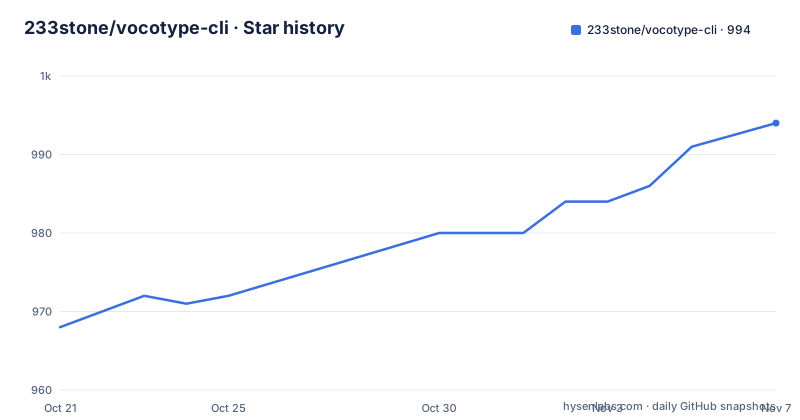
Star history
- 233stone/vocotype-cli994 ★ · +26
| Repository | 2026-10-21 | 2026-11-07 |
|---|---|---|
| 233stone/vocotype-cli | 968 | 994 |
26 Stars in the last 17 days, measured from the daily GitHub snapshot. Compare with other projects
Editorial analysis
The pitch is that your voice does not leave the machine
The headline claim in the README is that your voice never leaves the computer, and the comparison table makes the point against the two alternatives. Against a traditional cloud input method, the difference is that the data has to be uploaded there, and against the operating system's built-in option, the privacy policy is described as complicated. The network requirement follows from that, since the tool claims to need no connection at all and works with the network down, and the response time is claimed at the tenth of a second level, where the cloud option is slow because it is bound by network speed. The other row is customisation, where the tool claims a powerful custom word list against weak or none for the cloud option and basically none for the system one. This repository is the CLI, an open source version of the core engine, and the documentation is careful that it is the developer build, with the full desktop application offered separately for people who do not want to use a command line.
The core engine is shared, and it is designed for mixed Chinese and English
The engine section lists what every version of the product has. Recognition is entirely local, so nothing is uploaded even when the connection is down. The recognition engine is described as accurate on mixed Chinese and English input, which is the case that general purpose speech models usually get wrong, since a Chinese sentence with English identifiers in it is two different acoustic problems. The customisation story is the replacement dictionary, described as a table of terms, names, places and industry jargon so that they are recognised correctly the first time. The resource story is deliberately modest, with about 700MB of memory for pure CPU inference and no expensive graphics card required, and a claimed response time in the tenth of a second range. The design goal is stated in the simplest possible terms, say what you want and the text appears, which is a latency target rather than a feature list.
Setting it up is a venv, a requirements file and a first run download
The developer installation guide asks for Python 3.12 and strongly recommends creating a virtual environment with uv or venv. The sequence it documents is this:
git clone https://github.com/233stone/vocotype-cli.git
cd vocotype-cli

pip install uv
uv venv --python 3.12
source .venv/bin/activate  # macOS/Linux

uv pip install -r requirements.txt

python main.py
On Windows the activation line is different, and the documentation gives that variant separately. There is also a data mode, `python main.py --save-dataset`, for saving a dataset while it runs, which is the kind of hook a project needs if it wants to improve its own models. The one thing to plan for is the first run, where the program downloads roughly 500MB of model files automatically, so the documentation asks for a stable network connection at that point even though everything afterwards is offline.
The optional cloud backend, and what it costs you
Behind the local default there is an alternative, the Volcengine BigASR streaming recognition backend, and the documentation is refreshingly blunt about the trade. The comparison table has a network requirement row where the local FunASR engine needs none and the cloud backend does, a model download row where the local route costs about 500MB and the cloud route nothing, a latency row where local inference is compared against the very low latency of the cloud, a recognition quality row where the local engine is described as high and the cloud one as a flagship large model, and a data privacy row that says the local engine is fully offline while the cloud option sends the audio to Volcengine. The setup is a config file. You create a speech application in the Volcengine console, get an App Key and an Access Key, and write a `config.json`:
{
  "backend": "volcengine",
  "volcengine": {
    "app_key": "YOUR_APP_KEY",
    "access_key": "YOUR_ACCESS_KEY",
    "resource_id": "volc.bigasr.sauc.duration",
    "enable_punc": true,
    "enable_itn": true
  }
}
And you start it with `python main.py --config config.json`. The warning that follows the instructions is the one to read twice, since with the Volcengine backend the recorded audio is sent to Volcengine servers for recognition and is no longer fully offline, so anyone with strict privacy requirements should stay on the default local backend.
The requirements file tells you how the pieces work
The dependency list is short and each entry has an obvious job. `sounddevice` at 0.5.2 is the microphone capture, `keyboard` at 0.13.5 is the global hotkey handling that lets the tool type into whatever application has focus, and `pyperclip` at 1.11.0 handles the clipboard. The audio stack is `librosa` at 0.11.0 and `soundfile` at 0.13.1, which is the usual pairing for decoding and resampling audio before recognition. The recognition engine itself is `funasr_onnx` at 0.4.1, the ONNX build of FunASR, and `jieba` at 0.42.1 is the Chinese word segmenter that a Chinese ASR pipeline usually needs to split the transcript into terms. The cloud backend adds `websockets` at 12.0 or newer, which is only needed when the backend is set to volcengine. And `modelscope` at 1.30.0 is there for downloading and caching the models, described as optional but recommended, with a note that you can pick one or both of the supported model sources. There is also a note about the ONNX route through onnxruntime, and that GPU or PyTorch users should install torch with CUDA and torchaudio instead.
Who built it, and what it stands on
The acknowledgements section names the open source projects the tool leans on, and the first is the significant one. FunASR is the speech recognition framework open sourced by Alibaba's DAMO Academy, and it is what provides the offline recognition capability. The second is QuQu, credited as an important source of technical reference and inspiration. The project itself is under the Apache 2.0 licence, with the licence file in the repository root, and the tree is small, with a `main.py` at the root, an `app/` directory, a `files/` directory, the requirements file and a notes file. The release history shows a steady cadence, with v1.6.1 on 2026-09-27, v1.6.0 on 2026-09-14 and v1.5.7 on 2026-06-24, and the last push to the repository on 2026-10-14, so the tool is actively developed even though the version numbers are still in the one series.
Editorial conclusion
vocotype-cli suits a developer who wants voice input without their audio leaving the machine, especially one working with terminology that a general model would mangle, since the replacement dictionary is the part that makes a local model usable for technical work. It is a poor fit if you want a polished application rather than a command line tool, because the repository is explicitly the developer build and the full desktop application is what the project points non-technical users to. It is also a poor fit if you are not comfortable with a command line, since the documentation sends readers who are unfamiliar with one to the free desktop version instead. Before you build on it, check three things: which backend you want, since the default is local and the Volcengine option sends your audio to a server, how much disk and memory the local model needs, with roughly 500MB of model files downloaded on first run and about 700MB of memory for pure CPU inference, and which Python you have, since the documentation asks for 3.12.
Frequently asked questions
Does vocotype-cli send my voice to a server?
Not with the default backend. The local FunASR engine runs on your machine and the documentation claims the audio is never uploaded, which is also why the tool works with no network connection. If you switch to the Volcengine BigASR backend with a config.json, the recorded audio is sent to Volcengine for recognition and is no longer fully offline.
How do I install vocotype-cli?
With Python 3.12, clone the repository, create a virtual environment with uv or venv, activate it, install the requirements with `uv pip install -r requirements.txt`, and run `python main.py`. On the first run the program downloads about 500MB of model files automatically, so it needs a network connection once.
How do I switch to the Volcengine cloud backend?
Create a speech application in the Volcengine console to get an App Key and an Access Key, write a config.json with the backend set to volcengine and those keys, and start the tool with `python main.py --config config.json`. The resource id, punctuation and inverse text normalisation flags are set in the same file.
What is the custom dictionary in VocoType?
A replacement table of terms, names, places and industry jargon that makes the recogniser get them right the first time, which the documentation calls its own invention. It is one of the main reasons to run a local model, since a general recogniser will not know your project's vocabulary.
What are the hardware requirements for VocoType?
The documentation describes a lightweight design needing about 700MB of memory with pure CPU inference and no expensive graphics card, and a response time at the tenth of a second level. The project is Apache-2.0 licensed, and its last release was v1.6.1 on 2026-09-27.
Official sources
Add this badge to your README
If you maintain this project, the badge below links readers to this analysis and shows its maintenance status from the daily GitHub snapshot. Paste the markdown into your README; add ?metric=license or ?metric=stars to the image URL for a different field.

[](https://hysenlabs.com/projects/233stone-vocotype-cli)Star history chart for your README
[](https://hysenlabs.com/projects/233stone-vocotype-cli)Was this useful?