3proxy: a single C binary for HTTP, SOCKS and accounted proxy traffic
3proxy - tiny free proxy server
At a glance
- What is it?
- A look at the 3proxy proxy server: how its two release branches and three Docker images are organised, what the signed package repositories actually fixed, and where the README stops.
- Who is it for?
- 3proxy fits the job when you want a proxy with per-user accounting, daily traffic caps and ACLs on a small box, and you would rather compile one binary than adopt a daemon with a runtime tree. Its packaging split into current and lts channels is recent enough that 1.0.0 shipped with no code changes at all, so the version number tells you less than the channel does.
- Can I use it commercially?
- Check first. The repository uses a licence we do not classify automatically, so read its LICENSE file before any commercial use.
- Is it still maintained?
- Yes. The repository received new commits within the last day.
- What is it written in?
- Mainly C, according to GitHub's language statistics.
Answers come from the project's GitHub data, last synced on October 23, 2026, and from our analysis. They are not legal advice.
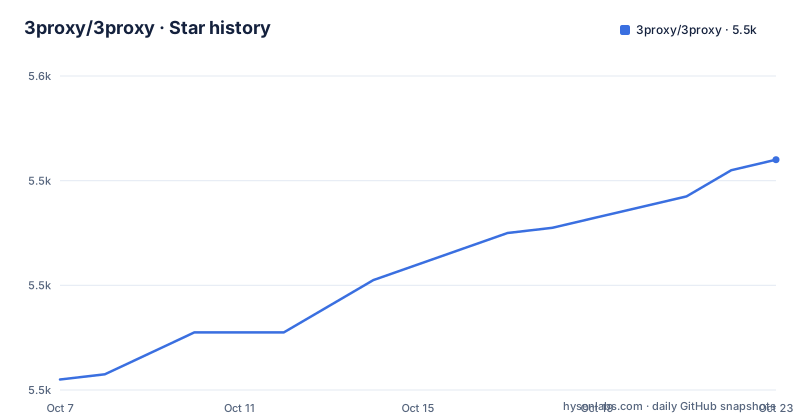
Star history
- 3proxy/3proxy5,544 ★ · +42
| Repository | 2026-10-07 | 2026-10-23 |
|---|---|---|
| 3proxy/3proxy | 5.5k | 5.5k |
42 Stars in the last 16 days, measured from the daily GitHub snapshot. Compare with other projects
Editorial analysis
What the repository actually contains
3proxy is one C program that speaks HTTP, SOCKS and SOCKSv5, with TLS termination, per-user accounting, access control lists and traffic shaping layered on. The README calls it a tiny free proxy server, and the copyright line runs from 2002 to 2026 under Vladimir '3APA3A' Dubrovin, so this is a long-lived single-maintainer project rather than a corporate one.
The repository topics describe the feature set more precisely than the one-line description does: https-proxy, socks, socks5, ipv6, sni, stunnel, tls-proxy, traffic-shaping, accounting, portmap and network-security. The tree backs that up. There is src/ for the server itself, man/ and doc/ for documentation, cfg/ for shipped configuration, tests/ for the test suite, debian/ for packaging, scripts/ for the user management helpers, and CMakeLists.txt sitting next to Makefile.Linux, Makefile.FreeBSD, Makefile.Solaris, Makefile.unix, Makefile.msvc, Makefile.watcom and Makefile.win. That spread is the honest picture of reach: one codebase, seven build systems, no framework underneath it.
Three branches run in parallel and they are not interchangeable. master carries 3proxy 1.0 and is described as current and latest. The 0.9 branch carries 0.9.9.x as the long term support line with bugfixes only. A devel branch holds 2.0 work, and the README tells you plainly not to use it. Docker images and the package repositories follow the same split, with `current` and `latest` built from master and `lts` built from the 0.9 branch.
Installing from the signed apt and dnf repositories
3proxy publishes its own signed package repositories at https://3proxy.org/repo/, in a current channel for master and an lts channel for the 0.9 branch. The README states that both the packages and the repository metadata are signed, which matters more for a network-facing daemon than it does for a library. On Debian 12 and Ubuntu 22.04 or newer the setup is four commands: drop the release key into /usr/share/keyrings, write a deb822 source file, refresh apt and install.
sudo curl -fsSL https://3proxy.org/repo/3proxy-release-key.asc \
     -o /usr/share/keyrings/3proxy.asc
sudo tee /etc/apt/sources.list.d/3proxy.sources <<EOF
Types: deb
URIs: https://3proxy.org/repo/deb
Suites: current
Components: main
Signed-By: /usr/share/keyrings/3proxy.asc
EOF
sudo apt update && sudo apt install 3proxy
Swap the source file for a dnf repository definition and the same idea covers AlmaLinux, RHEL, Rocky and CentOS Stream 8, 9 and 10, which is a narrower set of enterprise targets than people expect from a project of this age. Enterprise Linux has no 32-bit ARM build, so armhf is published as a deb only. Windows users get zip archives on the releases page instead, and there is a `-lite` zip for Vista and older.
Building from source is the other route, and it is deliberately plain: clone, symlink the Makefile you want, run make, install. The CMake path skips chroot entirely, which is worth knowing before you compare the two.
git clone https://github.com/z3apa3a/3proxy
cd 3proxy
mkdir build && cd build
cmake ..
cmake --build .
sudo cmake --install .
Three Docker images and what each one drops
The container story is unusually well thought out for a small C server. Three configurations are published: the default full image also tagged `:latest`, a `:busybox` variant, and an interactive `:minimal` one. All three point at the newest stable version, and each has an LTS counterpart built from the 0.9 branch, tagged `:lts`, `:lts-busybox` and `:lts-minimal`. The full image is distroless apart from the binaries, so there is no shell to run inside it and the README suggests running the container with a read only file system.
The full image wants a configuration file mounted at /etc/3proxy/3proxy.cfg, or supplied through docker config. The config itself is a few lines of directives rather than a file format with punctuation:
echo "log
nserver 8.8.8.8
nscache 65536
proxy -p3129" | docker config create 3proxy
docker run --read-only -p 3129:3129 --config source=3proxy,target=/etc/3proxy/3proxy.cfg --name 3proxy.full docker.io/3proxy/3proxy
`podman` does not support `config` in this form, so the README shows the mount-based equivalent with a local config directory. Writing `log` with no pathname sends output to stdout, which is what you want under a container runtime.
The `:minimal` image takes configuration on standard input instead and needs no mount at all. You open the shell, type directives, and end the block with `end`:
docker run --read-only -i -p 3129:3129 --name 3proxy docker.io/3proxy/3proxy:minimalWhat `:minimal` gives up is worth listing. Plugins do not work, the system resolver does not exist so `nserver` or `fakeresolve` is mandatory, and there is no RADIUS or IPv6 support. The distroless images also have an ephemeral port problem: SOCKSv5 UDP associate, the SOCKSv5 BIND functionality and the FTP proxy all need outbound access to a dynamically assigned port, which in practice means `--network host` or `-P` on `docker run`. A distroless image is a poor fit for a container you will want to debug in a hurry.
Two config files, a chroot split and the default listeners
The Makefile.Linux installation puts configuration in two places and the distinction confuses people. /etc/3proxy/3proxy.cfg runs before chroot and the README says not to modify it. /usr/local/3proxy/conf/3proxy.cfg, symlinked from /etc/3proxy/conf/3proxy.cfg, is the file you actually edit, and every path inside it is relative to the chroot directory at /usr/local/3proxy. Logs land in /usr/local/3proxy/logs, symlinked from /var/log/3proxy. A future version is planned to move the chroot directory under /var, so absolute paths written by hand today are worth keeping to a minimum.
If you install through CMake instead, there is no chroot arrangement and the config file is simply /etc/3proxy/3proxy.cfg. That is a real difference in behaviour, not a naming quirk, and it is the reason to pick one build path over the other deliberately.
Out of the box the server listens for SOCKS on 0.0.0.0:1080 and for HTTP with basic auth on 0.0.0.0:3128, and no users exist until you add them. The helper script for that takes a name, a password and two optional limits:
add3proxyuser username password [day_limit] [bandwidth]`day_limit` is a traffic ceiling in MB per day and `bandwidth` is bits per second, where 1048576 is one megabit. Users can also be edited by hand in the files under /etc/3proxy/conf/. The plugin mechanism lives at /usr/local/3proxy/libexec, or /libexec in a chroot setup, and since 0.9.6 those directories are symlinked from both /lib and /lib64 so a `plugin` directive does not need a full path. SSLPlugin is named in the README as one that works.
On Windows the same binary installs itself as a service and removes it on request:
3proxy [path_to_config_file] --installThe config file has to sit next to the executable unless you pass its path. Removal expects the service to be stopped first, with `net stop 3proxy`.
What 1.0.0 changed, which was mostly the packaging
The 1.0.0 release was published on 2026-08-22 and its notes say no proxy code changed since 0.9.9. What changed is how packages are built, signed and published, and that release is what split the project into current and lts channels. Read that as a packaging and release engineering milestone rather than a feature milestone.
The bugs it fixed are more interesting than the version number. TLS, PCRE2 and PAM support was being dropped silently on any system whose /bin/sh is not dash, which covers every RPM based distribution and macOS, because the build checks used echo escape sequences that only dash expands and a failed check looked like a disabled feature. The rpm packages were also being built on Ubuntu, so they demanded glibc 2.38, libssl.so.3 and libpcre2-8, none of which an RPM distribution provides; they could not be installed anywhere. Those packages are now built against AlmaLinux 8, 9 and 10 and carry el8, el9 or el10 tags. A third fix removed a circular dependency where the rpm package depended on its own interpreter at /bin/3proxy, taken from the first build.
The 0.9.9 release from 2026-08-20 is where the behaviour changes are, and several are security relevant. SOCKSv5 UDP now authorises the destination of every datagram, so ACLs on destination address, host name or port apply to UDP rather than only to the UDP ASSOCIATE request, with a new `-U` option choosing whether a mid-association destination change is logged, authorised, both or neither. DNS replies are validated: a reply from an address other than the nameserver queried, or one whose question section does not match, is dropped. Both were accepted before. There are also fixes for a socket leak in CLOSE_WAIT through a parent proxy and a file descriptor leak in the HTTP proxy on `ftp://` URLs. A `-C` option for TCP services ends the session as soon as either side closes, and a LINGER timeout joins the existing set as the eleventh, defaulting to 5.
The last push to master was on 2026-09-16, three weeks after those releases, so both lines are being worked on.
What the README does not tell you about shaping and ACLs
The README is an operations document and it says so. Install paths, container tags, config file locations, the plugin directory, the user script. What it does not do is enumerate the traffic shaping and access control directives, and those are a large part of why people pick 3proxy over a stock Squid or a tiny SOCKS daemon. Accounting, ACLs and shaping all appear in the repository topics and in the per-user options the script exposes, but the syntax lives in the man pages, which the README says are available with the download, on https://3proxy.org/ and in the GitHub wiki.
That split is the main thing to weigh before adopting. If you need per-user daily caps and bandwidth limits with a syntax you will look up in `man`, the project is a good fit and the documentation is where you would expect it. If you need a policy language with conditions you can write quickly, or configuration in a format your config management already parses, you will be editing a line-oriented file with no structure.
The licensing question deserves a sentence of its own. The GitHub license field reports NOASSERTION, and the repository carries a `copying` file rather than a licence named in the metadata. For a network daemon you may be redistributing internally, read that file before you rely on it. What can be said without ambiguity is that 3proxy is free software maintained by one person for over two decades, which cuts both ways: the code has had a very long life, and the bus factor is exactly one.
Editorial conclusion
3proxy fits the job when you want a proxy with per-user accounting, daily traffic caps and ACLs on a small box, and you would rather compile one binary than adopt a daemon with a runtime tree. Its packaging split into current and lts channels is recent enough that 1.0.0 shipped with no code changes at all, so the version number tells you less than the channel does. For a first run, use the signed apt repository on Debian 12 or Ubuntu 22.04, start with the default 1080 and 3128 listeners, add a user with add3proxyuser, and read the man pages for the traffic shaping directives, because the README lists that whole subsystem in a single phrase.
Frequently asked questions
How do I install 3proxy on Ubuntu?
Ubuntu 22.04 and newer can use the project's own signed apt repository, published in a current channel for master and an lts channel for the 0.9 branch. Install the release key, add a deb822 source file pointing at https://3proxy.org/repo/deb, then run apt update and apt install 3proxy.
How do I add a 3proxy user with a daily traffic limit?
The add3proxyuser script shipped with the Linux packages takes a username, a password and two optional limits. `day_limit` is a traffic ceiling in MB per day and `bandwidth` is bits per second, where 1048576 equals one megabit. Users can also be added by editing the files under /etc/3proxy/conf/ by hand.
What is the difference between the 3proxy master branch and the 0.9 branch?
master carries 3proxy 1.0 and receives current work, while the 0.9 branch is the 0.9.9.x long term support line with bugfixes only. A third devel branch holds 2.0 work that the README says not to use. Docker tags and the package channels mirror this: latest and current come from master, lts from the 0.9 branch.
Official sources
Add this badge to your README
If you maintain this project, the badge below links readers to this analysis and shows its maintenance status from the daily GitHub snapshot. Paste the markdown into your README; add ?metric=license or ?metric=stars to the image URL for a different field.

[](https://hysenlabs.com/projects/3proxy-3proxy)Star history chart for your README
[](https://hysenlabs.com/projects/3proxy-3proxy)Was this useful?