MPV-EASY Player for Windows: Portable Setup and mpv Configuration
MPV-EASY Player - An easy to use, modern video player based on mpv (一个基于MPV,易于使用,现代化的视频播放器)
At a glance
- What is it?
- MPV-EASY Player packages mpv with a custom GUI, scripts, and portable configuration for Windows. It suits users who want fewer configuration decisions, but it is not the right choice for a cross-platform installation.
- Who is it for?
- Adopt MPV-EASY Player when you specifically want its bundled Windows GUI and portable configuration, especially if you already rely on mpv scripts. Do not adopt it as a general cross-platform mpv package.
- Can I use it commercially?
- Yes, with conditions. GPL-3.0 is a copyleft licence: if you distribute software that includes it, you must release that software's source code under the same licence. Running it internally without distributing it does not trigger that obligation.
- Is it still maintained?
- Yes. The repository last received commits 4 days ago.
- What is it written in?
- Mainly Lua, according to GitHub's language statistics.
Answers come from the project's GitHub data, last synced on October 25, 2026, and from our analysis. They are not legal advice.
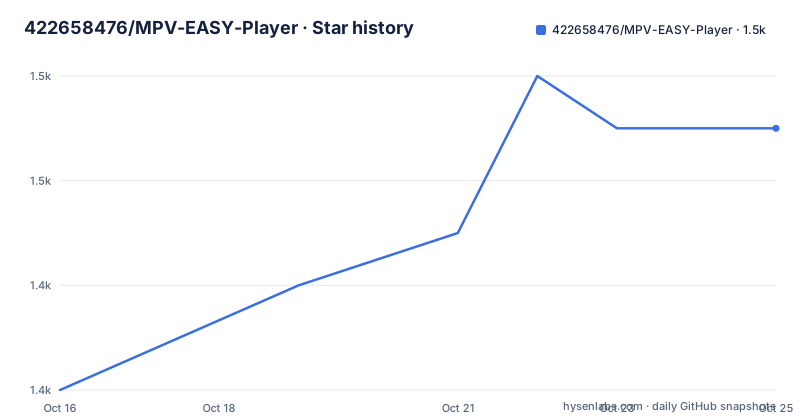
Star history
- 422658476/MPV-EASY-Player1,451 ★ · +5
| Repository | 2026-10-16 | 2026-10-25 |
|---|---|---|
| 422658476/MPV-EASY-Player | 1.4k | 1.5k |
5 Stars in the last 9 days, measured from the daily GitHub snapshot. Compare with other projects
Editorial analysis
Why MPV-EASY Player Exists Beyond mpv
MPV-EASY Player addresses a specific tension in mpv. The upstream player exposes extensive configuration, command-line options, and scripting support, but people who do not already understand its file layout can face several separate decisions: where configuration belongs, where scripts go, which GUI to use, and how to keep those pieces synchronized. The project assembles mpv, configuration files, Lua scripts, JavaScript scripts, and its own GUI into a Windows-oriented player.
The intended audience is therefore narrower than the audience for mpv generally. It is aimed at Windows users who want a graphical player but still expect access to mpv options and scripts. The README also speaks to experienced mpv users who value native interfaces, recent mpv releases, and the ability to place upstream scripts directly into mpv's script directory. MPV-EASY Player presents those files as a prepared bundle rather than asking the user to construct that arrangement from scratch.
That distinction matters. The project is not claiming to be an independent media decoding engine. Its repository is primarily Lua, while the top-level files include `mpv-easy-data`, `portable-data`, language resources, tutorials, and images. The README describes the result as an assembly of mpv, its documentation, configuration, Lua scripts, JavaScript scripts, and additional front-end work. In practical terms, adoption means accepting a particular distribution and GUI arrangement, not merely installing a standard mpv build.
Four Run Modes and Two GUI Choices
According to the README, MPV-EASY Player supports four run modes and two GUI interfaces. The project retains native mpv behavior while adding a complete GUI front end, so users can switch between its prepared presentation and the original mpv experience. This is the project's clearest design choice: it tries to preserve access to mpv rather than replace it with a closed collection of controls.
mpv scripts remain part of that model. The documented directory for scripts is `MPV-EASY Player\data\portable-data\scripts`, and the README says its subdirectory structure should match mpv's own structure. That makes it possible to use the mpv user-script collection already linked by the project. A user who depends on a particular Lua script needs to inspect whether that script behaves differently under the custom GUI, however. File placement can preserve compatibility while interaction assumptions can still differ.
The project also documents a path for trying another mpv build. It says a newer downloaded mpv should be stored in the `mpv` directory beside MPV-EASY Player. The README does not provide a supported mpv version compatibility matrix, nor does it explain what happens when the bundled front end relies on behavior changed by a newer mpv. This arrangement favors access to new mpv versions, but the user assumes compatibility risk. The documentation is thin on supported release combinations and upgrade failure recovery.
Portable Configuration Layout for MPV-EASY Player
MPV-EASY Player separates ordinary mpv resources from its own configuration. The `MPV-EASY Player\data\portable-data` directory corresponds to one of mpv's standard configuration locations: `%appdata%\mpv`, shown in the README as `C:\Users\user name\AppData\Roaming\mpv`, or `mpv\portable_config`. This correspondence allows scripts to follow mpv's expected directory structure while keeping them inside the portable application directory.
Not every familiar mpv path retains the same name. Settings that a user would normally look for in `%appdata%\mpv\mpv.conf` or `mpv\portable_config\mpv.conf` have been moved to `data\mpv-easy-data\rjno1.conf`. Keyboard bindings have a separate location at `data\mpv-easy-data\input.conf`. The split suggests that MPV-EASY Player controls initialization of its own settings rather than treating those files as an unmodified copy of a user's mpv configuration.
That design reduces some setup work but creates a migration decision. Existing mpv settings should not simply be assumed to be loaded from the usual `mpv.conf` location. The documented action is to modify `rjno1.conf` and, for keyboard behavior, `input.conf`. Before moving a working setup into this player, compare those files with the existing configuration and identify duplicate properties, removed settings, and scripts that expect particular option values.
Downloading a Release and Preparing the First Launch
The README directs users to the GitHub releases page and describes installation as extracting the downloaded application. It does not provide package-manager commands, a Chocolatey package name, a Scoop manifest, or a documented first-launch command. A first installation therefore consists of downloading a release, extracting its archive into a writable folder, and opening the released player interface. The README does not name the executable, so an exact launch command cannot be given without guessing.
For the first real use, review the three configuration locations before opening media. Confirm that the expected executable files are present, inspect `data\mpv-easy-data\rjno1.conf`, and inspect `data\mpv-easy-data\input.conf`. If the intended setup includes an mpv script, place it under `data\portable-data\scripts` while preserving mpv's expected subdirectory structure. The reader should see the script inside that directory tree, but the README does not specify a particular script to install or the interface action that confirms it loaded.
After that review, open the extracted application and try a media file that does not belong to a sensitive workflow. The project does not document a particular first-run wizard, import dialog, or media-opening command. It also does not document automatic association with every supported file type. The README says that after reinstalling a system, the extracted player can normally run immediately and may only require file associations to be restored. That makes the initial check simple, but it leaves codec expectations, subtitle behavior, and script startup errors undocumented.
Windows-Only Distribution Versus Cross-Platform mpv Files
The clearest limitation is platform scope. The README explicitly says that MPV-EASY Player cannot be used across platforms and can only operate under Windows. Some repository files can be adapted for mpv on Windows, macOS, or Linux, and the project states that most or all of these files are supported there after minor modification. That describes reusable configuration and scripts, not a cross-platform MPV-EASY Player application.
This distinction prevents two misleading conclusions. First, the presence of topics such as `linux`, `mac`, and `javascript` does not mean that the complete player supports those systems. Second, adapting `portable-data` or a script to mpv does not provide the project's custom GUI and run modes. Cross-platform users need to work with mpv and its interfaces directly rather than expecting the Windows bundle to install elsewhere.
Native mpv is the real alternative, with a materially different approach. Upstream mpv is the rendering and playback program around which this project adds configuration and interfaces. A user who already knows `portable_config`, `input.conf`, command-line options, and script placement can use that mechanism directly on supported operating systems. MPV-EASY Player reduces assembly work for Windows users, but it also ties the user to the contents, behavior, and upgrade compatibility of this particular bundle.
Maintenance, Upgrades, and GPL-3.0 Boundaries
The repository is not archived, and its last push was on 2026-10-11. Recent releases include 0.41.0.6 on 2026-09-06, 0.41.0.5 on 2026-07-05, and 0.41.0.4 on 2026-05-03. This supports treating the repository as recently changed, but the README does not provide a formal upgrade policy, migration guide, or list of compatible mpv versions.
Users who customize `rjno1.conf`, `input.conf`, or scripts will need to reconcile those edits when replacing a release. The portable directory layout makes the relevant files identifiable, but the README does not state whether release archives overwrite local changes, preserve them, or require manual migration. A separate user configuration outside the bundle may reduce this cost, although the README does not document a supported synchronization process.
The repository license is GPL-3.0. However, the README also states that the complete player contains open-source code and more closed-source code, and that several executable files are not included in the repository. That means the repository's `LICENSE` file alone does not establish the licensing status of every file in a downloaded release. This is not legal advice. Users who need to redistribute a modified bundle should inspect the licenses and notices for the bundled executables, GUI components, scripts, and other included files rather than assuming that every binary is covered by the repository license.
Editorial conclusion
Adopt MPV-EASY Player when you specifically want its bundled Windows GUI and portable configuration, especially if you already rely on mpv scripts. Do not adopt it as a general cross-platform mpv package. Verify first that a release contains the expected executables, inspect `rjno1.conf` and `input.conf`, and confirm how scripts in `data\portable-data\scripts` interact with the selected GUI before moving important customizations into the bundle.
Frequently asked questions
Is MPV-EASY Player available for Linux or macOS?
No, not as the complete Windows application described by the README. The project says its own player cannot operate across platforms, although some configuration files and scripts can be adapted for mpv on Windows, macOS, and Linux.
How do I install MPV-EASY Player?
The README directs users to download a release and treats installation as extracting a portable application. It does not document a package-manager installation or name the executable used to launch it.
Where should I put mpv scripts for MPV-EASY Player?
Place mpv scripts in `MPV-EASY Player\data\portable-data\scripts`. The README says the script subdirectory structure should be the same as mpv's structure.
Where are MPV-EASY Player settings and keyboard bindings stored?
The project-specific settings are in `data\mpv-easy-data\rjno1.conf`. Keyboard shortcuts are configured through `data\mpv-easy-data\input.conf`, rather than relying on the usual mpv locations.
Can I use a newer mpv build with MPV-EASY Player?
The README says a downloaded mpv can be placed in the `mpv` directory beside MPV-EASY Player. It does not provide a compatibility matrix or explain how to diagnose incompatibility with a newer build.
Is the entire MPV-EASY Player release covered by GPL-3.0?
The repository declares GPL-3.0, but the README says the complete player includes closed-source code and several executables that are not in the repository. The licensing notices for each downloaded release component must be checked separately.
Official sources
Add this badge to your README
If you maintain this project, the badge below links readers to this analysis and shows its maintenance status from the daily GitHub snapshot. Paste the markdown into your README; add ?metric=license or ?metric=stars to the image URL for a different field.

[](https://hysenlabs.com/projects/422658476-mpv-easy-player)Star history chart for your README
[](https://hysenlabs.com/projects/422658476-mpv-easy-player)Was this useful?