4xmen/Get-Github-Achievements: A Step-by-Step Badge Guide
How to Get GitHub Achievements, Step by Step ; Translated to Persian 🇮🇷, Deutsch 🇩🇪, France 🇫🇷, Russian 🇷🇺, Turkish 🇹🇷, Dutch 🇳🇱, Chinese 🇨🇳, Spanish 🇪🇸, Arabic 🇸🇦, Indonesian 🇮🇩, Japanese 🇯🇵, Hindi 🇮🇳, Swahili 🇰🇪, Armenia 🇦🇲, Vietnamese 🇻🇳, Polish 🇵🇱 Guide.
At a glance
- What is it?
- Get-Github-Achievements is a multilingual documentation project that explains how GitHub profile achievement pins can be earned. It is useful for learning GitHub actions, but it is not an automation package and its package metadata contains no functional test suite.
- Who is it for?
- Adopt this repository as a written guide when you need illustrated instructions for earning GitHub profile pins, especially if a translated guide fits your preferred language. Do not choose it as an automation library, CLI, SDK, or production integration because no such implementation is documented.
- Can I use it commercially?
- Yes, with conditions. GPL-3.0 is a copyleft licence: if you distribute software that includes it, you must release that software's source code under the same licence. Running it internally without distributing it does not trigger that obligation.
- Is it still maintained?
- Yes. The repository last received commits 16 days ago.
- What is it written in?
- GitHub does not report a main language for this repository.
Answers come from the project's GitHub data, last synced on November 7, 2026, and from our analysis. They are not legal advice.
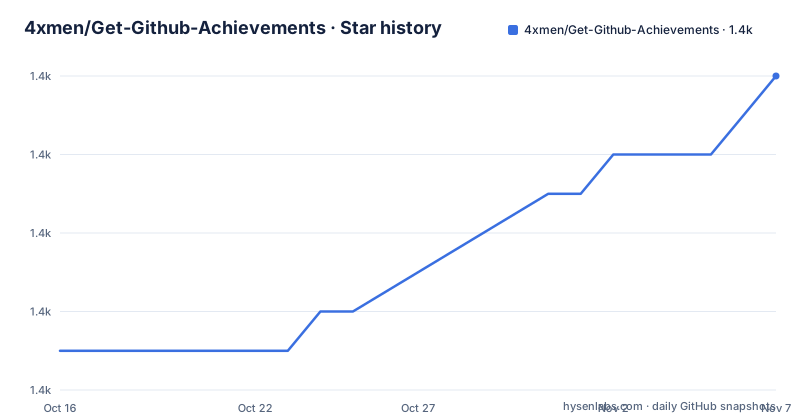
Star history
- 4xmen/Get-Github-Achievements1,446 ★ · +7
| Repository | 2026-10-16 | 2026-11-07 |
|---|---|---|
| 4xmen/Get-Github-Achievements | 1.4k | 1.4k |
7 Stars in the last 22 days, measured from the daily GitHub snapshot. Compare with other projects
Editorial analysis
What Get-Github-Achievements Actually Contains
Get-Github-Achievements addresses a narrow but concrete problem: GitHub profile achievements are displayed as pins, and this repository organizes explanations of activities that qualify for them. The project organizes that information as step-by-step documentation, with separate files under `assets/steps/` for individual achievements and links from the main README.
The intended audience is a GitHub user who wants to understand the activity required for a profile badge. That includes beginners learning repository actions and contributors who need a quick reference for issue handling, pull requests, or other documented achievement conditions. The repository is not positioned as a tool for other engineers to embed into an application. Its central value is instructional content and image-based navigation.
The repository structure supports that distinction. It contains a main `README.md`, localized `README.*.md` files, an `assets/` directory, contribution and security documents, and a `package.json` file. There is no documented CLI entry point, library API, service daemon, or deployment configuration. Based on that layout, adoption means using the guide or contributing corrections to its documentation, not installing it as a software dependency.
The achievement catalog is broader than the excerpt visible in the main README, but this description can only confirm the entries shown there. For example, the README identifies Quickdraw, Yolo, and Pull Shark. Each has a badge image and a link to a dedicated guide such as `assets/steps/README.quickdraw.md` or `assets/steps/README.yolo.md`.
GitHub Actions Behind the Quickdraw and Yolo Guides
The guide explains achievement pins through observable GitHub repository behavior. The README defines an achievement as a pin that GitHub displays on an account for specified activity. It also states that profile visibility is configurable: users can opt out of displaying achievements through GitHub profile settings.
Quickdraw has a direct timing condition. According to the main README, it can be earned by closing an issue or pull request within five minutes of opening it. The linked file `assets/steps/README.quickdraw.md` is identified as the step-by-step tutorial. This makes the mechanism procedural rather than automated. The user opens the relevant repository object and performs the qualifying close action within the stated interval.
Yolo is based on a different repository action. The README states that earning it requires merging a pull request without a review. Its detailed guide is stored in `assets/steps/README.yolo.md`. That condition reveals an important distinction: some achievements are tied to time-sensitive actions, while others depend on the state or review history of a pull request.
The top-level file list also includes `assets/steps/README.pull-shark.md`. The visible README excerpt begins describing Pull Shark but cuts off before the complete qualification rule. The article therefore cannot state that rule. Readers should open the dedicated file rather than infer it from the badge name or repository topics.
This documentation model keeps the GitHub activity in the foreground. There is no token request, GitHub API client, scheduled task, or browser automation described in the repository files. The repository teaches users to perform actions directly through GitHub.
Reading the Illustrated Guide Without an Installation Step
There is no installation tutorial for Get-Github-Achievements in the README, and the project does not present itself as a runnable application. The documented entry point is the GitHub repository itself. Open `README.md`, select a badge from the achievement list, and follow the linked `assets/steps/README.*.md` file.
A first practical use can be treated as a document review rather than a software setup. Start with Quickdraw because the main README gives its exact condition: close an issue or pull request within five minutes of opening it. Before acting, open `assets/steps/README.quickdraw.md` and confirm that the illustrated sequence matches the condition you intend to satisfy.
The README says the tutorials use photographs and explain each step. It also directs readers who have trouble receiving an achievement to the relevant training section. If the documented action does not produce the expected pin, the repository provides an issue reporting link for bugs or problems. That is a support route for documentation and behavior mismatches, not evidence that the project can diagnose the state of a GitHub account automatically.
The presence of `package.json` should not be mistaken for an installation guide. That file identifies the package as `get-github-achievements` and declares metadata, but it provides no usable application script. Its only script is a test command that prints an error stating that no test is specified. The documented way to use the project is therefore the README and its linked guides.
Multilingual Coverage and Documentation Drift
The repository has one of its clearest practical distinctions in its translation coverage. The language table links English, Persian, Arabic, German, French, Russian, Turkish, Dutch, Chinese, Spanish, Indonesian, Hindi, Japanese, Armenian, Swahili, Portuguese, Bengali, Vietnamese, and Polish README files. This is useful for readers who prefer to study GitHub activities outside English.
However, the README does not explain how those translations are synchronized. The root file list confirms that localized files exist, but it does not state whether every translation contains the same achievement list, images, or wording. The top-level entries also do not show localized files under `assets/steps/`, which makes it especially important to check the linked target rather than assume that a translated landing page contains translated detailed tutorials.
This creates a maintenance consideration for contributors. A correction to one achievement condition may need to be reflected across multiple README files, while a detailed guide remains a separate asset. The repository includes `CONTRIBUTING.md`, but its contents are not available in the repository listing, so the exact contribution workflow cannot be confirmed.
Translation breadth should therefore be treated as access to instructions, not as proof that every localized edition has identical coverage. Engineers integrating GitHub into a product should not extract badge rules from this project as a machine-readable policy. The source is a human-maintained course, and the repository files do not define a stable schema for synchronizing achievement conditions.
Limits Compared with Direct GitHub Documentation
The main limitation is scope. Get-Github-Achievements packages GitHub activity requirements into an illustrated course, but it does not document a programmatic API for querying achievements or an automatic way to verify whether an account qualifies. A user still has to perform the repository action and consult GitHub for the resulting profile state.
Direct GitHub documentation is the relevant alternative when the requirement is an authoritative reference for account settings, profile behavior, or current product rules. Its approach is to describe the service directly. This repository instead serves as a project-specific walkthrough that links a recognized badge to a concrete tutorial file. The difference is instructional organization, not a different implementation of GitHub achievements.
For learning, the Get-Github-Achievements approach can be more concrete because it names actions such as closing an issue within five minutes or merging a pull request without a review. For policy-sensitive or automated use, direct platform documentation is the safer source because the repository does not promise timely updates or formal compatibility guarantees.
Another wrong-tool case is organizational automation. If a team needs a script to create issues, operate pull requests, or monitor profile state, this repository does not document such capabilities. Its `package.json` contains metadata only, and the README does not present a reusable software interface.
Maintenance Signals and GPL-3.0-or-later Obligations
The repository is not archived, and the last push was on 2026-10-14. Recent release entries are also dated in September and October 2026, including v.1.17.2 on 2026-10-03 and the release entry labeled v.1.17.3 (v.1.17.4) on 2026-10-14. Those facts indicate recent repository activity, although the README does not explain what changed in each release or whether badge rules are versioned alongside the files.
Upgrade cost appears to be editorial rather than software-related. Consumers should compare the relevant `README.*.md` and `assets/steps/` file when achievement guidance changes. Users who maintain a fork or distribute modified copies of the guide must account for the repository's `GPL-3.0-or-later` license. This is a licensing observation, not legal advice. The license text governs redistribution and modification obligations, while readers of the GitHub page are not given a separate software dependency to upgrade.
The release tags should not be read as evidence of a tested client library. The repository has no documented test coverage, and the `package.json` test script exits with an error because no test is specified. Documentation changes, badge artwork, links, and translated guides are the maintenance surface visible from the repository layout.
Editorial conclusion
Adopt this repository as a written guide when you need illustrated instructions for earning GitHub profile pins, especially if a translated guide fits your preferred language. Do not choose it as an automation library, CLI, SDK, or production integration because no such implementation is documented. Before relying on a particular tutorial, verify its exact achievement condition against the linked GitHub activity, then confirm that `assets/steps/README.quickdraw.md` or the relevant badge guide contains the required step sequence.
Frequently asked questions
How do I get the Quickdraw achievement with Get-Github-Achievements?
The README states that Quickdraw requires closing an issue or pull request within five minutes of opening it. The project links the detailed instructions to `assets/steps/README.quickdraw.md`.
Does Get-Github-Achievements automatically unlock GitHub badges?
No automation is documented. The repository is a collection of illustrated instructions, and the user performs the qualifying GitHub action directly.
Does Get-Github-Achievements need to be installed with npm?
The README gives no installation steps, and the project is documented as a repository to read. Although a `package.json` file exists, it contains metadata and no documented application command or functional test suite.
Official sources
Add this badge to your README
If you maintain this project, the badge below links readers to this analysis and shows its maintenance status from the daily GitHub snapshot. Paste the markdown into your README; add ?metric=license or ?metric=stars to the image URL for a different field.

[](https://hysenlabs.com/projects/4xmen-get-github-achievements)Star history chart for your README
[](https://hysenlabs.com/projects/4xmen-get-github-achievements)Was this useful?