redroid-script: A Maintenance-Mode Fork That Adds Magisk, GApps, and ARM Translation to ReDroid
redroid-script
At a glance
- What is it?
- This fork of redroid-script packages OpenGApps, Magisk, libndk translation, and Widevine L3 into ReDroid images without a full rebuild. It is unmaintained, so its value now sits in the prebuilt images and the documented build workflow.
- Who is it for?
- Adopt this project if you need a ready-to-pull Android 11 container with Magisk, GApps, or ARM translation on x86_64 and you accept a fork that is no longer maintained. Do not adopt it if you expect upstream fixes or broad device support, because the README says to file issues with the original ayasa520 project.
- Can I use it commercially?
- Yes. MIT is a permissive licence: you can use, modify and sell software built on it, as long as you keep its copyright and licence notices.
- Is it still maintained?
- Yes. The repository last received commits 149 days ago.
- What is it written in?
- Mainly Python, according to GitHub's language statistics.
Answers come from the project's GitHub data, last synced on October 4, 2026, and from our analysis. They are not legal advice.
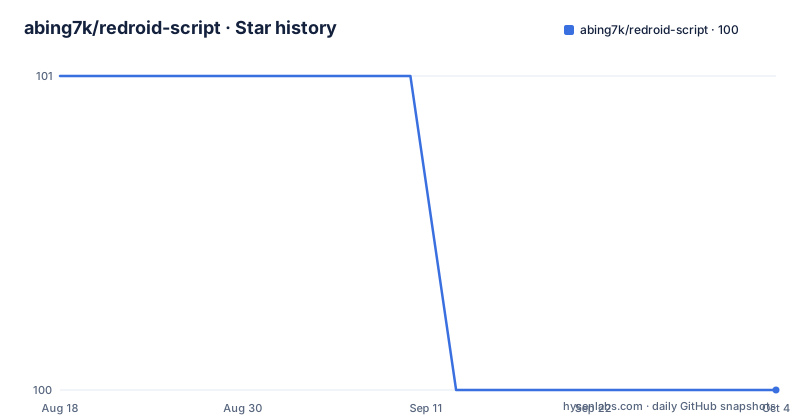
Star history
- abing7k/redroid-script100 ★ · -1
| Repository | 2026-08-18 | 2026-10-04 |
|---|---|---|
| abing7k/redroid-script | 101 | 100 |
-1 Stars in the last 47 days, measured from the daily GitHub snapshot. Compare with other projects
Editorial analysis
What This Fork Actually Provides
redroid-script is a Python wrapper around a set of scripts that modify ReDroid container images. ReDroid runs Android in a Docker container, and this fork adds four extras: OpenGApps, Magisk, libndk translation for x86_64 hosts, and Widevine L3 DRM. The README is explicit that this repository is a fork of ayasa520/redroid-script and that the upstream author is actively updating the original. The fork is no longer maintained. That means the code here is a snapshot, not a living project. The value you get is twofold: eight prebuilt images on Docker Hub, and a build script that lets you assemble your own image with a single command. The target user is someone who wants an Android environment with Google services and root-like access, running on a server or a cloud instance, without building a full Android image from source.
How the Build Script Works
The script, invoked as redroid.py, takes a base ReDroid image and layers modifications on top of it. The README says it does this without recompiling the entire image, which is the core design choice. You select the Android version with -a, choosing from 8.1.0, 9.0.0, 10.0.0, 11.0.0, 12.0.0, 12.0.0_64only, and 13.0.0, with 11.0.0 as the default. Flags add components: -g for OpenGApps, -n for libndk translation, -m for Magisk, and -w for Widevine L3. The example command python3 redroid.py -a 11.0.0 -gmnw produces an image tagged redroid/redroid:11.0.0_gapps_ndk_magisk_widevine on an x86_64 host. The mechanism is not documented in detail, but the credits list remote-android and waydroid_script as sources, which suggests the script pulls prebuilt components and inserts them into the image filesystem. The container runtime can be Docker or Podman, selected with -c or --container. This is a practical approach: you avoid a multi-hour AOSP build and instead patch a known-good ReDroid image.
Getting a Container Running
The README gives exact commands for both prebuilt images and locally built ones. The first step is always installing the kernel modules on the host: apt install linux-modules-extra-$(uname -r), then modprobe binder_linux devices="binder,hwbinder,vndbinder" and modprobe ashmem_linux. For a prebuilt ARM64 image, the docker run command mounts a host directory to /data, maps port 11101 to 5555, and passes androidboot.redroid_fps=30 and androidboot.redroid_gpu_mode=guest. The AMD64 image requires a longer set of kernel parameters that enable the native bridge: ro.product.cpu.abilist0=x86_64,arm64-v8a,x86,armeabi-v7a,armeabi, plus ro.dalvik.vm.native.bridge=libndk_translation.so and ro.ndk_translation.version=0.2.2. These parameters are not optional; they tell Android which ABIs to advertise and which translation library to load. If you build your own image, the script prints the tag, and you use that in the docker run command. The README also notes that on some AMD64 systems the kernel modules may not survive a reboot, and suggests adding the modprobe commands to a startup script.
Prebuilt Images: Tags and Architecture Differences
Eight image tags are listed, split between ARM64 and AMD64. The ARM64 tags include a11_arm, a11_magisk_arm, a11_gapps_arm, and a11_gapps_magisk_arm. The AMD64 tags all carry ndk in the name, such as a11_ndk_amd, a11_magisk_ndk_amd, a11_gapps_ndk_amd, and a11_gapps_magisk_ndk_amd. The naming is consistent: ndk refers to the libndk translation layer, which the README says performs better than libhoudini on AMD64. The ARM64 images do not include translation because ARM64 hardware does not need it. The AMD64 image includes ARM translation, but the README warns that compatibility is limited and some apps may not run correctly. This is a meaningful constraint: if you are on an x86_64 server, you are relying on a translation layer that is not a full compatibility guarantee. The tested environment for the ARM64 image is Oracle Cloud with Ubuntu 20.04, 4 CPU cores, and 24 GB memory, which gives you a sense of the resource footprint, though the README does not state minimum requirements.
Connecting with scrcpy-web
The README describes a way to interact with the Android container through a web browser. You run a separate container: docker run -itd --privileged --name scrcpy-web -p 8000:8000/tcp emptysuns/scrcpy-web:v0.1. Then you exec adb connect your_server_ip:11101 inside that container, pointing it at the ReDroid container's exposed port. Opening http://your_server_ip:8000 in a browser and clicking the H264 Converter gives you a screen view. The README says to swipe up from the bottom of the screen, which is the gesture to reach the app drawer. This is a practical way to use a headless Android container, but it adds another moving part: a second container that must stay running and have network access to the first. The scrcpy-web image is from a third party, emptysuns, so its maintenance is outside this project's control. The setup is straightforward, but it is not a turnkey UI; you still need to know the adb connect pattern and the browser step.
Known Failure Modes and Limitations
The troubleshooting section is honest about what breaks. The most specific warning is that libndk translation has only been verified with redroid/redroid:11.0.0. Enabling Zygisk, which is a Magisk component, may break libndk for 32-bit apps, though ARM64 apps can still work. That is a real trade-off: you cannot assume that Magisk and full app compatibility coexist. The README also states that the author could not make libhoudini work on ReDroid at all, which explains why libndk is the chosen translation layer. Another failure mode is Play Protect certification. The README says the device may not be certified, and the fix is to fetch the Android ID with adb shell settings get secure android_id and register it on Google's uncertified devices page. This is a manual step that may be necessary for Google apps to function. The Magisk installed status can show N/A, and the README points to a WayDroid Telegram thread about changing the kernel, which is vague and not a concrete fix. These limitations mean the project is not a drop-in Android emulator; it requires host-level kernel setup and per-app testing.
Maintenance Status and Upgrade Cost
The repository is explicitly unmaintained. The README says the original author is updating upstream and that issues should go there. This has direct consequences for adoption. There are no recent releases listed, and the last push date is unknown, so you cannot expect security updates or Android version bumps. The prebuilt images are fixed at Android 11; there is no Android 14 or 15 image here. If you need a newer Android version, you would have to switch to the upstream ayasa520 project or another tool. The build script depends on Python packages from requirements.txt, and the README instructs you to install them with pip. The script also requires lzip as a system package. Upgrading the script itself is not a concern because there is no active development. The license is MIT, which means you can fork and modify it freely, but you would be taking over maintenance yourself. The practical upgrade cost is the kernel modules: they must match your host kernel, and on some systems they do not persist across reboots, so you need a startup script. That is a recurring operational cost, not a one-time setup.
Editorial conclusion
Adopt this project if you need a ready-to-pull Android 11 container with Magisk, GApps, or ARM translation on x86_64 and you accept a fork that is no longer maintained. Do not adopt it if you expect upstream fixes or broad device support, because the README says to file issues with the original ayasa520 project. Before using any prebuilt image, verify the kernel modules load on your host, confirm the image tag matches your CPU architecture, and test your specific apps against the libndk translation layer, since the README warns that compatibility is limited and Zygisk can break 32-bit ARM apps.
Frequently asked questions
What is Redroid?
Redroid is the containerised Android this project targets: an image that runs inside a Docker or Podman container and needs binder_linux and ashmem_linux kernel modules loaded on the host first. This repository's job is to add Google apps, Magisk, ARM translation and Widevine to such an image, or to hand you a prebuilt one.
Which Android versions can redroid-script build an image for?
The -a or --android-version switch accepts 8.1.0, 9.0.0, 10.0.0, 11.0.0, 12.0.0, 12.0.0_64only and 13.0.0, with 11.0.0 as the default. The libndk translation layer is only installed for 11.0.0, 12.0.0 and 12.0.0_64only.
Why does redroid-script tell me to use the tag it printed?
The combined command python3 redroid.py -a 11.0.0 -gmnw produces redroid/redroid:11.0.0_gapps_ndk_magisk_widevine on an x86_64 host, but the documentation says that if the script prints a different tag you should use the one it printed rather than the one written in the example, because the naming depends on the host and the layers it actually added.
Official sources
Add this badge to your README
If you maintain this project, the badge below links readers to this analysis and shows its maintenance status from the daily GitHub snapshot. Paste the markdown into your README; add ?metric=license or ?metric=stars to the image URL for a different field.

[](https://hysenlabs.com/projects/abing7k-redroid-script)Star history chart for your README
[](https://hysenlabs.com/projects/abing7k-redroid-script)