PowerPaint: four inpainting tasks, one task prompt
[ECCV 2024] PowerPaint, a versatile image inpainting model that supports text-guided object inpainting, object removal, image outpainting and shape-guided object inpainting with only a single model.
At a glance
- What is it?
- PowerPaint is a research inpainting model that does text-guided object insertion, object removal, shape-guided insertion and outpainting with a single network, switching mode through a tailored task prompt. The training instructions are on a different branch, the newest released weights have no documented command, and the lint configuration carries rules for another project.
- Who is it for?
- PowerPaint suits a researcher who wants one inpainting network across four editing modes and who can live with a research-code checkout rather than a package. It does not suit someone who expects the released weights and the documented commands to line up, because the newest checkpoint has no example and the version names are inconsistent between the two hosting paths.
- Can I use it commercially?
- Yes. MIT is a permissive licence: you can use, modify and sell software built on it, as long as you keep its copyright and licence notices.
- Is it still maintained?
- Yes. The repository last received commits 92 days ago.
- What is it written in?
- Mainly Python, according to GitHub's language statistics.
Answers come from the project's GitHub data, last synced on November 15, 2026, and from our analysis. They are not legal advice.
Star history
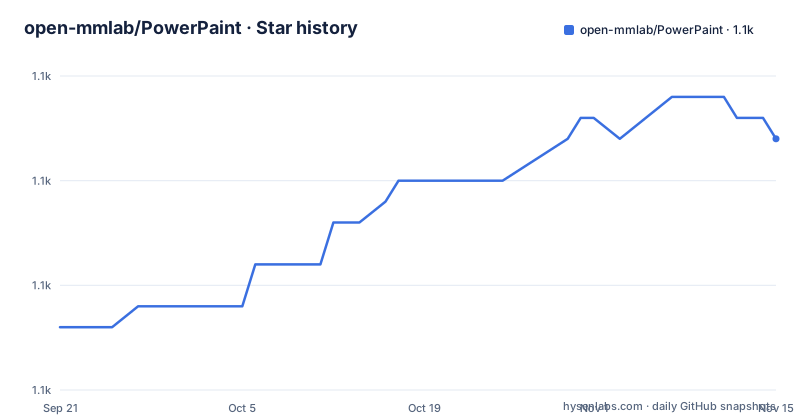
- open-mmlab/PowerPaint1,122 ★ · +9
| Repository | 2026-09-21 | 2026-11-15 |
|---|---|---|
| open-mmlab/PowerPaint | 1.1k | 1.1k |
9 Stars in the last 55 days, measured from the daily GitHub snapshot. Compare with other projects
Editorial analysis
Four tasks are one prompt token
The versatility claim is narrower than it first appears, and the narrowing is the contribution. One network handles text-guided object insertion, object removal, shape-guided insertion and outpainting, and the paper title states the mechanism in a sentence: a task is worth one word, learned with task prompts. So mode selection is a token in the prompt rather than a different checkpoint, a different head, or a different script. What that buys is a single set of weights that does four jobs, and what it costs is that the four modes share a trunk and a sampler, so the same negative prompt and the same guidance scale apply to all of them even when the tasks want different things. The removal mode is the clearest case, and it is covered separately below.
Training lives on a branch the default does not point to
The repository has been refactored, and the note explaining what that means sends you away. The training section says that because the code was refactored for better support of both the U-Net-based and the BrushNet network architectures, you should refer to the dev branch for more details on training. The environment itself is built two ways, from a requirements file inside a conda environment created for a specific Python version, or from a conda yaml file that builds the whole environment at once:
conda create --name ppt python=3.9
conda activate ppt
pip install -r requirements/requirements.txt
The default branch is the one a clone lands on, so the inference instructions are where you arrive and the training instructions are one branch switch away. That is an unusual split for a research repository whose main contribution is a method rather than a model, and it means two network architectures are documented across two branches with no single place that describes both. It also means anyone reproducing the paper has to notice the pointer rather than following the readme in order.
They kept the cross-attention layer BrushNet removed
The April 2024 entry says the model was retrained taking inspiration from BrushNet, and then adds a tip in the form of a divergence. The preserved cross-attention layer is the one BrushNet deleted, and PowerPaint keeps it because the task prompts need it. That is a small sentence carrying a lot of information. It means the architecture is not BrushNet with a different config; a layer upstream removed is deliberately reinstated for a stated reason, and anyone porting the approach to the upstream project should expect that decision to be the thing that needs arguing for. It also explains why the two codebases can diverge without the difference being visible from the outside, since a removed layer is an absence rather than a feature.
The newest released weights have no command, and the names differ
Three sets of weights are announced in the news and the inference section gives two commands. The first, in December 2023, is the enhanced v1 model. The second, in April 2024, is v2. The third, in May 2024, is v2-1, described as rectifying issues that were present during the training of version 2. The commands reference the first two. There is no example for the v2-1 checkpoint, which is the one the news recommends. The hosting paths are also spelled differently: the two repository names differ only in the character joining their two parts, a dash in one case and a low line in the other, which is why the two clone commands look unrelated. A reader who follows the news to the newest weights and then the inference section to a command has to supply the version flag and the checkpoint directory themselves.
The pyproject is a linter file with two rules for another project
There is a pyproject file and it is not a package definition. It has no build system, no project table and no dependencies, so the repository cannot be installed and there is no setup script beside it either. The whole file is lint configuration. Two entries in it belong to a different codebase. The per-file ignore list exempts unused imports in a path under a source directory for a library that is not a dependency of this project and whose directory does not exist here, where this repository's package sits at the top level instead. The import-sorting section names that same foreign library as the one to treat as first-party. Both are harmless when they match nothing, and both are a sign the configuration was copied from a template that was not fully adjusted.
Every launch example asks for a public share link
Both inference examples launch the interface with a share flag: the same flag appears in the v1 command and in the v2 command. In Gradio that flag does not merely start a local server, it creates a public tunnel and prints a shareable link, which means the interface is reachable from outside the machine. For a model that accepts an arbitrary uploaded image and a free-text prompt that is a reasonable default for a demo, and a reckless one for anything else, since the machine running it is also holding the model weights. The readme gives no alternative invocation that starts the interface on localhost only, so a user who wants a local interface has to know that the flag is optional. The weights fetch has a related gap: installing the large-file client is listed under inference, not under setup.
The line length is set to 119 and never checked
The formatting section is written as a series of four comments each beginning with the words like a well-known Python formatter, covering double quotes, space indentation, magic trailing commas and automatic line-ending detection. The formatter itself is not a declared dependency and is not mentioned anywhere else in the repository. Above that, the line length is set to 119, and the ignore list disables the rule that would enforce it, with a comment saying that rule is never enforced. Two more rules are globally disabled without explanation, one for complex functions and one for ambiguous variable names. So the file configures a formatter's behaviour without using it, sets a width that no check will test, and switches off a naming rule that would otherwise catch one-letter variables.
Removal keeps the prompt box and uses it as a negative prompt
Object removal is documented as needing no text, which reads as though the prompt field is unused. It is not unused. The text box is deliberately left in place so that object generation can be suppressed further with negative prompts, and the guidance advice follows from that: use a scale of 10 or higher, and if unwanted objects still appear in the masked area, raise it further. A high guidance scale normally means stronger adherence to the prompt, so this is the opposite of the usual intuition and only makes sense because there is no positive prompt to adhere to and the field is being used against generation instead. The shape-guided mode is the opposite case, where the readme gives concrete ranges: about 0.5 to 0.6 for objects that should ignore the mask shape and 0.8 to 0.95 for objects that must fit it.
Editorial conclusion
PowerPaint suits a researcher who wants one inpainting network across four editing modes and who can live with a research-code checkout rather than a package. It does not suit someone who expects the released weights and the documented commands to line up, because the newest checkpoint has no example and the version names are inconsistent between the two hosting paths. Check three things first. Check which weights you are downloading, because the v1 and v2 repositories are spelled with different separators and only two of the three releases appear in the instructions. Check that you are on the right branch before training, because the default branch points you elsewhere. And check the lint configuration, which contains a per-file ignore for a path this repository does not have.
Frequently asked questions
How does PowerPaint do four tasks with one model?
With tailored task prompts. The paper title puts it as a task being worth one word, so text-guided insertion, removal, shape-guided insertion and outpainting are selected by a prompt token rather than by separate checkpoints or scripts.
Where are the PowerPaint training instructions?
On the dev branch, not the default one. The training section says the code was refactored to support both the U-Net-based and BrushNet architectures and directs readers to the dev branch for details on training.
How do I download the PowerPaint model weights?
With the large-file client, which the readme installs separately under inference rather than under setup, then cloning from Hugging Face into a checkpoints directory. Examples are given for the v1 and v2 weights; the v2-1 release announced in May 2024 has no command.
What guidance settings does PowerPaint recommend?
For object removal, a guidance scale of 10 or higher, raised further if unwanted objects still appear, because the prompt field is retained for negative prompts. For shape-guided insertion, a fitting degree of about 0.5 to 0.6 for unconstrained objects and 0.8 to 0.95 when the object must follow the mask shape.
What Python version does the PowerPaint inference setup use?
The readme creates a conda environment with python=3.9 and installs from a requirements file, or builds the same environment from a conda yaml file in the requirements directory. The weights fetch additionally needs the large-file client installed through conda.
Official sources
Add this badge to your README
If you maintain this project, the badge below links readers to this analysis and shows its maintenance status from the daily GitHub snapshot. Paste the markdown into your README; add ?metric=license or ?metric=stars to the image URL for a different field.

[](https://hysenlabs.com/projects/open-mmlab-powerpaint)Star history chart for your README
[](https://hysenlabs.com/projects/open-mmlab-powerpaint)Was this useful?