OpenVDB 13.0: Sparse Volumetric Data for Film Production, Now on Apache-2.0
OpenVDB - Sparse volume data structure and tools. It was developed by DreamWorks Animation for use in volumetric applications typically encountered in feature film production.
At a glance
- What is it?
- OpenVDB is a C++ library and tool suite from DreamWorks Animation for storing and manipulating sparse volumetric data on 3D grids. This review covers its hierarchical data structure, build process, licensing change, and where it fits in a production pipeline.
- Who is it for?
- Adopt OpenVDB if you work in visual effects, animation, or scientific visualization and need a proven, high-performance sparse volume representation with a rich toolset. Skip it if your volumes are small or dense, or if you need a GPU-first solution without a CPU dependency.
- Can I use it commercially?
- Yes. Apache-2.0 is a permissive licence: you can use, modify and sell software built on it, as long as you keep its copyright and licence notices.
- Is it still maintained?
- Yes. The repository last received commits 5 days ago.
- What is it written in?
- Mainly C++, according to GitHub's language statistics.
Answers come from the project's GitHub data, last synced on November 14, 2026, and from our analysis. They are not legal advice.
Star history
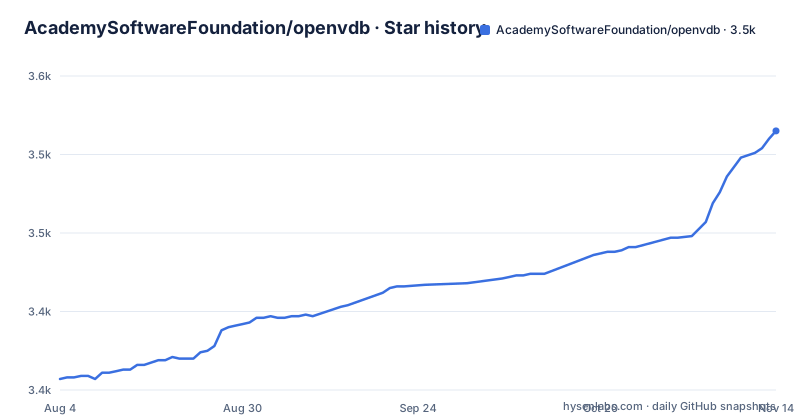
- AcademySoftwareFoundation/openvdb3,515 ★ · +158
| Repository | 2026-08-04 | 2026-11-14 |
|---|---|---|
| AcademySoftwareFoundation/openvdb | 3.4k | 3.5k |
158 Stars in the last 102 days, measured from the daily GitHub snapshot. Compare with other projects
Editorial analysis
The Problem: Dense Volume Data Wastes Memory
Volumetric data in film production, like smoke, fire, and clouds, often occupies a 3D grid where most cells are empty or uniform. Storing every voxel explicitly is wasteful. OpenVDB solves this with a hierarchical data structure that stores only active voxels, those with meaningful values, and skips the rest. This is not a new idea, but OpenVDB's implementation is designed for the scale and performance demands of feature film rendering. The target user is a technical director or software engineer building tools for volumetric effects, not a casual hobbyist. The library is written in C++ and is heavy on templates, so it assumes familiarity with that language.
How OpenVDB Stores Sparse Volumes
The core of OpenVDB is a tree structure where each node covers a region of space. Voxels are stored in leaf nodes, and internal nodes provide acceleration for traversal and operations. This allows the library to skip entire empty regions during iteration and computation. The README describes it as a 'novel hierarchical data structure,' and the design is central to its efficiency. The library also includes a suite of tools for operations like filtering, advection, and level set manipulation, which are common in volumetric workflows. The data structure is not just a container; it is the foundation for a range of algorithms that expect a sparse representation.
Getting OpenVDB Running: Build Commands and Dependencies
The README provides a straightforward build process for Linux and macOS. After installing dependencies like Boost, TBB, and Blosc, you clone the repository, create a build directory, and run cmake. The typical sequence is: git clone, cd openvdb, mkdir build, cd build, cmake .., then make -j4 && make install. On Windows, the process involves vcpkg to install libraries like zlib, blosc, tbb, and boost-iostreams, then cmake with a toolchain file. The README warns that other components, such as the Python module and OpenVDB AX, require additional dependencies. The core library builds with these commands, but you must be prepared to manage the dependency versions yourself, as the README notes that distributions may not have the required versions.
Optional Components: OpenVDB AX and NanoVDB
Beyond the core library, OpenVDB offers two notable components. OpenVDB AX is a language for writing expressions that operate on volumes, useful for procedural effects. NanoVDB is a version designed for GPU use, and it can be built with or without OpenVDB support. The cmake options are -D OPENVDB_BUILD_AX=ON and -D OPENVDB_BUILD_NANOVDB=ON, with -D NANOVDB_USE_OPENVDB=ON to link NanoVDB to the core library. This modularity is a strength, but it also means you must decide which parts you need. If you only need the core, you can ignore these, but if you want GPU acceleration, NanoVDB is the path, and it has its own build instructions.
Licensing Shift: From MPL-2.0 to Apache-2.0
OpenVDB has recently re-licensed from the Mozilla Public License 2.0 to the Apache License 2.0. This is a significant change for adopters. Apache-2.0 is more permissive, allowing use in proprietary software without the file-level copyleft of MPL-2.0. The README notes the change and points to a file named RE-LICENSE_NOTE.txt for details. If you are integrating OpenVDB into a commercial product, this change reduces some legal friction, but you should still review the license file and the note to understand any implications. The project also states that trademarks of contributors cannot be used without permission, which is standard.
Limitations and When OpenVDB Is the Wrong Tool
OpenVDB is not a silver bullet. For dense volumes, where most voxels are active, the overhead of the tree structure can make it slower and more memory-hungry than a plain 3D array. The README does not mention this, but it is a known trade-off with sparse structures. Also, the library is complex. The build requires multiple dependencies, and the API is template-heavy, which can steepen the learning curve. If your project involves small, dense grids, or if you need a simple volume representation without the full tool suite, OpenVDB may be overkill. The development repository is described as 'less stable' than production releases, so if you need reliability, you should use a tagged release like v13.0.0 rather than the trunk.
Alternative: NanoVDB for GPU, and the Difference
A direct alternative within the same ecosystem is NanoVDB. It is designed for GPU rendering, where OpenVDB's CPU-centric tree structure is not directly usable. NanoVDB converts an OpenVDB grid into a flat, GPU-friendly format. The difference in approach is that OpenVDB is a mutable, CPU-side structure with a rich API, while NanoVDB is read-only on the GPU, optimized for fast traversal during ray marching. If your goal is real-time rendering or GPU simulation, NanoVDB is the more appropriate choice, but it requires a conversion step from OpenVDB. The README notes that NanoVDB can be built without OpenVDB, meaning it can work with other sources, but the typical pipeline is to author in OpenVDB and then convert.
Editorial conclusion
Adopt OpenVDB if you work in visual effects, animation, or scientific visualization and need a proven, high-performance sparse volume representation with a rich toolset. Skip it if your volumes are small or dense, or if you need a GPU-first solution without a CPU dependency. Before adoption, verify your compilers and dependencies meet the version requirements for v13.0.0, and review the RE-LICENSE_NOTE.txt file to understand the transition from MPL-2.0 to Apache-2.0.
Frequently asked questions
What does OpenVDB stand for?
The acronym is never expanded anywhere in the repository. What OpenVDB is given as: a C++ library comprising a hierarchical data structure and a large suite of tools for storing and manipulating sparse volumetric data discretized on three-dimensional grids, developed by DreamWorks Animation for feature film production.
Is OpenVDB free?
It is released under the Apache License, Version 2.0, with a matching Apache Software License classifier in pyproject.toml. Two conditions come with it: the project has completed a re-licensing from MPL 2.0, detailed in RE-LICENSE_NOTE.txt, and contributor trademarks may not be used in association with the project without express permission.
what is openvdb
A C++ library and tool suite for sparse volumetric data on three-dimensional grids, hosted by the Academy Software Foundation and developed by DreamWorks Animation. Python bindings build from the same tree through pyproject.toml, which uses scikit-build-core and nanobind as its build backend.
how to install openvdb
On Linux, apt-get install for libtbb-dev and libblosc-dev covers the core library, then a five line cmake and make sequence installs it. On Windows, vcpkg supplies zlib, blosc and tbb with the x64-windows triplet, and those commands are marked as tested for 64bit systems only. The Python module, AX and NanoVDB need extra dependencies.
How to OpenVDB file in Blender?
The repository does not cover Blender. The top level has openvdb_houdini/, openvdb_maya/ and openvdb_wolfram/ directories, and the quick start names only the core library, the Python module, OpenVDB AX, NanoVDB and various executables. Blender appears in none of them.
Official sources
Add this badge to your README
If you maintain this project, the badge below links readers to this analysis and shows its maintenance status from the daily GitHub snapshot. Paste the markdown into your README; add ?metric=license or ?metric=stars to the image URL for a different field.

[](https://hysenlabs.com/projects/academysoftwarefoundation-openvdb)Star history chart for your README
[](https://hysenlabs.com/projects/academysoftwarefoundation-openvdb)Was this useful?