FastLED 3.10: The Arduino LED Library That Scales from ATtiny to Teensy 4.1
The FastLED library for colored LED animation on Arduino. Please direct questions/requests for help to the FastLED Reddit community: We'd like to use github "issues" just for tracking library bugs / enhancements.
At a glance
- What is it?
- FastLED is a C++ library for driving addressable LEDs on Arduino and other microcontrollers. It supports 50+ platforms and claims up to 30,000 LEDs on a Teensy 4.1, but its real strength is the balance of portability and performance.
- Who is it for?
- Adopt FastLED if you are building LED animations on Arduino, ESP32, Teensy, or any of the 50+ supported platforms and need a library that handles chipsets like WS2812 and APA102 without writing low-level timing code. Avoid it if you need a pure playback solution with no coding, or if your board is not in the supported list and you cannot handle platform-specific tweaks.
- Can I use it commercially?
- Yes. MIT is a permissive licence: you can use, modify and sell software built on it, as long as you keep its copyright and licence notices.
- Is it still maintained?
- Yes. The repository last received commits 1 day ago.
- What is it written in?
- Mainly C++, according to GitHub's language statistics.
Answers come from the project's GitHub data, last synced on November 14, 2026, and from our analysis. They are not legal advice.
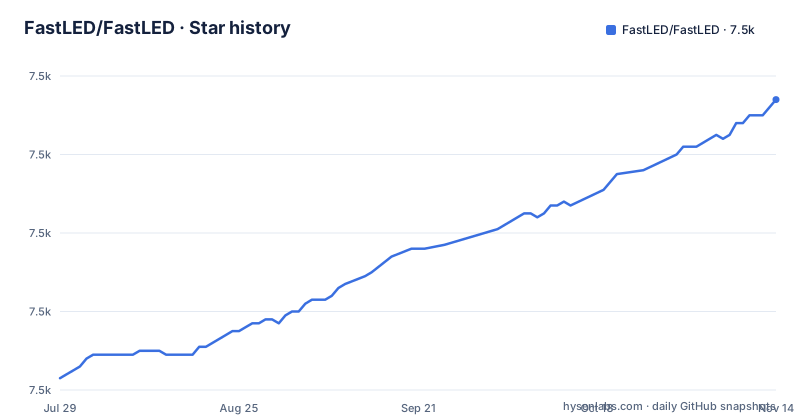
Star history
- FastLED/FastLED7,534 ★ · +71
| Repository | 2026-07-29 | 2026-11-14 |
|---|---|---|
| FastLED/FastLED | 7.5k | 7.5k |
71 Stars in the last 108 days, measured from the daily GitHub snapshot. Compare with other projects
Editorial analysis
What FastLED Actually Solves
FastLED addresses a specific pain: driving addressable LEDs, like WS2812 or APA102, from a microcontroller requires precise timing that varies by chipset and by MCU clock speed. Writing that from scratch is error-prone and eats project time. FastLED abstracts the timing behind a simple API, so you call FastLED.addLeds<WS2812, 6>(leds, NUM_LEDS) and the library handles the rest. It is for hobbyists and engineers who want to animate LEDs without reimplementing protocol logic. The README claims it can drive 30,000 LEDs on a Teensy 4.1 and run on a sub-dollar ATtiny85, which suggests it targets both high-end and low-end hardware. That range is unusual; most LED libraries pick one niche.
The Architecture: Core, FX, and Platform Layers
The repository is split into several directories, each with its own README. The src/fl directory holds the core fl:: namespace, which provides cross-platform STL-like containers, math, async, JSON, and I/O utilities. That means FastLED is not just a LED driver; it includes general-purpose helpers for embedded C++. The src/fx directory contains an FX library with 1D/2D effects, video playback, and composition utilities. The src/platforms directory has a backend selection guide, controller types, and board-specific documentation. This separation suggests a layered design: core utilities, effects on top, and platform-specific backends underneath. The README also mentions background rendering on ESP32 and Teensy, which implies the library can offload rendering to a separate task or interrupt, so your main loop does not block on LED updates. That architecture matters for responsive applications, like audio-reactive displays, where input handling and LED updates must coexist.
Getting Started: Installation and the 30-Second Blink
The README opens with a minimal example that compiles with just a few lines. You include FastLED.h, define an array of CRGB, and call FastLED.addLeds<WS2812, 6>(leds, NUM_LEDS) in setup, then set a color and call FastLED.show() in loop. That is the entire API surface for a basic blink. For installation, the README's table of contents points to its own Installation section, and the README describes FastLED as the #2 most popular Arduino library, linking to the Arduino libraries page. The example uses pin 6 on an Arduino, but the template parameter for the pin is board-specific. The README claims it works on 50+ platforms, including Arduino, ESP32, Teensy, and Raspberry Pi, so the same code should compile across those, though timing parameters may need adjustment per board.
Performance Claims and Their Limits
The README makes bold performance claims: 30,000 LEDs on Teensy 4.1, 50 parallel strips, and under 2KB of memory on an Arduino Uno. It also mentions zero-cost global brightness and high-performance 8-bit math. Those numbers are plausible for a library that has been around for years, but the README's headline table gives no benchmark methodology. Zero-cost global brightness likely means the library applies brightness scaling at the hardware level or via a clever math trick, but the term is not explained. The 8-bit math suggests a focus on memory efficiency on AVR platforms like the Uno, where RAM is tight. The claim of 30,000 LEDs is impressive but depends on the chipset and available RAM; a Teensy 4.1 has enough memory for that many CRGB values (30,000 * 3 bytes = 90KB, which fits), but the data line bandwidth becomes a bottleneck. The README's headline table gives no refresh rate for that figure, so check frame rates for your own layout before relying on it.
Platform Support: Breadth with Caveats
The build status section lists a wide range of boards: Arduino Uno, ATtiny85, Teensy 3.0 through 4.0, ESP32 variants, SAMD21, SAMD51, and more. Each board has a GitHub Actions workflow that compiles examples. The README is careful to note that every per-board build badge proves compile coverage only, not hardware or timing validation; the QEMU and AVR8JS emulation badges are the labelled exceptions. For example, ClearCore coverage is a compile-only Blink build, and it does not claim hardware timing validation. That is an honest limitation. The ATtiny4313 build only compiles WS2812 Blink and APA102 examples because of limited memory. The SAMD51 builds use Adafruit's fork of the SAMD core because the upstream Arduino core does not support SAMD51. These caveats matter: if you use an obscure board, you may get a green compile badge but no guarantee the timing works on real hardware. The README also mentions QEMU emulation for ESP32 and AVR8JS for AVR, which is a clever way to test without hardware, but emulation cannot catch all timing issues.
The WS2812 Timing Update in 3.10.3
The release line moves quickly: 3.10.7 was published on 2026-10-10, 3.10.8 on 2026-10-18 and 3.10.9 on 2026-11-01, a concrete sign that the library is actively maintained. WS2812 chipsets have strict timing requirements, and a change in a microcontroller's clock speed or a new revision of the chip can require adjustments. If you depend on a specific timing behavior, you need to track releases. For production projects, you should pin the library version and test after any update. Read the release notes or the source to know whether a release affects your setup. That is a maintenance cost that is easy to underestimate.
Alternatives: Adafruit NeoPixel and Raw Timings
The most direct alternative is the Adafruit NeoPixel library, which also drives WS2812 and similar chipsets. The difference is in scope: NeoPixel is simpler and more lightweight, but it does not support the same range of chipsets or platforms. FastLED supports APA102, DotStar, and many others, while NeoPixel focuses on the WS2812 family. If you only need a few LEDs on an Uno, NeoPixel might be easier to learn. FastLED offers more advanced features like the FX library and background rendering, which NeoPixel lacks. Another alternative is to write your own timing routines using direct port manipulation, which gives you full control but requires deep knowledge of the MCU's timer peripherals. That is only viable if you have a single, fixed chipset and board. FastLED is the middle ground: it abstracts the timing but still lets you choose the chipset and platform.
Licensing and Maintenance Costs
FastLED is MIT-licensed, which means you can use it in commercial projects with minimal restrictions, as long as you include the copyright notice. That is a low-license-friction choice. The maintenance cost is related to the library's breadth: with 50+ platforms and many chipsets, updates can introduce changes that affect your project. The release cadence is active, with three releases between 2026-10-10 and 2026-11-01, so you need to follow the changelog. The README directs questions to the Reddit community and asks that GitHub issues be reserved for bugs and enhancements, which means support is community-driven, not a formal SLA. For a hobby project, that is fine. For a commercial product, you need to budget time for testing each new release. The build status badges give you a quick check, but they do not replace hardware testing on your specific board.
Editorial conclusion
Adopt FastLED if you are building LED animations on Arduino, ESP32, Teensy, or any of the 50+ supported platforms and need a library that handles chipsets like WS2812 and APA102 without writing low-level timing code. Avoid it if you need a pure playback solution with no coding, or if your board is not in the supported list and you cannot handle platform-specific tweaks. Before committing, verify that your exact board and LED chipset appear in the build status badges, and check the release notes for timing updates, because timing-sensitive chipsets can break across MCU revisions.
Frequently asked questions
what is fastled
FastLED is a C++ LED animation library described as the universal LED library for embedded and Arduino. It claims 30,000+ LEDs on high-end devices, a footprint under 2KB on an Arduino Uno and support for $0.50 ATtiny chips, background rendering on ESP32 and Teensy, and coverage of 50+ platforms including Arduino, ESP32, Teensy and Raspberry Pi.
how to install fastled
The README has its own Installation section, and the repository carries a Cookbook at cookbook/README.md with step-by-step guides and copy-paste recipes once the library is present. The first program itself is the 30 second blink: declare a CRGB array, bind it with FastLED.addLeds<WS2812, 6>(leds, NUM_LEDS) and call FastLED.show() after changing a pixel.
Can you provide an example of how to use FastLED with Arduino?
The README's getting started example is: include FastLED.h, define NUM_LEDS 60, declare CRGB leds[NUM_LEDS], bind the strip in setup with FastLED.addLeds<WS2812, 6>(leds, NUM_LEDS), then in loop assign leds[0] = CRGB::Red, call FastLED.show() and delay(500). Nothing is sent to the strip until show() runs.
how to use fastled arduino
On Arduino the strip is a fixed CRGB array bound to a chipset and pin through template arguments, and you push frames with FastLED.show(). The library targets under 2KB on an Arduino Uno, so effects are written to fit small chips, and the examples folder ships one directory per effect such as Blink, Blur, ColorPalette and AudioReactive.
Official sources
Add this badge to your README
If you maintain this project, the badge below links readers to this analysis and shows its maintenance status from the daily GitHub snapshot. Paste the markdown into your README; add ?metric=license or ?metric=stars to the image URL for a different field.

[](https://hysenlabs.com/projects/fastled-fastled)Star history chart for your README
[](https://hysenlabs.com/projects/fastled-fastled)Was this useful?